
Tool calling lets a voice agent act mid-call, such as booking a slot or handing the caller to a person. The model picks a tool, your system answers, and the agent speaks from the result. For teams that want those tools next to their own data, Dograh, the open-source AI voice agent platform, runs self-hosted or on Dograh Cloud.
Key Takeaways
- Attach only the tools a step needs, since accuracy drops as tools pile up.
- Set the wait line on the tool, so it plays even if the model forgets.
- In Dograh, Pre-Call Data Fetch loads caller data before the greeting.
A tool that takes two seconds is two seconds of silence unless the agent plans for it. We follow a tool call through a turn, then where the time goes and what callers hear when it fails. Then we talk about how Dograh runs booking, lookup and transfer.
What happens on a call when a tool runs
A tool call is the agent pausing its own speech to ask a system for something, then speaking from the answer. The caller finishes a sentence and speech-to-text turns it into words. The language model reads those words with the step's prompt and the descriptions of the tools it may use, and decides whether to reply or to call a tool with arguments it fills from the conversation. If it calls one, the platform sends the request, waits for the result and hands it back to the model, which then answers the caller.
Two rules follow from that loop. A turn is either spoken text or a tool call, never both, and Dograh's own prompting guide says to make that explicit in the prompt. The model should also wait for the result before it says anything happened, because a booking the agent announces before the system confirms it is a booking that may not exist.
Tools run in one of two places across most stacks. Some run in your own code, which receives the request and replies, and some are called by the platform at a URL you give it. Either way, keep credentials on the server side so the model never sees them.
Moving between steps works the same way. In Dograh, each pathway out of a step is offered to the model as a function, so going from the greeting to the booking step is a tool call too, and so are Transfer Call and End Call. If a model writes a tool call out as text instead of calling it, Dograh catches it before it reaches the voice.
The four moments a tool can run
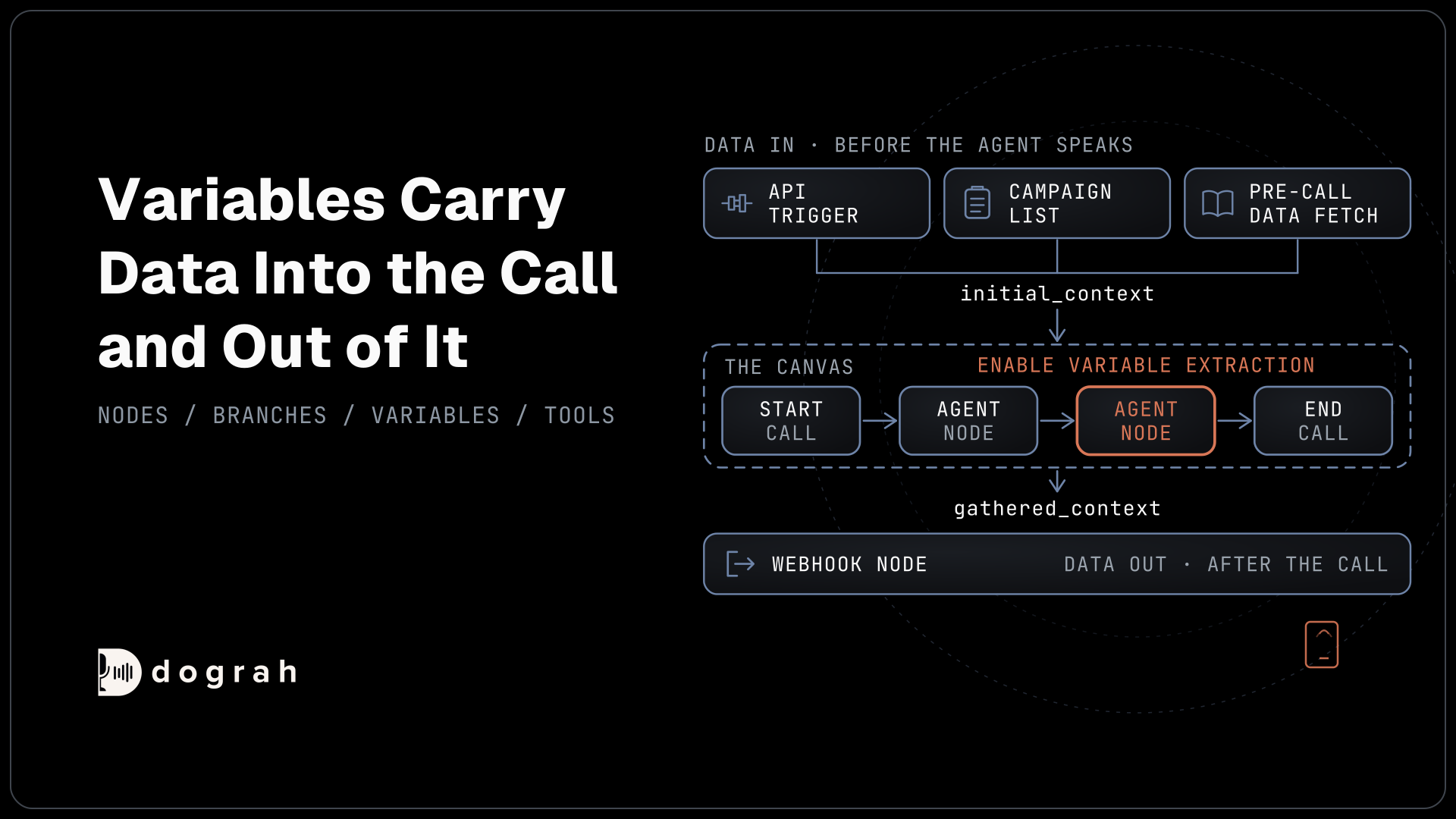
Tools are easiest to plan by the moment in the call they run, because each moment has a different time budget. The first moment is before the greeting. The phone is still ringing, so a lookup here costs the caller nothing they would notice, and it lets the first sentence already know who is calling. In Dograh this is Pre-Call Data Fetch, which runs once the call connects and loads the caller's record before the greeting plays.
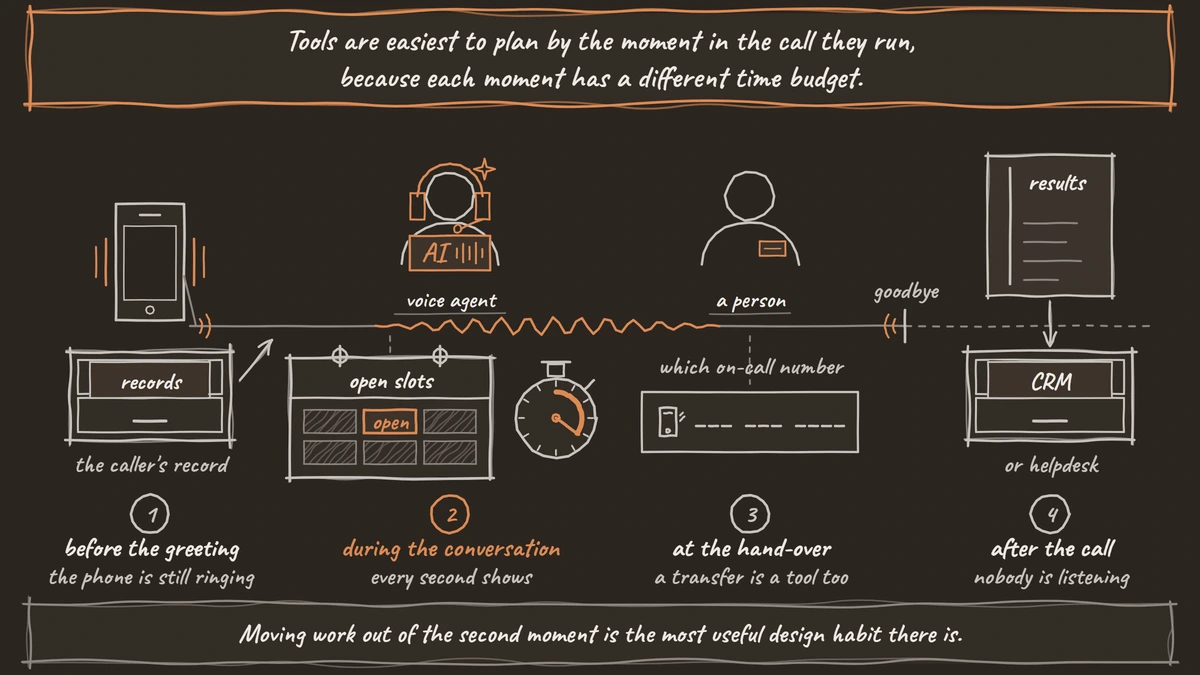
The second moment is during the conversation, where most tools live. Checking an order, reading open slots or writing a booking all happen between the caller's words and the agent's reply, so every second shows. This is the moment the rest of this guide is mostly about.
The third moment is the hand-over. A transfer is a tool too, and it may need its own lookup first, such as finding which team or which on-call number should take this caller. The fourth moment is after the call, when results are written to a CRM or helpdesk. Nobody is listening by then, so this is the place for slow or retry-heavy work, and in Dograh a Webhook node handles it, retrying temporary failures on its own.
Moving work out of the second moment is the most useful design habit there is. Anything that can be known before the greeting or written after the goodbye should not sit inside a turn.
Where the seconds go in a tool call
Tool time sits on top of a turn that is already tight. We treat 800 ms end to end as the bar for a natural reply, and speech-to-text already adds wait to that before any tool runs. A database on the same network as the agent can answer inside that budget. A third-party API across the internet often cannot, so the caller hears a gap.
Short lookups can run in silence, and longer ones need a line that tells the caller something is happening. There is also a ceiling past which silence makes callers think the call dropped, so a tool that might be slow needs a spoken line early and an update if it runs on.
There are two ways to provide that line. Some stacks have the model call a filler step before a lookup, so the line depends on the model choosing to say it. The other way sets the line on the tool itself. In Dograh, the tool's Messages play a short line as it starts, and an update if it runs long, on HTTP API and MCP tools alike, and the request runs while the line plays. Both approaches work, but a line set on the tool plays whatever the model decides, while a prompted filler depends on the model remembering. Text lines do not play on speech-to-speech models, so use a recording there.
Starting work early hides time too. In a study of speculative tool execution on an Android voice assistant, starting tools while the user was still speaking cut median time to first audio from 5.79 seconds to 4.60. That was on a device, not a phone line, but the lesson carries over, since time the caller never waits through is time they never notice.

Open Source Alternative to Vapi / Retell
Self-hosted voice agent platform — no per-minute fees
dograh-hq/dograh
Star on GitHub
Failures callers hear, and a line for each
Every tool fails sometimes, and the caller should always hear a next step rather than silence or a made-up success. Dograh's prompting guide puts the rule simply, "Handle tool errors using the supplied recovery policy." It adds a warning worth copying into any prompt, "Do not repeatedly retry or promise a callback or human handoff that has not been configured."
A timeout is the most common failure. Each HTTP API tool in Dograh waits 5,000 ms by default, then returns an error to the agent, and it does not retry on its own. The agent should say it cannot reach the system right now and offer what it can, such as taking a message. An error status from your server, a 4xx or a 5xx, comes back the same way, as an error the agent can act on.
Wrong arguments are a design failure more than a runtime one. If the model sends a date in the wrong shape or the wrong account number, the fix is usually in the tool's description, not the prompt. Picking the wrong tool has the same cause, and the same cure.
Some failures are about the system behind the tool. If an MCP server is down when the call starts, the call goes on without those tools, so the prompt should say what to do when a lookup is not available. A transfer that is busy or unanswered comes back to the agent too, and the call continues with the caller still on the line.
Writes need one more guard. If a booking request times out but your system did save it, a second attempt books twice. Add a Preset Parameter named workflow_run_id with the value {{initial_context.workflow_run_id}}, so your system can ignore a request it has already handled.
Designing tools the model picks correctly
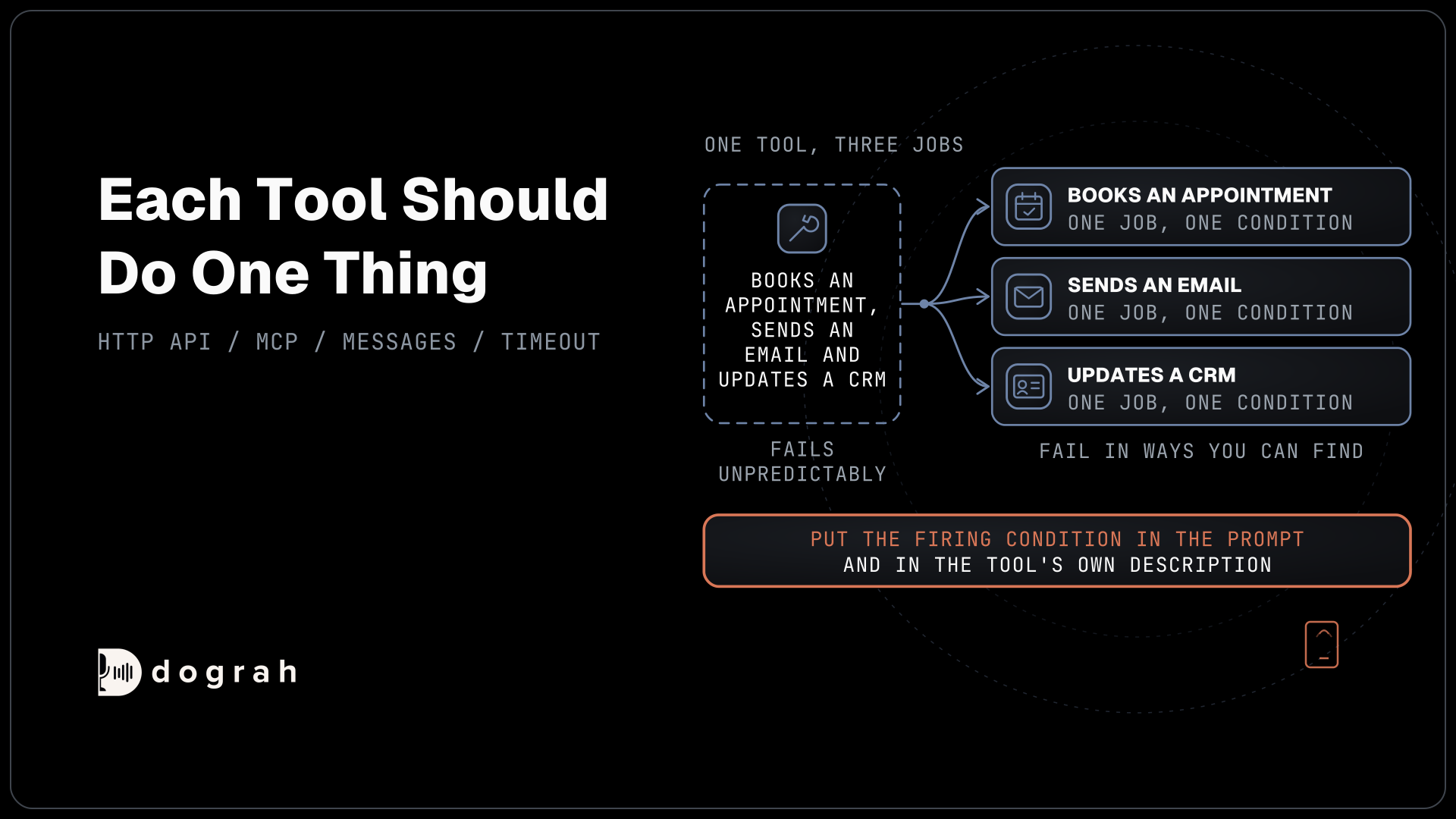
A model picks tools well when each one does one job and says plainly when to use it. Dograh's guide puts both rules in one line each, "Each tool should do one thing" and "Put the firing condition in the prompt AND in the tool's own description field." A tool that books an appointment, sends an email and updates a CRM fails unpredictably. Three tools with three clear conditions fail in ways you can find.
The number of tools on offer matters as well. In the HumanMCP study, Gemini 2.0 Flash picked the right tool 98.4% of the time with 10 tools in front of it, 93.6% with 50 and 88.2% with 100. Phone agents rarely carry a hundred tools, but the direction is clear. Attach to each step only the tools that step needs, which in Dograh is how tools work anyway, since a tool is callable only from the steps it is attached to.
The model itself is the last piece. Text models handle tool tasks far better than today's full-duplex voice models, and tau-Voice found that most failures in its evaluation came from agent behavior. If your agent leans on tools, a cascade setup of speech-to-text, a language model and text-to-speech is the safer choice, and our post on speech-to-speech tool calling shows where realtime models break.
Join the Dograh Community
Dograh is an OSS alternative to Vapi. Join our Slack community for queries, releases, best practices & community interactions.
Booking, lookup and transfer in Dograh
Dograh covers all three common jobs with tools you configure rather than code you write. A booking uses two HTTP API tools, one to read open slots and one to write the booking, each with an LLM Parameter for what the caller chose and the workflow_run_id preset on the write. The prompt says to call the booking tool only after the caller confirms the read-back. Our post on the AI booking agent walks through that call and its failure cases.
A lookup can happen at two moments. Before the greeting, Pre-Call Data Fetch sends a POST with the caller's and the called number, waits up to 10 seconds and adds the response to the call's context, and if it fails the call carries on with what it already had. During the call, an MCP tool connects a server built on the Model Context Protocol. Dograh discovers the server's tools, lets you pick which ones each step may call, and opens one session per server when the call starts, with a 30-second default timeout. The model never sees the server's credential.
A transfer can look up its own destination. Transfer Call takes a fixed number, a value from the call's context or a Dynamic HTTP Resolver, where it asks your URL which number to dial and waits 3,000 ms by default. Dograh calls the destination first and connects the caller only when someone answers. It works on Twilio, Telnyx, Plivo, Cloudonix and Asterisk ARI. When a different agent should take over instead of a person, Transfer To Agent hands the live call to another agent you built, with a labeled transcript, on cascade agents only.
For the step-by-step setup of an HTTP API tool, including the Messages format and the Test Tool dialog, see our tutorial on how to add tool calls to a voice agent.
Testing tools and choosing where they run
Tools have to be tested on the path a real caller takes. A browser test call is quick, but telephony-only tools such as Transfer Call need a real phone call. Test Tool on an HTTP API tool sends one request with values you type, and with tracing set up, View Trace on a run shows every tool request, its timing and the reply. Credential handling and logging have their own checklist in our post on securing tool calls and webhooks.
Where the agent runs decides how far each lookup travels. A self-hosted install can sit on the same network as your database, which keeps a lookup inside the turn. Running Dograh on that network adds no per-minute platform fee. What you pay for is the servers, the model keys and the phone minutes, and the database and upgrades stay with your team. The open-source community handles support, and Enterprise adds custom SLAs. Teams that would rather not host it can use Dograh Cloud for a 1¢-a-minute platform fee.
Start with the one tool your most common call depends on. Give it a clear description, a start line and an update, then break it on purpose on a phone call and listen to what the caller hears.
Glossary
- Tool description
- The text that tells the model when to use a tool. It works as the tool's usage rule, and most wrong-tool and wrong-argument errors are fixed here.
- Filler line
- A short spoken line that covers the wait while a tool runs. Set on the tool, it plays whatever the model decides.
- Speculative tool execution
- Starting a tool while the caller is still speaking, so the result is ready sooner. A study on an Android voice assistant cut median time to first audio from 5.79 to 4.60 seconds.
- Idempotency key
- An ID sent with a request so the receiving system can spot a repeat and handle it once. In Dograh you add the call's workflow_run_id to a tool as a Preset Parameter for this.