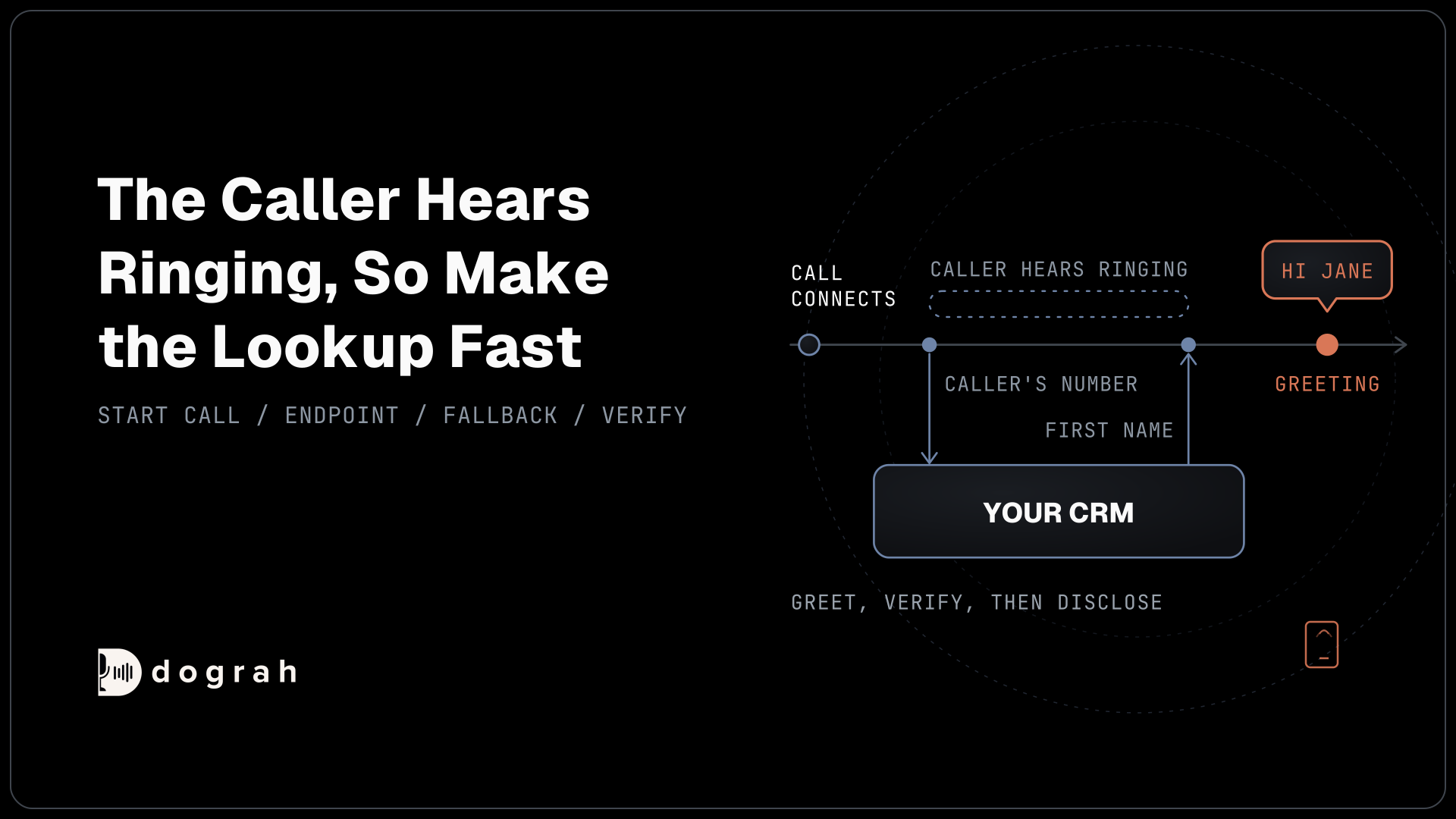

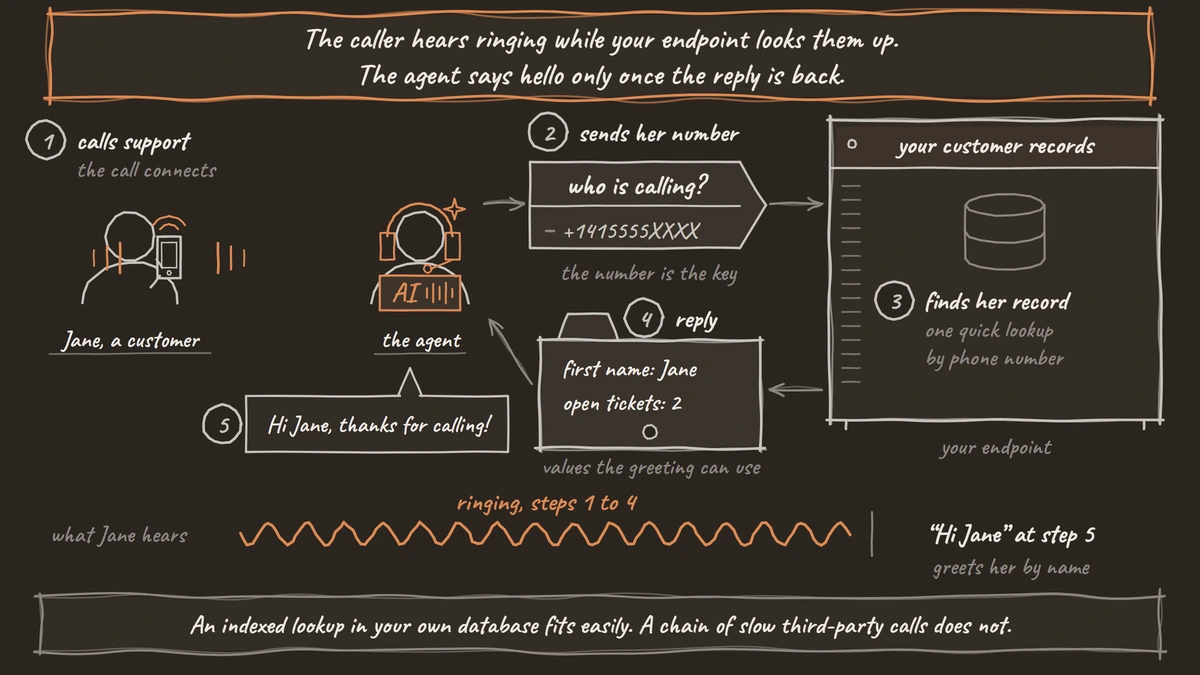
Pre-Call Data Fetch is a setting on Dograh's Start Call node that sends a POST request to your endpoint once a call connects, with the caller's and the called number. Your system replies with values such as the customer's first name, and the greeting and prompts use them. You can self-host Dograh or run it on Dograh Cloud.
Key Takeaways
- The caller hears ringing until your endpoint replies, so make the lookup fast.
- A phone number finds a record. It never proves who is calling.
- Return only what the agent may say before the caller is verified.
This post is part of our guide to how to build an AI voice agent, where giving the agent the caller's data before it speaks is one step of the build. Here we set up Pre-Call Data Fetch, step by step, in Dograh, our open-source AI voice agent platform.
What you need before you start
You need an agent with a Start Call node and an endpoint that can look up a customer by phone number. Our example is the support line of a small internet provider. When a customer calls, the agent should already know their first name and how many open tickets they have.
The endpoint can be your CRM's own API or a small service in front of it, including a workflow tool that answers HTTP requests. It must be reachable from Dograh over HTTPS. If it needs a key, add it under Credentials in the sidebar first, so you can pick it in Step 1.
This post covers the one setting. For the other ways a call reads and writes your systems, such as tools during the call and webhooks after it, see Integrating Voice Agents With Your Stack.
Step 1: Turn it on in the Start Call node
Open the Start Call node, scroll to the bottom and set Pre-Call Data Fetch to the calls that need it. The field starts at Disabled. The other options are Always, Inbound calls only and Outbound calls only.
Inbound calls only suits a support line, where the caller's number is the key to the record. Outbound calls only suits a campaign or an API-triggered call, where the record is refreshed just before the agent speaks. Always runs on every call, including calls with no direction set.
Once the mode is not Disabled, two more fields appear. Endpoint URL is the address Dograh posts to. Authentication is optional, and it takes a credential such as an API key, a bearer token, basic auth or a custom header. The Pre-Call Data Fetch page lists every field.
For the internet provider, choose Inbound calls only, paste the lookup URL and pick the saved credential. Click Save.
Check: the Start Call node shows your mode, the Endpoint URL and the credential.
Step 2: Answer the request from your endpoint
Your endpoint receives one POST per call and replies with the values the agent should know. The request below tells your system which number is calling, in from_number, and which of your numbers it dialled, in to_number:
{
  "event": "call_inbound",
  "call_inbound": {
    "agent_id": 123,
    "workflow_run_id": 456,
    "from_number": "+1415555XXXX",
    "to_number": "+1628555XXXX"
  }
}
What this does: It hands your endpoint the caller's number to search on. The
eventvalue is alwayscall_inbound, even on outbound calls, so read the direction from your own records if you need it.
Dograh sends the request once per call, with an Idempotency-Key header such as dograh-pre-call-456. If your endpoint writes anything, such as a log of the call, use that key to skip duplicates. The IETF draft for the Idempotency-Key header explains the pattern.
The reply below puts the values the agent may use inside initial_context, here first_name and open_tickets:
{
  "initial_context": {
    "first_name": "Jane",
    "open_tickets": 2,
    "plan": { "speed": "500 Mbps" }
  }
}
What this does: It gives the agent Jane's first name and her ticket count before it says hello. The nested
planobject is read asplan.speedin a prompt.
You can also nest initial_context inside call_inbound. Replies must be JSON with a 2xx status. If the request fails or returns anything else, the call goes on with the context it already had.
The timeout is 10 seconds, but treat that as a ceiling to stay well under. The caller hears ringing until your endpoint replies, and the greeting waits for it. An indexed lookup in your own database fits easily. A chain of slow third-party calls does not.
Check: your endpoint's log shows one request per test call, and it returns JSON with initial_context.

Open Source Alternative to Vapi / Retell
Self-hosted voice agent platform — no per-minute fees
dograh-hq/dograh
Star on GitHub
Step 3: Use the values in the greeting and prompts
Each key in initial_context becomes a variable you can drop into the Greeting Text or any prompt. Write {{first_name}} or {{initial_context.first_name}}, and give it a fallback for callers your system doesn't know, such as {{first_name | there}}. Without a fallback, a missing value is spoken as empty text.
For the internet provider, the Greeting Text becomes:
Hi {{first_name | there}}, thanks for calling Northline Internet. How can I help today?
What this does: A known caller hears their first name, and an unknown one hears "Hi there". Nothing private is said before the caller is checked.
A phone number finds a record. It does not prove who is calling, because a partner or a new owner of the number can answer. So the call runs greet, verify, then disclose. Return only what the agent may say before the verify step, such as a first name or a ticket count. Keep account details and balances out of the reply, or mark them in the prompt as after-verification only and confirm identity with an approved check first. The context and variables page shows every place a variable can go.
Check: a test call with a known number greets that customer by first name, and an unknown number hears "Hi there".
Step 4: Test it in the browser
Browser test calls have no phone numbers, so give them test values before you call. Open the Variables tab at the top of the agent editor. Add caller_number with a number your endpoint knows, masked here as +1415555XXXX, and called_number with your support line. These are sent to your endpoint as from_number and to_number.
Browser test calls count as inbound by default, so Inbound calls only runs as it would on a real call. To test an outbound agent, add the variable direction with the value outbound. Then Outbound calls only and Always both run.
Click Test Agent, choose Test Audio and call. Then try a number your endpoint doesn't know, and turn your endpoint off once to see the agent carry on without the data.
Check: with the endpoint on, the agent uses the first name. With it off, the agent still answers, and it says "Hi there".
Join the Dograh Community
Dograh is an OSS alternative to Vapi. Join our Slack community for queries, releases, best practices & community interactions.
Change the models for one call
The same reply can also change the language model or the voice for this one call. Add model_overrides next to initial_context, for example to lower the temperature for a sensitive account or to pick a different voice from the same voice provider.
Overrides reach the language model and its backup, and the voice. They cannot change the speech-to-text model or switch between cascade and speech-to-speech, because the call is already connected when your reply arrives. Speech-to-speech agents ignore overrides altogether. If an override is invalid, Dograh logs it and the call carries on with the models it already had.
Before you ship it
On outbound calls, the fetch runs only after the person answers. It refreshes the record for a call that is already happening, and it never decides whether to call. Hiya's 2026 State of the Call report found that 86% of calls from unknown numbers go unanswered. Your call list decides who gets dialled, and the fetch only fills in the record once someone picks up.
If several of your numbers point at the same agent, to_number tells your endpoint which line was called, so one agent can greet each line differently. For a full agent that uses the fetch in context, see How to Build a Voice Agent for Logistics. For the other direction, writing results back after the call, see How to Extract Structured Data From Calls Into Any CRM.
Before you publish, check these:
- The lookup returns fast enough that callers barely notice the ringing.
- The reply holds no detail the agent may not say before verification.
- Every variable in the Greeting Text has a fallback.
- The agent still answers when your endpoint is down.
Glossary
- initial_context
- The set of values a Dograh call starts with, filled by a campaign's CSV columns, an API Trigger or Pre-Call Data Fetch. Prompts and the Greeting Text read it through variables such as {{first_name}}.
- Idempotency-Key
- A unique value sent with a request so the receiving system can recognise a repeat. Pre-Call Data Fetch sends one per call, so an endpoint that writes a log entry can avoid writing it twice.
- model_overrides
- An optional part of the Pre-Call Data Fetch reply that changes the language model, backup model or voice settings for one call. It cannot change speech-to-text, and speech-to-speech agents ignore it.
- Fallback
- The value after the pipe in a variable such as {{first_name | there}}, spoken when the real value is missing. Without one, a missing value is spoken as empty text.