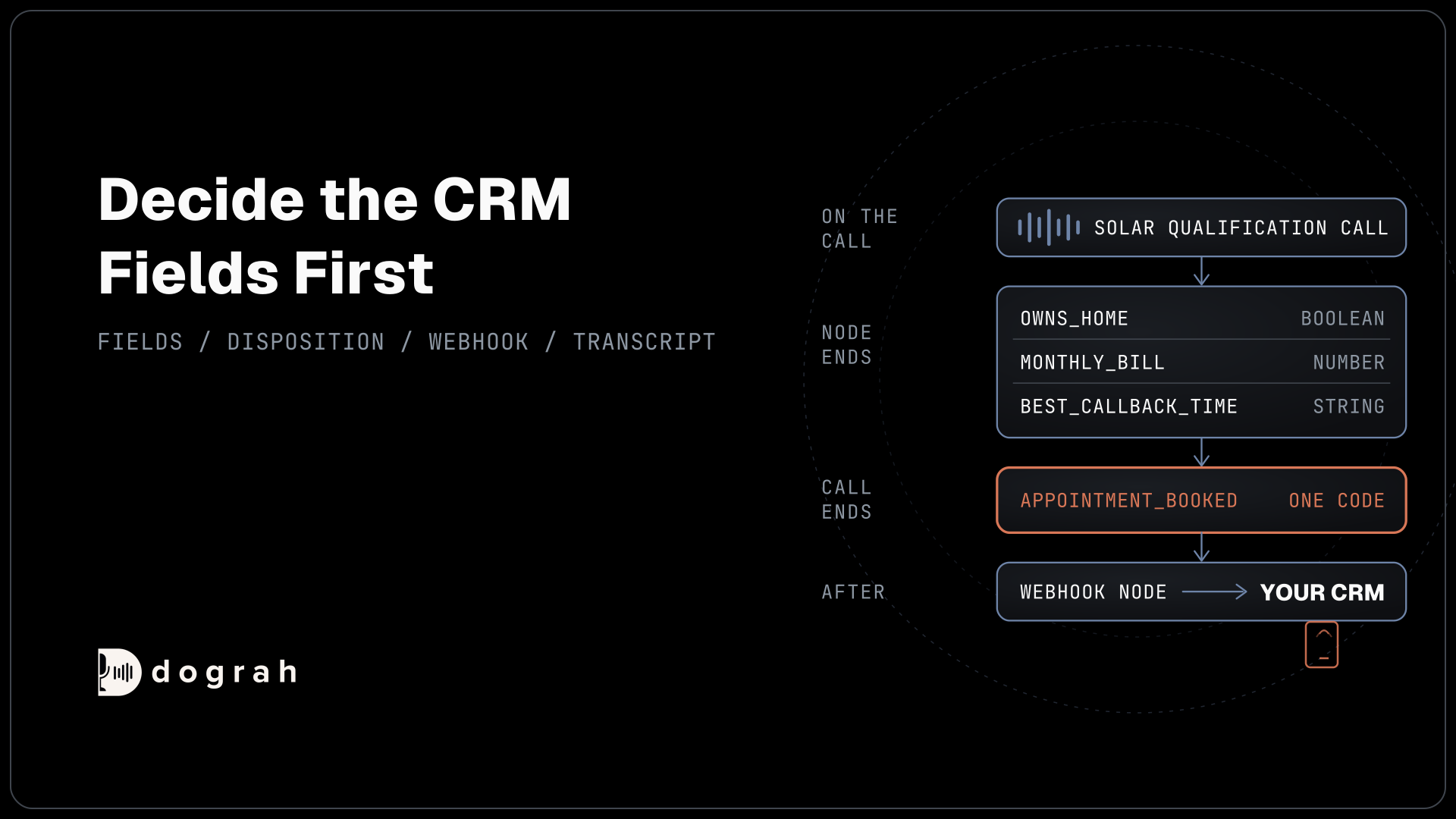

To extract structured data from calls in Dograh, turn on Enable Variable Extraction on the node where each answer comes up, and list each field with a type and a hint. Add call dispositions for one outcome per call, then send both to your CRM with a Webhook node. You can self-host Dograh or run it on Dograh Cloud.
Key Takeaways
- Decide the CRM fields first, then extract only those.
- One disposition per call is easier to count than a free-text summary.
- Extracted values are AI readings. The transcript stays the exact record.
This post is part of our guide to how to build an AI voice agent, where recording what happened on every call is one step. Here we extract call fields and send them to a CRM, step by step, in Dograh, our open-source AI voice agent platform.
What you need before you start
You need a working agent and a CRM endpoint that accepts a POST request. Our example is a solar installer's outbound campaign that qualifies homeowners. After each call, the installer's CRM should show the homeowner's answers and the call's outcome. Reading the CRM before the call starts is the reverse job, covered in pre-call data fetch with CRM context.
Dograh has no built-in CRM connector, so the record goes to your CRM's own API, or to a workflow tool such as n8n that writes it there. That works in your favour, because you decide the shape of the payload, so it matches your CRM's fields exactly. The other ways a call reads and writes your systems are covered in Integrating Voice Agents With Your Stack.
Step 1: Choose the fields before the prompt
Start from the CRM record and work back to the conversation. List the fields your team actually uses after a call, and extract only those. Everything else stays in the transcript, where anyone can read it later.
For the solar installer, three fields matter. owns_home is a Boolean, because the answer is yes or no. monthly_bill is a Number, so the CRM can filter on it. best_callback_time is a String, because people say it in many ways.
Prefer closed answers wherever you can. A Boolean or a fixed list gives the same value for the same answer, and free text drifts. Language models don't always give the same answer to the same input. In a test by Thinking Machines, Qwen3-235B-A22B-Instruct-2507 gave 80 different completions when one prompt was sampled 1,000 times at temperature 0. Narrow types leave less room for that variation.
Use snake_case names that match your CRM, so the payload in Step 4 maps one to one.
Check: you have a short list of fields, each with a type and the CRM field it fills.
Step 2: Turn on extraction on the right node
Turn on extraction on the node where the answer comes up, so it runs with that part of the conversation fresh. Open the node, for example the Agent Node that asks about the home and the bill, and switch on Enable Variable Extraction. Two fields appear: Extraction Prompt and Variables to Extract.
The Extraction Prompt gives overall instructions, such as "Extract the homeowner's answers from this solar qualification call." Under Variables to Extract, add each field with a Variable Name, a Type and an Extraction Hint:
owns_home (Boolean): True only if the caller says they own the home they live in.
monthly_bill (Number): The caller's usual monthly electricity bill in dollars, as a number.
best_callback_time (String): The day and time the caller asks to be called back, in their words.
What this does: Each line tells the model what to look for and in what form. The hint on
owns_homestops a renter who "pays the bills" from being marked as an owner.
Extraction runs when the node completes, and the model reads the conversation so far. If it can't tell an answer, it leaves the field empty instead of guessing. A later node can fill the same name again, so give each field one home. The values land in gathered_context, which prompts can't read, so they travel out through a webhook or the run record. Speech-to-speech agents use a separate text model for this step. The Agent Node page has more examples.
Check: after a test call, the run shows owns_home, monthly_bill and best_callback_time with sensible values.

Open Source Alternative to Vapi / Retell
Self-hosted voice agent platform — no per-minute fees
dograh-hq/dograh
Star on GitHub
Step 3: Add one disposition per call
A disposition is the one outcome of the whole call, picked from a list you write. Open Settings, choose General and switch on "Extract call disposition at the end of the call". A dialog called "Call disposition extraction" opens with starter codes such as qualified, not_interested and callback_requested.
Edit or remove the starters that don't fit. Then click Add custom disposition and add your own, such as appointment_booked with the description "Use when the homeowner agrees to a specific site-visit date and time." Write each description as something you could spot in the transcript, so two codes never fit the same call. Click Enable extraction, then Save General Settings, and publish the agent so live calls use it.
At the end of the call, Dograh reads the whole conversation and picks exactly one code from your list. It can't invent a new one. You can have up to 50 codes, each up to 64 characters, and the call dispositions page lists the description limits.
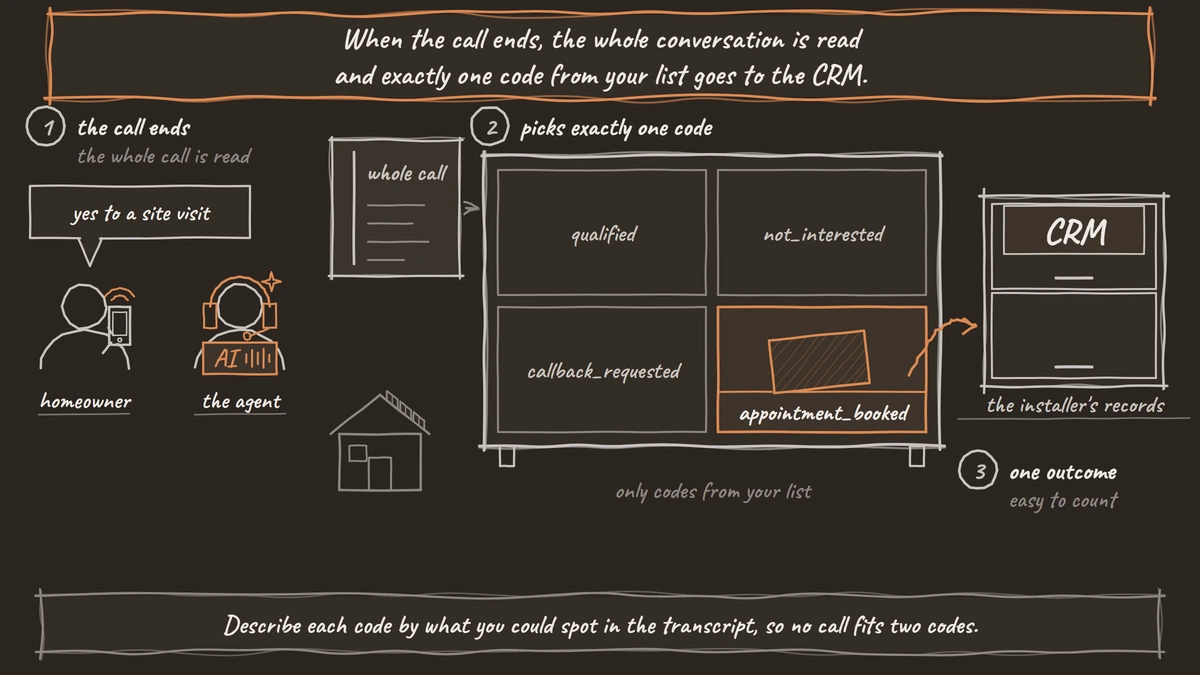
Check: a test call where you book a visit ends with appointment_booked.
Step 4: Send the record to your CRM
A Webhook node at the end of the flow sends the record wherever you point it. Add one, set the HTTP Method to POST, paste your CRM endpoint as the Endpoint URL and pick a credential under Authentication. Then write the Payload Template.
The template below maps each extracted field to the CRM field of the same name, adds the outcome in disposition and keeps call_id for duplicates:
{
  "call_id": "{{workflow_run_id}}",
  "owns_home": "{{gathered_context.owns_home}}",
  "monthly_bill": "{{gathered_context.monthly_bill}}",
  "best_callback_time": "{{gathered_context.best_callback_time}}",
  "disposition": "{{gathered_context.call_disposition}}",
  "recording_url": "{{recording_url}}",
  "transcript_url": "{{transcript_url}}"
}
What this does: It sends one JSON record per call to your CRM. The
call_idlets your CRM ignore a second delivery of the same call, and the recording and transcript links let anyone check a field against the call.
If your CRM is briefly down, the Webhook node retries temporary failures automatically, up to 5 attempts. A wrong URL or credential is not retried. You can also pull a call's results later through the run details API. Delivery and retries have their own post, Webhook-Driven Voice Agents, and the Webhook node page lists every field.
Check: a test call creates or updates one record in your CRM with all four values.
Join the Dograh Community
Dograh is an OSS alternative to Vapi. Join our Slack community for queries, releases, best practices & community interactions.
Step 5: Check the values against the transcript
An extracted value is the model's reading of what the caller said, so check a sample before you trust the numbers. Models add details even when the source is in front of them. On Vectara's hallucination leaderboard, as measured on 22 October 2026, gpt-5.4 (2026-03-05) added unsupported content to 7.0% of document summaries.
Open a handful of calls each week and compare each field with the transcript. A caller who said "about one eighty, maybe less" might come through as 180. If a field is often wrong, tighten its Extraction Hint, or move it to a node that asks the question more directly. The recording and transcript stay the exact record, so your team goes back to them for anything that matters.
Check: in your sample, each field matches what the caller said, or you have a hint to fix.
Before you ship it
Run through this list before the campaign goes live:
- Every field maps to a CRM field your team uses.
- Each disposition description fits only one kind of call.
- The Webhook node sends
call_id, and your CRM ignores repeats. - You have compared a sample of fields with their transcripts.
For a full agent that extracts fields and sends them by webhook, see How to Build a Voice Agent for Logistics.
Glossary
- gathered_context
- Where Dograh stores the values extracted during a call, including the call disposition. Prompts can't read it, so it travels out through a Webhook node payload or the run record.
- Extraction Hint
- A short note on each extracted variable that tells the model what counts as the answer and in what form. A precise hint, such as 'true only if they own the home', prevents near-miss values.
- Call disposition
- One outcome code per call, picked by Dograh from a list you write in the agent's General settings. It can't invent a code, which keeps reports consistent.
- Payload Template
- The JSON body a Webhook node sends, with variables such as {{gathered_context.monthly_bill}} filled in for each call. You write it to match your CRM's fields.