
An AI voice agent workflow builder lays a call out as steps joined by branches, each step with its own prompt and tools. A prompt-only agent keeps everything in one block of text. For teams that want to describe a call and edit each step, Dograh, the open-source AI voice agent platform, drafts the canvas, self-hosted or on Dograh Cloud.
Key Takeaways
- A workflow puts each rule and tool on the step that needs it.
- One prompt still suits short, low-stakes calls with a single goal.
- Dograh's Agent Builder drafts the canvas and lists missing connections as gaps.
A phone agent can live in one long prompt or across a set of linked steps, and that choice shapes every fix you make. We cover what a workflow builder changes and when a single prompt is enough. Then we talk about how Dograh's Agent Builder drafts the first canvas.
What a workflow builder changes
A workflow builder turns one phone call into a map of small steps you can see and edit. Each step, usually called a node, holds a short prompt for one job, such as confirming who is calling. Branches connect the steps and say when the call moves on. Variables carry data into the call and out of it, and tools let a step read or write a business system while the caller is talking.
A prompt-only agent holds all of the same things in one block of text. The rules for every part of the call sit together, every tool is offered on every turn, and the model decides on its own when one part of the call has ended. That can work well, and it is quick to write. It gets harder to change once the call has many parts, because a fix for one part can shift how the model behaves in another.
| What you are changing | Prompt-only agent | Workflow builder |
|---|---|---|
| A rule for one part of the call | One prompt, read on every turn | The prompt of that one step |
| Which tools the model can call | Every tool, on every turn | Only the tools attached to the step |
| When the call moves on | The model decides inside the prompt | A branch condition you can read and test |
| Data in and out | Placed into the prompt text | Variables in, extracted fields out |
In Dograh, that map is a graph of nodes and pathways, laid out in the voice agent builder as a canvas. The rest of this post uses it as the worked example.
Why long calls get split into steps
Long prompts lose rules, and a workflow keeps each prompt short enough to hold. A study of how many instructions models can follow at once found that even the best frontier models reached 68% accuracy when given 500 instructions together. A phone call with a greeting, an identity check, a booking, a policy answer and a goodbye can collect dozens of rules quickly.
Conversations add a second strain. A study of multi-turn conversations found models did 39% worse on average when a task arrived over several turns, which is exactly how callers give information. Splitting the call means each step only has to hold its own part of the job.
Tools follow the same logic. A model picks the right tool less often as the list it can choose from grows, so a step that books appointments should offer the booking tools and little else. Our guide to tool calling in voice agents covers how many tools a step should carry and why.
When one prompt is the better choice
One prompt is the right choice for short calls with a single goal and little at stake. An after-hours line that takes a name and a message, or a survey with three questions, gains little from a map of steps. Some hosted platforms advise teams to start every agent this way and add structure only when the call needs it, and that advice is sound.
Steps also add friction. A caller who gives their date of birth before the agent asks for it, or who changes their mind halfway through, has to be handled at the edge between two steps. A single prompt absorbs that more easily, because the whole call is in front of the model. So add steps where the business needs a guarantee, such as an identity check before any account detail is read out, and keep the rest loose.
Our post on prompt and flow design patterns works through that split in detail, including where exact wording has to come from.

Open Source Alternative to Vapi / Retell
Self-hosted voice agent platform — no per-minute fees
dograh-hq/dograh
Star on GitHub
How builders decide which branch to take
Workflow builders route calls in two broad ways, and the difference matters when you write branches. Some let a branch fire on a fixed expression over a variable, such as a value equal to "yes", alongside branches the language model judges. Others offer dedicated logic nodes, or scripted workflows that run in the same order every time next to looser instructions. A buyer should ask which style a builder uses before drawing the first branch.
In Dograh, every pathway is a condition the language model judges. Each outgoing pathway is offered to the model as a function, and when the model decides the caller's words match a condition, it calls that function and the call moves on. That suits phone calls where people phrase the same answer many ways. It also means a pathway is a judgment, never a hard rule, so each condition on an Agent Node should be one plain sentence the model can check, such as "The caller wants to move an existing appointment to a new day."
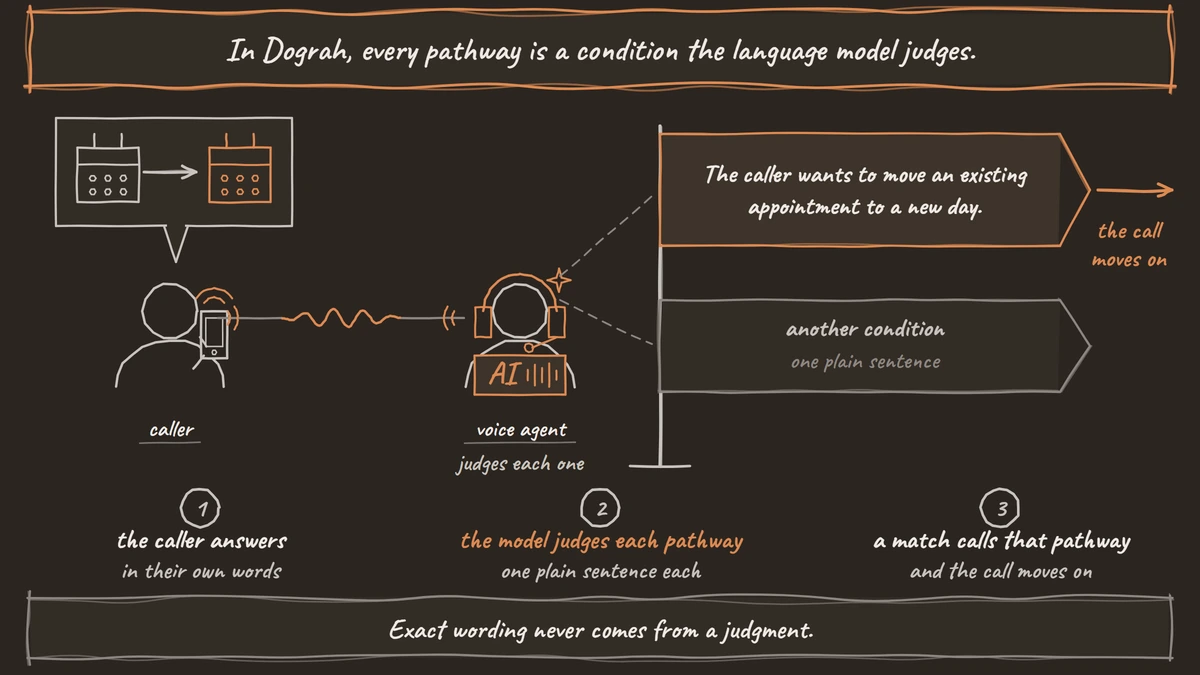
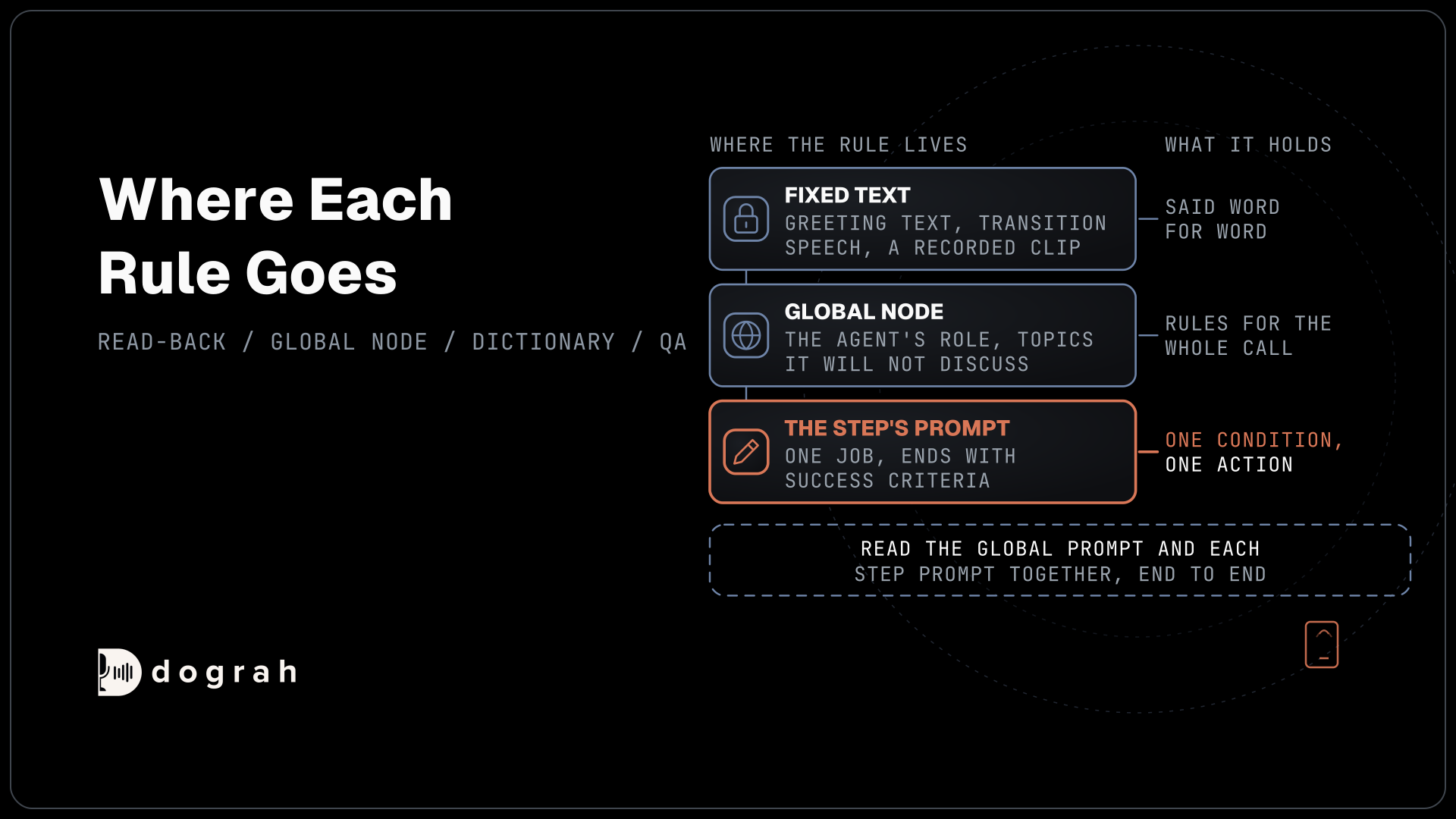
Exact wording never comes from a judgment. Text that must be said word for word goes in fixed text, such as the Start Call Greeting Text or a pathway's Transition Speech, or in a recorded clip. Our guide to designing conversation flows with a visual builder covers the fields on each pathway.
Models are chosen per agent, in the editor's Model tab, never per step. When part of a call needs a different setup, the Transfer To Agent tool hands the live call to a second Dograh agent with a labeled transcript of the conversation so far.
Describing the call to Dograh's Agent Builder
Dograh's Agent Builder drafts the canvas from a plain description, so the first map of steps comes from words rather than drag and drop. You open Voice Agents in the sidebar, click Create Agent and choose Use Agent Builder, then answer "What should your agent do?" in a box that starts "Build me an agent that…". The builder asks follow-up questions on cards and then shows a card titled Your agent requirements, with the information to collect, the business rules, the successful outcome and any assumptions to confirm.
Nothing is built until you click Approve & build. The first draft is deliberately plain. It uses four node types, a Global Node for shared rules, Start Call, Agent Nodes for the conversation and End Call, and it writes each prompt from Dograh's own voice prompting guide.
Connections to your systems are where the builder stops short of guessing. A booking system, CRM or calendar you mention is recorded as a configuration gap, because collecting a preferred time is not the same as a confirmed booking. If the builder does not know an endpoint's address, the tool keeps a placeholder and the gap is listed in its summary, never filled with an invented URL.
When the agent needs a tool, the builder shows a New tool or Edit a tool card with the tool's full definition, and nothing changes until you click Approve & create. Our post on the AI agent builder for voice walks through every one of these screens.
Taking over on the canvas
The draft is a starting point, and the canvas is where you shape it into the call you need. Clicking Test agent saves the agent as version 1, publishes it and opens the editor, whose tabs are Builder, Canvas, Model, Variables and Settings. A sentence typed in the Builder tab edits the agent for you, and the Canvas tab is there for edits by hand, such as rewording one step's prompt or drawing a new pathway. Edits from either tab save as a draft, so the published version keeps taking calls until you publish.
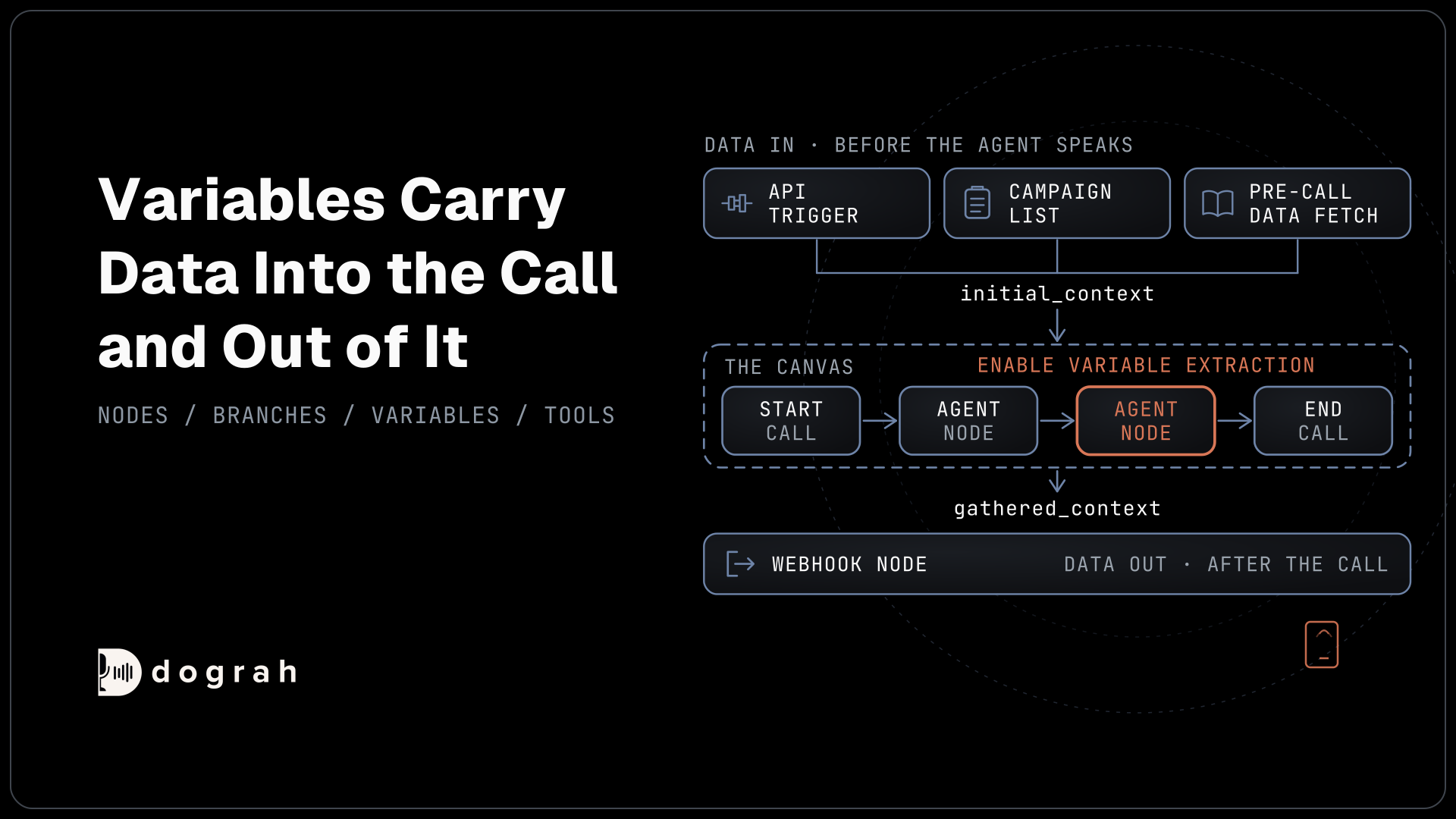
Most hand edits fall into a few kinds. A step that grew too long becomes two Agent Nodes joined by a clear condition. A tool is attached to the one step that needs it, because a tool is only callable from the nodes it is attached to. Data the agent needs before it speaks arrives through initial_context, from an API Trigger, a campaign list or Pre-Call Data Fetch. Data the caller gives goes the other way through Enable Variable Extraction, into gathered_context, and leaves after the call through a Webhook node.
The builder's own checks read the agent's text and structure. Voice timing, phone audio and whether a live system answers only show up on a real call, so place one with the editor's Phone Call button before you publish a change. Teams that prefer code can build the same graph of nodes and pathways through Dograh's SDK or its MCP server.
Join the Dograh Community
Dograh is an OSS alternative to Vapi. Join our Slack community for queries, releases, best practices & community interactions.
Running the builder yourself or on Cloud
Where you run the builder decides how its own use is billed. The Agent Builder runs on Dograh's model service. On Dograh Cloud its use is charged in credits, and a self-hosted install needs a Service Key in its model settings to reach it. An install that must stay fully offline builds agents on the Canvas by hand, with the rest of the open-source code the same either way.
The calls themselves are billed separately. When you run Dograh on your own infrastructure, calls carry no per-minute platform fee, though you still pay for servers, model keys and phone minutes. The database and each upgrade become your team's to manage. Help is available from the open-source community, and Enterprise contracts add custom SLAs. On Dograh Cloud, the hosting is handled for you for a 1¢-a-minute platform fee.
If you are still choosing between chat builders, canvases and code, our list of the best AI voice agent builders compares them. Whichever you pick, start with the one call your team answers most, draft it, test it on a phone and split it into more steps only where a real call shows you need to.
Glossary
- Pathway condition
- A plain-language sentence on a branch between two steps. In Dograh the language model judges whether the caller's words match it, so it is never a hard rule.
- Global Node
- A Dograh node that holds rules every step shares, such as tone and when to offer a person. Its prompt is added to each node that has Add Global Prompt switched on.
- Configuration gap
- A connection the Agent Builder could not complete from your description, such as a booking system's address. It is listed for you to fill in, never guessed.
- gathered_context
- Where Dograh stores values extracted from the caller's answers. Node prompts cannot read it, and it leaves the call through a Webhook node or the run record.