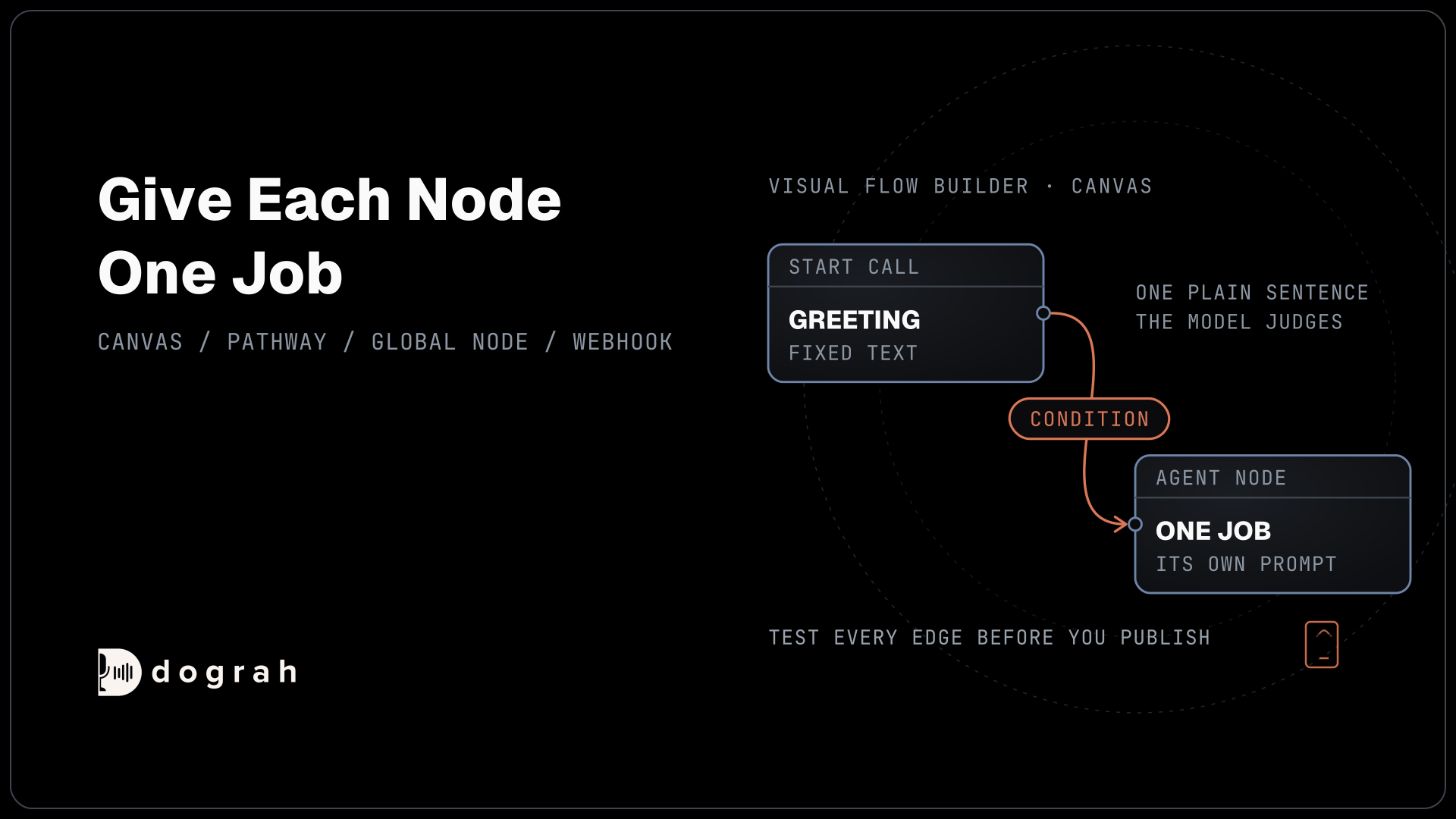

A visual flow builder lays a phone call out as nodes and edges. Each node is one step with its own short prompt, and each edge is a condition the language model checks before it moves on. In Dograh, the open-source AI voice agent platform, you can self-host the builder or use it on Dograh Cloud.
Key Takeaways
- Give each node one job and a short prompt of its own.
- An edge is a condition the model judges, so write it as one plain sentence.
- Variables come in through initial_context and leave through the Webhook node.
Cram a whole phone call into one long prompt, and the model loses track a few turns in. We show how a flow is laid out in Dograh, what each node does, how edges pick the next step and how variables move. It builds on our guide to building an AI voice agent.
What a flow is made of
A flow is a graph. Nodes are the steps of the call, and edges are the pathways between them. In Dograh, you open an agent from Voice Agents in the sidebar, and the editor shows four tabs at the top: Canvas, Model, Variables and Settings. The canvas is where the flow lives.
The plus button at the top right, labelled Add node, opens the Add New Node panel. Its sections are Triggers, Agent Nodes, Global Nodes, Webhook, QA and Integrations. Click a node to drop it on the canvas, then drag from one node's handle to another to draw an edge. The voice agent builder overview shows the same graph model.
Some node types are capped. A flow has exactly one Start Call, at most one Global Node and at most one API Trigger. When a type reaches its cap, its button greys out with "limit reached for this workflow". If you have never built an agent, Build Your First Voice Agent in Under 2 Minutes gets you a drafted flow to edit first.
The node types, and what each one does
Every node type has one job, and keeping it that way is the main design rule, for reasons the research makes plain. A study of LLMs in multi-turn conversation measured an average 39% drop in performance across six tasks when instructions arrived over several turns instead of all at once, driven mostly by a large rise in unreliability. A 2025 study of instruction density found that even the best frontier models reached only 68% accuracy with 500 instructions in one prompt. A short prompt per node keeps each step inside what the model handles well.
Nodes the caller hears
Start Call opens every call. Its Greeting Text is optional fixed text spoken word for word, or you can choose a pre-recorded greeting instead. The node also holds the opening Prompt, Allow Greeting Interruption, Delayed Start and Pre-Call Data Fetch, which loads the caller's record once the call connects.
An Agent Node is a conversational step where the model runs one focused exchange, such as confirming a booking. Each has its own Prompt, Allow Interruption and Add Global Prompt switches, and needs at least one incoming edge. End Call closes the conversation and hangs up. It has no outgoing edges, and a flow can have several, one for each way a call can end.
Nodes that run around the call
The Global Node holds rules every step shares, such as tone and when to offer a person. Its prompt is added to every node that has Add Global Prompt switched on, and it takes no edges. The API Trigger gives the agent a public endpoint that starts an outbound phone call.
Webhook and QA Analysis run after the call and take no edges. The Webhook node sends the call's results to your system, and QA Analysis reviews the transcript. The Integrations section adds Noveum, Paygent and Tuner nodes.

Open Source Alternative to Vapi / Retell
Self-hosted voice agent platform — no per-minute fees
dograh-hq/dograh
Star on GitHub
Edges are conditions the model judges
An edge moves the call from one node to the next when its condition is true, and the language model decides whether it is. Click an edge and the Edit Condition dialog opens with three fields. Condition Label is a short name of up to 64 characters that shows in the logs. Condition describes when this pathway should be taken. Transition Speech is optional text or audio played right before the move.
Under the hood, each outgoing edge becomes a function the language model can call. When the model judges that a condition is met, it calls that function and the call moves on. Some flow builders route with explicit logic nodes instead, and the trade-off is real. A pathway here is a judgment, never a hard rule. So write each condition as one plain sentence the model can check against what the caller said, such as "The caller wants to change the date of an existing booking", and test it with many phrasings.
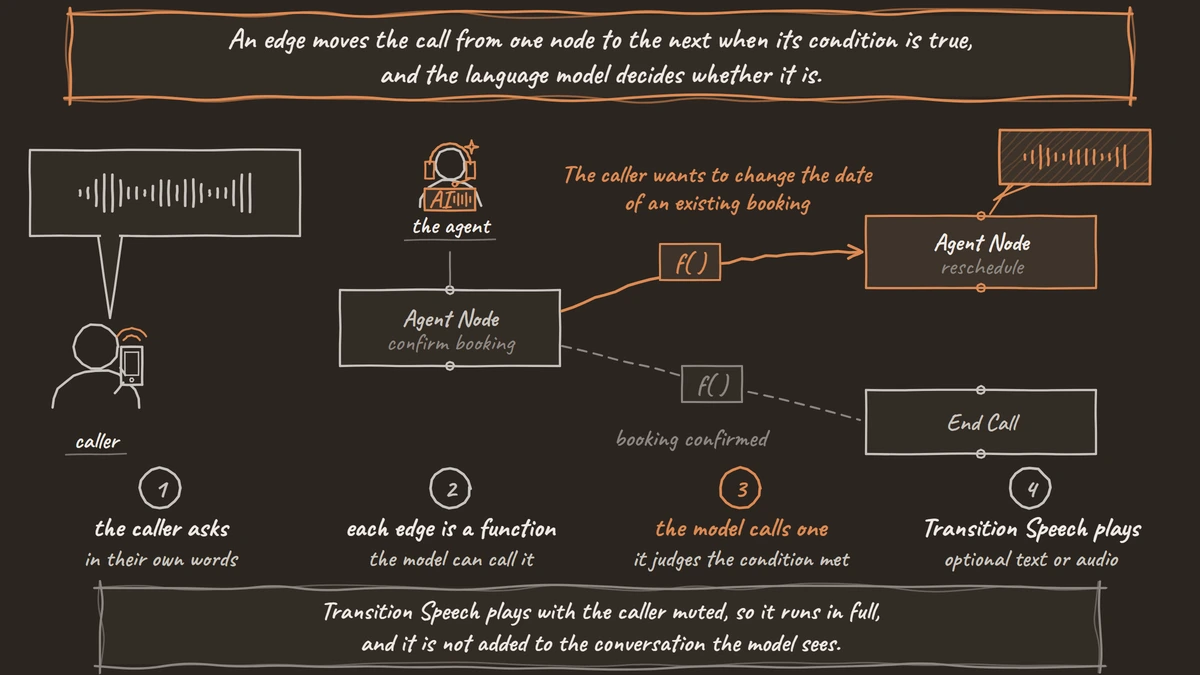
Exact wording lives only in fixed text. Transition Speech plays with the caller muted, so it runs in full, and it is not added to the conversation the model sees. Text lines do not play on speech-to-speech models, so use a recorded clip there. Our post on prompt and flow design patterns covers how to split a call by what each part must guarantee.
Variables in, variables out
Variables carry data into the call and out of it, and the two directions work differently. Data that arrives before the call sits in initial_context. It comes from an API Trigger request, the extra columns of a campaign CSV or Pre-Call Data Fetch. Prompts and the Greeting Text use it as template variables, such as {{customer_name | there}}. Give each one a fallback, or a missing value is spoken as empty text.
Built-in variables such as {{current_time_America/New_York}} and {{current_weekday}} need no setup. To test with sample data, put values in the Variables tab. Browser test calls count as inbound, so set direction to outbound to test the outbound path.
Data the caller gives you goes the other way. Switch on Enable Variable Extraction on an Agent Node or End Call node, write an Extraction Prompt, and add each field under Variables to Extract with a Variable Name, a Type (String, Number or Boolean) and an Extraction Hint. Extraction is an AI step that records the answer as the caller stated it, with the transcript and recording as the exact record. Extracted values land in gathered_context, which Agent prompts cannot read. The Webhook node sends them out with {{gathered_context.field_name}}, as our guide to extracting structured data from calls into any CRM shows.
Join the Dograh Community
Dograh is an OSS alternative to Vapi. Join our Slack community for queries, releases, best practices & community interactions.
Tools and documents attach per node
Tools and documents attach to single nodes. Each Start Call and Agent Node has a Tools field and a Knowledge Base Documents field, and the model can call only the tools attached to the node it is in. Attach the booking tool to the booking node and nowhere else, so the model is never tempted to book from the greeting. Our post on how to add tool calls to a voice agent covers setting up each tool.
Test every edge before you publish
A flow is only as reliable as its weakest edge, so test each one on purpose. Start a browser test call and walk every pathway, then walk each one again with different wording and with the caller cutting in mid-sentence. Read the transcript to confirm which pathway fired and that each Transition Speech line played.
When the flow holds, publish it as a new version. Then test on a real phone number before callers reach it. Most phone calls reach the agent as 8 kHz audio, while a browser test runs at 16 kHz, so the speech model can hear names and numbers differently and a condition that fired in the browser can miss on a phone line.
Glossary
- Pathway
- An edge between two nodes, with a Condition Label, a Condition and optional Transition Speech. The language model reads the condition and decides when to take it, so the choice is a judgment call each time.
- Transition Speech
- Fixed text or a recorded clip that plays as a pathway is taken, with the caller muted so it runs in full. It is not added to the conversation the model sees, and text lines do not play on speech-to-speech models.
- Global prompt
- The prompt in the Global Node, added to every node that has Add Global Prompt switched on. It holds rules every step shares, such as tone and when to offer a person.
- gathered_context
- The values the agent extracts during a call, keyed by variable name. Agent prompts cannot read them, so they leave the call through the Webhook node payload or the run record.