
Voicebot prompt engineering is writing the instructions a language model follows on a live call. Good voice prompts ask for short spoken sentences, one question per turn, read-backs and a plan for misheard words. For teams that want those rules built in, Dograh, the open-source AI voice agent platform, writes first prompts from its guide, self-hosted or on Dograh Cloud.
Key Takeaways
- Ask one question per turn and end every turn with a question.
- Read IDs back character by character, and wait for a yes.
- Dograh's Agent Builder writes first prompts from its built-in voice prompting guide.
A prompt that reads well on screen can sound wrong when spoken. We cover what changes for the ear, how to ask and confirm, what to do when the agent mishears and where each rule belongs. Then we talk about how Dograh's Agent Builder writes the first prompts.
What changes when a prompt is heard
A voicebot prompt is written for a listener, so every rule about format becomes a rule about speech. A chat answer can use a list, a bold heading or a table, and the reader scans it. On a call, a list read aloud becomes a long run of words the caller has to hold in their head, and markdown either gets spoken as symbols or silently dropped. LiveKit's prompting guide puts the rule plainly, "Respond in plain text only. Never use JSON, markdown, lists, tables, code, emojis, or other complex formatting."
Length changes too. The same guide sets one to three sentences per reply and one question at a time, and that matches what works on a phone. A caller cannot skim ahead or scroll back, so a long answer is a long wait for the part they need. Numbers, phone numbers and email addresses should be spelled out as words the voice can say.
Some platforms clean up output before it is spoken. Dograh drops markdown structure, JSON and stage directions when they open a sentence, so a stray heading never reaches the caller. That is a safety net, and the prompt should still ask for plain spoken sentences. Our post on keeping LLM answers short enough for the phone covers the length rule and how to test it in detail.
One question per turn, then hand it back
The most common voice prompt mistake is asking for several things at once. Dograh's own voice prompting guide, which its Agent Builder writes from, says it directly, "Collect one thing at a time." It gives the reason with an example, that agents that ask 'Can I get your name, date of birth, and reason for calling?' almost always fail, because the caller answers one part and the agent has to chase the rest.
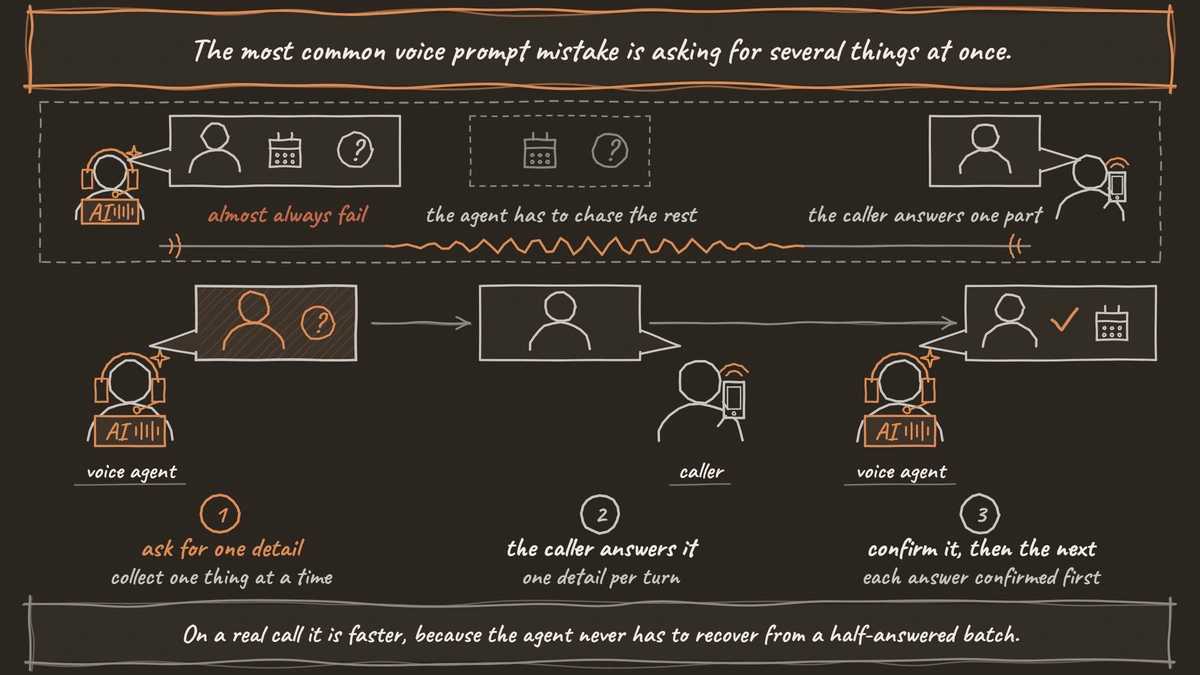
The fix is a sequence, one detail per turn, with each answer confirmed before the next question. It feels slower on paper. On a real call it is faster, because the agent never has to recover from a half-answered batch.
The other half of a turn is how it ends. The guide's rule is "End every agent turn with a question or a clear prompt for the user to respond." If the agent finishes speaking with no cue, both sides wait, the line goes quiet and the call stalls. The guide shows the difference with a pair of node prompts. A good one reads "Read back the appointment slot. Wait for the user to confirm or pick a different time." A bad one reads "Thank the user. End the call.", which gives the caller no signal that it is their turn and risks dead air before the call ends.
Confirmations and read-backs
A voice agent should repeat back anything it is about to act on, and wait for a yes. Speech recognition gets letters and digits wrong more often than words, and a wrong order ID or appointment time is worse than a slow call. Dograh's guide shows a multi-turn task as a numbered sequence inside the step's prompt, and its refund-status example, quoted below, puts the check in step 3 and the tool call in step 4, after the ID is confirmed.
1. Get the caller's name.
2. Ask for the order ID.
3. Verify the order ID character by character.
4. Call get_order_details with orderId and name.
5. Read back the order status.
6. Ask if they need anything else.
What this does: The sequence puts the ID check before get_order_details, so a misheard character is caught by the caller in step 3 instead of becoming a wrong lookup in step 4.
OpenAI's voice prompting guide makes the same point for numbers, telling agents to read numeric identifiers back digit by digit, because a number read as a whole can hide an error. The read-back also has a partner rule on the other side of the action. Dograh's guide says "Do not claim a booking, update, or transfer succeeded without its result." A prompt that lets the agent say "you're all booked" before the system replies will, sooner or later, confirm a booking that never happened.

Open Source Alternative to Vapi / Retell
Self-hosted voice agent platform — no per-minute fees
dograh-hq/dograh
Star on GitHub
When the agent hears it wrong
Every voice agent mishears some callers, and the prompt decides what happens next. Most phone calls still reach the agent as 8 kHz audio, while a browser demo runs at 16 kHz, so speech recognition that looks clean in a demo can miss more words on a call. In our experience the gap can be up to about three times the error rate, depending on the speech-to-text model and the phone path, so it has to be tested on a real line.
The prompt's job is to keep a misheard word from turning into a wrong action. Dograh's guide gives the rule, "If speech is unclear, ask for the relevant detail again. If the caller asks for a repeat, repeat the relevant part." Ask again for the one detail that was unclear, never the whole set, and never let the agent guess a name, a number or a date it did not hear.
A prompt cannot fix a word the speech-to-text model never recognized. Brand names, product codes and local street names belong in Dograh's Dictionary, in the agent's Settings. It passes them as expected terms to Dograh's own speech-to-text, Deepgram, AssemblyAI, Soniox and Speechmatics. The prompt then only has to handle what is left.
Mishearing matters most before anything private is shared. A caller's phone number finds a record but does not prove who is calling, so the agent greets, verifies with an approved check such as a date of birth, and only then discloses details. Write that order into the prompt as a hard sequence.
Where each rule goes in a voice agent
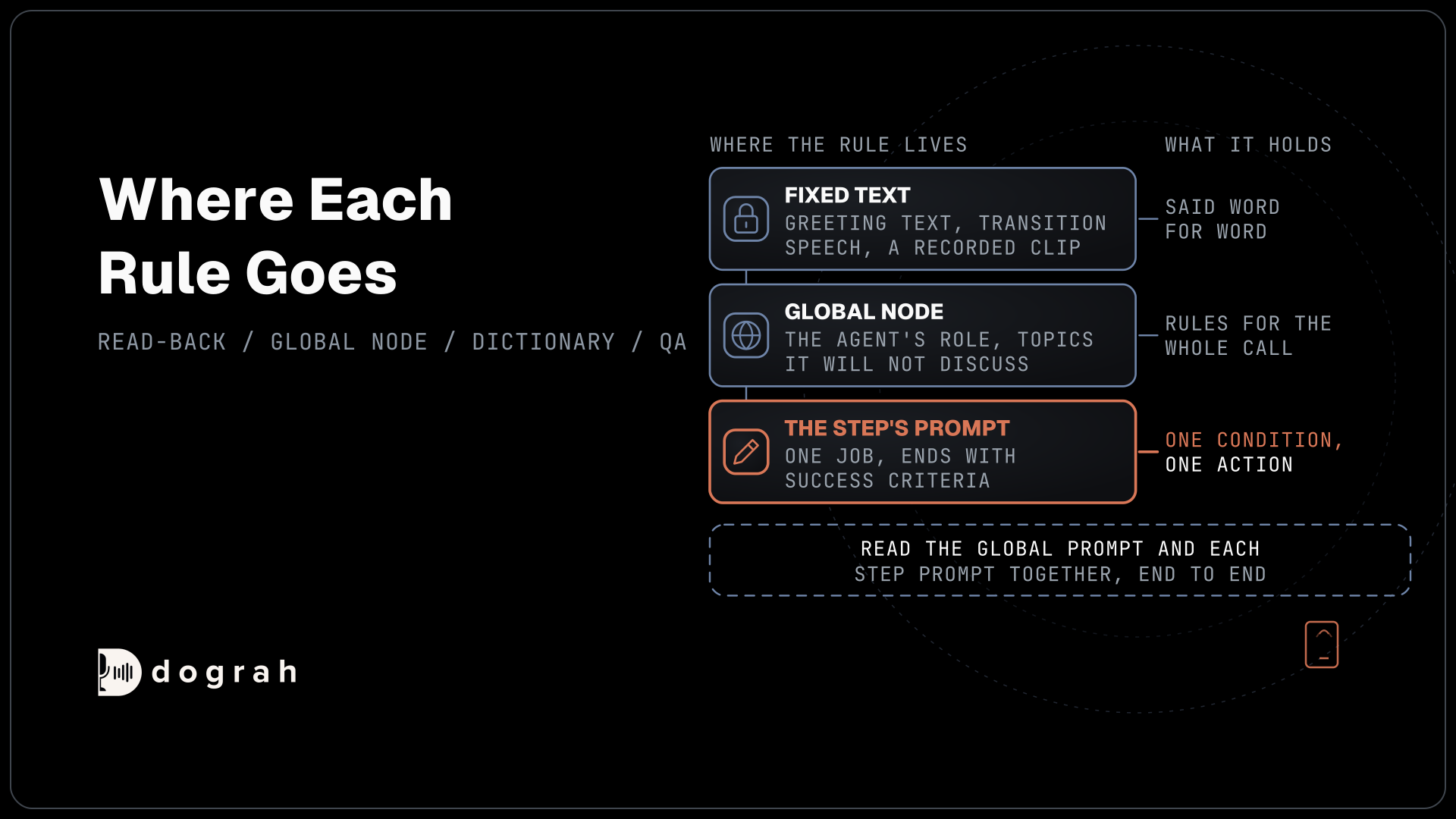
A prompt makes words likely, never certain, so each rule belongs in the place that can actually hold it. Models paraphrase, and a rule like "never say X" can be followed in letter and broken in meaning. Text that must be said exactly, such as a legal line or the business's opening, goes in fixed text. In Dograh that is the Greeting Text on the Start Call node, a pathway's Transition Speech or a recorded clip, all spoken word for word.
Rules that apply to the whole call, such as the agent's role and the topics it will not discuss, go in one shared place. Dograh's Global Node holds them, and its prompt is added to every step that has Add Global Prompt switched on. Rules for one job go in that step's prompt, which stays short.
Each step's prompt should end with its success criteria, written as conditions and actions. Dograh's guide gives the example below of that section, quoted from the code.
## Success Criteria
- Call schedule_appointment only after the user passes all three screening
  questions.
- Call end_call if the user is disqualified, not interested, voicemail, or a
  wrong number.
- Call end_call_rescheduled if the user wants a different time and has given a
  specific slot.
What this does: Each line pairs one condition with one action, so the model has a clear rule for every exit from the step and no tool fires on a vague "when qualified".
Variables need care too. A value such as {{customer_name | there}} falls back to "there" if the name is missing, and without a fallback the gap is spoken as empty text. Our post on prompt and flow design patterns covers how to split a call into steps by what each must guarantee.
Instruction collision, the quiet failure
Instruction collision is when two parts of a prompt ask for different things, and it is more common than it looks. The model picks a side on each turn, so the agent behaves one way on one call and another way on the next, and nothing in a single transcript explains why. Dograh's guide describes two shapes it shows up in.
The first is an instruction against an example. A prompt that says to open by giving the agent's name and the reason for the call, then shows an example line that only asks whether it is a good time to talk, gives the agent two patterns to choose from. The second is a style rule against itself, and the guide's example is a prompt that says "Be conversational and empathize deeply" and later "Keep responses under 10 words." Both cannot hold at once, so pick one.
Collisions also happen between the shared prompt and a step's prompt, such as a global "confirm every detail" against a step that says "keep this quick". The only reliable check is to read the global prompt and each step prompt together, end to end, before you ship a change.
Tool rules are a common source of collisions, because the prompt and the tool's description can say different things about when to call it. Our guide to tool calling in voice agents covers how to write those rules so they agree.
Join the Dograh Community
Dograh is an OSS alternative to Vapi. Join our Slack community for queries, releases, best practices & community interactions.
Letting the Agent Builder write first prompts
Dograh's Agent Builder writes an agent's first prompts from the same voice prompting guide quoted above. You describe the call, answer its questions and approve a Your agent requirements card, and the business rules on that card become rules in the prompts. Before writing, the builder reads the guide's eight topics, which run from shared identity and voice style to guardrails, tool calls, success criteria, end-call logic, turn-taking and instruction collision.
The builder also reviews its own draft. Its review step looks for conflicting instructions, missing hand-off cues, unjustified assumptions and claims that an action succeeded before its result came back, which are the faults this post describes. Coding agents get the same rules, because the Dograh MCP server serves the guide as a tool called get_voice_prompting_guide.
You still own the prompts after that. A sentence in the editor's Builder tab, such as "ask for the order ID before the name", changes the prompt for you, and the Canvas tab lets you edit any step's prompt by hand. Both save as a draft, and live calls keep running the published version until you publish.
The builder runs on a hosted model service, billed in credits on Cloud, while a self-hosted install reaches it with a Service Key or builds prompts on the Canvas by hand. Calls on a self-hosted install carry no per-minute platform fee. Your costs there are servers, model keys and phone minutes, plus the team time to keep the database and upgrades in order. Support comes through the open-source community, and Enterprise adds custom SLAs. For teams that would rather not host, Dograh Cloud runs calls for a 1¢-a-minute platform fee.
Testing a prompt change on real calls
A prompt change has to be tested on several calls, because the same prompt can give different answers each time. Thinking Machines Lab sent one prompt to Qwen3-235B 1,000 times at temperature 0 and got 80 different completions, with the most common appearing 78 times. One good test call proves very little.
Run each changed step several times, over a real phone line, with callers who answer early or change their minds halfway. Dograh's QA node scores each step of a call separately, with tags such as ASSISTANT_IN_LOOP when the agent repeats a question, ASSISTANT_REPLY_IMPROPER when it misses what the caller asked and DEAD_AIR for long silences. Those tags point at the step whose prompt needs work, so you fix one prompt rather than rewrite the agent.
Everything here is for cascade agents, where speech-to-text, a language model and text-to-speech run as separate parts. Realtime speech-to-speech models take prompts differently, and our post on prompting a speech-to-speech voice agent covers what changes. Whichever you run, write one rule at a time, test it on a phone and keep the line that works.
Glossary
- Dictionary
- A Dograh agent setting where you list brand names, product codes and street names so they are passed to the speech-to-text provider as terms to expect, on providers that accept them.
- Success criteria
- The closing section of a step's prompt, written as condition and action pairs, that tells the model which tool to call or which way to leave the step.
- Instruction collision
- Two parts of a prompt asking for different behavior. The model picks a side on each turn, so the agent acts inconsistently across calls.
- Fixed text
- Words spoken exactly as written, such as Dograh's Greeting Text, Transition Speech or a recorded clip. Use it wherever exact wording matters.