
Prompting a speech-to-speech voice agent means writing for a model that hears the caller and speaks its reply, with no text step to check. The prompt must set pace in words, cap reply length per task and say when to call tools. Dograh, the open-source AI voice agent platform we build, runs speech-to-speech agents.
Key Takeaways
- Describe pace and tone as rules about words, since nothing reshapes the reply.
- Define "short" per task and read numbers back one digit at a time.
- Lines that must be exact belong in a recording, not the prompt.
This post is part of our guide to speech-to-speech voice AI for phone calls, where tool calls are the weak spot. Below, we cover what the prompt now carries, from pace and reply length to tool timing, which lines no prompt can guarantee, and how Dograh splits the work.
What changes when there is no text step
In a cascade, the language model writes text before any voice speaks it. That text can be checked and shaped on its way to the voice, so a number can be rewritten for the ear or a stray bullet point removed. A speech-to-speech model skips that step. It hears the caller's audio and answers in audio, so the prompt is the only place you can shape what comes out.
That makes the prompt carry more. OpenAI's prompting guide for its realtime models recommends short, labeled sections such as Role and Objective, Personality and Tone, Verbosity, Tools, Unclear Audio and Escalation, and adding rules only for behavior that fails in testing. We agree with starting small, because every extra rule is one more thing the model can weigh wrongly mid-call. Our view is that cascades still handle complex tool calls and exact wording better, so on speech-to-speech the prompt has to make up for the missing text step.
Write tone and pace as rules about words
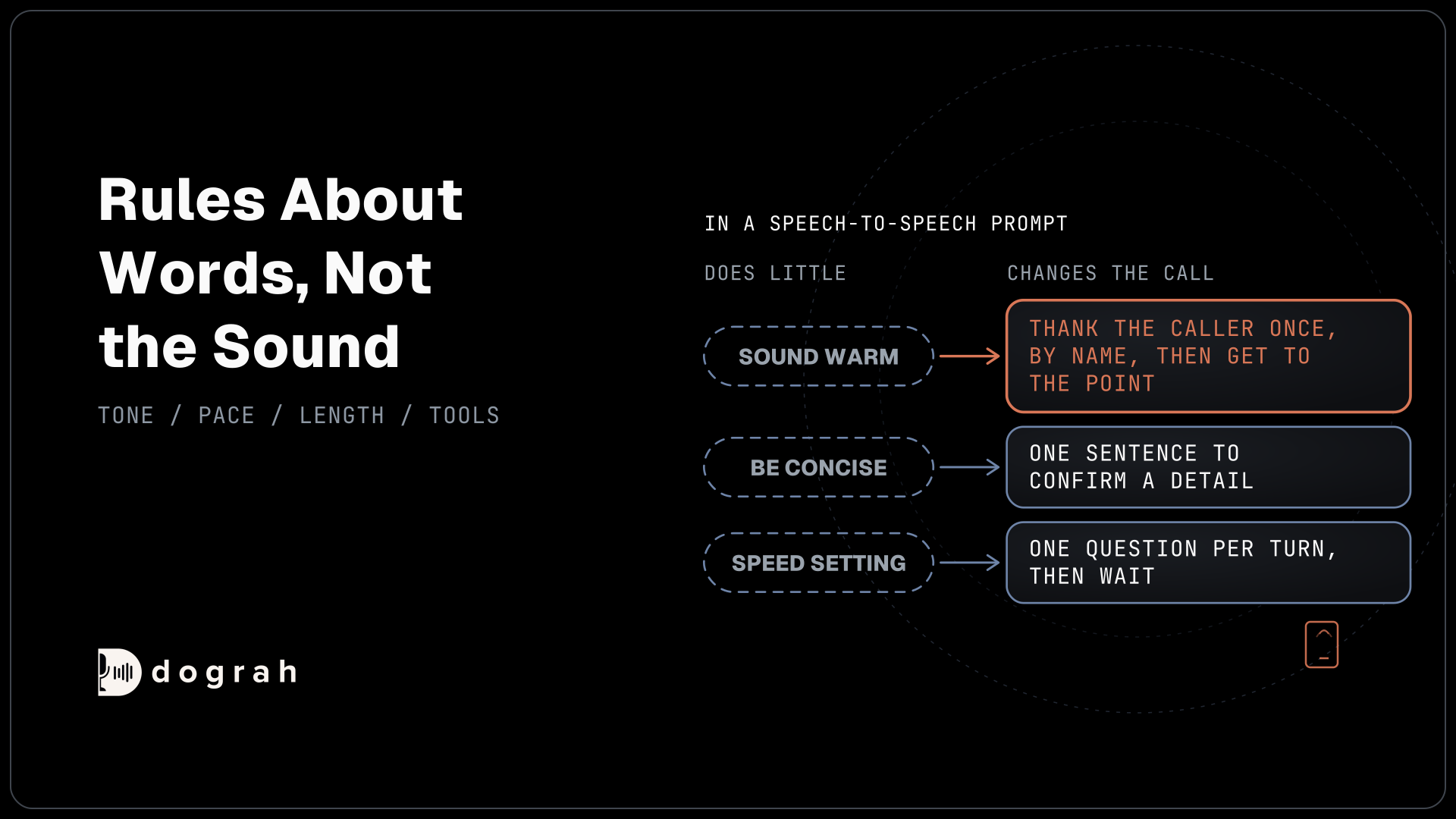
A voice prompt works best when every instruction describes words the model can say. xAI's speech-to-speech prompting guide puts it plainly: "The prompt controls what the agent says, not the sound of the voice." So "sound warm" does little, while "thank the caller once, by name, then get to the point" changes the call.
Pace works the same way. OpenAI notes that its speed setting only changes playback rate, so pacing belongs in the instructions, for example "Deliver your audio response fast, but do not sound rushed." On a phone line we add one question per turn, then wait.
Write the prompt in plain sentences, and tell the model to reply in spoken words only, with no lists or symbols. Pin the language as well, so a caller's accent does not pull the agent into another language mid-booking.
Set reply length for each kind of answer
"Be concise" means nothing to a model that has no way to measure it. OpenAI's guide says to define what concise means in context, for example one or two sentences for a direct answer. On a phone call we set a limit for each kind of turn, such as one sentence to confirm a detail and two to answer a question. Our post on short LLM answers on phone calls explains why long replies hurt more on a call than in a chat.
Numbers need their own rule. OpenAI warns that "reading the value as a full number can hide errors", so collect one value at a time, read identifiers back digit by digit and ask for a yes before any tool uses them. Unclear audio gets a rule too: "Do not guess what the user meant from unclear audio." A short question such as "Sorry, was that a five or a nine?" is better than a wrong booking.
Here is an example length section, written for a booking line. Note the per-task limits in Length and the read-back rule in Numbers:
# Length
- Confirmations: one sentence.
- Answers to a question: two sentences at most.
- Offer at most two time slots at once.

# Numbers
- Collect one value at a time.
- Read policy and phone numbers back digit by digit and wait for a yes.
- If the audio is unclear, ask a short question. Never guess.
What this does: It gives the model a measurable limit for each kind of turn and a fixed routine for numbers, so a misheard digit gets caught on the call before it reaches your booking system.

Open Source Alternative to Vapi / Retell
Self-hosted voice agent platform — no per-minute fees
dograh-hq/dograh
Star on GitHub
Tell the model when to use a tool and what to say
Tool instructions decide when the model acts, so they need the most care. xAI's guide says to "only mention tools that exist in the tool definition", because a prompt that names a missing tool invites the model to promise an action it cannot take.
For each tool, say when to call it and what must be true first. Write actions, such as booking a slot or changing an address, should wait until the caller has confirmed the details out loud. Lookups can run as soon as the model has what it needs. OpenAI suggests a one-sentence preamble only when it helps the caller know work is happening, such as "Let me check that for you", and none before a direct answer.
On a speech-to-speech agent in Dograh, a typed Custom Message on an HTTP API tool does not play, because there is no separate voice to read it. Use a recorded message there, or put the preamble rule in the prompt. Then add a rule for failure. If a tool errors, the model should say it could not finish, offer the next step and not repeat the same call with the same details.
These rules reduce tool mistakes without removing them. Our post on speech-to-speech tool calling shows how these calls fail and how to test them before go-live.
Lines a prompt cannot guarantee
Some lines must be said word for word, and a prompt cannot promise that. On a speech-to-speech agent, the Greeting Text on the Start Call node is not played as fixed audio. Dograh sends it to the model as an instruction to say the opening line exactly as written, so the model is asked to say it exactly, but the words it speaks are its own. Most calls match, and some do not.
For a disclosure, a consent line or a business name that must be right on every call, set Greeting Type to Pre-recorded Audio. Dograh plays that recorded greeting as a pre-recorded clip first and then hands the turn to the model. Allow Greeting Interruption is on by default, so switch it off on the Start Call node when the greeting carries a notice the caller must hear in full.
Turn timing is outside the prompt as well. OpenAI Realtime, Azure Realtime and Grok bring their own voice detection, so Dograh skips its local detector on those calls, and no instruction will make the agent wait longer for a slow speaker. For cascade agents, our post on prompt and flow design patterns maps where exact wording comes from in each part of a flow.
Join the Dograh Community
Dograh is an OSS alternative to Vapi. Join our Slack community for queries, releases, best practices & community interactions.
How Dograh splits the work in Realtime mode
In Dograh, a speech-to-speech agent runs on a model configuration in Realtime mode. That configuration pairs the speech-to-speech connection with a separate text language model for jobs such as extracting variables and running QA. The voice model talks, while the text model works from the transcript to fill the variables and score the call.
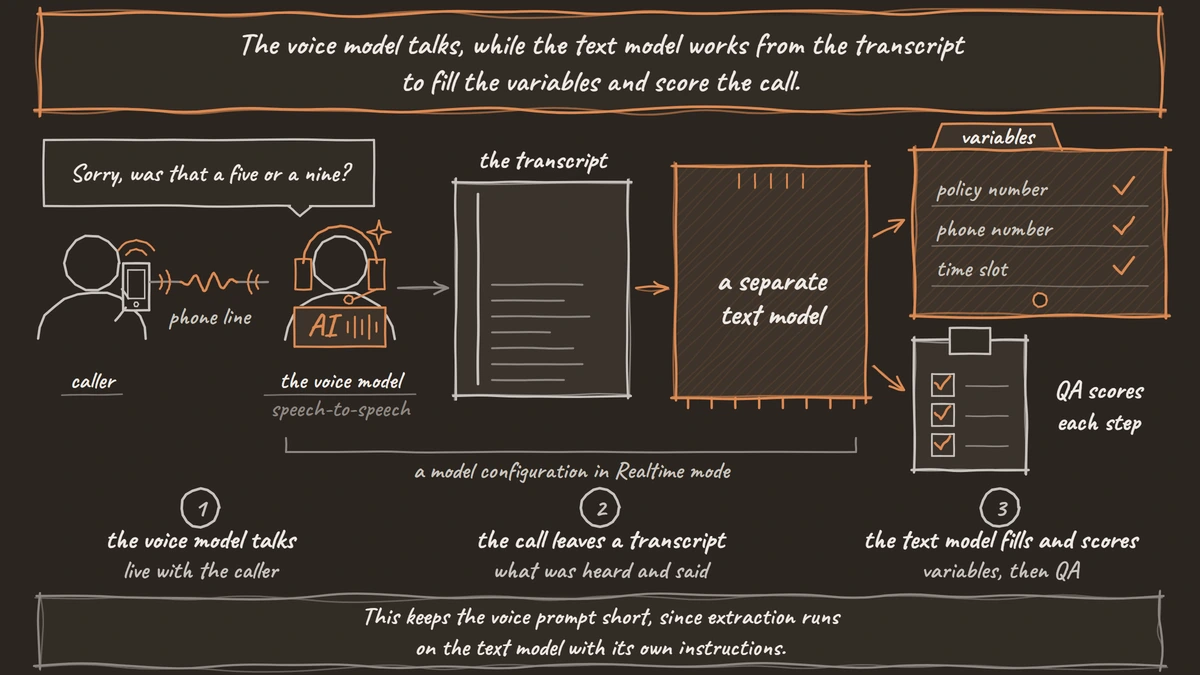
This keeps the voice prompt short, since extraction runs on the text model with its own instructions. Each node's prompt becomes the model's instructions for that part of the call, so a node can carry only its own goal, its tools and its length rules.
Hard words need one change. The Dictionary in an agent's Settings feeds speech-to-text providers, and a Realtime configuration has no separate speech-to-text step, so put brand names and how they are spelled in the prompt itself. QA then scores each step on the text model, and each call's trace shows what the model heard and said turn by turn. With your own key for each realtime provider, you can test one prompt on two models and keep the better one.
Start with a short prompt, place real phone calls, read the traces and add a rule only where a call went wrong.
Glossary
- Preamble
- A short sentence the agent says before a tool call, such as "Let me check that", so the caller knows work is happening. OpenAI suggests one sentence, used only when it helps, and none before a direct answer.
- Read-back
- Repeating a number or code to the caller, one digit or character at a time, and waiting for a yes before using it. It catches misheard values on the call, before a tool writes them anywhere.
- Realtime mode
- Dograh's model configuration for speech-to-speech agents. It pairs a realtime speech-to-speech connection with a separate text language model that handles variable extraction and QA.
- Recorded greeting
- A Start Call greeting set to Pre-recorded Audio, so the caller hears the same recording on every call. On a speech-to-speech agent, typed greeting text is spoken by the model in its own words instead.