
An AI booking agent answers a call, asks what the caller needs, reads open slots from your calendar, books one and reads it back. The hard part is handling failures such as no free slot or a tool error. For teams that want to own it, Dograh, the open-source AI voice agent platform, runs it self-hosted or on Dograh Cloud.
Key Takeaways
- Confirm a booking only after your calendar's write comes back as a success.
- Give every failure, from no free slot to a timeout, its own spoken line.
- In Dograh, an HTTP API tool or MCP tool connects any calendar.
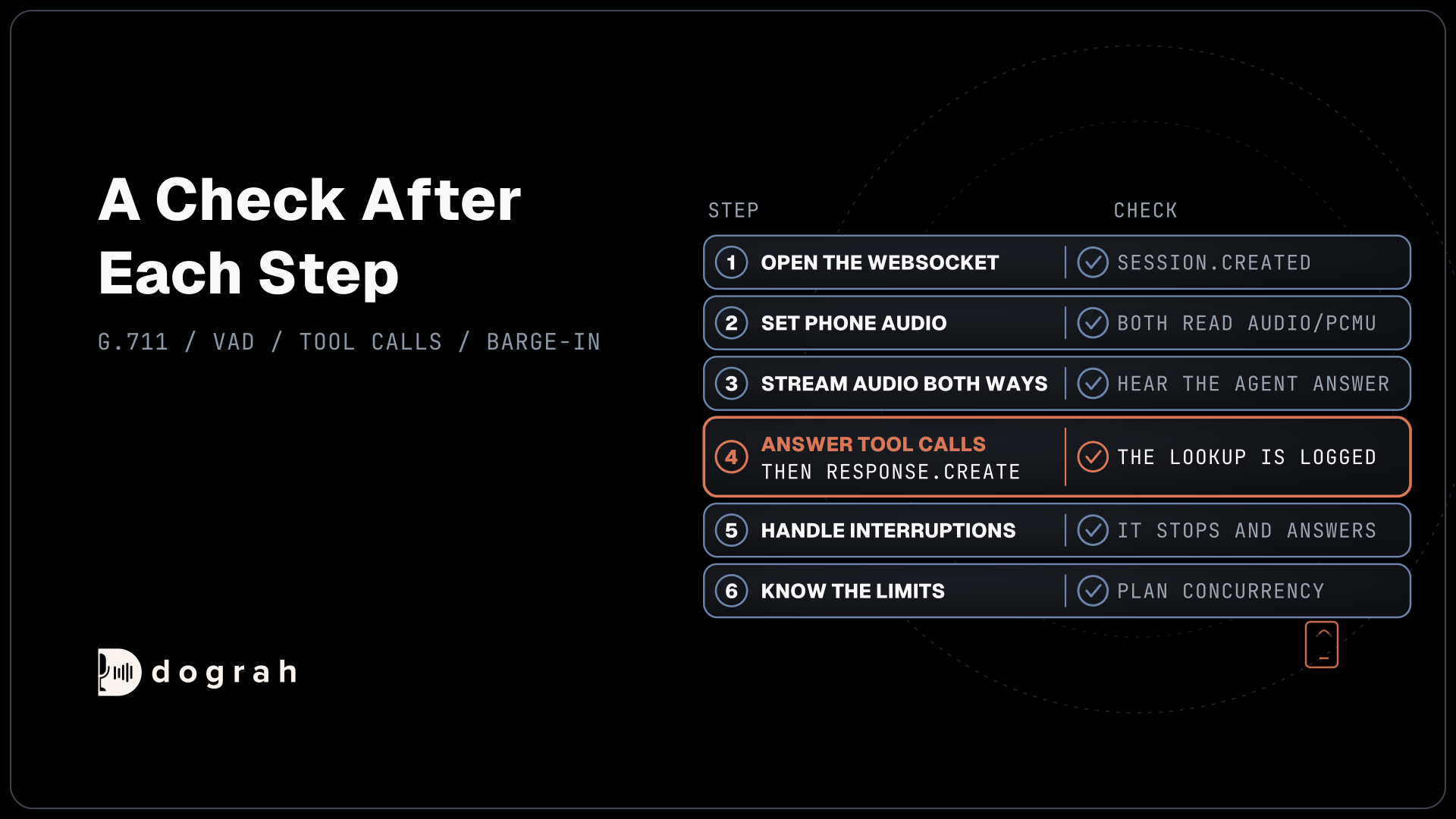
A booking call sounds simple until the slot the caller wanted is gone. We follow the call from the greeting to a confirmed slot, then the places it breaks and the line the agent says in each. Then we talk about how to build one in Dograh, step by step.
How a booking call runs, start to finish
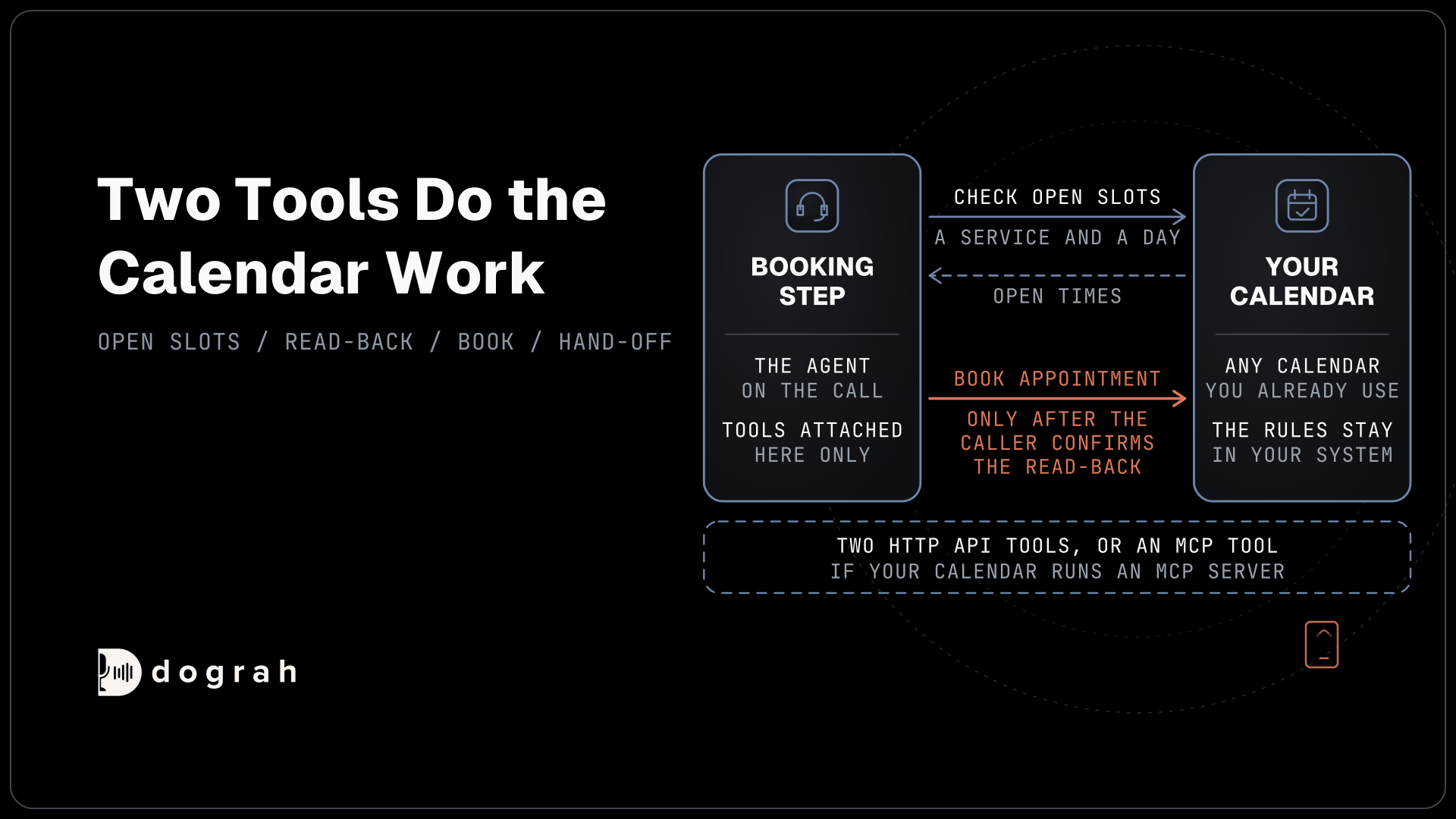
A booking call follows the same path in almost every business, so it pays to build it once and well. The agent greets the caller, asks what they need and when suits them, and checks live availability in the business's calendar. It offers two or three times, because nobody can hold a whole day of slots in their head by ear. The caller picks one, the agent reads it back and waits for a yes, and only then does it write the booking.
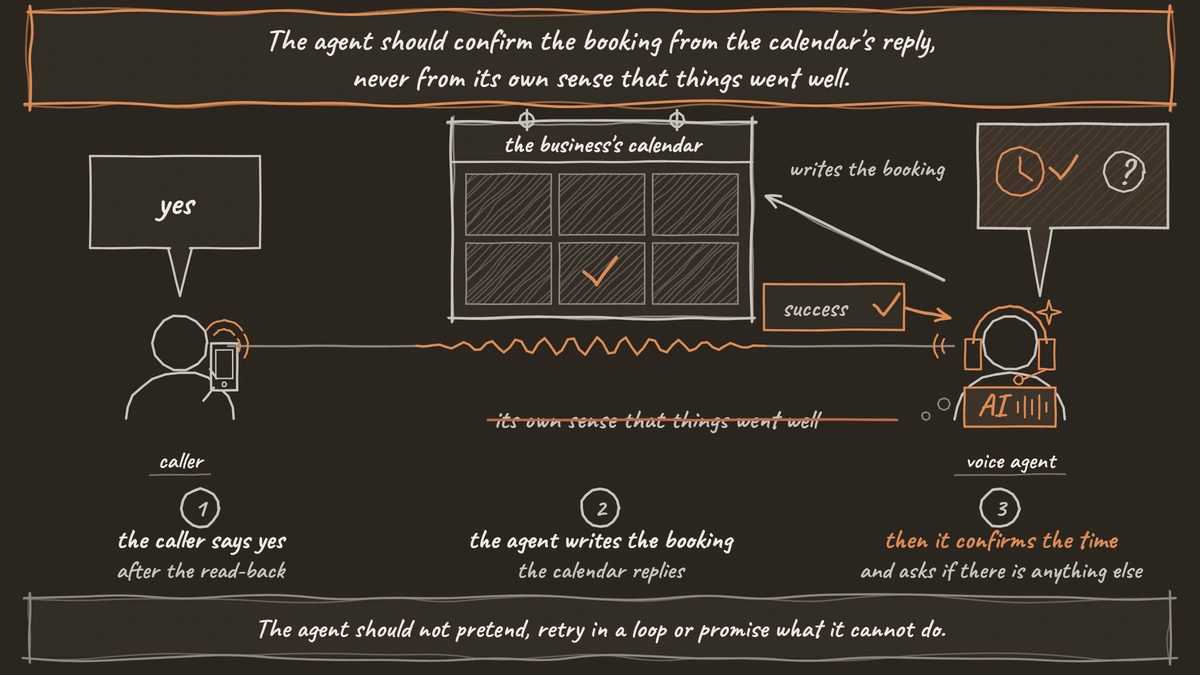
The last step is easy to get wrong. The agent should confirm the booking from the calendar's reply, never from its own sense that things went well. If the write comes back as a success, the agent states the confirmed time and asks if there is anything else. A confirmation text, if the business sends one, goes out through the business's own messaging provider.
Moving or canceling an existing booking adds one step at the front. A phone number finds a booking but does not prove who is calling, so the agent confirms identity with an approved check, such as a date of birth, before it names anything on file. A new booking needs no such check, because nothing on file is read out.
Demand for this call is real. In a survey of 1,011 Americans that Zenoti, which sells an AI receptionist, ran in September 2025, 77% said calling is always or mostly the easiest way to update appointments. Our post on AI voice agents for appointment scheduling covers reschedule order and confirmation calls in more depth.
Where booking calls go wrong
Most of a booking agent's design is what it says when the happy path breaks. The lines below are examples we wrote, and each one pairs with a rule in the prompt or a setting on the tool.
No slot fits. The caller wants Saturday morning and there is nothing. The agent should say so plainly and move the search, "Saturday morning is full. I have Saturday at 2 pm or Monday at 9 am. Would either work?", rather than ask the caller to suggest times blind. If nothing in the next few weeks suits them, it offers a callback from staff.
The slot is taken between the offer and the write. Another caller, or a person at the front desk, can book the same time in the seconds after the agent offers it. Only the calendar can settle that, by accepting the first write and refusing the second. The agent treats a refused write as a lost slot and says, "Someone just booked that time. The next opening is 3:30. Shall I take that?"
The tool errors or times out. The calendar is slow or down, and the request comes back as an error. The agent should not pretend, retry in a loop or promise what it cannot do. It says it cannot reach the calendar right now and offers the next real step, such as a callback request.
The date is vague. "Next Friday" or "after lunch" means nothing until the agent knows today's date in the business's time zone. Give the prompt the business's IANA time zone name, such as America/New_York, so "tomorrow" lands on the right day for a caller ringing late at night.
The caller changes their mind after the read-back. That is what the read-back is for. Until the caller says yes, nothing is written, so the agent simply goes back to the slots.

Open Source Alternative to Vapi / Retell
Self-hosted voice agent platform — no per-minute fees
dograh-hq/dograh
Star on GitHub
When the caller wants a person
A booking agent has to hand the call to a person when the caller asks for one, and many callers will. In a ServiceForge survey reported by CMM Online, 82% said they have asked to speak with a human instead of an AI agent or chatbot. Requests the booking rules do not allow, such as a fee waiver or a slot outside opening hours, belong with staff too.
In Dograh, the Transfer Call tool does this on Twilio, Telnyx, Plivo, Cloudonix and Asterisk ARI. Dograh calls the destination first and connects the caller only when someone answers. If the line is busy, unanswered after the 30-second default or fails, the result comes back to the agent and the call continues. The agent then offers a callback and writes the request to the business's system through an HTTP API tool. On Exotel, Vobiz, Vonage and WhatsApp numbers, the agent writes that callback request the same way whenever the caller needs a person.
What you need before you start
The build needs an agent, a way to reach your calendar and a phone number. You need a Dograh Cloud account, or a self-hosted install with a Service Key so the Agent Builder can run. Without a Service Key you can build the same agent by hand on the Canvas.
Dograh connects to any calendar through an HTTP API tool or an MCP tool, so the calendar stays whatever the business already uses. For HTTP API tools, you need two endpoints on your side, one that returns open slots for a service and a date range, and one that creates a booking. Our tutorial on how to connect a voice agent to Google Calendar builds them for Google Calendar, with a service account and free-busy checks.
If your calendar offers an MCP server, you can connect that instead and skip writing endpoints. Either way, the booking rules, such as how long a service takes, stay in your own system. Last, you need a phone number on a carrier Dograh supports, set to this agent under its Inbound workflow setting.
Check: you can call your slots endpoint with a service and a date and get open times back.
Step 1: Describe the booking call
Start by describing the call to the Agent Builder, so the first draft already has the booking flow and its rules. Open Voice Agents in the sidebar, click Create Agent and choose Use Agent Builder. Write the description the way you would brief a new receptionist, with the services, the read-back and what happens when nothing fits. The example below names the calendar step and the hand-off rule, so the builder can ask about the parts still open.
Build me an agent that books appointments for Riverside Physio by phone.
Ask which service the caller wants and which days suit them. Check open
slots in our booking system, offer two, read the chosen one back and book
it only after the caller says yes. If nothing fits, offer a callback.
Transfer to the front desk if the caller asks for a person.
What this does: It gives the builder the service question, the two-slot offer, the read-back before booking and both fallbacks, so its follow-up questions go to what it cannot know, such as the booking system's address.
Answer the question cards, read the Your agent requirements card and click Approve & build. The builder records the booking system as a configuration gap and keeps an unknown address as a placeholder rather than guessing a URL. Its own rule is that collecting a preferred time is not a confirmed booking, so the draft never claims to book until a real tool is connected.
Check: the builder's closing summary lists the booking system connection as still needed.
Step 2: Connect the calendar with two tools
Two tools do the calendar work, one that reads open slots and one that writes the booking. Open Tools in the sidebar, click Create Tool and choose External HTTP API. Give the first a Tool Name such as "Check open slots" and a Description that works as its usage rule, such as "Use when the caller has named a service and at least one day that suits them." Set the HTTP Method and Endpoint URL, and add the service and date as LLM Parameters. Repeat for "Book appointment", whose description says to use it only after the caller has confirmed the read-back.
Each HTTP API tool waits 5,000 ms by default, then the agent gets an error, and it does not retry on its own. The HTTP API tool also has a Messages card, and the tool's Messages play a short line as it starts, and an update if it runs long. A start line such as "Let me check the calendar" covers the lookup, and an update at three seconds covers a slow day.
The booking tool needs one more setting. Add a Preset Parameter named workflow_run_id with the value {{initial_context.workflow_run_id}}. That ID travels with every request, so your booking system can use it, with the slot, to ignore a repeated request.
If your calendar runs an MCP server, add an MCP Server tool instead, pick the slot and booking functions for this node, and the agent calls them the same way, with a 30-second default timeout. Attach the tools to the booking step only, since a step with fewer tools picks the right one more often, as our guide to tool calling in voice agents explains.
For reschedules, Pre-Call Data Fetch on the Start Call node can load the caller's existing booking by phone number before the greeting, so the agent knows what to ask about after the identity check.
Check: Test Tool on "Check open slots" returns real times from your calendar, and both tools show on the booking step.
Step 3: Write the booking rules into the prompt
The prompt carries the rules no tool can enforce, such as when to call which tool and what to say when one fails. Dograh's own voice prompting guide, which the Agent Builder writes from, puts the core rule plainly, "Do not claim a booking, update, or transfer succeeded without its result." Keep that line, and add the business's time zone with a built-in variable such as {{current_time_America/New_York}}, since the plain {{current_time}} is UTC.
Then end the booking step's prompt with success criteria written as conditions and actions. The block below is an example we wrote, using the tool names from Step 2.
## Success Criteria
- Call check_open_slots once the caller has named a service and a day.
- Call book_appointment only after the caller confirms the read-back.
- If book_appointment says the slot is taken, offer the next two openings.
- If a tool returns an error, say you cannot reach the calendar and offer a callback.
- Call transfer_front_desk if the caller asks for a person.
What this does: It gives each tool a firing condition the model can check against the conversation, and a spoken next step for the slot race, the error and the hand-off, so no failure ends in silence.
Check: in a browser test call, saying "actually, make it Tuesday" after the read-back sends the agent back to the slots, with no booking written.
Join the Dograh Community
Dograh is an OSS alternative to Vapi. Join our Slack community for queries, releases, best practices & community interactions.
Step 4: Add the hand-off and test on a phone
The hand-off and the confirmation finish the build, and both need a real phone call to test. Attach a Transfer Call tool named "Transfer front desk" to the booking step with the front desk's number, and add an HTTP API tool that writes a callback request to your system for when no one answers. If the business sends a confirmation text, another HTTP API tool asks your own messaging provider to send it, as our post on how to send SMS from a voice agent shows.
Then call the agent with the editor's Phone Call button and walk through each failure case on purpose. Ask for a full day, take a slot from a second phone while the first caller is deciding, point the slots tool at a broken URL and ask for a person. Transfers only run on a phone call, never in a browser test. If tracing is set up, open View Trace on a run to see every tool request, its timing and what came back. Otherwise read the call transcript.
Check: each failure case ends with a clear spoken next step, and the calendar holds exactly one booking per confirmed call.
Choosing where the booking agent runs
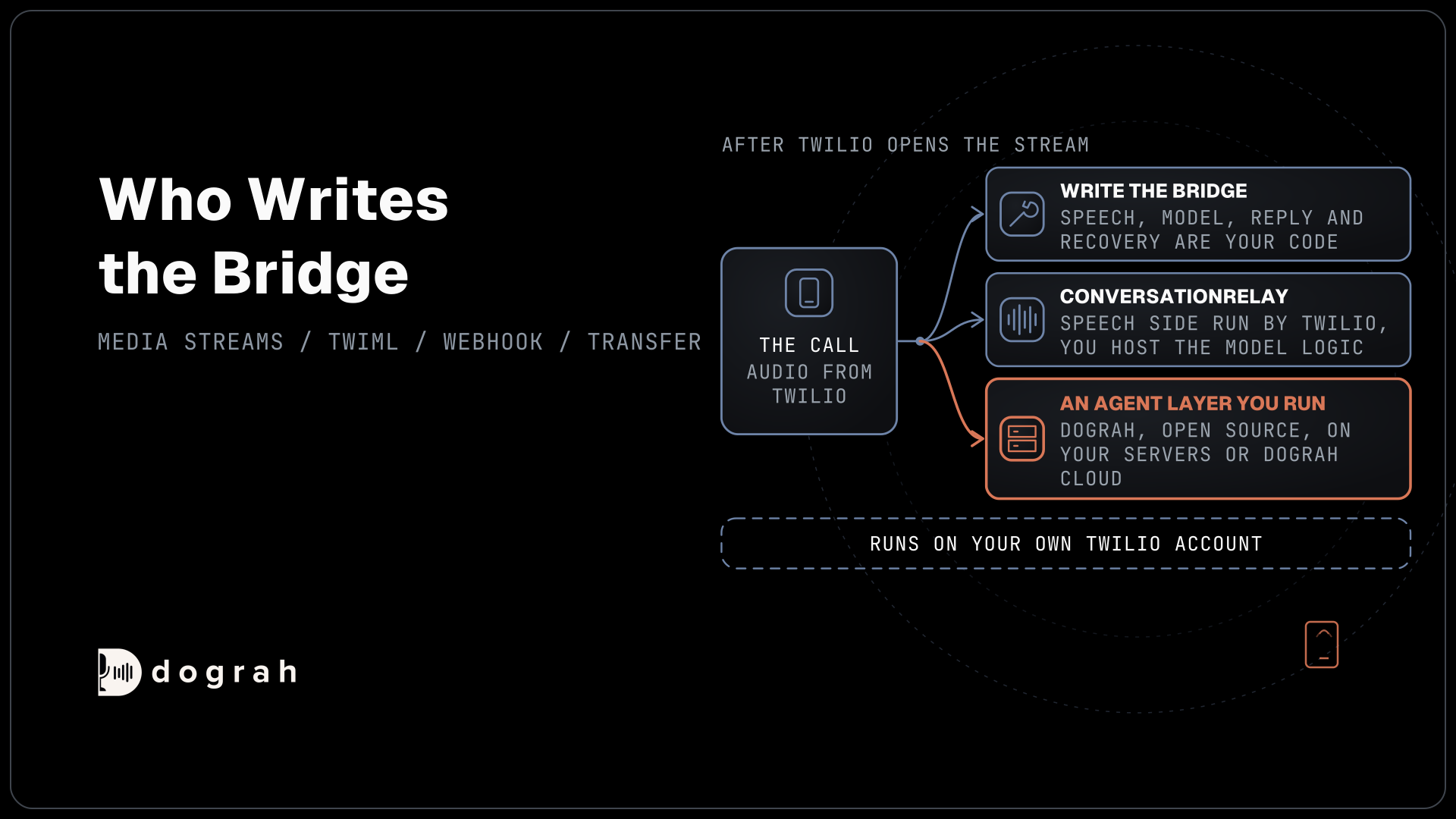
Where the agent runs decides where the booking conversations are stored. Booking calls carry names, phone numbers and sometimes reasons for a visit, so some teams want the recordings and transcripts on their own servers. Hosting Dograh on those servers carries no per-minute platform fee. The bill there is for the servers, the model keys and the phone minutes, and your team keeps the database and each upgrade running. Help comes from the open-source community, with custom SLAs on Enterprise. Teams that want the hosting handled for them can use Dograh Cloud, which charges a 1¢-a-minute platform fee.
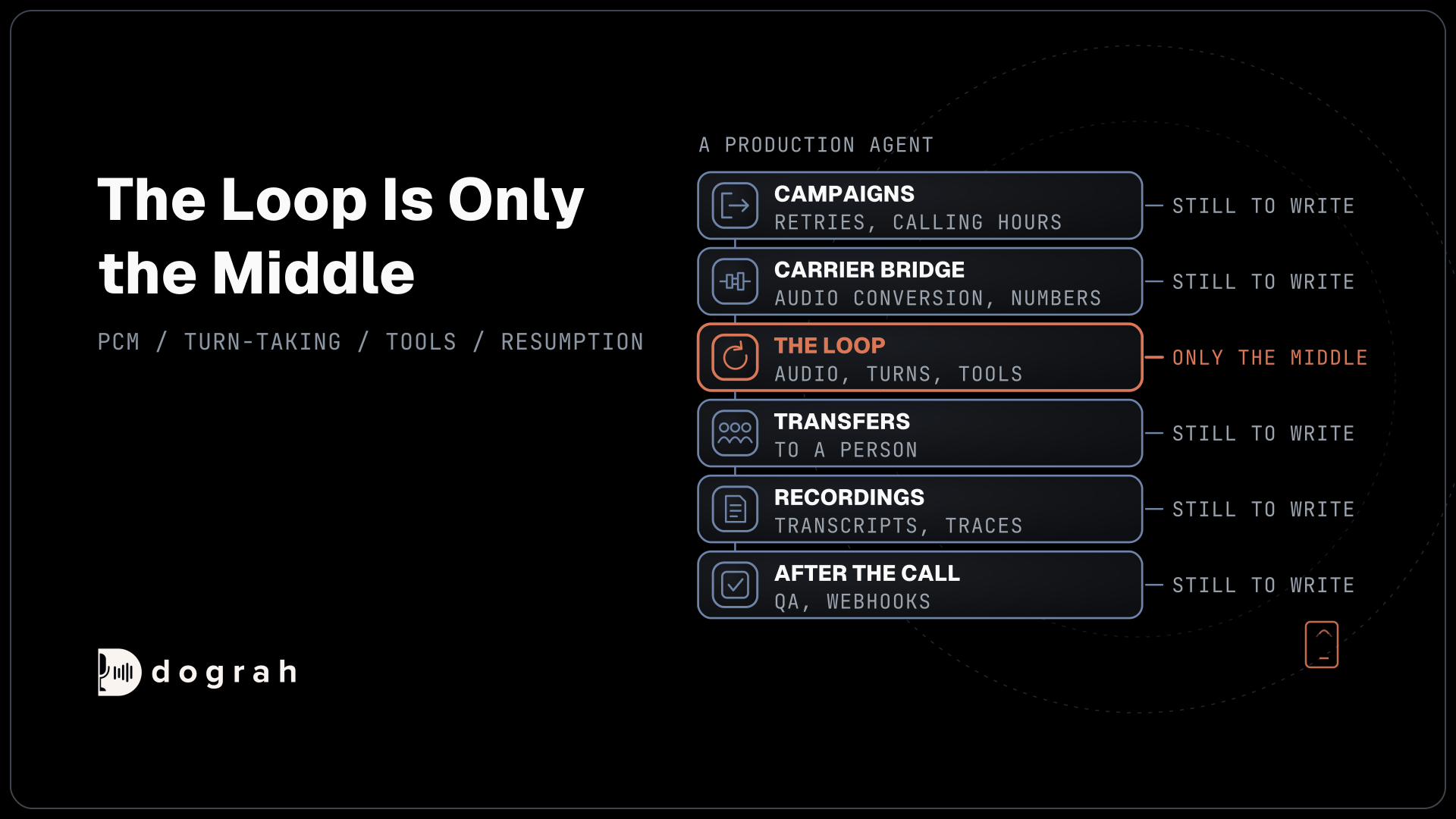
The call above is the generic one, and each trade adds its own rules on top, such as service lengths, deposits or who can book what. Our post on the AI receptionist for hair salons shows how one trade shapes the same booking call. Start with your most common booking, run the failure cases on a phone each time you change a rule, and add the next service once the first one books cleanly.
Glossary
- Read-back
- The agent repeating the chosen slot and service to the caller and waiting for a yes before anything is written to the calendar.
- Slot race
- Two bookings reaching the calendar for the same time within seconds. Only the calendar can settle it, by accepting the first write and refusing the second.
- LLM Parameter
- A field on a Dograh tool that the model fills from the conversation before the request goes out, such as the service and date the caller chose.
- IANA time zone name
- A zone label such as America/New_York. Put it in the prompt so words like tomorrow land on the right day for the business, and use it in variables such as current_time.