
To build a voice agent with the OpenAI Realtime API, open a WebSocket to gpt-realtime-2.1, send session.update with G.711 audio and semantic VAD, stream the caller's audio both ways, answer tool calls and truncate replies on barge-in. Dograh, the open-source AI voice agent platform, runs the same agent on your phone lines, self-hosted or on Dograh Cloud.
Key Takeaways
- Use audio/pcmu both ways so phone audio needs no resampling.
- After a tool result, send response.create or the model stays silent.
- Dograh runs this agent as a Realtime configuration on your own OpenAI key.
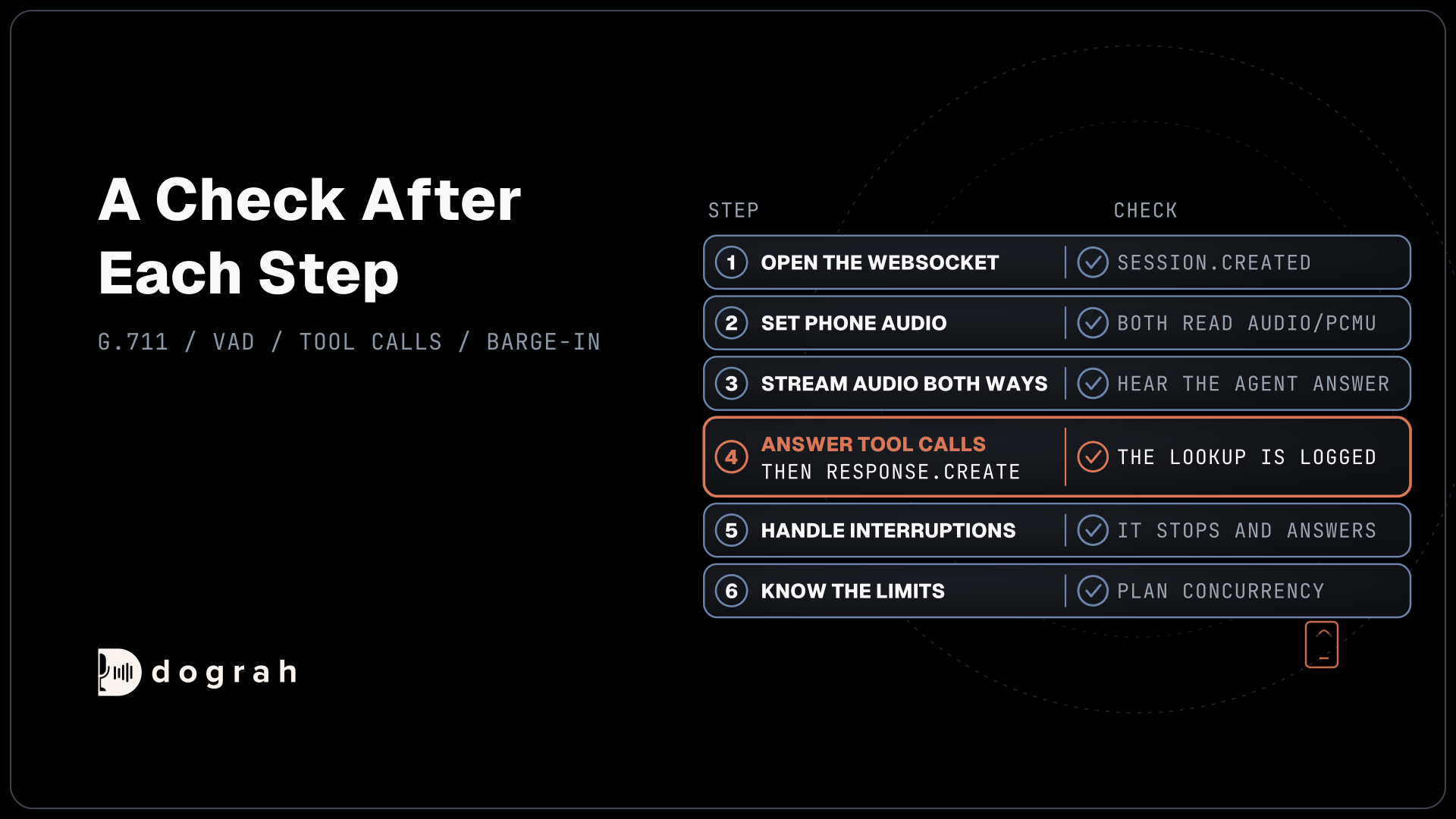
A phone voice agent on the OpenAI Realtime API is one WebSocket, a few events and the code around them. We walk through connecting, configuring phone audio, streaming, tool calls and barge-in, with a check after each step, then we run the same agent in Dograh without the bridge.
What you need before you start
You need an OpenAI key on a paid tier. On the Build tier, gpt-realtime-2.1 allows 400 requests and 200,000 tokens a minute, which is enough to test but not to run a busy line. Our overview of realtime voice APIs for phone agents compares the options if you have not picked a model yet.
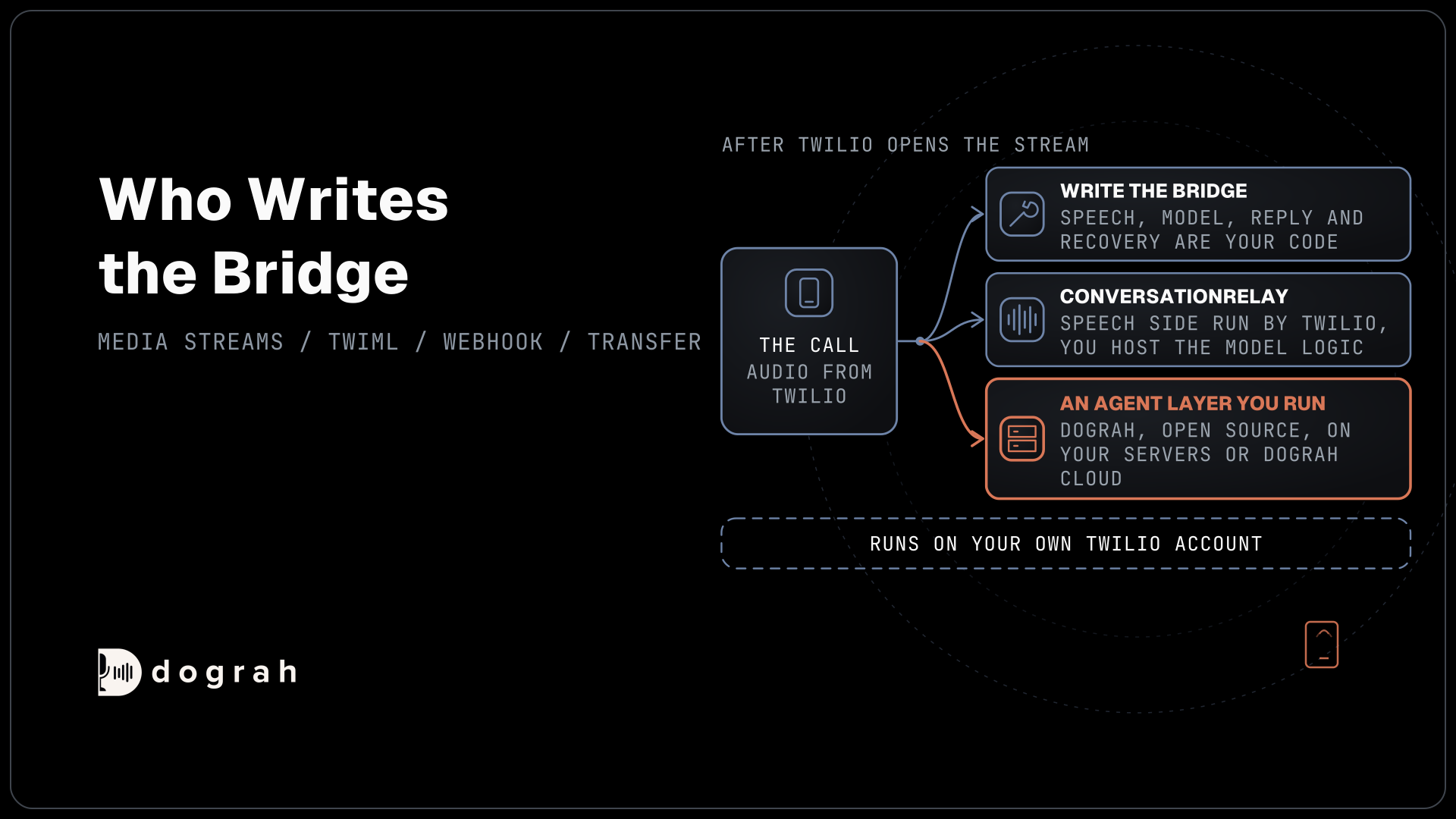
You also need a phone number whose carrier can stream call audio over a WebSocket, and a public WSS address for your server. Twilio's Media Streams are the example here, and a tunnel such as ngrok gives your laptop a public address while you test. OpenAI's Realtime WebSocket guide covers the connection itself.
The code below is our own example, built from the event and field names on OpenAI's pages. It uses Python with the websockets library and leaves out logging and retries to stay short.
Step 1: Open the WebSocket
Your server opens one WebSocket to OpenAI for each call. The model goes in the URL and your key in the header, with no beta header.
import json, os, websockets

URL = "wss://api.openai.com/v1/realtime?model=gpt-realtime-2.1"
HEADERS = {"Authorization": f"Bearer {os.environ['OPENAI_API_KEY']}"}

async def open_openai():
    return await websockets.connect(URL, additional_headers=HEADERS)
What this does: It opens a Realtime session on gpt-realtime-2.1 with your key. Swap the model name for gpt-realtime-2.1-mini to cut the audio price to about a third.
Check: the first message from OpenAI is a session.created event.
Step 2: Configure the session for phone audio
The first message you send is session.update. Set both audio formats to audio/pcmu, the 8 kHz G.711 mu-law audio most phone lines carry, so the carrier's audio passes straight through with no resampling.
SESSION = {
    "type": "session.update",
    "session": {
        "type": "realtime",
        "instructions": "You answer the booking line for a dental clinic. Keep replies short.",
        "audio": {
            "input": {
                "format": {"type": "audio/pcmu"},
                "turn_detection": {"type": "semantic_vad"},
            },
            "output": {"format": {"type": "audio/pcmu"}, "voice": "marin"},
        },
        "tools": [{
            "type": "function",
            "name": "lookup_account",
            "description": "Fetch account by phone number.",
            "parameters": {
                "type": "object",
                "properties": {"phone": {"type": "string"}},
                "required": ["phone"],
            },
        }],
    },
}

async def configure(openai_ws):
    await openai_ws.send(json.dumps(SESSION))
What this does: It sets the agent's instructions, phone-format audio in and out, the marin voice and one tool the model can call to look up a caller.
Semantic VAD judges from the caller's words whether they have finished, and its eagerness defaults to auto, which equals medium. The default mode is server VAD, which listens for silence and takes a threshold, prefix_padding_ms and silence_duration_ms. OpenAI's voice activity detection settings show 0.5, 300 and 500 as examples, which are starting points to tune on real calls.
Check: OpenAI answers with session.updated, and its audio formats read audio/pcmu.
Step 3: Stream audio both ways
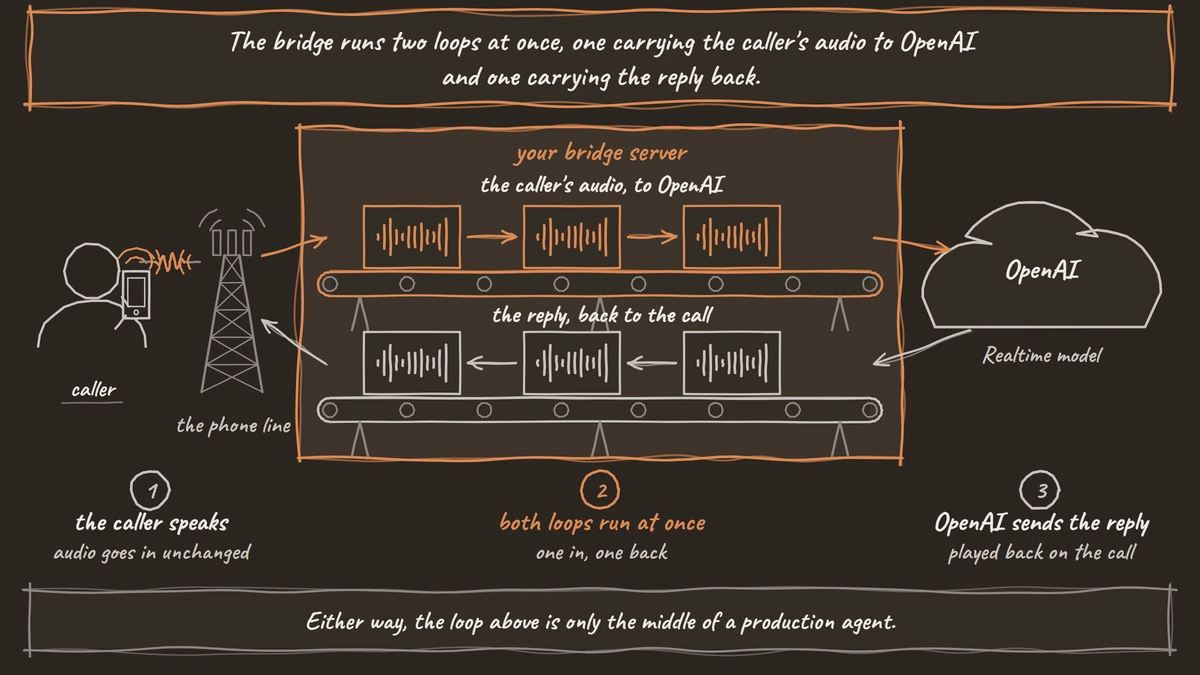
The bridge runs two loops at once, one carrying the caller's audio to OpenAI and one carrying the reply back. Twilio Media Streams send a start message with the stream ID, then media messages whose payload is already base64 mu-law, so it goes to OpenAI unchanged.
async def caller_to_openai(twilio_ws, openai_ws, state):
    async for raw in twilio_ws:
        msg = json.loads(raw)
        if msg["event"] == "start":
            state["stream_sid"] = msg["start"]["streamSid"]
        elif msg["event"] == "media":
            await openai_ws.send(json.dumps({
                "type": "input_audio_buffer.append",
                "audio": msg["media"]["payload"],
            }))

async def openai_to_caller(openai_ws, twilio_ws, state):
    async for raw in openai_ws:
        event = json.loads(raw)
        if event["type"] == "response.output_audio.delta":
            state["item_id"] = event["item_id"]
            state["sent_ms"] = state.get("sent_ms", 0) + len(event["delta"]) * 3 // 32
            await twilio_ws.send(json.dumps({
                "event": "media",
                "streamSid": state["stream_sid"],
                "media": {"payload": event["delta"]},
            }))
        await handle_event(event, openai_ws, twilio_ws, state)
What this does: It forwards each chunk of the caller's audio to OpenAI and plays each chunk of the reply back on the call. It also counts milliseconds of reply sent, since 8 kHz mu-law is 8 bytes a millisecond, for Step 5.
Run both loops with asyncio.gather when the carrier connects. The carrier side, a number that streams to your WSS address, is covered in our guide to building a voice agent with Twilio.
Check: call the number, say hello and hear the agent answer in the marin voice.
Step 4: Answer tool calls
When the model wants a tool, the response.done event carries a function_call item with its name, arguments and call_id. Your code runs the tool, sends the result back with the same call_id, then asks for a new response.
async def handle_event(event, openai_ws, twilio_ws, state):
    if event["type"] == "response.done":
        for item in event["response"]["output"]:
            if item["type"] == "function_call":
                args = json.loads(item["arguments"])
                result = await lookup_account(**args)  # your own code
                await openai_ws.send(json.dumps({
                    "type": "conversation.item.create",
                    "item": {
                        "type": "function_call_output",
                        "call_id": item["call_id"],
                        "output": json.dumps(result),
                    },
                }))
                await openai_ws.send(json.dumps({"type": "response.create"}))
    await handle_barge_in(event, openai_ws, twilio_ws, state)
What this does: It runs the lookup, hands the answer to the model as a function_call_output and asks it to speak. Skip response.create and the model stays silent.
OpenAI's Realtime conversations guide lists every event this loop can receive. Keep tools fast, because the caller hears silence while one runs.
Check: ask the agent to find your account, and your server logs a lookup_account call with the phone number.

Open Source Alternative to Vapi / Retell
Self-hosted voice agent platform — no per-minute fees
dograh-hq/dograh
Star on GitHub
Step 5: Handle interruptions
On a WebSocket bridge, barge-in is your job. SIP and WebRTC connections truncate automatically, but here the model does not know how much of its reply the caller heard. When OpenAI sends input_audio_buffer.speech_started, stop playback and cut the reply at that point.
async def handle_barge_in(event, openai_ws, twilio_ws, state):
    if event["type"] == "input_audio_buffer.speech_started" and state.get("item_id"):
        await twilio_ws.send(json.dumps({"event": "clear", "streamSid": state["stream_sid"]}))
        await openai_ws.send(json.dumps({
            "type": "conversation.item.truncate",
            "item_id": state["item_id"],
            "content_index": 0,
            "audio_end_ms": state.get("sent_ms", 0),
        }))
        state["item_id"], state["sent_ms"] = None, 0
What this does: It tells Twilio to drop the audio it has queued, then tells OpenAI to cut its reply at the last millisecond sent. That count runs slightly ahead of what the caller heard, so a little unheard text may stay in the model's memory.
A response cut off this way comes back as response.done with the status cancelled, so your handler in Step 4 should ignore it.
Check: talk over the agent mid-sentence, and it stops within a moment and answers what you said.
Step 6: Know the limits and the cost
A Realtime session lasts at most 60 minutes, so a call that could run longer needs to end or reconnect with its context. Plan concurrency against your tier's request and token limits before you route real traffic.
Audio on gpt-realtime-2.1 costs $32 per million tokens in and $64 out, and the mini costs $10 and $20. Each turn bills the conversation again, so long calls cost more per minute. Our OpenAI Realtime API pricing breakdown works through a 5-minute call at about $1.17 uncached, or about $0.35 on the mini.
On tool tasks, GPT-Realtime-2.1 High passed 45.7% of tau-Voice 2.0 tasks on Artificial Analysis, as measured on 19 November 2026, so test your own tools on real calls. Our comparison of OpenAI Realtime vs Gemini Live covers the other main option.
GPT-Live (gpt-live-1) is a different endpoint, v1/live/sessions, with its own events, session.input_audio.append and session.output_audio.delta. It listens while it speaks and hands tools to a backend model. It costs $0.05 a minute while active and $0.02 on standby, billed per second, with the backend model and its tools billed separately. Our tutorial on the OpenAI Realtime API on phone calls covers it over SIP.
What a platform adds
OpenAI's voice agents guide names three designs, GPT-Live, the Realtime API and a chained pipeline, and says to use the chained one "when each stage needs to be visible or replaceable". If you need to store transcripts or run checks before the agent speaks, that is the better start.
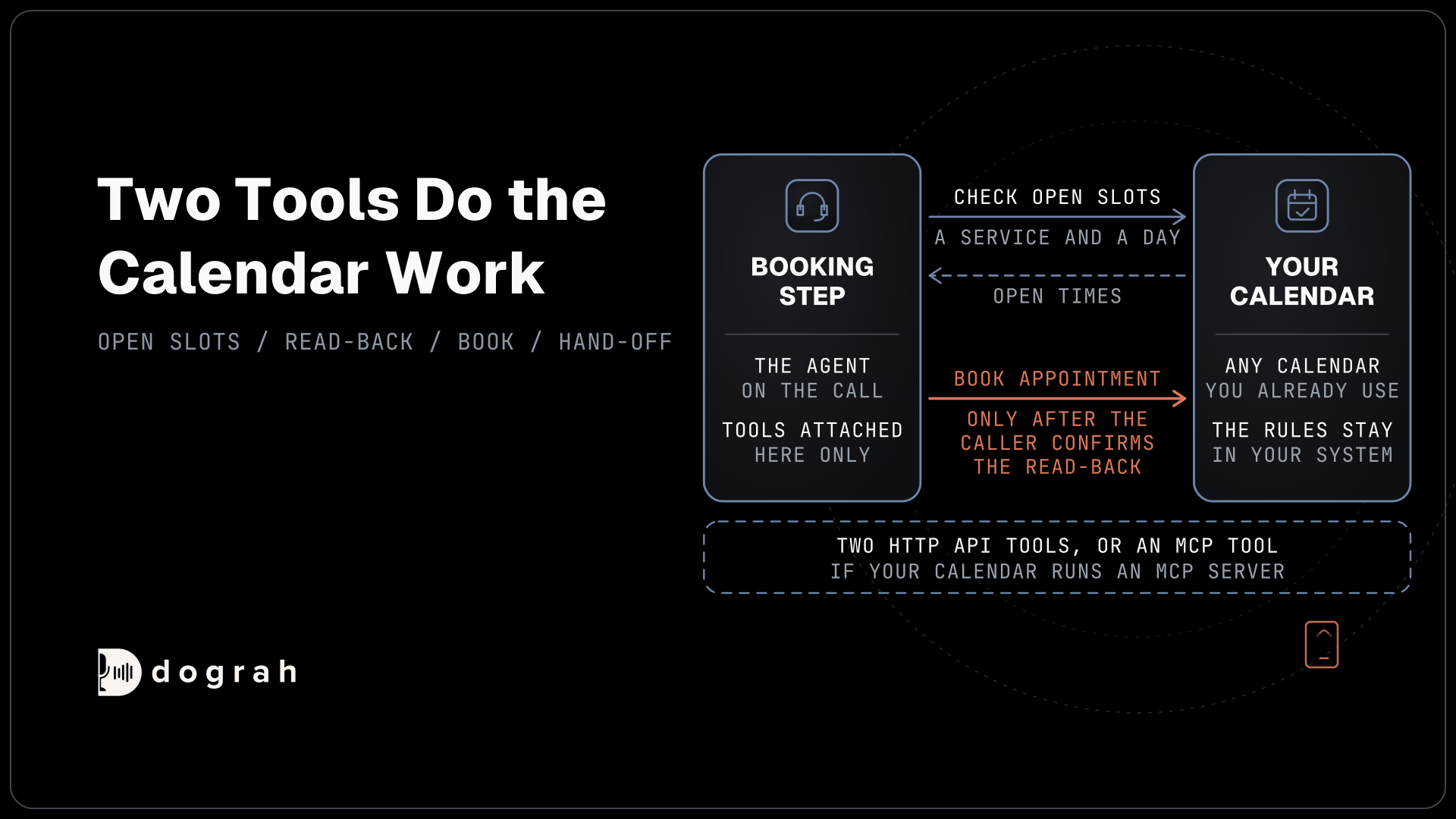
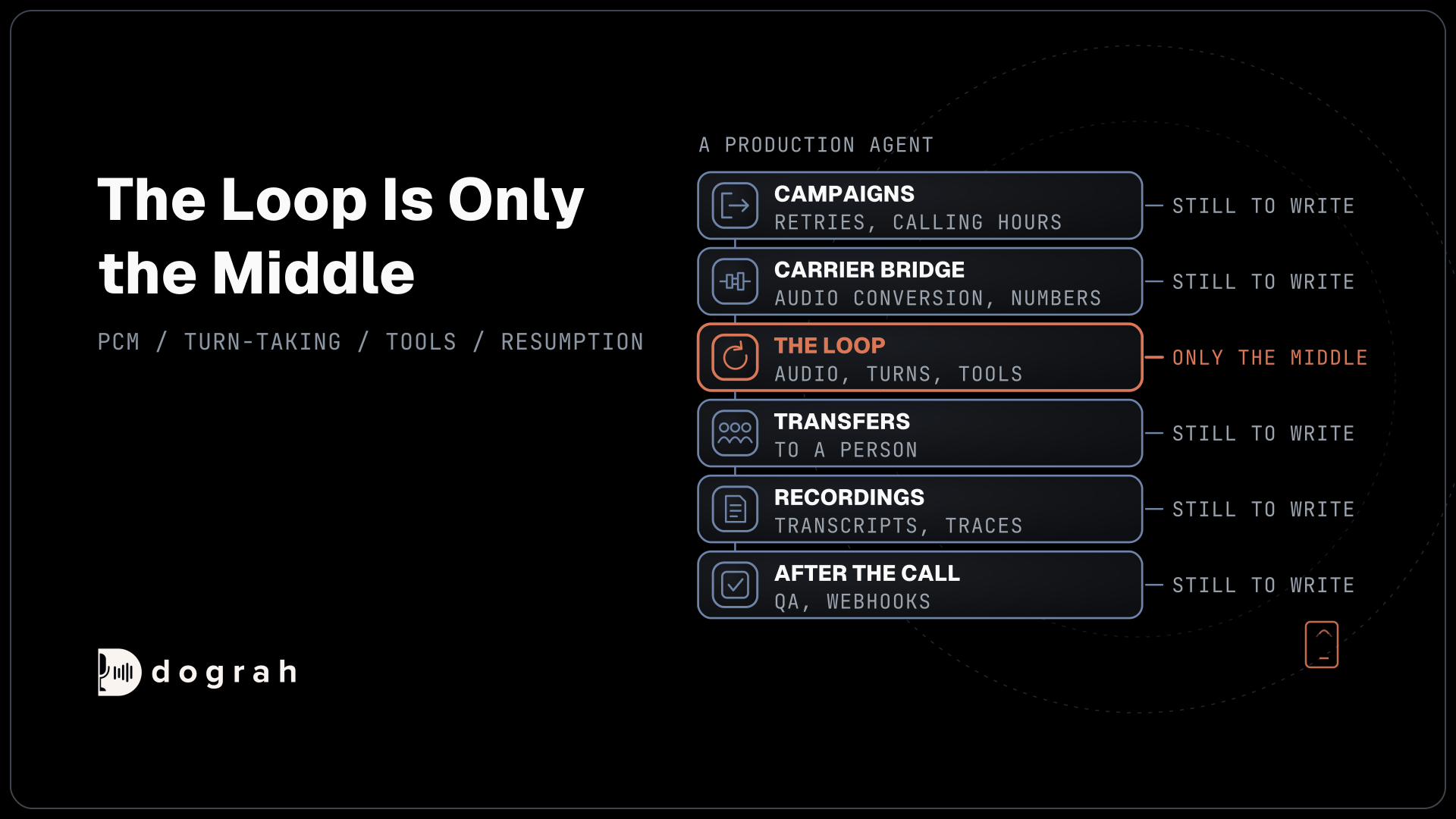
Either way, the loop above is only the middle of a production agent. Around it, a team still writes number management for each carrier, transfers to a person, outbound campaigns with retries and calling hours, recordings, transcripts, traces of each turn, QA after the call and webhooks to the CRM. Each of those is code you run and keep running.
Join the Dograh Community
Dograh is an OSS alternative to Vapi. Join our Slack community for queries, releases, best practices & community interactions.
Run it in Dograh
Dograh runs this same agent as a Realtime configuration in Models, selected in the agent's Model tab. Under Providers, click Add Provider and add your OpenAI key. Under Models, click Add Configuration, choose Realtime, then pick the OpenAI connection and gpt-realtime-2.1 on the Realtime tab. The model configuration docs cover each field.
On the LLM tab, pick a text model. The realtime model holds the conversation, and the text model handles variable extraction and other background tasks. Save, then open the agent, choose the configuration in its Model tab and place a test call from the Phone Call dialog. View Trace shows each turn and tool call afterward.
The bridge, barge-in and session handling are already built, and so are the parts around them. On Twilio, Telnyx, Plivo, Cloudonix and Asterisk ARI numbers, a Transfer Call tool hands the caller to a person, and Dograh calls the destination first and connects the caller only when someone answers. Campaigns, recordings, QA and webhooks run on the same agent. On speech-to-speech, typed transition lines do not play, so use a recording.
OpenAI bills its tokens to your key either way. Hosting Dograh on your own servers adds no per-minute platform fee on top, though the servers, model keys and phone minutes are still yours to pay for. Your team also keeps the database running and applies each upgrade. For help there is the open-source community, with custom SLAs on the Enterprise plan. Dograh Cloud is the other route, running the platform for you at a 1¢-a-minute platform fee.
Glossary
- session.update
- The first event a Realtime client sends. It sets the instructions, audio formats, turn detection, voice and tools for the session.
- Semantic VAD
- Turn detection that judges from the caller's words whether they have finished speaking, rather than waiting for a set length of silence.
- G.711 mu-law (audio/pcmu)
- The 8 kHz audio format most phone lines in North America carry. The Realtime API accepts it in and out as audio/pcmu.
- Truncation
- Cutting the model's reply at the point the caller interrupted, with conversation.item.truncate, so its memory matches what the caller heard.