
Secure a voice agent's tool calls at the endpoint. Check a credential on every request, give each endpoint one narrow job, keep timeouts short so failures stop safely, and log each request by call. Dograh, the open-source AI voice agent platform, sends a stored credential with each tool call. You can self-host it or run it on Dograh Cloud.
Key Takeaways
- Your endpoint decides what a caller may do, whatever the prompt says.
- Give each tool its own credential and the narrowest endpoint that does the job.
- Keep the timeout short, and write the failure path into the prompt.
This post is part of our guide to voice AI for developers, where security comes from limiting what the agent can do. Below, we cover the receiving side of each mid-call request in Dograh. That means the credential, endpoint scope, timeout, webhook after the call and log line.
Why the endpoint has to make the decision
A tool call is a request your system receives because of something a caller said. The caller is a stranger on a phone line, and the language model picked the request's arguments from that stranger's words. Treat every tool request the way you would treat a request from a public web form.
OWASP's entry on excessive agency, in its Top 10 for LLM applications, puts the fix in the downstream system. Enforce authorization there, and never rely on the model to decide whether an action is allowed. A prompt can tell the agent to look up only the caller's own order. Only the endpoint can refuse an order ID that belongs to someone else.
Salt Security's API security report found that 33% of organizations had an API security incident in the past year, and 80% lack continuous, real-time API monitoring. A voice agent puts new callers in front of those same APIs.
Check a stored credential on every request
In Dograh, an HTTP API tool sends a credential you save once under Credentials in the sidebar. You can pick from four kinds, which are API Key (sent in a header named X-API-Key unless you rename it), Bearer Token, Basic Auth and Custom Header. Choose one on the tool's Authentication tab, and it goes out with every request that tool makes.
The model sees the tool's name, description and parameters, never the credential, so a caller cannot talk the agent into reading it out. Saved secrets never come back to the browser in full, and test results show the header masked. Our post on API key safety for voice AI covers rotating these keys without dropping calls.
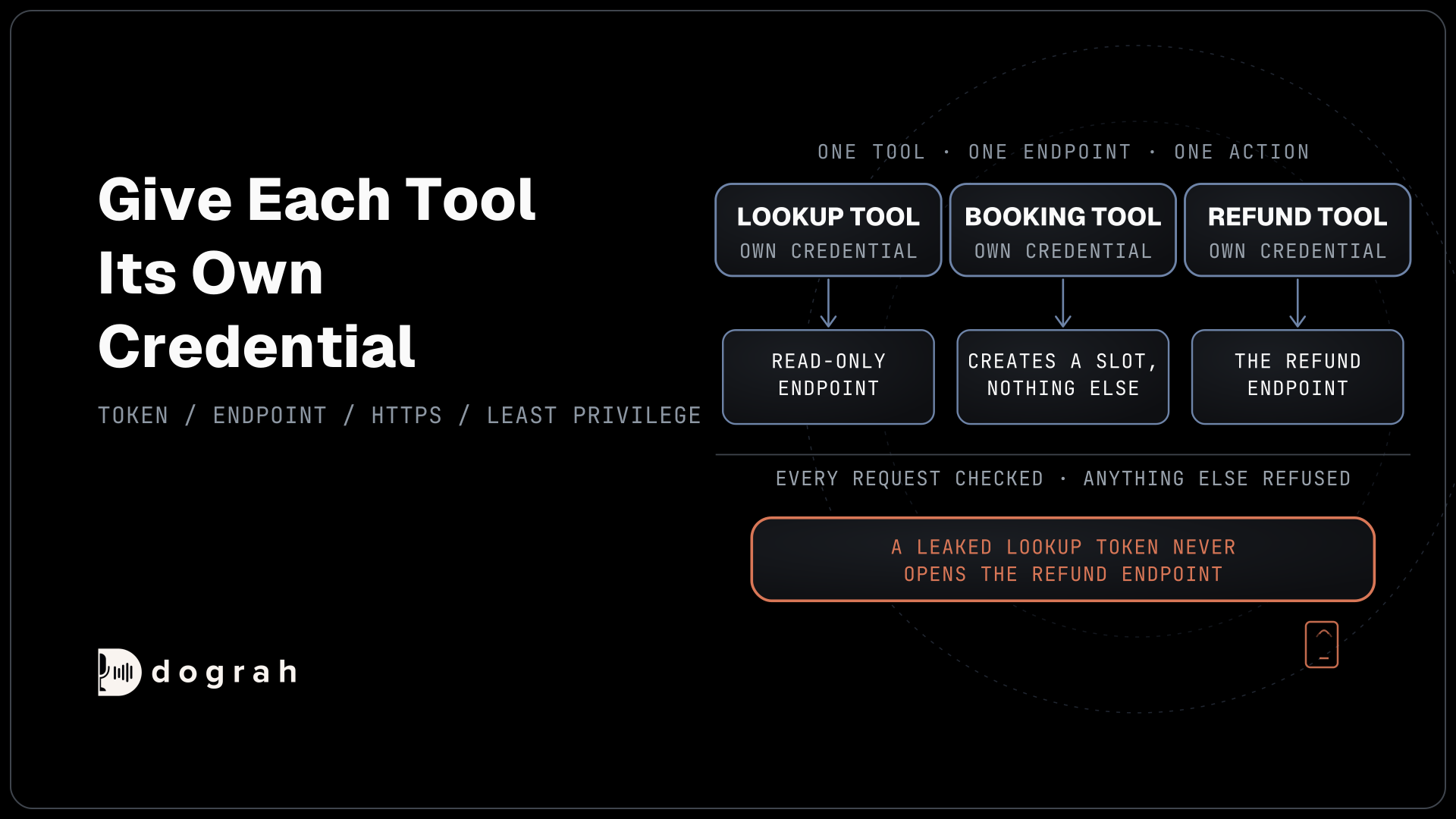
One token shared by every tool is the minimum. Give each tool its own credential, so a leaked lookup token never opens the refund endpoint. On your side, compare the header in constant time, answer anything else with a 401, and map each token to the one action it allows. Serve every endpoint over HTTPS, because the header Dograh sends is the proof that the request came from your agent.
Give each endpoint one narrow job
Least privilege for a voice agent means one tool, one endpoint and one action. A lookup tool calls a read-only endpoint, and a booking tool can create a slot and nothing else. If a request ever arrives with fields the tool never sends, reject it.
Dograh narrows the agent's side as well. Tools attach to a node and can only be called while the call is on that node, so a refund tool does not exist during the greeting. IDs the caller should never choose, such as an account ID, go in as Preset Parameters from the call's own data, the pattern our guide to voice AI security for phone agents sets out. Your endpoint should still confirm that the ID matches the caller the agent verified.
Trim what comes back, too. The whole response body reaches the model, and anything the model reads it can repeat to the caller. Return the open slot times or the order status, never the full customer record.
An API that fetches a URL built from user input can be pointed at internal hosts, the attack OWASP calls server-side request forgery. Dograh Cloud refuses tool URLs that resolve to localhost or a private address. Self-hosted Dograh allows them, so internal endpoints work, and your firewall decides which hosts a tool may reach.

Open Source Alternative to Vapi / Retell
Self-hosted voice agent platform — no per-minute fees
dograh-hq/dograh
Star on GitHub
Set the timeout so a stuck call fails closed
Each HTTP API tool has its own Timeout (ms), 5,000 by default and settable from 1,000 to 30,000. When it runs out, the agent gets an error result and the request is not retried. Failing closed means that error leads to the safe path. No booking is assumed, no refund is promised, and the prompt says what the agent tells the caller next.
Endpoints do go down. Uptrends measured average weekly API downtime of 55 minutes in Q1 2025, up from 34 minutes a year earlier. Set the timeout a little above what the endpoint takes on a busy day, as our walkthrough of how to add tool calls to a voice agent explains, and a dead endpoint costs the caller only a few seconds.
A timeout can also hide a write that worked, saved just as the agent gave up. Add a Preset Parameter named workflow_run_id with the value {{initial_context.workflow_run_id}}, and have the endpoint ignore a second write with the same run ID and slot. For lookups that take a while, the tool's Messages line plays as the request starts, so the caller hears something during the pause.
Lock down the Webhook node too
The receiver for the Webhook node, which sends the call's results after the call ends, needs the same care. The node uses the same Credentials, so pick one in its Authentication field and check it exactly as you would a tool request. Every delivery also carries a delivery ID in the X-Dograh-Delivery-Id header, which stays the same across retries, along with X-Dograh-Workflow-Run-Id and X-Dograh-Delivery-Attempt.
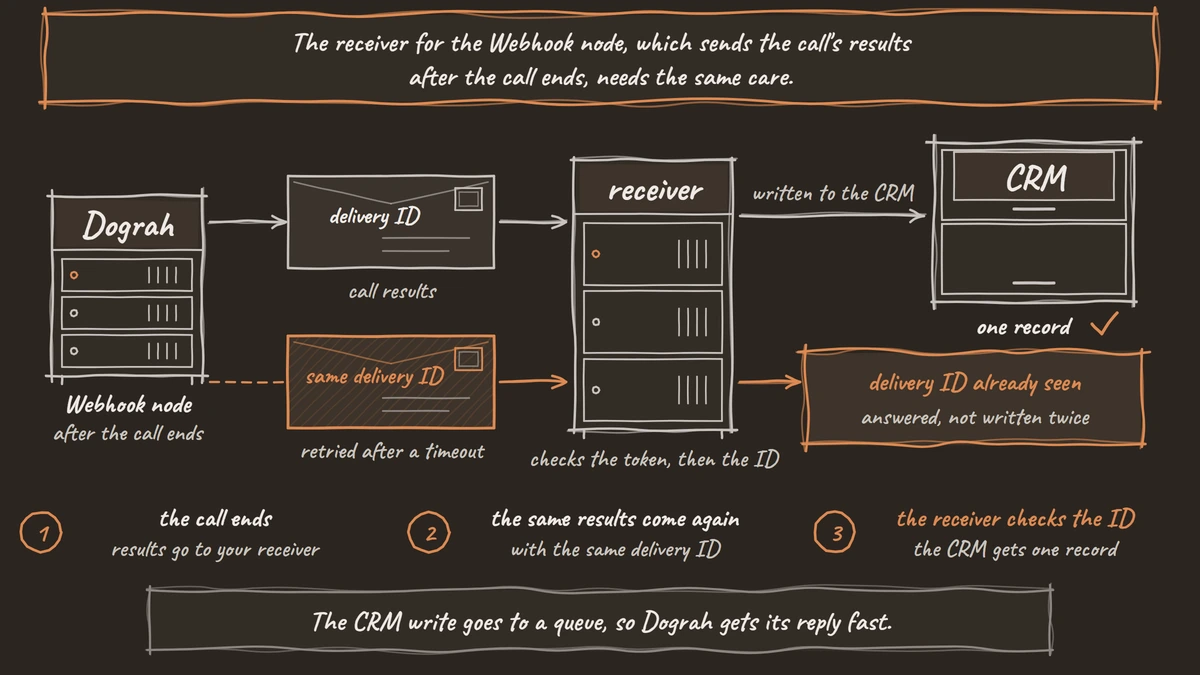
Dograh retries a delivery that times out or gets a 429 or a 5xx, up to five attempts, but a 401 is final. When you rotate the receiver's token, accept both tokens for a short overlap, save the new one in Dograh, then drop the old one, or results sent in between are lost. Payloads and retries have their own post, on webhook-driven voice agents.
The receiver below checks the bearer token in authorization and drops repeats by x_dograh_delivery_id.
import hmac
import os

from fastapi import FastAPI, Header, HTTPException

app = FastAPI()
EXPECTED = f"Bearer {os.environ['DOGRAH_WEBHOOK_TOKEN']}"
seen = set()  # use a table with a unique key in production


@app.post("/dograh/call-results")
async def call_results(
    payload: dict,
    authorization: str = Header(default=""),
    x_dograh_delivery_id: str = Header(default=""),
):
    if not hmac.compare_digest(authorization, EXPECTED):
        raise HTTPException(status_code=401)
    if x_dograh_delivery_id in seen:
        return {"status": "duplicate"}
    seen.add(x_dograh_delivery_id)
    # put the CRM write on a queue here, then answer at once
    return {"status": "accepted"}
What this does: It turns away any request without the right token with a 401, and answers a repeated delivery of the same results without writing it twice. The CRM write goes to a queue, so Dograh gets its reply fast.
Join the Dograh Community
Dograh is an OSS alternative to Vapi. Join our Slack community for queries, releases, best practices & community interactions.
What to log for every tool call
Log one line per request on the endpoint, keyed by the call. Include the run ID from the Preset Parameter, the tool name, which credential arrived, the decision (allowed or refused), the status code you returned and how long it took. Leave out the secret itself, and mask phone numbers, dates of birth and card digits.
Dograh's own logs follow the same rule. Tool requests are logged with a redacted URL, and webhook delivery logs redact fields such as authorization, token, phone and date of birth. Once tracing is set up, each call's View Trace button opens its trace in Langfuse, so you can match a refused request in your log to the turn where the agent asked for it.
Review the refusals every week. A burst of refused lookups for other people's account IDs is a caller probing the agent. Start your hardening with the endpoints that write, since a wrong write costs more than a wrong read.
Glossary
- Least privilege
- Giving each tool only the access its one action needs. For a voice agent, a lookup tool gets a read-only endpoint and its own credential, so a misuse or a leak reaches one action and nothing more.
- Failing closed
- Taking the safe path when a check or request fails. A tool call that times out books nothing and promises nothing, and the agent follows the fallback the prompt describes.
- Server-side request forgery (SSRF)
- An attack where a server is tricked into fetching a URL the attacker chose, often an internal host. Dograh Cloud blocks tool URLs that resolve to private addresses for this reason.
- Delivery ID
- The X-Dograh-Delivery-Id header on each Webhook node delivery. It stays the same across retries, so the receiver can store it and ignore a delivery it has already processed.