
Keep voice AI keys out of prompts and code, and rotate them with an overlap so calls keep working. Model keys can sit in a pool, so add the new key before removing the old one. A Twilio Auth Token cannot overlap, so swap it in a quiet hour and place a test call.
Key Takeaways
- Model keys rotate with no downtime: add the new key, then remove the old.
- Promoting a new Twilio Auth Token deletes the old one, so update Dograh at once.
- Dograh service keys expire after 90 days by default, so plan the renewal.
This post is part of our guide to voice AI for developers, where every programmatic path starts with an API key kept in a secret manager. Below, we map where each key lives in a self-hosted Dograh install, then show how to rotate each kind without dropping calls.
Where each key lives in a self-hosted stack
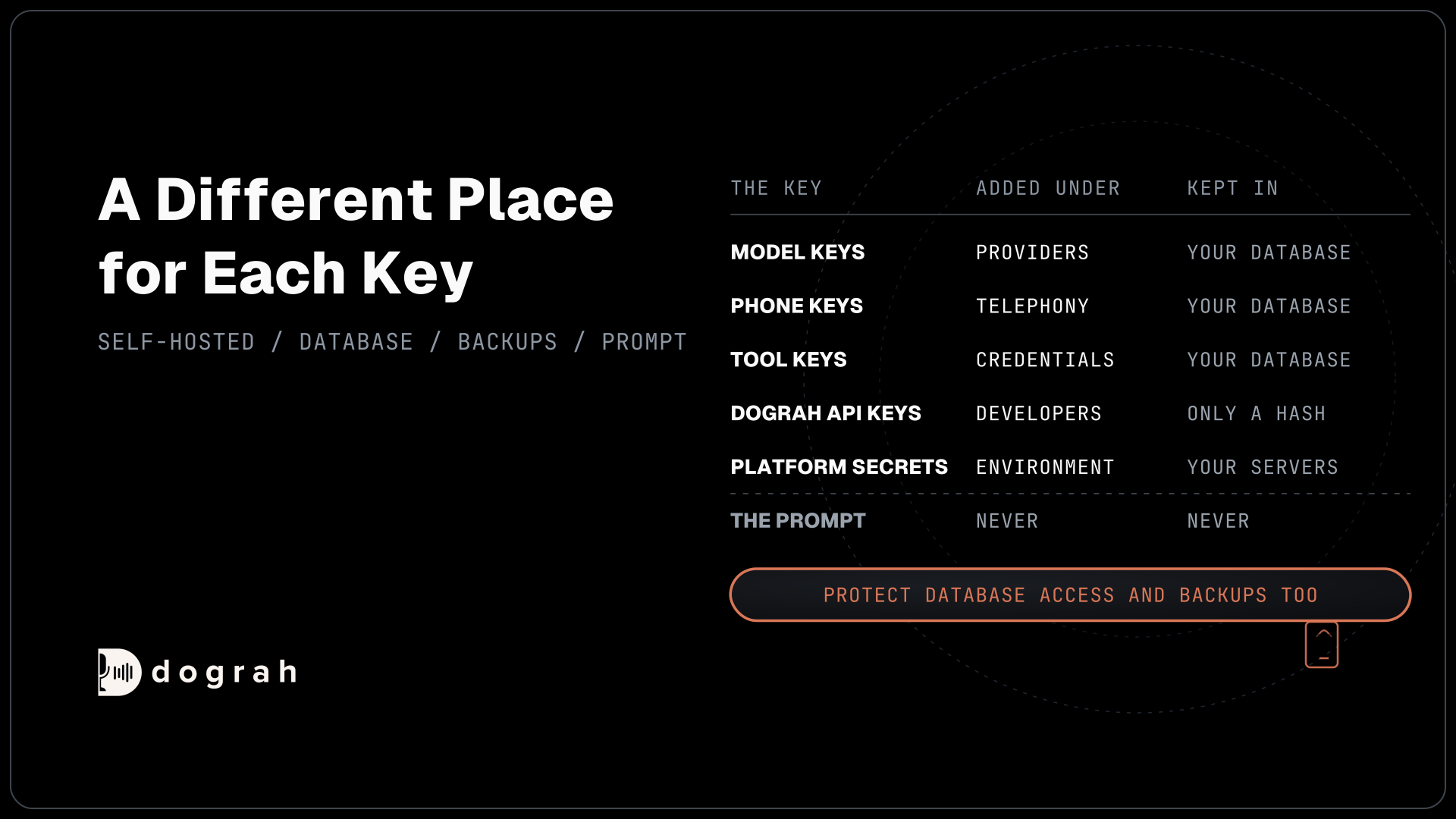
A voice agent holds more keys than most web apps, because every call touches a phone provider and several model providers. On a self-hosted Dograh install each kind of key is added on its own sidebar page and kept in a different place.
| Key | Where you add it | Where it is kept |
|---|---|---|
| Model provider keys (LLM, speech-to-text, voice) | Providers | Your own database, masked when read back |
| Phone provider keys, such as a Twilio Account SID and Auth Token | Telephony | Your own database, masked when read back |
| Keys your tools and webhooks send to other systems | Credentials | Your own database |
Dograh API keys (dgr_) | Developers | Only a SHA-256 hash and the first 8 characters |
| Dograh service keys, for Dograh's own models | Developers, then a Dograh provider connection | Your own database, with the provider connection |
Platform secrets, such as OSS_JWT_SECRET | Environment variables | Your servers' environment |
Because the keys sit in your own database, database access and backups are part of key safety. Limit who can query that database, and treat every backup copy with the same care as the live one. Saved secrets never come back to the browser in full, and when you edit a phone connection, sending the masked value back keeps the stored secret as it is.
Why old keys stay valid for years
Teams skip rotation because a careless swap breaks production. GitGuardian's secrets sprawl report found that 64% of the valid secrets it detected four years earlier still worked, and it puts the delay down to that fear of outages. A rotation plan that cannot drop a call is what gets rotation done.
The OWASP secrets management cheat sheet sets the rule plainly: rotate regularly "so that any stolen credentials will only work for a short time" and revoke an exposed key at once. Keep separate keys for test and production, too, so a leaked test key never reaches live calls.
One place a key must never go is the agent's prompt. OWASP's entry on system prompt leakage says the system prompt "should not be considered a secret", and a caller can talk a model into reading its instructions aloud. Tools carry their keys through Credentials, so the model never sees them.
Rotate model keys with a key pool
Model keys are the easiest to rotate, because a provider connection can hold more than one. In the connection editor under Providers, Add API Key puts each key in its own row, and every call picks one of the keys in the pool at random. That overlap is the whole trick. Old and new keys work side by side while you check the new one.
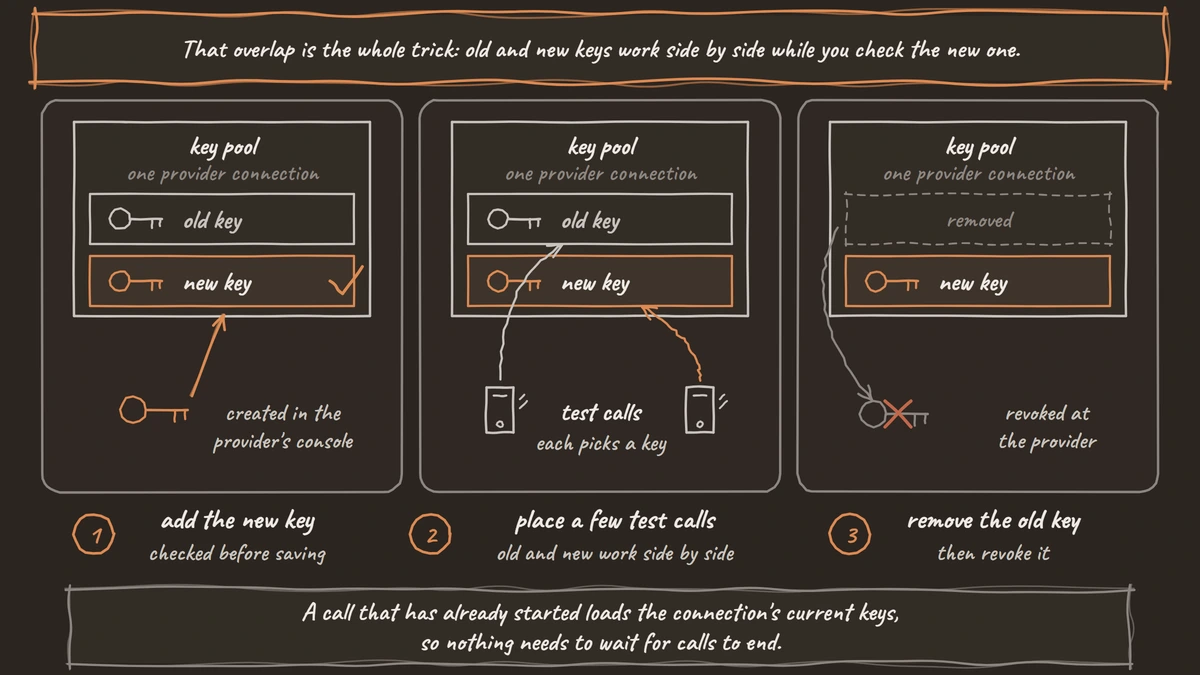
The sequence takes a few minutes. Create the new key in the provider's console, add it to the pool and save. Dograh checks every key in a pool before saving, and a rejected key leaves the existing connection unchanged, so a typo never takes calls down. Place a few test calls, then remove the old key from the pool and revoke it in the provider's console.
Two details from the provider connection setup matter here. A call that has already started loads the connection's current keys, so nothing needs to wait for calls to end. And a credential update replaces the stored values with no copy kept, so keep the old key alive at the provider until your test calls pass. Pools also spread load across accounts, which our post on BYOK vs managed models covers for spend and rate limits.

Open Source Alternative to Vapi / Retell
Self-hosted voice agent platform — no per-minute fees
dograh-hq/dograh
Star on GitHub
Rotate a Twilio Auth Token in a quiet hour
A Twilio Auth Token cannot overlap the way a pooled key does. In Twilio's Auth Token docs, you create a secondary token and then promote it, and promoting "deletes the current primary Auth Token". From that moment the old token stops working everywhere.
Dograh uses the stored token for two jobs on Twilio. It authenticates outbound requests, and it checks the webhook signature in the X-Twilio-Signature header on every inbound request, which Twilio computes from your account's token. Until the new token is saved in Dograh, inbound calls fail that check.
So plan the swap. Pick a quiet hour, create the secondary token in the Twilio console and copy it. Promote it, then paste it straight into the Twilio connection under Telephony in Dograh, leaving the Account SID as it is. Place one inbound and one outbound test call before you leave the screen. The window between promote and save is short, but it is real, so keep it to a quiet hour.
Dograh API keys and service keys
Dograh API keys start with dgr_ and open up the API, the SDKs and the API Trigger. Only a SHA-256 hash of each key and its first 8 characters are stored, so a key cannot be read back and the screen shows it only once. Each key has full access to your organization, so give every system its own key. To rotate one, create the new key under Developers, deploy it to the system that uses it, then archive the old key.
Service keys are a different thing. They let a provider connection use Dograh's own managed models, and API keys and service keys are created on the same Developers page. Each service key expires after 90 days by default, and the page shows the Expires date. On Dograh Cloud, creating one needs a verified email and the matching team selected. A self-hosted install gets its key from app.dograh.com/get-service-key, and usage is billed to the Cloud account that owns it.
Rotate a service key before its expiry date. Create the new key, put it on the Dograh connection your model configuration uses, place a test call and then archive the old key. Archiving is one-way, since an archived key cannot be reactivated. All the Dograh services in a single run share one service key, so swap it on the connection, never service by service. For dgr_ keys in a secrets manager and the rest of the account settings, see voice AI security for phone agents.
Platform secrets and what to do after a leak
A self-hosted install also runs on secrets that never appear in the app. The environment variables reference lists them, including OSS_JWT_SECRET, which signs logins, the MinIO storage keys, TURN_SECRET for browser calls and LANGFUSE_SECRET_KEY for traces. Changing OSS_JWT_SECRET signs everyone out, so schedule it like any other change.
TELEPHONY_WS_TOKEN_SECRET deserves a look on a phone setup. It signs the media WebSocket URL and the Telnyx call-events webhook URL, and checks stay off until you set it. Set the same value on every process that places or receives calls, and turn on TELEPHONY_WS_TOKEN_ENFORCE to reject connections without a valid token.
When a key leaks, revoke it first and investigate second. Revoke it at the provider, or archive it in Dograh, then rotate it with the steps above and search your repos and chat history for other copies. After that, check what the key could reach and who opened call records while it was exposed, which is where an auditable voice AI stack earns its keep.
Join the Dograh Community
Dograh is an OSS alternative to Vapi. Join our Slack community for queries, releases, best practices & community interactions.
Glossary
- Key pool
- Several API keys for the same provider held on one connection, with each call picking one at random. Adding the new key before removing the old one rotates a model key with no gap in service.
- Secondary token
- The second Twilio Auth Token you create to rotate the first. Promoting it deletes the old primary at once, and anything still using the old token, including webhook signature checks, fails until it is updated.
- Service key
- A Dograh key that lets a provider connection use Dograh's own managed models. It expires after 90 days by default, is billed to the Cloud account that owns it, and cannot be reactivated once archived.
- Webhook signature
- A header a phone provider adds to each request, computed with your account's secret, so the receiver can prove the request is genuine. Dograh checks Twilio's X-Twilio-Signature with the stored Auth Token.