
Knowledge-base grounding makes a voice agent answer from your own documents instead of the model's memory. In Dograh, you upload files to the Knowledge Base, attach them to the nodes that answer, and tell the agent when to look things up and what to say when the answer isn't there. You can self-host Dograh or run it on Dograh Cloud.
Key Takeaways
- The agent only searches when the model decides to, so the prompt must say when.
- Short FAQs suit Full Document. Long manuals suit Chunked Search.
- Grounding narrows mistakes. Test questions your files can't answer, several times each.
This post is part of our guide to how to build an AI voice agent, where answering from your own documents is one step. Below, we explain how Dograh's Knowledge Base finds an answer, then how to keep the agent to your files and test it.
How the agent finds an answer in your files
The agent doesn't read your files on every turn. Retrieval is a tool the model chooses to call when it thinks a question needs it. The model writes a short search query, Dograh searches the documents attached to the node the call is in, and the results go back to the model before it answers.
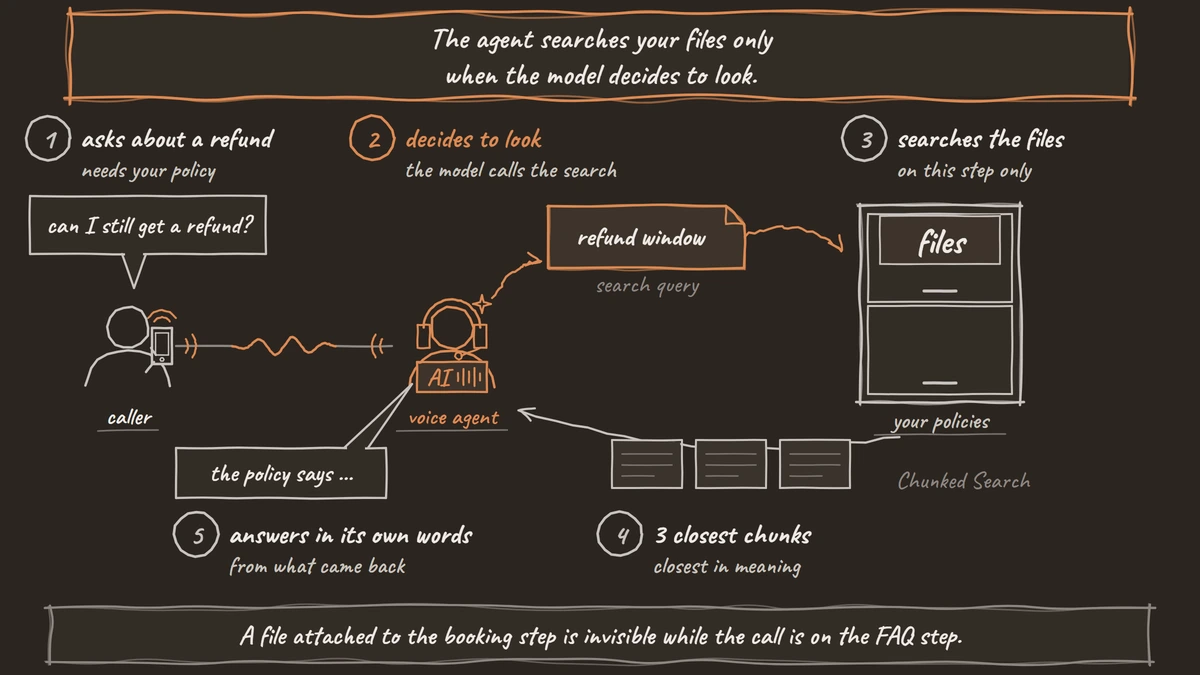
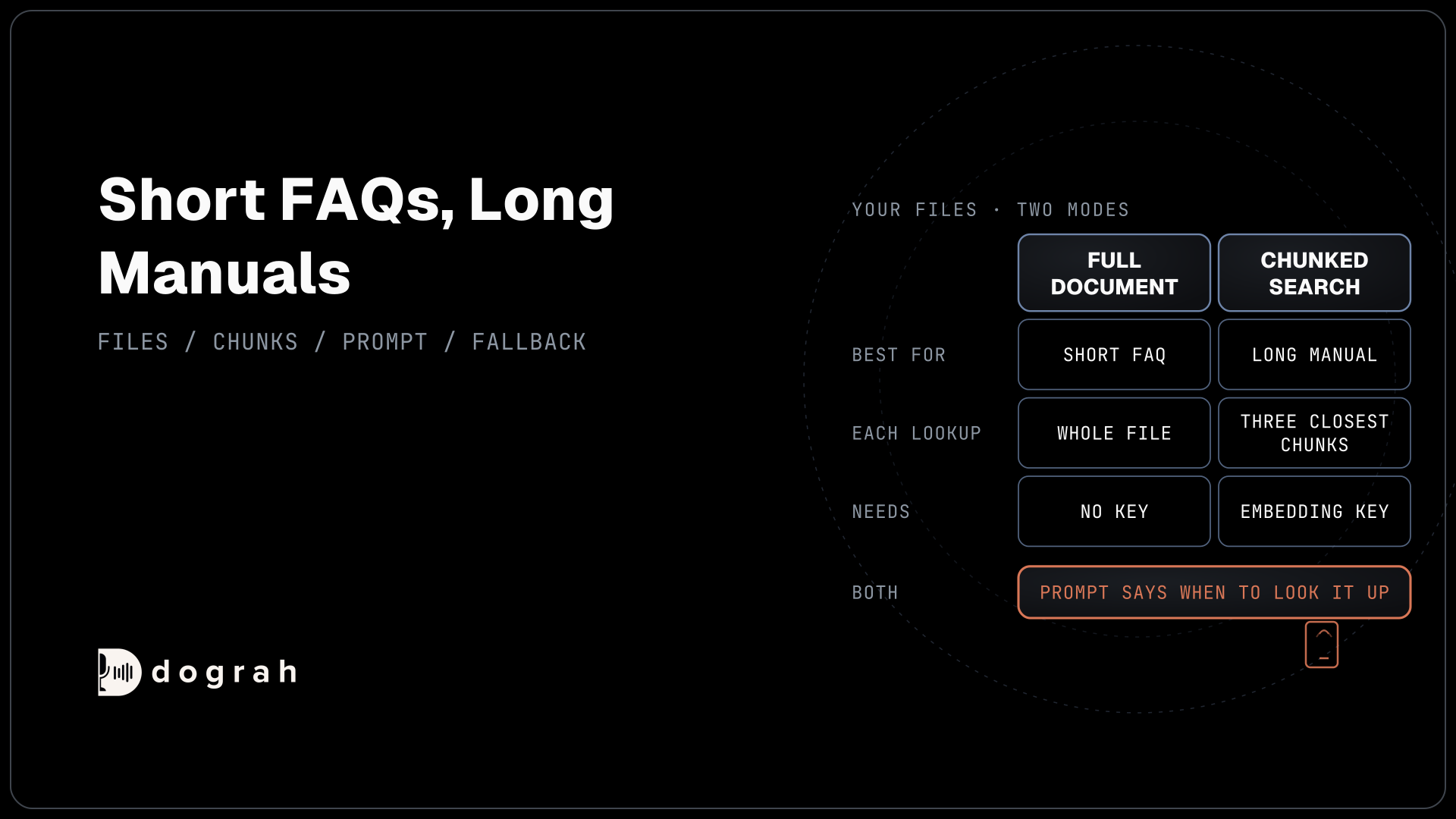
What comes back depends on the file's mode. A Full Document file returns its whole text on each lookup. A Chunked Search file has been split into chunks of up to 128 tokens, and the lookup returns the three chunks closest in meaning to the query. Either way, the model writes the answer in its own words from what it received.
Two things follow. If the model doesn't call the tool, nothing is retrieved, and the agent answers from memory. And the search only covers documents attached to the current node, so a file attached to the booking node is invisible to the agent while it is on the FAQ node.
Documents attach to each step the same way for cascade and speech-to-speech agents, so the Knowledge Base works with both. Answer quality can still differ between models, so test whichever one you use.
Upload each file in the right mode
Each file gets a mode when you upload it, and the right one depends on the file's length. Open Files in the sidebar, which opens the Knowledge Base Files page, and click Upload Document. The dialog asks "How should the agent use this document?" with two choices. Full Document is the default, and Chunked Search is the other. Then drop the file in or click Choose File, and click Upload & Process.
Dograh accepts PDF, Word (DOC or DOCX), TXT, Markdown and JSON files, up to 5 MB each. Full Document needs no embedding key. Chunked Search needs an embedding model key, because it turns each chunk into an embedding for the search.
Use Full Document for short reference files that fit comfortably in one answer, such as a one-page FAQ or a price list. Use Chunked Search for long manuals and policy sets, where sending the whole file every time would slow the reply and bury the answer.
TXT and Markdown files can be edited in place, so they suit facts that change often. Saving a Full Document file is quick. For a Chunked Search file the button reads Save & re-index, and agents keep using the current version until the new one finishes processing. Other file types are replaced by uploading a new copy.

Open Source Alternative to Vapi / Retell
Self-hosted voice agent platform — no per-minute fees
dograh-hq/dograh
Star on GitHub
Write documents a voice agent can use
Documents written for a person reading a page don't always work for an agent answering a call. With Chunked Search, each chunk of about 128 tokens arrives on its own, so every section has to make sense without the one before it. Put the subject in each section, as in "Refunds for annual plans are..." rather than "These are...".
Write one fact per short paragraph, and use headings that sound like the questions callers ask. Spell out what the agent should say aloud, such as "nine a.m. to five p.m." or "the twenty-dollar plan", where a symbol or a table could be read badly. Remove anything you would never want said on a call, such as internal notes or staff names.
A clean document doesn't fix a misheard word. If callers say product names the speech-to-text model gets wrong, the search query is wrong before it starts. That problem belongs to speech-to-text, and our post on custom dictionaries for voice agents covers it.
Keep the agent to your documents
Grounding needs the file in the right place and two rules in the prompt. First, select the file under Knowledge Base Documents on every node that should answer from it, on the Start Call node or an Agent Node.
Then tell the agent when to look things up and what to do when the answer isn't there. The prompt lines below give it both rules, the lookup trigger and the fallback:
For any question about prices, plans, refunds or opening hours, look it up in the knowledge base before you answer.
Answer only with what the documents say. If they don't cover the question, say you don't have that information and offer to pass it to the team.
Never guess a price, a date or a policy.
What this does: The first line makes the model call the lookup for the questions that matter. The second gives it a safe answer when the search comes back empty or fails, instead of a made-up one.
Even with the right text in hand, models sometimes add details that aren't there. On Vectara's hallucination leaderboard, as measured on 22 October 2026, models added unsupported content to between 4.1% (Llama-3.3-70B-Instruct-Turbo) and 10.6% (claude-sonnet-4-6) of document summaries, with gpt-5.4 (2026-03-05) at 7.0%. Grounding narrows mistakes, and it doesn't end them, which is why the fallback rule matters.
If the search itself fails, the agent receives an error with no results, and the same fallback line covers it. For a worked example, Step 4 of How to Build an AI Receptionist attaches a salon FAQ and limits prices to it.
Test it with real caller questions
The questions you test with should come from real callers. Collect them from call notes and chat logs, in the words people use. Add a handful the documents don't answer, such as a product you don't sell, to check that the fallback line plays.
Ask each question several times. Language models don't always answer the same input the same way. In a test by Thinking Machines, Qwen3-235B-A22B-Instruct-2507 gave 80 different completions when one prompt was sampled 1,000 times at temperature 0. One right answer proves little.
Use Test Chat to run many questions quickly by typing. Then use Test Audio and a real phone call for questions with names, numbers and prices, because spoken input changes the search query. Each call's View Trace button opens its trace in Langfuse, where you can see whether the lookup ran and what it returned.
After launch, add a QA node to score calls, and run it on a random 5 to 10% of calls through its Sample Rate setting. A wrong answer usually traces back to a missing fact or a chunk that lost its subject, and sometimes to a prompt that never asked for a lookup. Testing Voice Agents Before You Go Live covers the wider test order.
Join the Dograh Community
Dograh is an OSS alternative to Vapi. Join our Slack community for queries, releases, best practices & community interactions.
Use a tool when the answer changes daily
Documents suit facts that change rarely, and live data belongs in a tool. Opening hours and refund rules fit a file. An order's status or today's open slots change by the minute, so the agent should ask your system for them during the call with an HTTP API tool. Details the agent needs before it says hello, such as the caller's name, can load at the start with pre-call data fetch from your CRM.
Many agents need both, and the prompt says which source answers which question. AI Voice Agents for Inbound Customer Support shows a support line built on the two.
Glossary
- Grounding
- Making an AI answer from a supplied source, such as your documents, instead of its own memory. It reduces made-up answers but doesn't remove them, so a fallback rule and testing still matter.
- Chunked Search
- A Dograh Knowledge Base mode that splits a file into chunks of up to 128 tokens and returns the three closest to the agent's query. It suits long manuals and needs an embedding model key.
- Full Document
- The default Knowledge Base mode, which hands the agent a file's whole text on every lookup. It suits short FAQs and price lists and needs no embedding key.
- Retrieval
- The step where the language model decides to search the attached documents and writes a query. If the model doesn't make the call, nothing is retrieved, so the prompt says when to look things up.