
To run post-call analysis on voice calls, write a rubric for the outcome, tone and missed steps, grade a sample of finished calls, send the results where your team works, and fix the agent from flagged calls. Dograh, the open-source AI voice agent platform, runs that loop on your own model key, self-hosted or on Dograh Cloud.
Key Takeaways
- Score the agent's outcome, tone and missed steps, never the caller.
- Grade every test call, then a random 5 to 10% of live calls.
- In Dograh, the Webhook node sends QA results after each scored call.
Finished calls hide their problems in transcripts nobody reads. We set out what to measure on an AI call, build a five-step scoring loop with Dograh as the worked example, then we talk about acting on flagged calls and checking that the grader itself can be trusted.
What to measure on an AI call
Post-call analysis for an AI agent should measure what the agent did, step by step. Contact-center tools were built for human staff. Amazon Transcribe Call Analytics, for example, reports talk time, interruptions, loudness and the customer's sentiment so a manager can coach people. An AI agent has no bad day to coach. It has a prompt, tools and a flow, and a score should point at the part that failed.
Three questions cover most of it. Did the call reach the outcome it was built for, such as a booked slot or a qualified lead? How did the agent sound, calm and clear or rushed and repetitive? And did it skip a step the flow requires, such as confirming identity before naming an account? Grade the agent's conduct on each, never the caller's mood, since an angry caller with a correct answer is a good call.
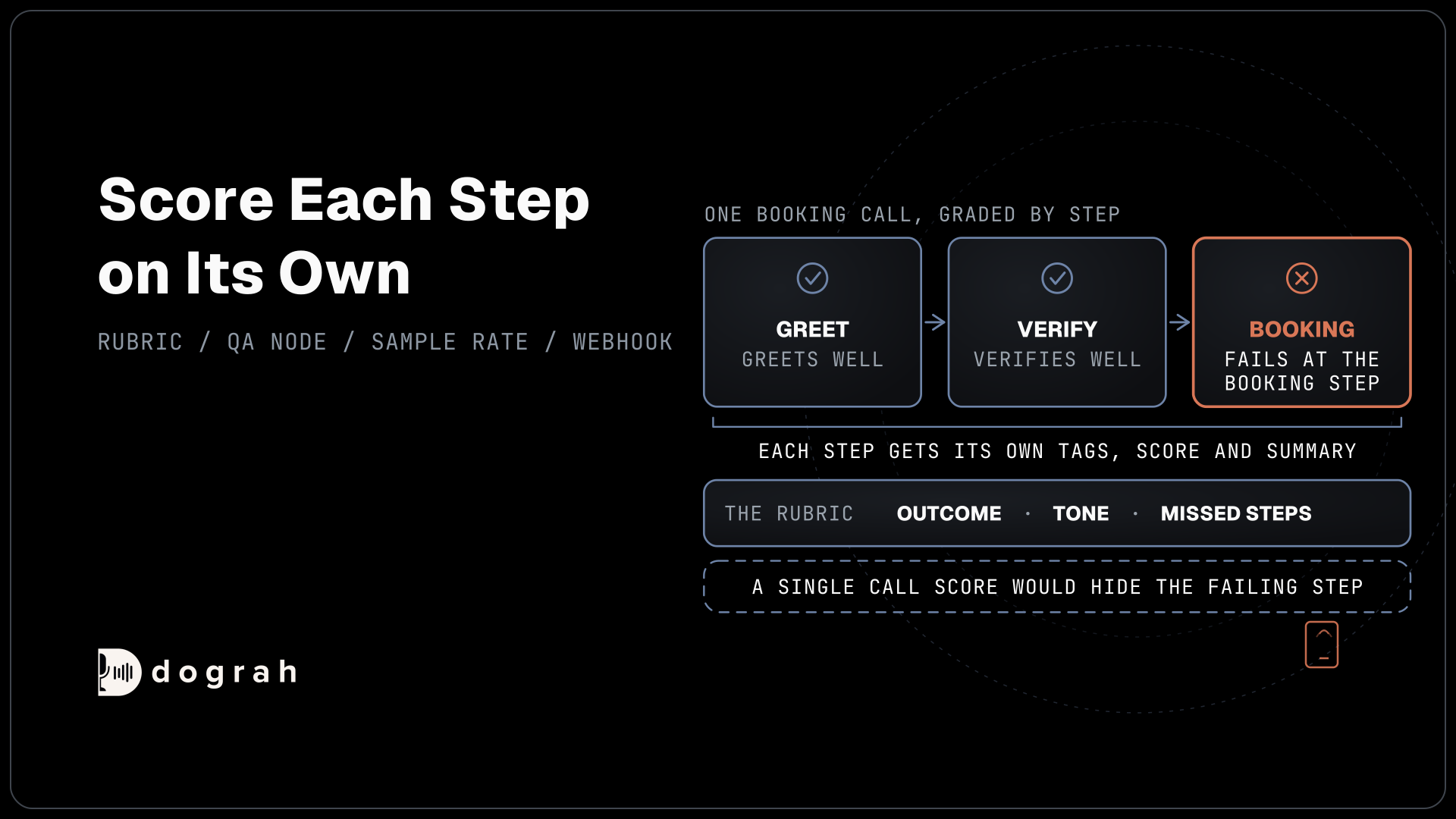
Score each step of the flow on its own rather than giving the call one number. A booking agent can greet well, verify well and then fail at the booking step, and a single call score would hide which step failed. Hosted platforms ship post-call fields of their own, and our comparison of voice AI platforms with QA and post-call analysis sets them side by side.
What you need before you start
You need a published agent that has taken some calls, either test calls from the editor or live ones. You also need a place for results to land, such as a spreadsheet tool, a CRM or an internal dashboard that accepts a webhook.
Set aside an hour to read ten transcripts before you write anything. The failures you see in those ten will shape a better rubric than any template.
Step 1: Write the rubric
A rubric turns "was it a good call" into questions a grader can answer the same way every time. Write each item as something you can see in the transcript, with a yes or no answer or a 1-10 score and a stated pass line.
For the outcome, lean on what the call already records. The agent's call dispositions, such as callback_requested or do_not_call, and the values it collected already say what happened, so the rubric only asks whether the outcome matched what the caller wanted. For tone, ask about the agent's behavior, such as whether it repeated itself or talked over the caller. For missed steps, list the steps your flow requires and ask about each one.
The rubric below is an illustration we wrote for a booking agent. It asks for identity_verified and slot_confirmed as yes or no answers, a tone_score with a pass line of 7, and a one-line summary.
You review calls handled by a booking agent. Read the transcript and return JSON:
- "identity_verified": true or false. Did the agent confirm date of birth before naming the appointment?
- "slot_confirmed": true or false. Did the agent read back the date and time before booking?
- "tone_score": 1-10. 7 or above means calm, clear and never talking over the caller.
- "summary": one sentence on what the caller wanted and whether they got it.
What this does: It tells the grader exactly what to look for and what shape to answer in. Because each field has a fixed meaning, a
falseonidentity_verifiedmeans the same thing on every call, and you can count it.
Step 2: Add a QA node with your rubric
In Dograh, the QA Analysis node reads each finished call's transcript and grades it. Open the agent's canvas and add the node anywhere. It has no connections, because it runs after the call ends and never touches the live conversation. The QA node page shows the full settings.
Paste your rubric into System Prompt, replacing the default. The default prompt is a fair start if you have no rubric yet, since it returns tags such as DEAD_AIR and USER_FRUSTRATED, a 1-10 score, sentiment and a summary. Use Workflow's LLM is on by default, so grading runs on the agent's own model. Turn it off to pick a different QA LLM Provider and QA Model, for example a stronger model for grading than for talking.
The grader scores each step of the agent separately, with its own tags, score and summary, and lists all tags together for the call. QA also runs on test calls from the editor, so you can check the rubric before any customer hears the agent. Our guide to automated QA for voice agents goes deeper on prompt wording.
Check: Place a test call, open the run, and the QA Results section shows your rubric's fields for each step.

Open Source Alternative to Vapi / Retell
Self-hosted voice agent platform — no per-minute fees
dograh-hq/dograh
Star on GitHub
Step 3: Set how many calls get scored
Grading every call is right while you test and wasteful once traffic grows. Sample Rate (%) controls the share of calls graded, and it starts at 100. Below 100, each call is picked at random, so a 10% setting grades about one call in ten without favoring any time of day.
Grade every call while the agent is new, then a random 5 to 10% in production. That sample is enough to spot a step that keeps failing, and the remaining calls still carry their dispositions and collected values for counting.
Two more settings decide which calls qualify. Minimum Call Duration (seconds) skips calls shorter than 15 seconds by default, which removes hang-ups that have nothing to grade. Include Voicemail Calls is off by default, so calls that reached a voicemail box are skipped too.
Check: After a batch of calls, the share of runs with QA Results matches your Sample Rate, give or take chance.
Step 4: Send results out with a Webhook node
The Webhook node runs after the QA step, so its payload can carry the grades. When a call ends, Dograh runs every QA node first, saves the results on the run as annotations, then fires the webhooks with those annotations available in the template. The webhook variables page lists everything the payload can use.
The template below sends the run ID, the call's disposition, the QA results in annotations, the combined tags list and the recording link.
{
  "run_id": "{{workflow_run_id}}",
  "disposition": "{{gathered_context.call_disposition}}",
  "qa": "{{annotations}}",
  "qa_tags": "{{annotations.tags}}",
  "recording": "{{recording_url}}"
}
What this does: It posts one record per call to your endpoint with the outcome and the grades side by side. The QA results and tags arrive as JSON text inside their fields, which your endpoint parses, and a call that was not sampled simply carries no grades.
Temporary failures on your side, such as timeouts or 429 and 503 responses, are retried automatically, up to five attempts in all, so make your endpoint ignore a second delivery for the same run_id. Wrong URLs and credentials are not retried.
Check: Your endpoint receives a payload after a test call, with the rubric's fields inside qa.
Join the Dograh Community
Dograh is an OSS alternative to Vapi. Join our Slack community for queries, releases, best practices & community interactions.
Step 5: Act on what the scores show
Scores only matter when they change the agent. Start from Agent Runs and filter by Tags or Disposition Code to pull the calls that failed one rubric item. Read the pattern before reading any one call, such as whether slot_confirmed fails mostly at night or after a transfer back from staff.
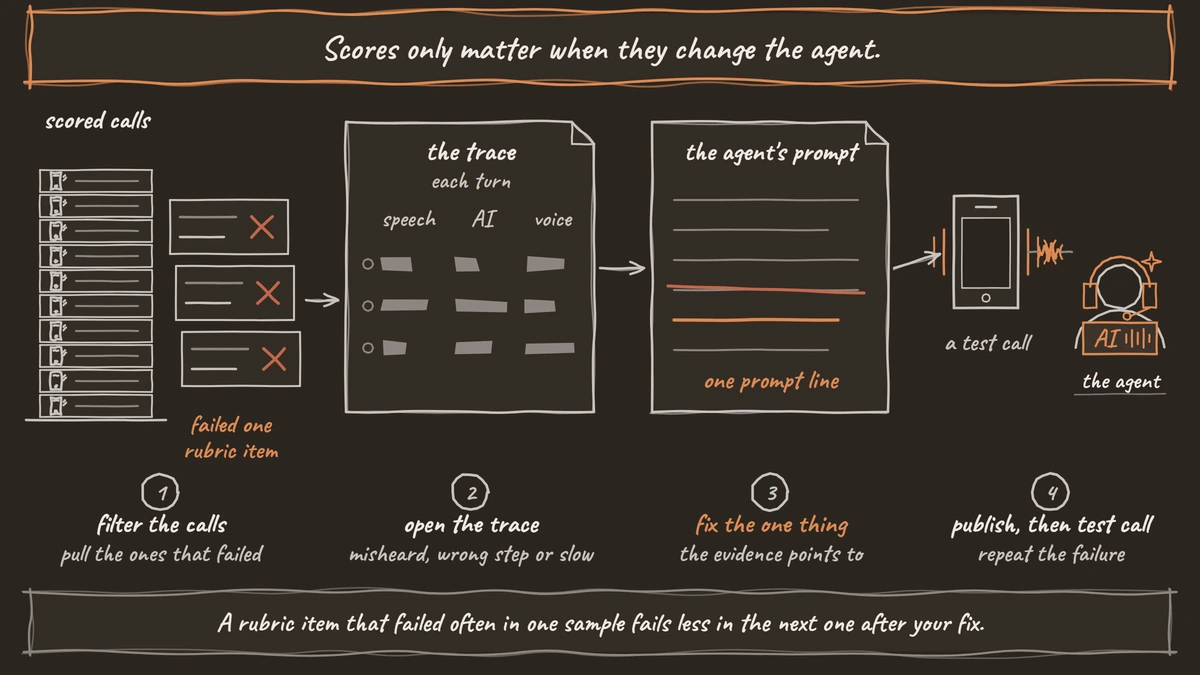
Open a flagged run and read its QA Results, then select View Trace. The trace shows each turn with its speech-to-text, AI and voice time, so you can tell whether the agent misheard, chose the wrong step or answered too slowly. Our post on how to read call traces to debug a voice agent walks through each layer.
Fix the one thing the evidence points to, such as a prompt line, a tool's description or a missing step. Publish the change, place test calls that repeat the failure, and watch the same rubric item over the next sample. For trends across weeks, the Reports page downloads runs as a CSV, and our piece on turning transcripts into product insight covers what to do with that file.
Check the grader as well as the agent. In the Testing the Testers study, written by the team behind Evalion, human reviewers judged three commercial voice AI testing platforms. Evalion's own platform scored an F1 of 0.92 and the other two scored 0.73. Read ten graded calls yourself each month and compare. If you also want to catch failures before launch, our list of voice AI testing and evaluation tools covers simulations.
Check: A rubric item that failed often in one sample fails less in the next one after your fix.
Before you ship it
Grading costs model tokens, so plan for them. With Use Workflow's LLM on or your own QA model, each grade is a model call on your key, and Dograh adds its tokens to the run's usage so you can see the cost per call.
The platform is the other line. With Dograh on your own servers there is no per-minute platform fee, and the costs that remain are servers, model keys and phone minutes. Your team handles the database and upgrades, and the transcripts and grades stay on those servers. The open-source community provides support, and Enterprise adds custom SLAs. Dograh Cloud takes over the running for a 1¢-a-minute platform fee.
To recap, you wrote a rubric for outcome, tone and missed steps, added it to a QA node, set the sample, sent the grades out with a webhook, and fixed the agent from the flagged calls. Run the loop every week and the rubric will grow with the agent.
Glossary
- Rubric
- The fixed list of questions a grader answers for every call, each with a yes or no answer or a score and a pass line.
- Sample Rate
- The share of finished calls the QA step grades. Below 100%, calls are picked at random, so the sample is not skewed.
- Annotations
- Where Dograh saves QA results on a call's run, one entry per QA node plus a combined tags list. Webhooks can send them.
- Call disposition
- The recorded outcome of a call, such as a callback requested or do not call, which the rubric uses to judge the outcome.