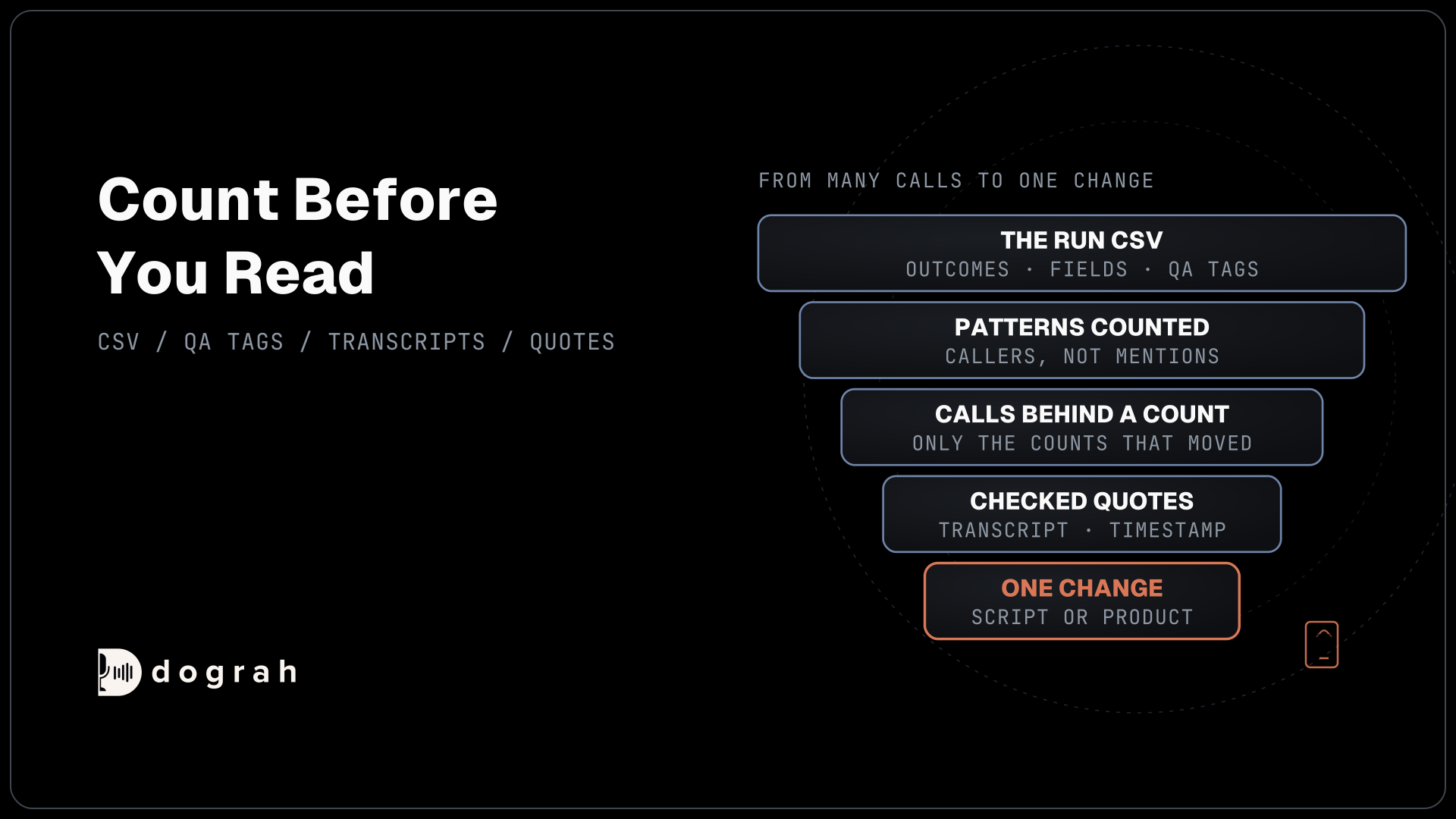

Post-call analysis turns voice agent transcripts into product insight by counting before reading. Export the outcome codes, extracted fields, QA tags and transcript links for many calls, find the patterns that repeat, then read the transcripts behind each pattern and check them before you change the script or the product.
Key Takeaways
- The same tag on the same step across many calls is a decision.
- An empty field across many calls usually points at a script problem.
- Summaries and extracted fields are AI output, so check themes against transcripts.
Reading a hundred transcripts in order can eat a week and still leave you guessing. We start from the run CSV in Dograh, count before reading, map QA tags to fixes, then check themes against transcripts and turn them into changes. For the measures behind it, see our guide to measuring voice-agent quality.
One transcript is an anecdote
A single transcript tells you what happened to one caller. The same QA tag on the same step across two hundred calls tells you what to change. Post-call analysis is the work of getting from the first to the second.
The calls worth studying most are the ones that went wrong, because callers who fail with an AI tool tend not to come back. In Gartner's survey of 3,566 customers, 58% of those who use generative AI had used it to complete a task for them, and 74% in B2B. Gartner adds that customers forced through several failed AI exchanges before reaching a person are less likely to use the tool again.
So every failed call is a user you may lose, and the reason it failed is product information. Sometimes the fix is a sentence in the script. Sometimes it is a feature your product does not have yet.
Start from the run CSV
The fastest starting point is a table with one row per call. A voice agent already leaves most of what you need, so you rarely start from raw audio.
In Dograh, open the agent's Settings, choose Report and click Download Report, with a date range if you want one. A campaign page has the same button for that campaign's calls, and Agent Runs has Download Filtered Results for whatever your filters show. Each row carries the call disposition, the duration in seconds, one column for each extracted variable, the call tags, and links to the transcript and recording.
The disposition column needs call dispositions turned on, so every call ends with one outcome code from your list. The variable columns come from variable extraction on each step. The final extraction also runs when the caller hangs up first, so short calls still leave their fields. Our post on how to extract structured data from calls into any CRM sets both up.
One setting helps later. Under General in the agent's Settings, turn on Enhanced Timestamped Transcript to add start and stop times for each speaker. Quotes with a timestamp are easy to check and easy to share.

Open Source Alternative to Vapi / Retell
Self-hosted voice agent platform — no per-minute fees
dograh-hq/dograh
Star on GitHub
Count before you read
Reading a hundred transcripts in order wastes a week. Count first, then read only the calls behind the counts that moved.
Start with two counts: the share of each outcome code this week against last week, and the share of calls where each extracted field came back empty. An empty field on many calls usually means the agent never asked the question, or the caller did not understand it.
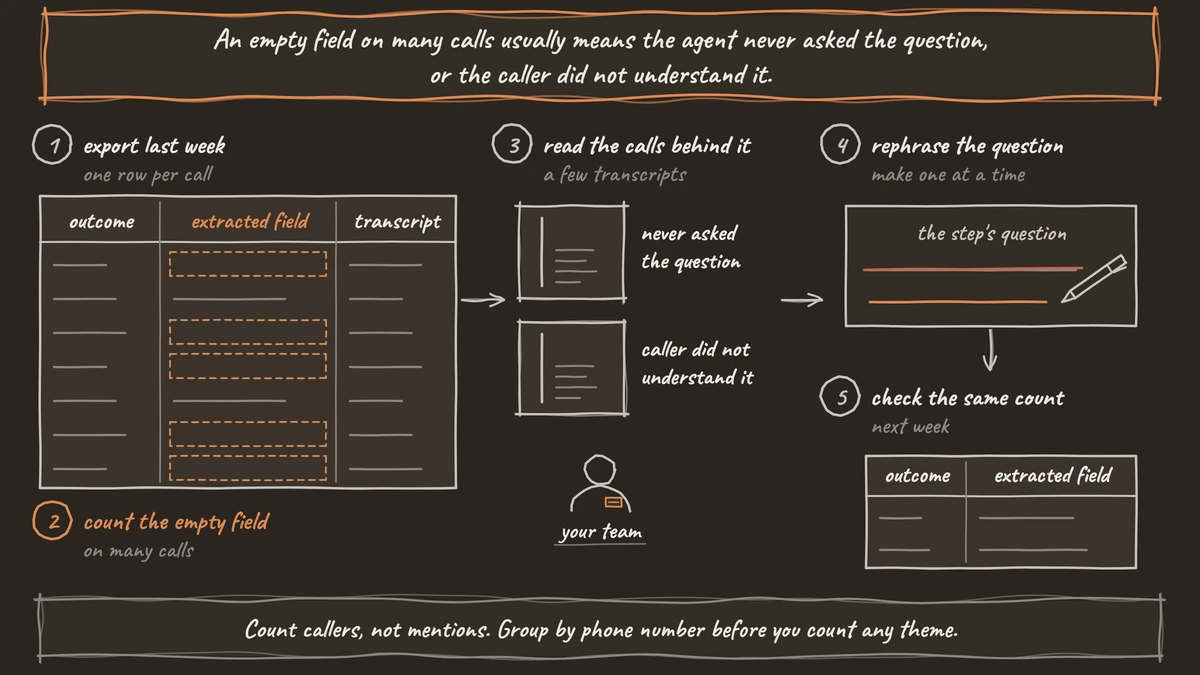
Count callers, not mentions. One angry caller who raises the same complaint five times is one caller. Ten callers who each mention it once are a pattern. Group by phone number before you count any theme.
Then narrow down. Agent Runs filters by disposition code, call duration, direction and campaign, so you can pull the forty calls behind one number and read those. An MCP client connected to Dograh can do the same through list_calls, which lists recent calls by agent, minimum duration and outcome, and get_call_transcript.
The grouping itself happens in your own tool, such as a spreadsheet, a BI dashboard or a language model run over the exported transcripts. Managed call analytics products such as Amazon Transcribe Call Analytics add sentiment, categories and summaries per call. A voice agent's own records already hold the outcome and the fields, so you are counting things the agent did, not guessing them from audio.
What each QA tag points to
QA tags are the shortcut from a count to a cause. Dograh's QA review tags each step of a call, so a tag also tells you where in the flow it happened.
Each default tag tends to point at a different kind of fix. USER_REQUESTING_FEATURE is the direct product signal: callers asking for something you do not offer. USER_NOT_UNDERSTANDING usually means a script problem, such as a question asked in jargon. ASSISTANT_REPLY_IMPROPER points at the prompt or at the documents the agent answers from. ASSISTANT_IN_LOOP points at the flow, often a step whose exit condition is never met.
You can also replace the QA System Prompt with your own checks and fields, such as whether the caller mentioned a competitor. QA results show on each run's page under QA Results. To count them across calls, send them to your own system with a Webhook node payload after the call.
Treat the tags as a filter for what to read. Testing the Testers compared three commercial voice-agent testing platforms with 21,600 human judgments. The top platform reached an F1 of 0.92, while the others averaged 0.73. A tag tells you which transcript to open. Automated QA for voice agents covers setting up the checks.
Join the Dograh Community
Dograh is an OSS alternative to Vapi. Join our Slack community for queries, releases, best practices & community interactions.
Check every theme against the transcript
A theme you found in summaries or extracted fields is a lead until you have read the calls behind it. Both are AI output.
Language models add things to summaries that the source never said. On Vectara's hallucination leaderboard, which scores models on summarizing short documents, gpt-5.4 added unsupported content 7.0% of the time and Llama-3.3-70B-Instruct-Turbo 4.1%. A theme built on a few hundred summaries can include some that are simply wrong.
Extracted fields carry the same risk. The agent records each answer as the caller stated it, and the transcript and recording stay the exact record. Before a theme goes to the product team, pull three or four transcripts behind it and copy the caller's own words, with the timestamp. If the quotes do not match the theme, drop the theme.
Turn findings into changes
A checked theme becomes one of two things: a script change you can make today, or a product request with evidence attached.
Script changes are fast, so make one at a time. Rephrase the question callers misunderstand, or add a path for the request the agent keeps failing. Then check the same count next week. If the empty-field rate drops, the fix worked. If it does not move, read the calls again.
Product requests go to the product team with the count of distinct callers, a few quotes and the step where they came up. That is harder to argue with than "callers seem to want this".
One last check before you send transcripts to an outside model for analysis: that model is a new place your call data goes. If calls carry personal data, run the analysis on a model you host yourself, next to a self-hosted Dograh. Our post on why voice data needs to stay local covers the risks.
Glossary
- Run CSV
- The export with one row per call: disposition, duration, one column per extracted variable, call tags, and transcript and recording links. It is the starting table for post-call analysis.
- Empty-field rate
- The share of calls where an extracted variable came back blank. A high rate on one field usually means the agent skipped the question or callers did not understand it.
- Distinct-caller count
- How many different callers raised a theme, as opposed to how many times it was mentioned. One loud caller should not outweigh ten quiet ones.
- Per-step QA tag
- A QA label such as USER_NOT_UNDERSTANDING attached to one step of a call. The tag says what went wrong, and the step says where to fix it.