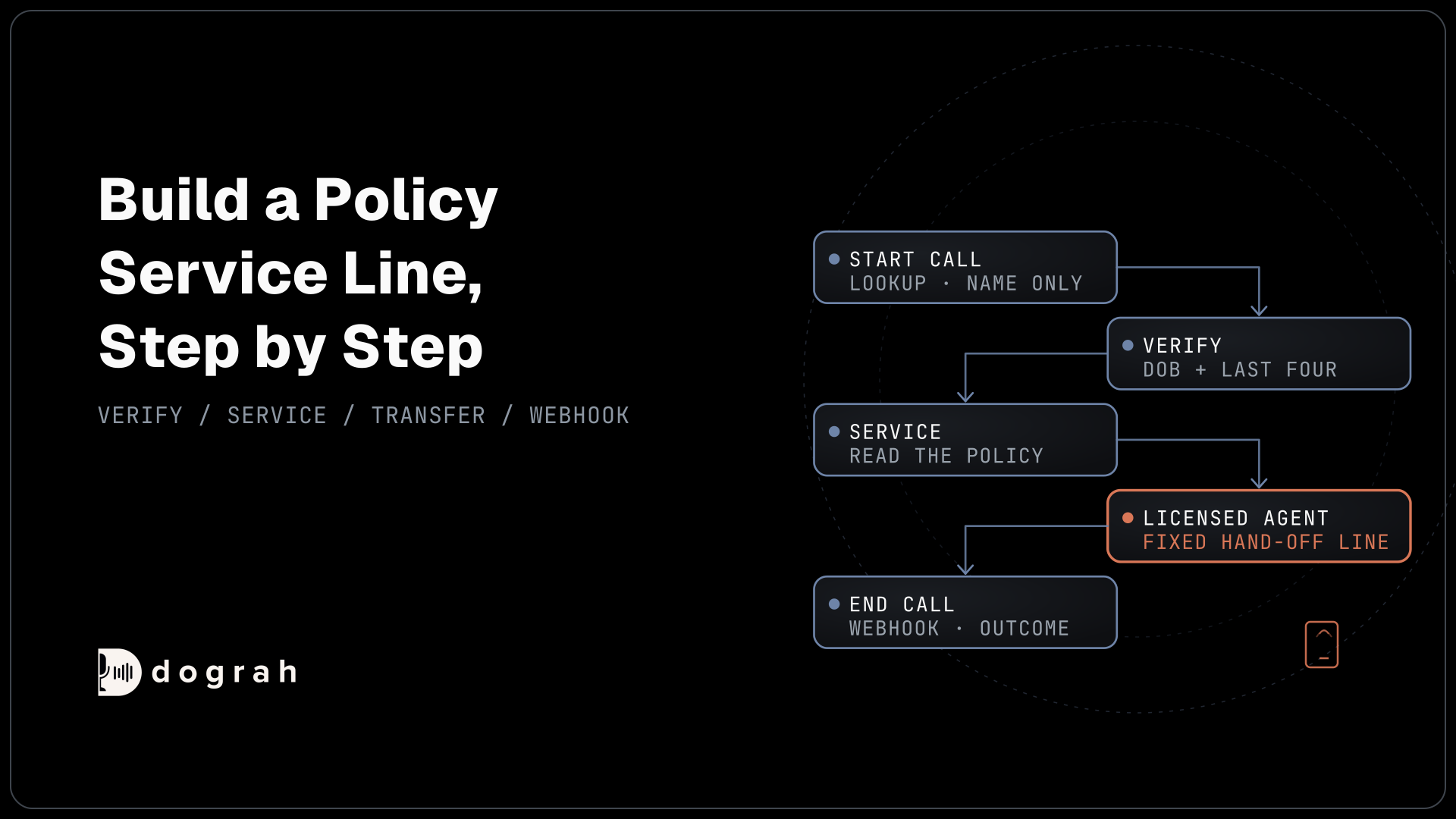

To build a voice agent for insurance in Dograh, greet with a fixed line, look the caller up by number without loading policy data, and verify them with an HTTP API tool before reading anything. Then record change requests, route advice questions through fixed Transition Speech to Transfer Call, post the outcome by webhook and test by phone.
Key Takeaways
- Look up by phone number, but read policy data only after verification.
- Advice questions take a pathway with fixed Transition Speech into Transfer Call.
- Test on a phone line; browser tests cannot run Transfer Call.
This post is part of our guide to AI voice agents for insurance. The guide's section "Building one and choosing a platform" says the first agent most agencies build is an inbound policy-service line, and that the build follows the guide's two lines: verify before anything is shared, and never sell, advise or bind. This tutorial builds that agent click by click in Dograh, an open-source, self-hostable voice agent platform.
What you need before you start
You need Dograh, a phone number on Twilio, Telnyx or Asterisk ARI connected to Dograh (Transfer Call works only on those), and four endpoints on the agency's side. Dograh runs as Dograh Cloud or on your own machine. A local install needs at least 2 CPU cores, 8 GB of RAM (4 GB available for Docker), 10 GB of free disk and Docker 20.10 or later.
Endpoints are web addresses your agency system answers at. This build uses a caller lookup, a verification check, a request writer and a webhook receiver. How to Build an AI Receptionist covers the editor basics if this is your first Dograh agent.
What you'll build:
- A greeting that names the agency and a lookup that loads no policy data.
- A verification step before any policy detail is read.
- A service step that reads status and records change requests as stated.
- A fixed hand-off line into a transfer to a licensed agent.
- A webhook that sends every call's outcome to the agency system.
Self-hosted Dograh has no per-minute platform fee (servers, model keys and phone minutes still cost); Dograh Cloud has a 1¢-a-minute platform fee.
Step 1: Create the agent and choose its models
Start in Voice Agents in the sidebar. Click Create Agent, then Use Agent Builder. On the Create Voice Agent form, set Call Type to "Inbound (Users call AI)", enter Policy Service as the Use Case and describe the job in Activity Description: "Answer policyholder calls for an insurance agency, verify the caller and pass coverage questions to a licensed agent." Click Create Agent, and Dograh drafts a workflow for you to edit.
Next, open the Model tab at the top of the editor. Under Preset configuration, the Configuration list starts on "Organization default". Dograh is the orchestration layer: it runs the call flow, tools and telephony, and the speech and language models are a separate layer you choose. Dograh starts every account on its own managed models. To keep call audio away from Dograh, open Models, switch the Organization default to BYOK with your own speech and language providers (or local models), and check that no agent has its own model override. In Models, click Add Configuration, choose BYOK, save it, then click Make org default on that row. The call audio stays in-house only when the speech and language models run on your own servers too. Then leave this agent on "Organization default", so it follows that setup.
Then put the agency's rules in plain words in the Global Prompt of a Global Node (add one from the Add New Node panel if the draft has none). The agent reads and records. It never says which policy suits the caller, never quotes a price your tools did not return and never says whether a loss is covered.
Check: the Model tab shows "Organization default" with your own configuration's name in brackets.
Step 2: Greet and look up the caller
The greeting and a light lookup run before anyone is verified, so neither may carry policy data. Open the Start Call node, keep Greeting Type on "Text (TTS)" and write the Greeting Text, which Dograh speaks word for word: Hi {{first_name | there}}, thanks for calling Harbor Insurance Agency. The | there part is a fallback, so a caller with no match hears "Hi there" instead of a greeting with the name missing. If you want to tell callers they're speaking with an automated assistant, or your location requires it by law, write it in the Greeting Text along with the business's name.
At the bottom of the Start Call node, set Pre-Call Data Fetch to "Inbound calls only", enter your lookup's Endpoint URL and pick its Authentication credential (created under Credentials in the sidebar). It runs once the call connects, and the caller hears ringing until it answers. Dograh sends a POST with the caller's number in from_number and the dialled number in to_number:
{
  "event": "call_inbound",
  "call_inbound": {
    "agent_id": 412,
    "from_number": "+1415555XXXX",
    "to_number": "+1650555XXXX",
    "workflow_run_id": 58214
  }
}
What this does: It tells your lookup who is calling, so it can find a matching policyholder. The request also carries an
Idempotency-Keyheader,dograh-pre-call-58214, so a repeated request is easy to spot.
Your endpoint answers with an initial_context object. Return only policy_match and first_name:
{
  "initial_context": {
    "policy_match": true,
    "first_name": "Maria"
  }
}
What this does: It gives the agent a first name for the greeting and nothing else. A phone number finds a record, but it does not prove who is calling, so the policy stays out of the prompt until Step 3.
If the lookup fails or takes over 10 seconds, the call carries on with no values, and the greeting's fallback covers it.
Check: with your endpoint returning the response above, the agent opens with "Hi Maria".
Step 3: Verify the caller
Verification asks your system, not the agent, whether the caller matches the policy. On the canvas, open the Agent Node that follows Start Call and name it "Verify" (if the drafted workflow has none, add an Agent Node from the Add New Node panel and draw a pathway to it from Start Call). In its prompt, tell it to ask for the date of birth and the last four digits of the policy number before anything else.
Next, in Tools in the sidebar, click Create Tool, choose "External HTTP API" as the Tool Type and name it verify_policyholder. On its Settings tab, set HTTP Method to POST, enter the Endpoint URL, keep the Timeout (ms) at its default of 5000, and add a Custom Message such as "One moment while I find your policy." In Description, tell the model when to call it: "Check the caller's date of birth and the last four digits of their policy number before sharing any policy detail." On the Authentication tab, pick your credential.
On the Parameters tab, add two LLM Parameters, date_of_birth (String) and policy_last4 (String, the last four digits of the policy number), both Required. Save the HTTP API tool, then attach it to the Verify node under Tools.
Your endpoint does the matching and returns the policy facts only when the check passes:
{
  "verified": true,
  "line": "personal auto",
  "status": "active",
  "premium_due_date": "2026-11-15",
  "premium_amount": "184.20"
}
What this does: It hands the agent the facts it may read back, and only after a match. On a failed check, return
{"verified": false}and nothing else, so the agent has no policy detail to leak.
In the Verify node's prompt, allow one retry. On a second failure, the agent offers a callback and never says which answer was wrong. HTTP API tools wait 5 seconds by default and do not retry, so tell the prompt to treat an error the same way.
Check: with a wrong date of birth, the agent reads out no policy detail and offers a callback.
Step 4: Read the policy and record changes
Once verified, the agent can answer from the record and take requests. Draw a pathway from the Verify node to a new Agent Node named "Service". In the Edit Condition dialog, set the Condition Label to "Verified" and the Condition to "verify_policyholder returned verified true".
In the Service node's prompt, list what it may do: read the status, due date and amount from the verification result, and take requests such as an ID card, an address change or a new driver. Your agency system sends any document, since Dograh sends no texts or emails itself. A change can move the premium, so the agent records it as the caller states it and never quotes a new price.
Create a second HTTP API tool, log_request, with the method POST. Its LLM Parameters are request_type (String) and details (String). Add a Preset Parameter named workflow_run_id, type Number, with the value {{initial_context.workflow_run_id}} and Required on. Dograh fills it from the call, so the model never types it. Attach the tool to the Service node. Your endpoint receives a body like this:
{
  "workflow_run_id": 58214,
  "request_type": "address_change",
  "details": "Moving to 22 Elm Street, Austin, from December 1"
}
What this does: It writes the request into the agency system as the caller stated it, tied to this call through
workflow_run_id, so staff can open the recording if they need the exact words and a repeated request is easy to spot.
Check: after a test call asking to change an address, one request appears in your system with the call's run ID.

Open Source Alternative to Vapi / Retell
Self-hosted voice agent platform — no per-minute fees
dograh-hq/dograh
Star on GitHub
Step 5: Send advice questions down their own path
The agent never advises, and the flow enforces that with a separate path. The NAIC Producer Licensing Model Act, which each state enacts in its own version, says: "A person shall not sell, solicit or negotiate insurance in this state for any class or classes of insurance unless the person is licensed for that line of authority in accordance with this Act." So the agent generally collects facts and hands any buying or coverage question to a licensed agent. Check your state's producer licensing rules with counsel.
A prompt cannot guarantee exact wording, so the hand-off sentence goes in fixed text. Draw a pathway from the Service node to a new Agent Node named "Licensed agent". Set its Condition Label to "Licensed agent" and its Condition to "the caller asks which coverage to buy, whether a loss is covered, for a quote, or to change a limit or deductible". In Transition Speech, choose Text and write: "That's a question for one of our licensed agents, so let me connect you." Dograh plays it word for word before the next node starts.
Choosing the pathway is still the model reading your Condition, so you prove it on transcripts. A caller reporting a loss gets a pathway that gives the claims line number. AI Voice Agents for Insurance Claims covers what that line handles.
Check: ask "Would my policy pay if my boat sank?" three different ways. Each time you hear the exact hand-off line, and the call moves to the Licensed agent node.
Step 6: Transfer to a licensed agent
The transfer connects the caller to a licensed person, with the request already in your system. Transfer Call works on Twilio, Telnyx and Asterisk ARI. It passes no summary by default; on Twilio it can play a short spoken introduction to both people. Write the details to your system with an HTTP API tool before the transfer.
Attach log_request to the Licensed agent node, and tell it in the prompt to write the question with request_type "licensed_handover" first. Then create a tool with the Tool Type "Transfer Call", named transfer_to_licensed_agent. Set Pre-Transfer Message to No Message, since the Transition Speech already spoke. Leave Transfer Timeout at its 30-second default (it accepts 5 to 120). Under Destination Source, choose Static / Template and enter the licensed team's number in E.164 format, such as +1415555XXXX. Attach the tool to the Licensed agent node.
If nobody answers, the caller stays with the agent; tell it in the prompt to offer a callback and write it with log_request, request_type "callback".
Before the first phone test, publish the agent with Publish version, because edits reach test calls straight away but live calls only after publishing. Then in Telephony, set your phone number's Inbound workflow to this agent.
Check: on a phone call, ask which deductible you should choose. The licensed team's phone rings, and the handover request is already in your system.
Step 7: Send the outcome to the agency system
A webhook writes every call's outcome to the agency system, including calls that end early. On the End Call node, turn on Enable Variable Extraction. Under Variables to Extract, add outcome (String, Extraction Hint: "served, transferred, callback or not verified") and request_type (String, Extraction Hint: "the main request, as the caller stated it").
Then add a Webhook node from the Add New Node panel. Set HTTP Method to POST, enter the Endpoint URL, pick the Authentication credential and write the Payload Template. The template below sends the run ID, the two extracted fields and the transcript link:
{
  "call_id": "{{workflow_run_id}}",
  "outcome": "{{gathered_context.outcome}}",
  "request_type": "{{gathered_context.request_type}}",
  "transcript_url": "{{transcript_url}}"
}
What this does: After each call, Dograh fills the braces with that call's values and posts one record to your system, so staff see every policy call, served or not, in one place.
A temporary failure, such as a timeout or a 5xx, is retried automatically, up to 5 attempts. Extraction runs only for the node the call is on when it ends, so a caller who hangs up before End Call still sends a record, without those two fields.
Check: one finished test call adds one record to your system, with a working transcript link.
Join the Dograh Community
Dograh is an OSS alternative to Vapi. Join our Slack community for queries, releases, best practices & community interactions.
Step 8: Add insurance words to the Dictionary
Insurance terms and carrier names are where speech-to-text slips. In the agent's Settings, open Dictionary, type the words into the box separated by commas and click Save Dictionary. Good candidates are terms such as "deductible", "endorsement", "declarations page" and "umbrella", plus the carriers you write with.
Check: say "comprehensive deductible" and a carrier name on a phone call, then read the transcript. Both are spelled the way you entered them.
Step 9: Test in the browser, then on a phone line
A browser test proves the flow, and a phone test proves the call. Browser test calls count as inbound, so Pre-Call Data Fetch runs on them too, but a web call has no caller number. Give it one: open the Variables tab at the top of the editor, add the Key caller_number with a test policyholder's number as the Value (masked here as +1415555XXXX), click Add Variable, then Save Variables. Your lookup receives it as from_number.
Click Test Agent, choose Test Audio and click Run Test. A web call runs at 16 kHz, and it cannot run telephony-only tools such as Transfer Call. Then call your number from a phone. Most phone calls still reach the agent as 8 kHz audio, where digits are misheard more often. How much depends on the speech-to-text model and the phone path.
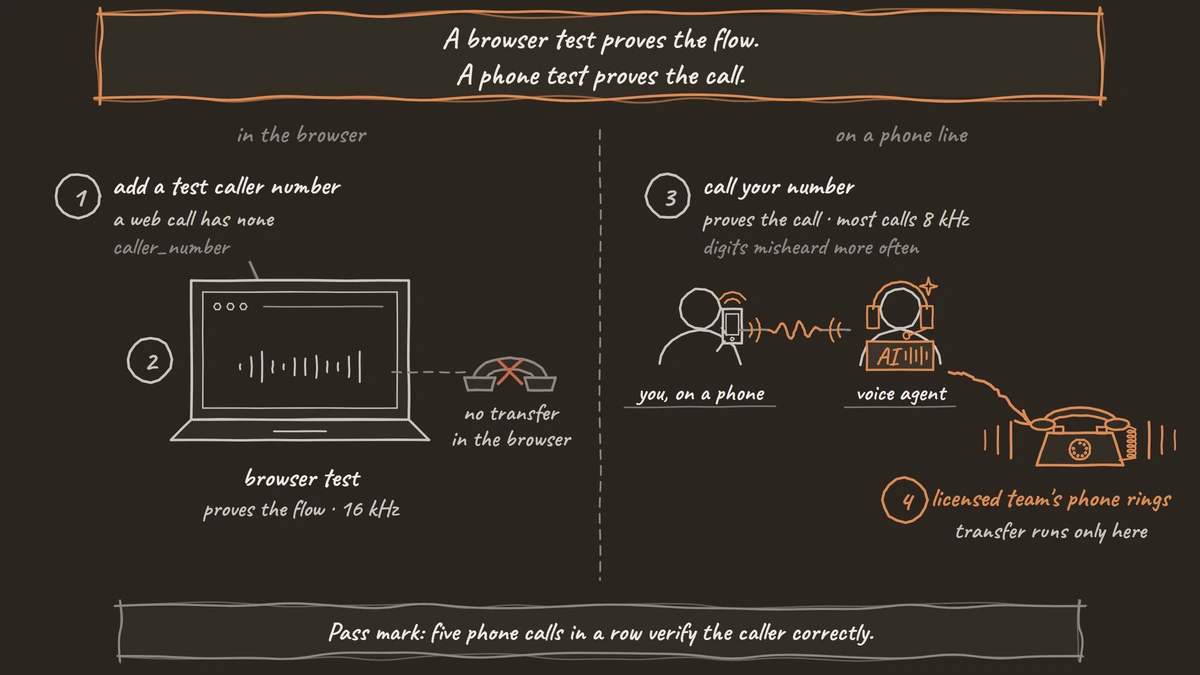
Run each leg several times, because AI replies vary. Read digits fast, give a date of birth in two formats and ask for advice in different words. Testing Voice Agents Before You Go Live gives the tests in order. Mask any real numbers in what you share, as in +1415555XXXX.
Check: five phone calls in a row verify the caller correctly, and every advice question reaches the licensed team.
Score live calls with QA, then launch
Add a QA Analysis node and set its Sample Rate (%) to 10, so a random tenth of calls is scored step by step (the default is 100). Read every call that ended in a transfer or a failed verification, and check that advice questions took the Licensed agent path. Recordings and transcripts keep whatever is said, which is why the check uses only the last four digits of the policy number.
Then publish, and start with one line, such as calls after the office closes. Outbound premium calls are a separate agent with their own consent rules, covered in AI voice agents for premium reminders.
Glossary
- Pre-Call Data Fetch
- A setting at the bottom of Dograh's Start Call node that posts the caller's number to your endpoint once the call connects and adds the reply to the call's variables. Here it returns only a match flag and a first name.
- Transition Speech
- Fixed text or a recorded clip that Dograh plays word for word as the call moves along a pathway. It carries the hand-off line to a licensed agent, where wording must be exact.
- Preset Parameter
- An HTTP API tool value Dograh fills from the call itself, such as workflow_run_id, rather than from the conversation. The agency system uses it to tie each request to its call.
- Organization default
- The model configuration every Dograh agent inherits unless it has its own override. A new organisation starts on Dograh's managed models, so to keep call audio away from Dograh, switch the Organization default to BYOK in Models.