
The best voice AI with CRM integration looks up the caller before the greeting, writes during and after the call, and keeps the CRM token where you choose. For teams that want any CRM by API on their own servers, Dograh is the open-source option, self-hosted or on Dograh Cloud. Retell AI and ElevenLabs Agents list the most native connectors.
Key Takeaways
- Retell AI syncs Salesforce, HubSpot, Dynamics 365, GoHighLevel and Zoho contacts both ways.
- Vapi's prebuilt list covers GoHighLevel, so Salesforce and HubSpot need its API or MCP tools.
- Dograh reaches any CRM with an API through HTTP API tools, MCP tools and webhooks.
A voice agent that cannot see the CRM asks callers for details your team already has. We set three tests first, compare eight platforms on them led by open-source Dograh, then talk about native connectors, the API route, Agentforce Voice for Salesforce teams and how to pick one.
Three tests for a CRM-connected voice agent
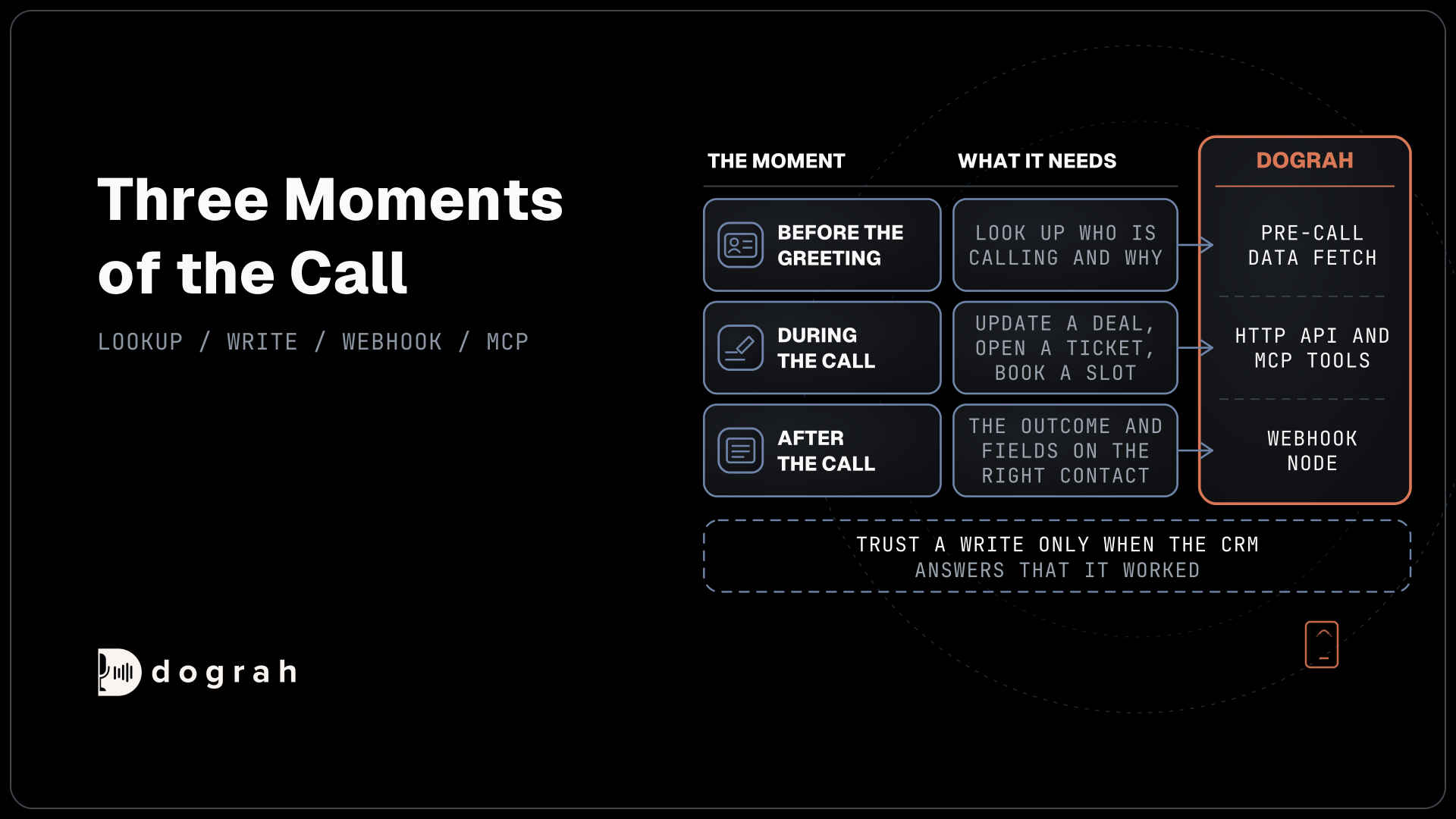
A CRM integration has to work at three moments of the call, and each platform handles them differently. The first is the lookup before the greeting, so the agent knows who is calling and why before it says hello. The second is the write during the call, such as updating a deal stage, opening a ticket or booking a slot. The third is the record after the call, with the outcome, the summary and the fields the agent collected landing on the right contact.
Then there is how the platform reaches the CRM. A native connector is a ready-made integration you switch on with a sign-in or a token. The generic route is an API tool, an MCP server or a webhook that you point at the CRM yourself. Native connectors are faster to switch on, while the generic route lets you choose every field and keep the CRM token wherever you want it.
One rule holds on every platform. Trust a write only when the CRM answers that it worked, and retry or flag it when the CRM sends back an error. A phone number also finds a record without proving who is calling, so the agent verifies the caller before it reads out anything personal.
CRM integration compared, platform by platform
The table lists what each vendor documents for CRMs today, with open-source Dograh first and Salesforce's own voice agent last. Dograh is the only open-source row, and the rest run as closed code on each vendor's cloud.
| Platform | Native CRM connectors | Generic route | Writes after the call | Code |
|---|---|---|---|---|
| Dograh | Your API or MCP server | HTTP API tools, MCP tools, Pre-Call Data Fetch, Webhook node | Webhook node payload with collected fields, QA results, recording and transcript links | Open source, BSD 2-Clause |
| Retell AI | Salesforce, HubSpot, Dynamics 365, GoHighLevel and Zoho contact sync. HubSpot, Salesforce and Zendesk agent tools | Custom functions | Post Call Extraction written to CRM fields, calls logged as activity | Closed |
| ElevenLabs Agents | Salesforce, HubSpot, Zendesk, ServiceNow, Freshdesk and Intercom | Tools and MCP servers | Post-call webhooks with evaluation results and extracted data | Closed |
| Synthflow | Salesforce app, HubSpot app, GoHighLevel subaccount sync | Inbound call webhook and post-call webhook | Post-call webhook for CRM updates | Closed |
| PolyAI | Salesforce, Zendesk, HubSpot and Dynamics 365 in Agent Studio | Any API or MCP server | Set up in each integration | Closed |
| Bland | Salesforce, Cal.com and Slack tools, HubSpot Marketplace app | Custom API tools for any HTTP endpoint | Through the HubSpot app or your own API | Closed |
| Vapi | GoHighLevel, Google Calendar, Google Sheets, Slack, Make and n8n | API Request, MCP and Function tools | Through your own tools or webhooks | Closed |
| Agentforce Voice | Built into Salesforce | Salesforce actions and flows | Salesforce records directly | Closed, Salesforce only |
Dograh: any CRM through your own API calls
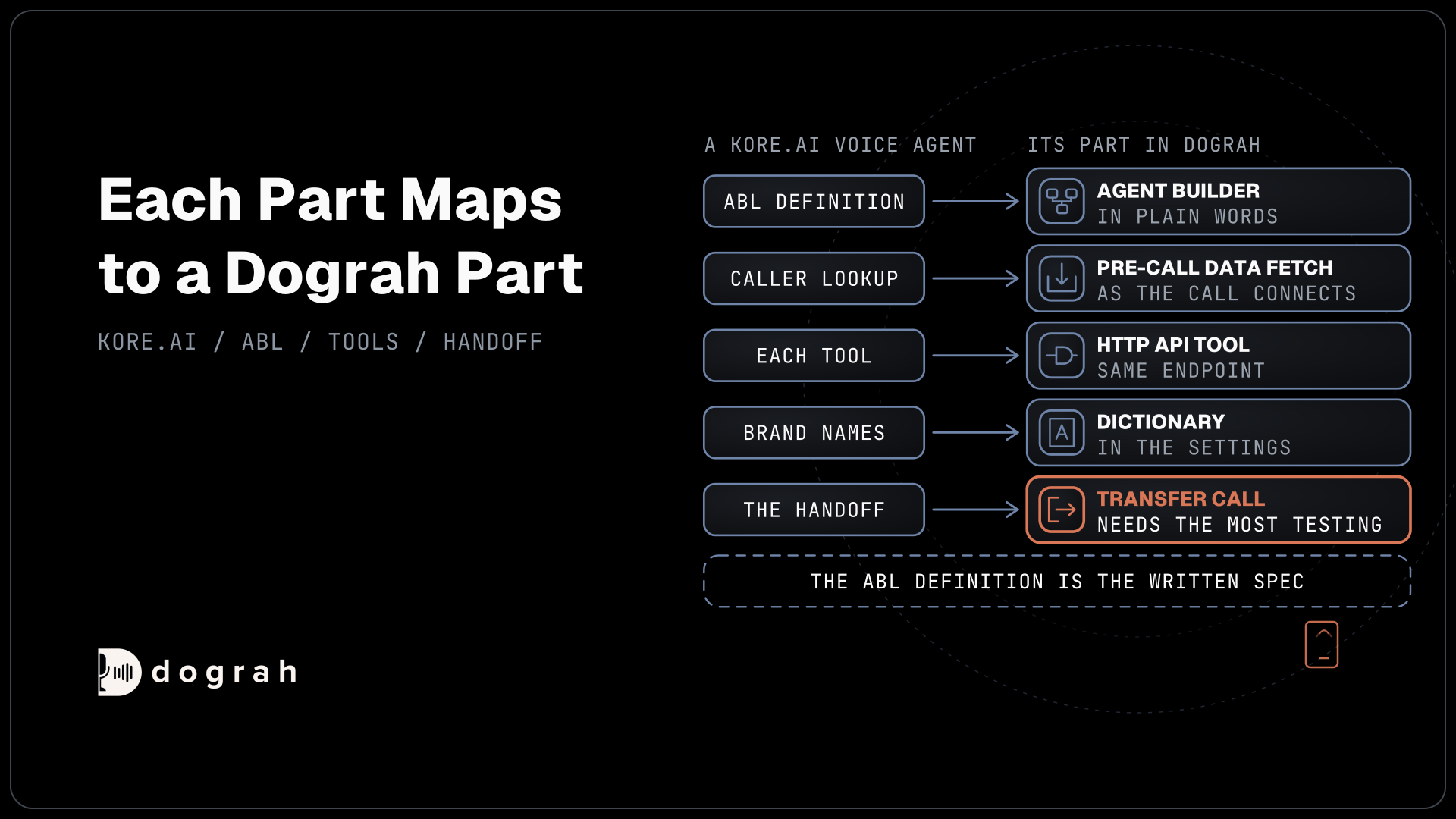
Dograh covers each of the three moments with a general tool that you point at your CRM's API. Before the greeting, Pre-Call Data Fetch sits at the bottom of the Start Call node, with modes for every call, inbound calls only or outbound calls only. It sends the caller's and the called number to your endpoint, and the greeting waits for the answer while the caller hears ringing, so the first line can use the contact's name and open case.
During the call, HTTP API tools read and write records, and the agent gets an error back if the CRM does not answer within the tool's five-second default. The MCP tool connects a CRM's own MCP server, and its tools become available to the agent. To stop a retried write from creating two records, add a preset parameter named workflow_run_id. That makes each request an idempotent write, which your CRM can recognize and skip when it repeats.
After the call, the Webhook node posts a payload you write yourself, with the fields the agent gathered, the QA results and links to the recording and transcript. It retries on timeouts and server errors, up to five attempts. The agent records each answer as the caller stated it, and the transcript stays the exact record. Our post on connecting a voice agent to your CRM walks through all four steps on HubSpot and Salesforce.
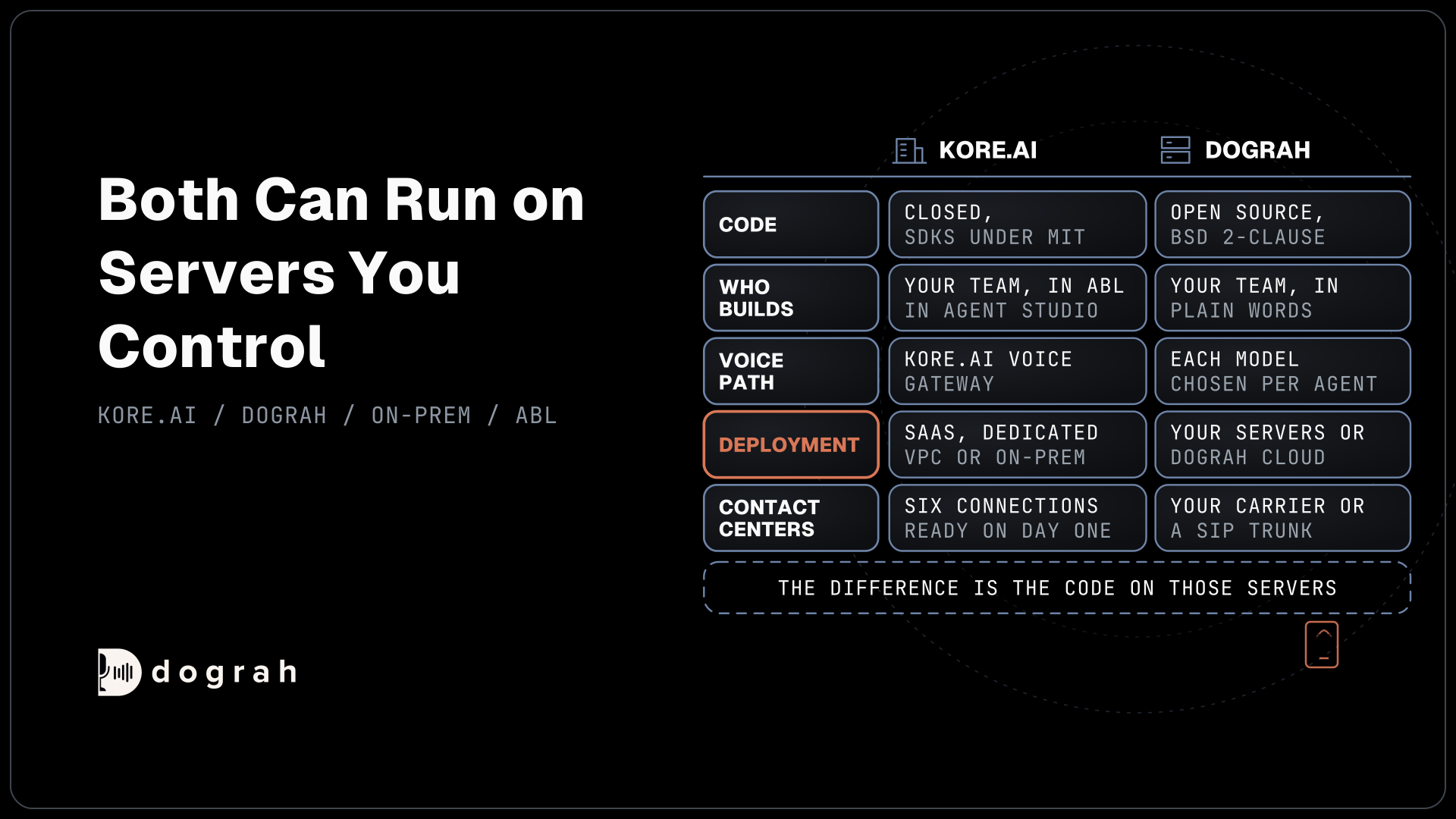
Where the token lives is part of the choice. Self-hosted, the CRM credential sits in the credential store on your own servers, next to the call data. Running Dograh yourself means no per-minute platform fee. You still pay for servers, model keys and phone minutes, and your team looks after the database and upgrades. Support comes from the open-source community, and Enterprise adds custom SLAs. If you would rather not host it, Dograh Cloud runs it for a 1 cent a minute platform fee.

Open Source Alternative to Vapi / Retell
Self-hosted voice agent platform — no per-minute fees
dograh-hq/dograh
Star on GitHub
Retell AI and ElevenLabs Agents: the longest lists
Retell AI has the widest native CRM sync of the hosted platforms. Retell's CRM integration syncs contacts both ways with Salesforce, HubSpot, Dynamics 365, GoHighLevel and Zoho, matched on the phone number. Synced fields reach the agent as variables before the first word, Post Call Extraction results write back to CRM fields, and each call logs to the contact, as Salesforce Tasks or HubSpot timeline entries. Separate agent tools look up and update HubSpot, Salesforce and Zendesk records during the call.
ElevenLabs Agents lists integration pages for Salesforce, HubSpot, Zendesk, ServiceNow, Freshdesk and Intercom, along with contact-center connections for Genesys, Five9 and Amazon Connect. Evaluation results and extracted data leave through post-call webhooks. Both run on the vendor's cloud, so the CRM token and the call data sit there too.
Synthflow, PolyAI and Bland: apps and integration cards
These three package CRM access as apps or cards inside their builders. Synthflow ships a Salesforce app and a HubSpot app that triggers calls from HubSpot contacts, plus GoHighLevel subaccount sync. Its inbound call webhook pushes outside data into a call before it starts, and a post-call webhook sends results out.
PolyAI's integrations page lists a Salesforce CRM card in Agent Studio, with Zendesk, HubSpot and Microsoft Dynamics 365 also available, and the platform takes any other API or MCP server. Bland offers built-in integration tools for Salesforce, Cal.com and Slack, a HubSpot app from the HubSpot Marketplace that reads and updates the CRM, and custom API tools for any HTTP endpoint.
Vapi: a short prebuilt list and open tools
Vapi keeps its prebuilt list short and leans on general tools. Vapi's integrations page covers Make, n8n, Google Calendar, Google Sheets, Slack and GoHighLevel. Salesforce, HubSpot and every other CRM go through its API Request, MCP or Function tools, which is the same route Dograh takes, on Vapi's cloud and closed code.
Agentforce Voice for teams that live in Salesforce
Salesforce now sells its own voice agent. Agentforce Voice is native to the Salesforce platform and uses the same subagents, actions and data as your other Agentforce agents, so there is no connector to set up at all. It is priced through Salesforce's consumption models, Flex Credits or per conversation. The trade is scope, since the agent works inside Salesforce, and a team with a second CRM or a helpdesk elsewhere still needs another route.
Join the Dograh Community
Dograh is an OSS alternative to Vapi. Join our Slack community for queries, releases, best practices & community interactions.
When a native connector wins
Native connectors save real time. If your team runs one mainstream CRM, has no developer free and wants contacts and call logs flowing this week, a ready-made sync on Retell AI or an app on Synthflow or Bland gets there faster than writing API calls. Field mapping screens also make it easy for an operations lead to change what gets written without touching code.
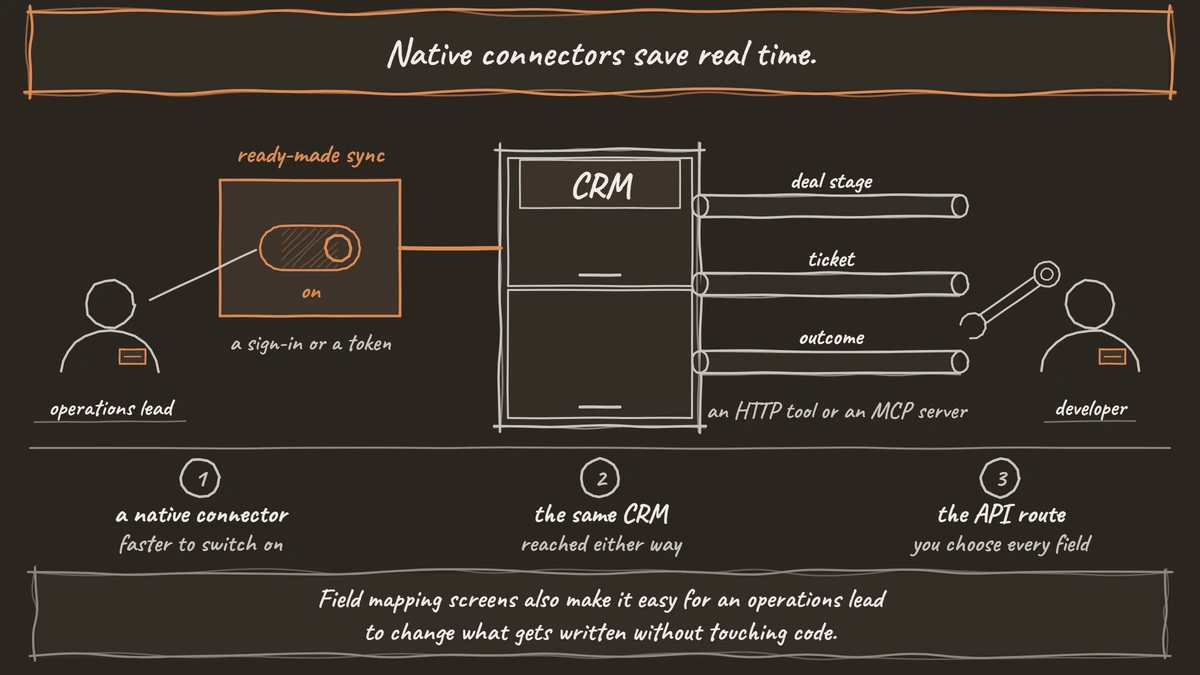
The API route pays off in other cases. If you run two CRMs, a custom object model or a CRM no vendor lists, an HTTP tool or an MCP server reaches it the same way. It also lets you keep the token on your own servers and decide exactly which fields the agent may read. Our guide to extracting call data into any CRM covers choosing those fields and checking the values.
Picking a voice agent for your CRM
Start with where your CRM data must stay. If the token and the call data have to sit on your own servers, or your CRM is not on any vendor's list, start with Dograh and its API, MCP and webhook route. If you want a hosted platform with a sync you switch on, Retell AI and ElevenLabs Agents have the longest lists, and Synthflow, PolyAI and Bland cover the big names. A Salesforce-only team can look at Agentforce Voice first.
Whichever you choose, test the lookup, one write and the post-call record on a real phone call before you switch a line over. The Salesforce sign-in step is often the slowest part, and our post on connecting a voice agent to Salesforce covers it. When the call also needs a person, our list of voice AI with human handoff compares how each platform transfers.
Glossary
- Native connector
- A ready-made integration a platform builds for one CRM, switched on with a sign-in or a token. It maps common fields for you, but only for the CRMs the vendor lists.
- Contact sync
- A connector that copies contacts between the CRM and the voice platform on a schedule, matched on a key such as the phone number. Retell's sync runs every five minutes.
- MCP server
- A server that publishes a system's actions as tools an AI agent can call, using the Model Context Protocol. Many CRMs now offer one for reading and updating records.
- Idempotent write
- A write the CRM can receive twice without creating two records, usually because each request carries a unique ID. It makes retries safe after a timeout.