
To connect a voice agent to Salesforce, create an External Client App with the client credentials flow, run it as an integration user and let a small endpoint of yours fetch the tokens. Dograh, the open-source AI voice agent platform, sends every Salesforce request through that endpoint, and you can self-host it or run it on Dograh Cloud.
Key Takeaways
- New Salesforce integrations start as External Client Apps, since connected apps are restricted.
- The client secret lives in your endpoint, never in a Dograh credential.
- Log each call as a Task, with TaskSubtype set when it is created.
This post is part of our guide to how to build an AI voice agent, which gives the agent the caller's data before it speaks. Here we build that for Salesforce in Dograh, step by step, with the auth step first, then the phone lookup and the call log.
What you need before you start
You need an agent that works in a browser test call, admin rights in a Salesforce Enterprise, Unlimited or Performance Edition org, and a server where a small endpoint of yours can run over HTTPS. Salesforce's server-to-server flow issues short-lived tokens and no refresh token, while every Dograh credential (API Key, Bearer Token, Basic Auth or Custom Header) is a fixed value. So the endpoint holds the Salesforce secret, and Dograh only ever sends it a fixed key of yours.
Our guide to connecting a voice agent to your CRM explains this pattern in general, and this post fills in the Salesforce side. A layer in the middle can sound like a project, but the endpoint below fits in one short Python file.
Check: your endpoint answers over HTTPS at an address your Dograh install can reach.
Step 1: Create the External Client App and its user
Start in Salesforce, since nothing works until it trusts your endpoint. Creating new connected apps is restricted since Spring '26, and Salesforce recommends External Client Apps instead. Connected apps you already have keep working.
Create an External Client App, enable OAuth and turn on the client credentials flow in its OAuth policies. Then set the run-as user. Every action through this flow runs as that user, so make it a dedicated integration user and never a person's own login. Enterprise, Unlimited and Performance Edition orgs include five Salesforce Integration user licenses, and the integration user takes the "Minimum Access - API Only Integrations" profile.
Give that user a permission set that can read Contacts and Leads and create Tasks, and nothing more. Copy the app's consumer key and secret into your endpoint's environment variables, where only your server can read them.
Check: the app shows the client credentials flow switched on, with your integration user as the run-as user.
Step 2: Fetch Salesforce tokens in your endpoint
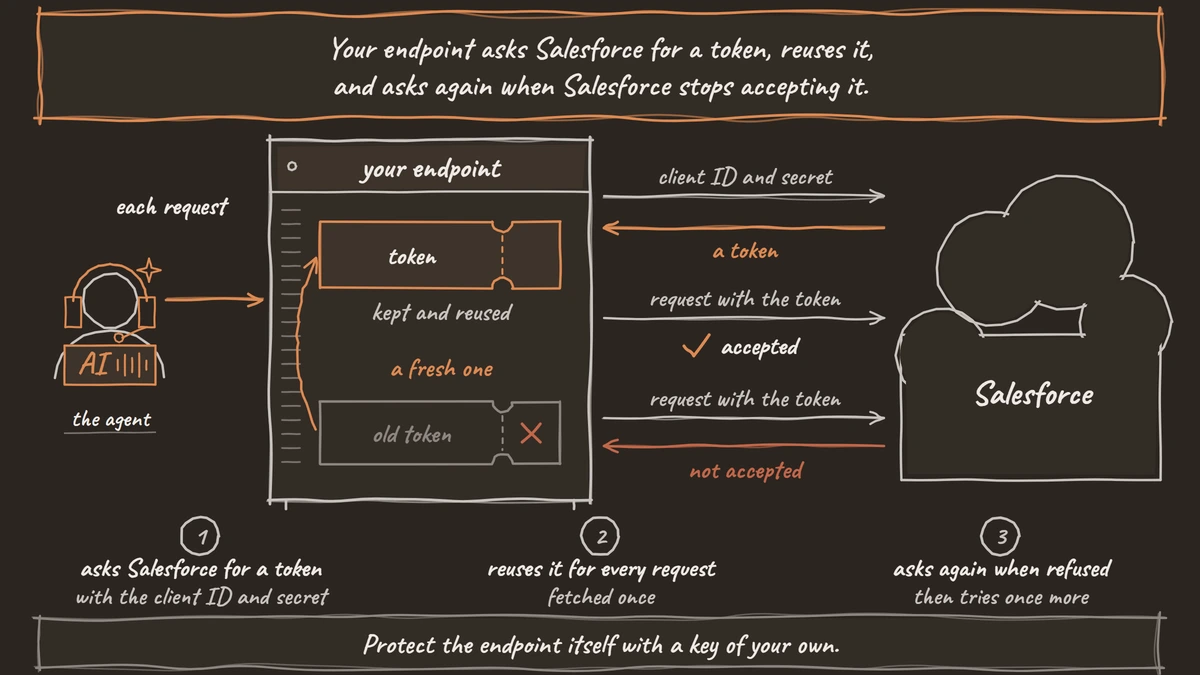
Your endpoint asks Salesforce for a token, reuses it, and asks again when Salesforce stops accepting it. The client credentials flow has no refresh token, so asking again with the client ID and secret is the whole renewal. This Python code, using httpx, does it with your org's My Domain in SF_DOMAIN and wraps every later request in sf_request:
import httpx, os

SF = f"https://{os.environ['SF_DOMAIN']}.my.salesforce.com"
_token = {"value": None}

async def sf_token(force: bool = False) -> str:
    if _token["value"] and not force:
        return _token["value"]
    async with httpx.AsyncClient(timeout=5) as client:
        reply = await client.post(f"{SF}/services/oauth2/token", data={
            "grant_type": "client_credentials",
            "client_id": os.environ["SF_CLIENT_ID"],
            "client_secret": os.environ["SF_CLIENT_SECRET"],
        })
    reply.raise_for_status()
    _token["value"] = reply.json()["access_token"]
    return _token["value"]

async def sf_request(method: str, path: str, **kwargs) -> httpx.Response:
    for attempt in (0, 1):
        token = await sf_token(force=attempt == 1)
        async with httpx.AsyncClient(timeout=5) as client:
            reply = await client.request(method, f"{SF}/services/data/v68.0{path}",
                                         headers={"Authorization": f"Bearer {token}"}, **kwargs)
        if reply.status_code != 401:
            break
    return reply
What this does: It fetches a token once and reuses it for every request. When Salesforce answers
401, it fetches a fresh token and tries once more, so no later step has to think about expiry.
Protect the endpoint itself with a key of your own. In Dograh, open Credentials, click Add Credential and choose API Key, with a Header Name such as X-Bridge-Key and a long random value. The endpoint checks that header before doing anything, and on a self-hosted install the client secret and every Salesforce request stay inside your network.
Check: two calls to sf_token() in a row return the same token, and the second makes no request to Salesforce.
Step 3: Look up the caller before the greeting
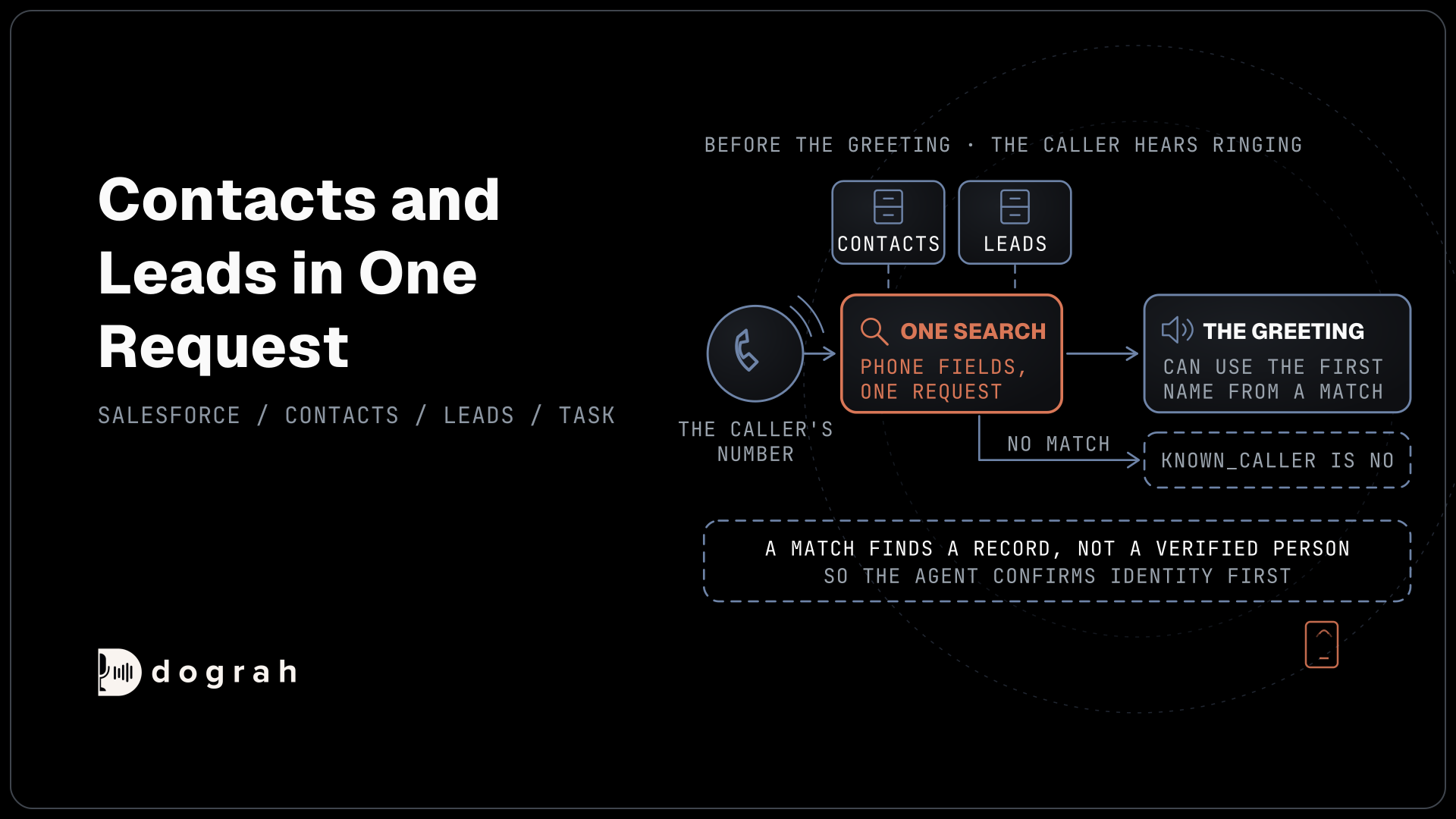
Set Pre-Call Data Fetch, at the bottom of the Start Call node, to Inbound calls only. Point it at your endpoint and pick the API Key credential. Dograh POSTs the caller's number in call_inbound.from_number, waits up to 10 seconds, and turns whatever comes back under initial_context into variables. Salesforce keeps phone numbers as people typed them, so search the phone fields instead of matching one exact string. The handler below uses parameterizedSearch with in=PHONE to look through Contacts and Leads in one request:
from fastapi import FastAPI, Header, HTTPException, Request

app = FastAPI()

@app.post("/dograh/pre-call")
async def pre_call(request: Request, x_bridge_key: str = Header(...)):
    if x_bridge_key != os.environ["BRIDGE_KEY"]:
        raise HTTPException(401)
    body = await request.json()
    caller = body["call_inbound"]["from_number"]  # e.g. +1415555XXXX
    reply = await sf_request("GET", "/parameterizedSearch/", params=[
        ("q", caller[-10:]), ("in", "PHONE"),
        ("sobject", "Contact"), ("sobject", "Lead"),
        ("Contact.fields", "Id,FirstName"), ("Lead.fields", "Id,FirstName"),
    ])
    records = reply.json().get("searchRecords", []) if reply.is_success else []
    if not records:
        return {"initial_context": {"known_caller": "no"}}
    match = records[0]
    return {"initial_context": {
        "known_caller": "yes",
        "sf_record_id": match["Id"],
        "first_name": match.get("FirstName") or "",
    }}
What this does: It checks your key, searches Contact and Lead phone fields for the last 10 digits of a US number and returns the first match's ID and first name. The greeting can use
{{first_name}}, and{{initial_context.sf_record_id}}waits for the call log in Step 4.
The greeting waits for this lookup while the caller hears ringing, so keep it quick. A matching number finds a record, not a verified person, so the agent confirms identity with an approved check, such as date of birth, before it mentions anything from Salesforce. Outbound calls can skip the search by carrying the Salesforce ID in the campaign CSV or the API Trigger's initial_context. The same endpoint can also serve mid-call HTTP API tools, such as updating a Lead's status.
Check: a test call from a number stored on a Contact opens with that contact's first name.

Open Source Alternative to Vapi / Retell
Self-hosted voice agent platform — no per-minute fees
dograh-hq/dograh
Star on GitHub
Step 4: Log each call as a Salesforce Task
When the call ends, a Webhook node posts the result to your endpoint, which files a Task on the matched Contact or Lead. Pick the API Key credential under the node's Authentication. In its Payload Template, send the record from Step 3 in record_id, the call's length in duration_s and the outcome code in outcome:
{
  "run_id": "{{workflow_run_id}}",
  "record_id": "{{initial_context.sf_record_id}}",
  "direction": "{{initial_context.direction}}",
  "duration_s": "{{cost_info.call_duration_seconds}}",
  "outcome": "{{gathered_context.call_disposition}}",
  "transcript_url": "{{transcript_url}}"
}
What this does: Once the call is over, it sends your endpoint everything the Task needs, from the record and direction to the length, the outcome and the transcript link.
The endpoint turns that into Task fields from Salesforce's object reference. TaskSubtype has to be Call when the Task is created, because Salesforce does not let you change it afterwards. WhoId takes a Contact or Lead ID, and CallDurationInSeconds takes Dograh's seconds as they are:
{
  "Subject": "Voice agent call",
  "Status": "Completed",
  "TaskSubtype": "Call",
  "CallType": "Outbound",
  "CallDurationInSeconds": 184,
  "CallDisposition": "callback_requested",
  "WhoId": "003XXXXXXXXXXXXXXX",
  "Description": "Transcript: <transcript_url from the webhook>"
}
What this does: Posted to
/sobjects/Task/throughsf_request, it files a finished call activity on that person's record. The direction is capitalized the way Salesforce lists it, and the outcome code goes in as free text.
Treat Salesforce's success reply as the proof that the Task exists. If Salesforce returns an error, return one from your endpoint too, and the Webhook node retries temporary failures up to 5 attempts. Keep the run_id of every Task you have filed so a retry never files a second one. The outcome codes come from the disposition list you write in Dograh, which our post on extracting call data into your CRM walks through.
Check: a finished test call appears once on the right Contact's activity timeline, as a call with its length.
Join the Dograh Community
Dograh is an OSS alternative to Vapi. Join our Slack community for queries, releases, best practices & community interactions.
Testing it and choosing where it runs
Place a test call from a real phone and open its View Trace, where the pre-call request and the webhook show what was sent and what your endpoint answered. Call once from an unknown number too, and make sure the agent still greets well when known_caller is no.
Running Dograh yourself puts the agent, the endpoint and the client secret on servers you control, and caller data then moves only between those servers and Salesforce. A self-hosted install carries no per-minute platform fee from Dograh, but you still pay for the servers, the model keys and the phone minutes. Dograh Cloud bills a 1¢-a-minute platform fee. In return for that control, the server, the database and the upgrades are your team's to run, with support from the community Slack on the open-source plan and custom SLAs on Enterprise.
Get the token step and the Task log working first. The lookup and any mid-call writes then sit on an endpoint you have already watched run for a week.
Glossary
- External Client App
- The Salesforce app type for new API integrations, recommended since creating new connected apps was restricted in Spring '26. It holds the OAuth settings, including the client credentials flow.
- Client credentials flow
- A server-to-server OAuth flow where your app swaps its client ID and secret for an access token. It gives no refresh token, so the app simply asks for a new token when the old one stops working.
- Run-as user
- The Salesforce user every client credentials request acts as. Its permission set decides what the voice agent's endpoint can read and write, so it should be a dedicated integration user.
- TaskSubtype
- The Task field that marks an activity as a call, email or plain task. It can only be set when the Task is created, so a call log must send Call on the first request.