
To make an AI voice sound human on a phone call, play real recordings for the lines every call repeats and clone that same speaker for everything else. Then keep replies short and let callers cut in. Dograh, the open-source AI voice agent platform, runs this mix, and you can self-host it or run it on Dograh Cloud.
Key Takeaways
- Listeners judged voice clones human on 58% of trials, generic AI voices 41%.
- Record the lines every call repeats. A clone of that speaker says the rest.
- Slow, long replies give an AI away faster than the voice does.
This post is part of our guide to Running Voice AI on Local, Self-Hosted Models, where the stack section covers voices you can clone. Here we set up each lever in order, from recordings and a cloned voice to pace, short replies and turn-taking, in Dograh.
What you need before you start
You need one speaker and a voice engine that can clone them. The speaker records your fixed lines and gives a cloning sample, with written consent, which our post on voice cloning for pre-recorded and TTS playback covers in full along with telling callers they are talking to AI. The engine can be a hosted provider that clones, such as Cartesia or ElevenLabs, or an open model on your own servers. Chatterbox is MIT-licensed and clones, while Magpie TTS ships fixed voices and cannot.
Dograh runs the call flow, tools and telephony, while the speech and language models are a separate layer you pick. With open models on your own servers, a fully local setup keeps the recordings and the calls on your hardware.
A self-hosted Dograh install has no per-minute platform fee, while servers, model keys and phone minutes still cost money. On Dograh Cloud, a 1¢-a-minute platform fee applies. Running it yourself also means the server, the database and the upgrades are your team's job, with help from the community on Slack and GitHub and custom SLAs on Enterprise.
Step 1: Record the lines every call repeats
Start with recordings, because a real human clip is the most human thing an agent can say. Pairing real clips for the fixed lines with a cloned voice of the same speaker takes delay and cost out of each call, and the caller still hears one person. A clip plays from storage, so no voice synthesis sits in that turn, and the text to speech bill only covers the lines nothing in the library says. Our post on cutting voice AI costs with pre-recorded audio and TTS works out how much of a script is worth recording.
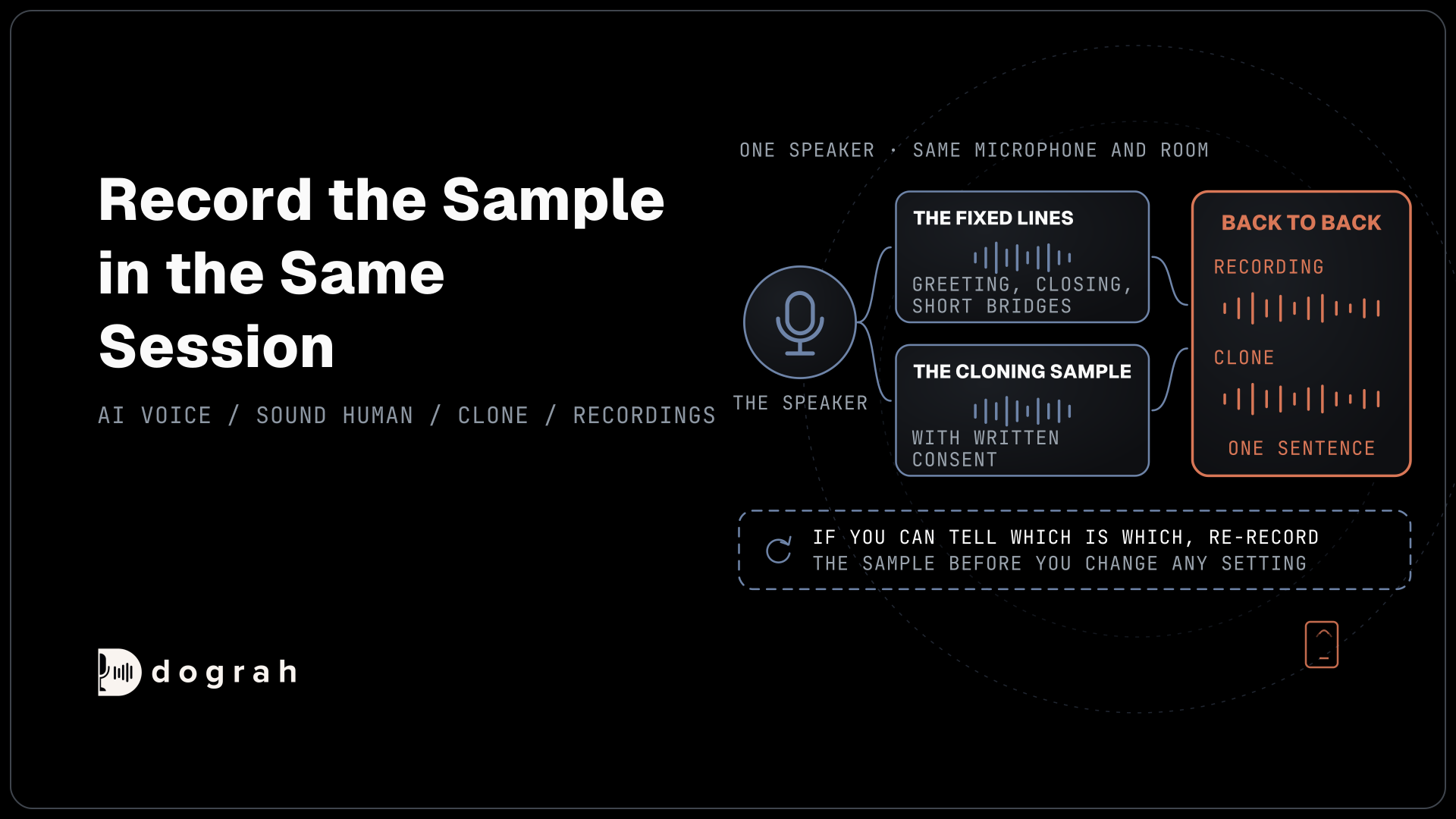
Record the greeting, the closing, short bridges such as "Let me check that for you" and the confirmations you hear on every call. Open Recordings in the sidebar and click Upload Recording, then upload a file of up to 5 MB or record in the browser. Dograh transcribes each one, and you can correct the text and name it.
Then put the clips where they play, as the pre-recorded audio guide shows. Set the Start Call node's Greeting Type to Pre-recorded Audio for the opening line. Inside a node's prompt, type "@" to insert a recording. When a recording fits the moment, the agent plays it, and when nothing fits, the line goes to text to speech in the cloned voice.
Check: play a test call and listen for the greeting and one bridge line. Both should be the recordings, word for word.
Step 2: Clone the same speaker for the rest
The generated lines should come from the same person who recorded the clips. A 2025 study in PLOS One found listeners judged clones of real speakers as human on 58% of trials on average, against 41% for generic AI voices. Real voices were judged human only 62% to 72% of the time, so a good clone of a real speaker sits close to the real thing.
Record the cloning sample in the same session as the fixed lines, with the same microphone and room. A sample from another day drifts from the recordings in small ways a caller can hear when the agent switches from a clip to the clone.
Once the provider gives you a voice ID, open the agent's Model tab, then TTS, and pick the provider you cloned with. In the Voice field, choose Enter Custom Value and paste the ID, as the voice settings describe. For a clone on your own servers, point the same tab at your locally hosted voice model.
Check: play one sentence from the recordings and the same sentence from the clone back to back. If you can tell which is which, re-record the sample before you change any setting.

Open Source Alternative to Vapi / Retell
Self-hosted voice agent platform — no per-minute fees
dograh-hq/dograh
Star on GitHub
Step 3: Set the pace for each provider
Pace comes after the voice, because a matched voice at the wrong speed still sounds read aloud. Speed lives in the same TTS settings, and the range depends on the provider. Dograh's own voices run from 0.5 to 2.0 with 1.0 as normal. Cartesia takes 0.6 to 1.5, and ElevenLabs voices take a speed value where 1.0 is the default and lower numbers slow the speech.
Cloned voices need a lighter touch. Cartesia's speed control does not apply to its Professional Voice Clones, which take their pacing from the source recordings, so the way to change their pace is a new sample. For the rest, move in steps of 0.05 or 0.1 and listen on a call after each change. Punctuation matters as much as the number, because providers pause at commas and periods in the text the agent writes.
Check: the clone's pace matches the recorded clips on the same call, and a long reply never sounds rushed.
Step 4: Keep replies short and let callers cut in
On a live call, timing gives an AI away faster than the voice does. Long answers break the feeling of a person on the line, and so does an agent that talks over the caller. The end-to-end reply should land within about 800 milliseconds, and speech-to-text is usually the slowest part, so keep the models close to each other.
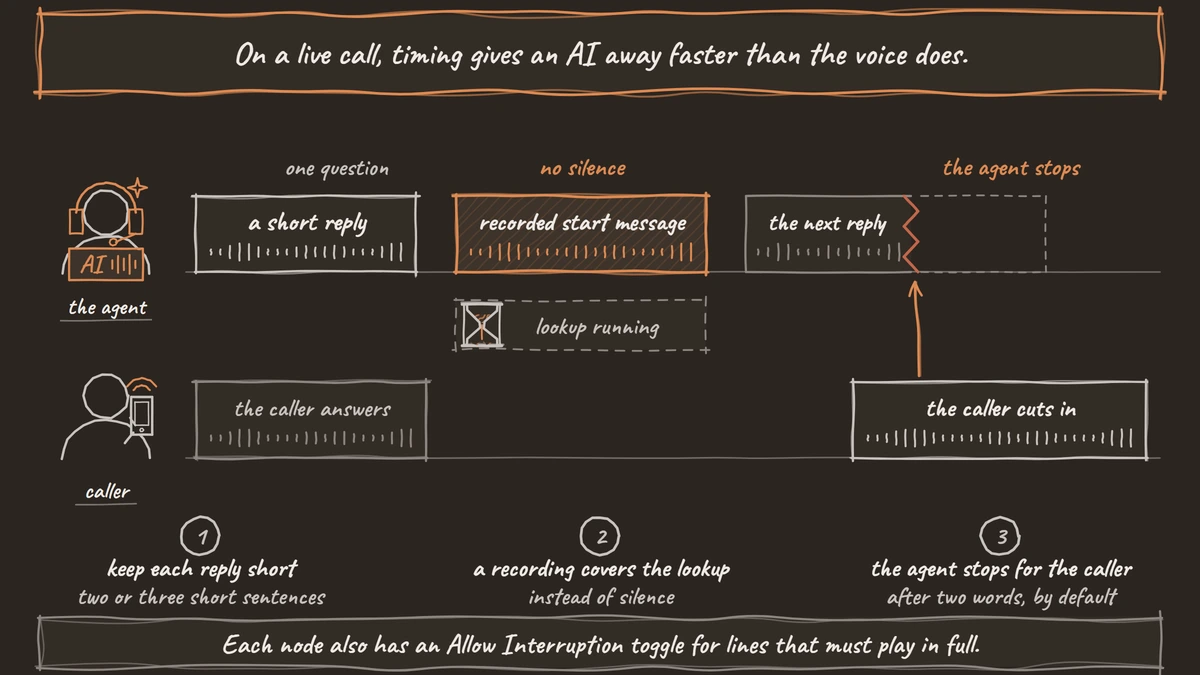
Keep each reply to two or three short sentences with one question at a time. Dograh's blank-canvas starter prompt already says so, and our post on keeping LLM answers short enough for the phone shows how to test that each model keeps the rule.
Cover slow lookups with tool messages. On an HTTP API tool, a start message plays while the request runs, and delayed updates play after a set time if it is still running. Use a recording of the same speaker for these lines. Text lines do not play on speech-to-speech models, so a recording is the one that works on every model.
Then tune turn-taking in the agent's Settings. Under Turn Detection, Detection Strategy is Transcription-based by default, with Smart Turn Analyzer as the other choice. Under Interruption, the default Interruption Strategy waits for a minimum of two transcribed words before the caller can cut in, so a cough does not stop the agent. Each node also has an Allow Interruption toggle for lines that must play in full. Our post on VAD vs turn detection explains which setting decides what.
Check: on a test call, interrupt the agent mid-sentence and it stops, and a lookup that takes a few seconds plays its start message instead of silence.
Join the Dograh Community
Dograh is an OSS alternative to Vapi. Join our Slack community for queries, releases, best practices & community interactions.
Before you ship it
Test over a real phone line before anyone else hears the agent. Most phone calls still reach the agent as 8 kHz audio, while a browser demo runs at 16 kHz, the rate behind wideband audio, so a voice that sounds warm in the dashboard can sound flat on a phone.
Add background sound with care, if at all. Settings has Use Ambient Noise with a Volume and a Custom Audio File, and a low office hum can make silence feel less empty. Too loud, and callers strain to hear the agent over it. Before launch, confirm:
- The greeting and bridge lines play as recordings.
- The clone and the recordings sound like one speaker on a real phone.
- Replies stay at two or three sentences, and slow tools play a start message.
- Interrupting the agent stops it, and coughs do not.
Glossary
- Pre-recorded audio
- A real human recording of a line the agent says on many calls, such as the greeting. Dograh plays it instead of synthesizing the line, so no voice synthesis sits in that turn.
- Voice clone
- A synthetic voice made from a sample of one real speaker. Using a clone of the person who recorded the clips keeps the whole call in one voice.
- Interruption Strategy
- The Dograh setting that decides when a caller's speech stops the agent. The default waits for two transcribed words, and Voice activity reacts to any detected speech.
- Tool messages
- Lines an HTTP API tool plays while its request runs, a start message and optional delayed updates, in text or as a recording. They cover the silence of a slow lookup.