
Set calling hours from the strictest rule, 8 a.m. to 9 p.m. in the contact's local time, in weekday slots with one time zone per campaign. Then pick retries and a delay that fit those slots. Dograh, the open-source AI voice agent platform, holds both as campaign settings, and you can self-host it or run it on Dograh Cloud.
Key Takeaways
- A retry due after the window closes waits for the next time slot.
- Automatic retries cover busy and unanswered calls. Voicemail contacts go to Redial Campaign.
- Florida allows three sales calls a person in 24 hours, retries included.
Calling hours and retries are set in separate fields, yet each changes what the other does. Here we set both up step by step in Dograh, from the legal window to the slots, the retry numbers, how retries meet the window and the redial for voicemail contacts.
What you need before you start
You need a published agent and a contact list you have the right to call before any of these settings matter. Our outbound voice campaigns guide walks through the whole campaign form, so this post stays on the two parts teams most often get wrong, the schedule and the retries.
You also need a written retry policy. How many tries to make and when to stop are business choices, and in our experience they change from one use case to the next. The system has to tell a result worth retrying, such as a busy line, from a final one, such as a wrong number or an opt-out. It then has to hold to your limits and keep a record of every attempt.
Where the campaign runs is the other early choice. The campaign code is open source, so you can read exactly how the window and the retries behave, and run it on your own servers next to your own carrier. Self-hosted Dograh has no per-minute platform fee, though servers, model keys and phone minutes still cost money. Dograh Cloud charges a 1¢-a-minute platform fee.
Self-hosting means the server, the database and the upgrades are yours to run. Help on the open-source version comes from the community on Slack and GitHub, and Enterprise plans add custom SLAs. A self-hosted install and the Cloud pay-as-you-go plan both run 10 calls at once to start, which decides how quickly a slot works through a list.
Step 1: Set the window from the strictest rule
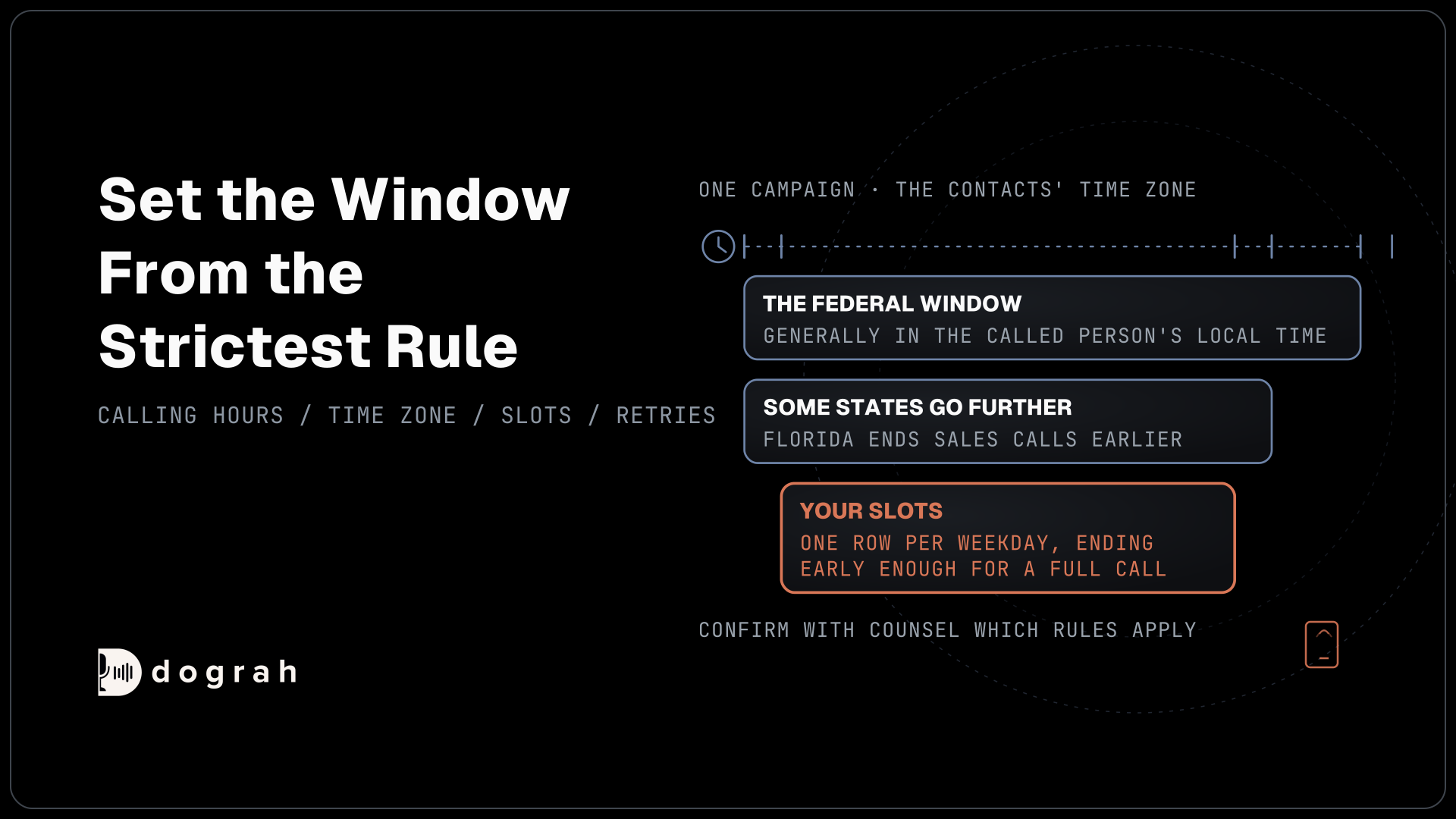
Start from the law, because every slot you enter later only follows the window you choose here. In the US, the Federal Communications Commission's rules under the Telephone Consumer Protection Act (TCPA) bar telephone solicitations to a residence before 8 a.m. or after 9 p.m., local time where the called person is. The Federal Trade Commission's Telemarketing Sales Rule sets the same 8 a.m. to 9 p.m. window for calls made without the person's prior consent.
Some states go further. Florida's telephone solicitation law ends sales calls at 8 p.m. in the called person's time zone. It also allows no more than three sales calls to one person in 24 hours on the same subject, whichever numbers they come from. A Florida list therefore needs an earlier end time and a retry count that keeps the total at three. Which rules cover a list depends on the call and on who you are calling, so confirm with counsel before the first campaign starts.
Debt collectors keep a separate count. Regulation F presumes a collector complies when it calls about one debt no more than seven times in seven days, and not within seven days of a phone conversation about it. Our post on AI payment reminder calls for collection agencies shows how to count those calls.
Check: each list has one written window inside 8 a.m. to 9 p.m. local time, ending at 8 p.m. for Florida contacts, and counsel has confirmed which rules apply.
Step 2: Enter the slots in one time zone
A campaign checks its calling hours in one time zone, so the window from Step 1 has to be entered in the zone where the people on the list live. Open Campaigns, click Create Campaign, then open Advanced Settings and switch on Call Schedule. The Timezone starts at your browser's zone, which is wrong for any list in another region, so set it to the contacts' zone. A national list becomes one campaign per time zone.
Next, use Add Time Slot to add one row per weekday you call, each with a start and end time on a 24-hour clock. A campaign can hold up to 50 slots. The end time is exclusive, so a slot from 09:00 to 20:00 starts its last call before 20:00. A slot cannot run past midnight, so a window that would cross it needs two slots, one on each side.
The schedule has a few edge cases worth knowing. Before each batch of calls, the campaign compares the time in its zone with the slots and starts calls only inside one. With Call Schedule off, or switched on with no slots, the campaign dials at any hour, and a time zone the server cannot read has the same effect. Calls already running when a slot ends are not cut off, so end the last slot early enough for a full call to finish before the legal limit.
Check: Call Schedule is on, the Timezone matches the list, every weekday you call has a slot, and the last slot ends early enough for a whole call to finish inside the window.

Open Source Alternative to Vapi / Retell
Self-hosted voice agent platform — no per-minute fees
dograh-hq/dograh
Star on GitHub
Step 3: Turn the retry policy into numbers
Retries sit under Enable Retries, and each field takes a number from your written policy. Max Retries runs from 0 to 10 and counts the tries after the first call, so 2 means up to three calls in all. Retry Delay (seconds) runs from 30 to 3,600, which makes one hour the longest gap, and the same delay applies to every retry with no growing back-off. Under Retry On, the Busy Signal and No Answer switches decide which of those two results earn another try.
Check the defaults before you trust them. The first campaign an organization creates in the form starts with Max Retries at 1, a 120-second delay and both Busy Signal and No Answer on. Every later form copies the settings of your last campaign, so the numbers from a quick test can carry over into a real one. A campaign created through the API with no retry settings gets 2 retries.
Only calls that never reached a person are retried, and a contact who answered gets one call per campaign. That still leaves room for a second try to matter. In Hiya's 2026 State of the Call survey of more than 12,000 consumers in six countries, 41% said they let an unknown call ring to see whether the caller leaves a voicemail. Some of the people who miss the first call are screening it, and a later try can reach them.
Retries live inside one campaign, and there is no cap per contact across campaigns. If one person can sit on two lists, or you run a redial later, the count that Florida or Regulation F cares about has to be kept on your own list. The simplest guard is a Max Retries low enough that one campaign plus one redial stays under the limit.
Check: Max Retries and Retry Delay match the written policy, Busy Signal and No Answer are set as the policy says, and the total tries per person across campaigns stay under the strictest rule.
Step 4: Check how retries meet the window
A retry always waits for the calling window. When a call ends busy or unanswered, the retry falls due one Retry Delay later, and the campaign starts it only once that time has passed and a slot is open. A retry that falls due after the last slot of the day waits for the next slot, which can be the following morning or after a weekend.
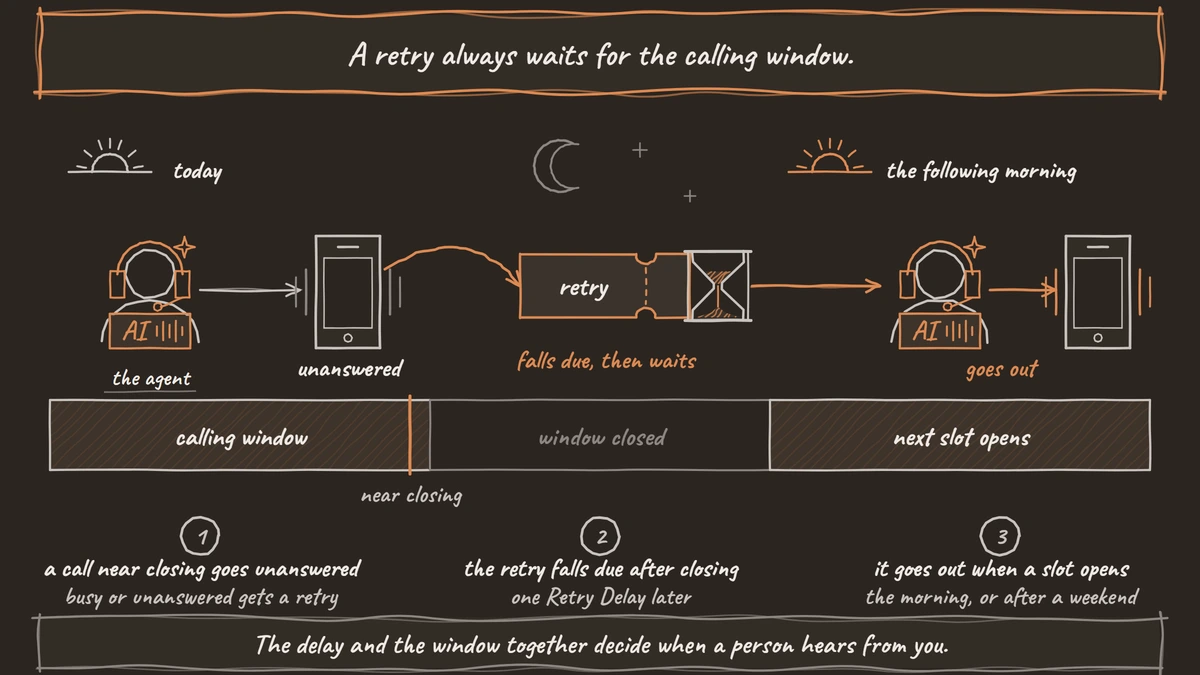
Here is an example, worked through line by line. A campaign calls from 09:00 to 20:00 in its time zone, with Max Retries at 2 and Retry Delay at 3,600 seconds.
- The first call goes out at 19:30 and nobody answers.
- The first retry falls due at 20:30, after the slot has closed, so it waits.
- It goes out when the next slot opens, at 09:00 the following day.
- If that call is unanswered too, the second retry goes out at about 10:00.
The delay and the window together decide when a person hears from you. In the example, all three calls land inside about 15 hours. With Max Retries at 2, one contact can get three calls inside 24 hours, which is the whole of Florida's allowance for that subject, so a redial on the same day would push past it.
Short delays behave differently. A 120-second delay tries a busy line again almost at once, which helps when the line was busy for a moment and does little for someone away from the phone. Because the delay tops out at one hour, the way to spread tries across days is the window itself or a redial campaign.
Check: for a call at the start of your first slot and one near the end of your last slot, you can say when each retry goes out, and the calls per contact in any 24 hours fit the strictest rule.
Join the Dograh Community
Dograh is an OSS alternative to Vapi. Join our Slack community for queries, releases, best practices & community interactions.
Step 5: Reach voicemail contacts with Redial Campaign
Automatic retries cover busy and unanswered calls, and contacts whose call reached voicemail get their next try through Redial Campaign once the campaign completes. On a completed campaign, click Redial Campaign. The dialog asks for a Name and, under "Redial when last call was", which results to include, with Voicemail, No Answer and Busy all ticked at first.
Click Create Redial Campaign, and Dograh builds a new campaign from the contacts whose last call matched. It keeps the parent's time zone and slots, its concurrency, circuit breaker, traffic split and retry settings. The new campaign waits for you to start it, so check the list and the slots first. Each campaign can be redialed once.
Settle voicemail messages at the same time. Voicemail handling is off by default on the agent, and once it is on, "When voicemail is detected" starts at Disconnect the call. If you set it to Leave a message, a redial can leave a second message for the same person, so decide how many messages each contact should get. Our outbound caller ID checklist covers the other check an older list needs before a redial, whether a number has changed hands since the person agreed to calls.
Check: the redial campaign holds only the results you ticked, runs in the same time zone and slots, and no contact gets more voicemail messages than you intended.
Before you ship it
Run one campaign against your own number first, shown here as +1415555XXXX, and leave it unanswered on purpose. The retry should appear one delay later. If you end a slot a few minutes after that first call, you can watch the retry wait for the next day instead of going out at night.
Each attempt is recorded as its own run, so the campaign's report shows how many times each person was called. Read that count after the first day, because a retry policy only holds if the numbers agree with it. Before the real list goes out, confirm:
- One campaign per time zone, with Call Schedule on and slots inside the strictest window.
- Max Retries and Retry Delay copied from the written policy, not from the last campaign.
- Calls per person in any 24 hours within Florida's three wherever it applies.
- Voicemail contacts left to Redial Campaign, with a set number of messages each.
Glossary
- Calling window
- The hours a campaign may start calls. For US sales calls the outer limit is 8 a.m. to 9 p.m. in the called person's local time, and Florida ends it at 8 p.m.
- Time slot
- One row in a Dograh campaign's Call Schedule, with a weekday, a start time and an exclusive end time in the campaign's single time zone. A slot cannot run past midnight.
- Retry delay
- The wait before a busy or unanswered contact is called again. In Dograh it is one fixed value per campaign, from 30 seconds to an hour, and a retry that falls due outside the slots waits for the next one.
- Redial campaign
- A new campaign built from a completed one, holding the contacts whose last call ended in voicemail, no answer or busy. It keeps the parent's schedule and settings, and each campaign can be redialed once.