
An outbound voice campaign needs a consented, scrubbed list, calling hours in each contact's local time, a pace your numbers can carry, a retry rule, a voicemail choice and a stop for failing calls. In Dograh, the open-source AI voice agent platform we build, most are campaign settings, and you can self-host it or run it on Dograh Cloud.
Key Takeaways
- Split the list by time zone, since a campaign dials in one zone.
- Retries only chase unanswered calls. Answered contacts get one call.
- The circuit breaker counts failed AI calls, not unanswered ones.
Here we set up a first outbound campaign in Dograh, step by step, in the order the decisions come. Each step names the setting, the choice behind it and what to check before the first contact hears the agent, and it links the deeper post where one exists.
What you need before you start
You need three things in place before you open the campaign form, and none of them lives on the form itself. The first is a published agent whose outbound path you have tested on a real phone call, since the campaign runs a published version. Our guide on how to build an AI voice agent covers the build up to that point.
The second is a telephony configuration under Telephony, with the numbers your calls will come from. Those numbers are the caller IDs the campaign uses. The third is a contact list you have the right to call, which Step 1 covers.
Budget is worth a minute too. Self-hosted Dograh has no per-minute platform fee, but servers, model keys and phone minutes still cost money. Dograh Cloud charges a 1¢-a-minute platform fee. On either one you can bring your own keys for any speech and language provider.
Step 1: Build and scrub the contact list
Build the list as a CSV file with a phone_number column, one row per contact. Every other column becomes a variable the agent can use on that call, such as first_name or appointment_date. Phone numbers must be unique, so the upload rejects a file that lists the same number twice. For a first test, make a small file whose only row is a number you own, shown here as +1415555XXXX, so the first call rings your own phone.
Next, check the right to call each person. In the US, the Federal Communications Commission (FCC) treats an AI voice as an artificial voice under the Telephone Consumer Protection Act (TCPA), as its ruling on AI-generated voices makes clear, so each call needs the person's prior consent. Sales calls need prior express written consent, and the FCC's calling rules also require a scrub against the National Do Not Call Registry and your own do-not-call list. That is the short version, so confirm with counsel how the rules apply to your list before it goes live.
Scrub every time, not once. The FTC's Do Not Call data book counted over 258 million active registrations and over 2.6 million complaints in its 2025 fiscal year, and numbers move onto the registry every day. Add anyone who opted out on an earlier campaign before you upload the next file. Our post on whether AI voice agents can make outbound calls covers the consent side in more depth.
Check: the CSV has a phone_number column, no repeated numbers, and only contacts with recorded consent who are not on a do-not-call list.
Step 2: Set calling hours and pace
The calling window decides when the campaign may dial, and in Dograh it runs in one time zone per campaign. Open Campaigns, click Create Campaign, and fill in the Campaign Name, the agent under "Agents & traffic split", the Telephony Configuration and Data Source Type set to CSV File. Then open Advanced Settings and switch on Call Schedule, choose the Timezone (the form starts with your browser's) and add Time Slots for each weekday.
US sales calls may only reach people between 8 a.m. and 9 p.m. in their own local time, and a campaign has one zone, so split a national list into one campaign per time zone before you upload it. Call Schedule is off by default, and with no time slots set a campaign dials continuously. The campaigns overview covers each field.
Pace comes next. Max Concurrent Calls caps how many calls run at once, and you can leave it empty to use your account's limit. Self-hosted Dograh allows 10 concurrent calls by default, which you can raise, and Dograh Cloud's pay-as-you-go plan includes 10. Calls Started per Second defaults to 1. The form also shows how many caller IDs your telephony configuration has, and notes that they rotate across calls and may be reused on simultaneous calls.
Check: each campaign covers one time zone, Call Schedule is on with slots inside 8 a.m. to 9 p.m., and the concurrency fits your numbers and your account limit.

Open Source Alternative to Vapi / Retell
Self-hosted voice agent platform — no per-minute fees
dograh-hq/dograh
Star on GitHub
Step 3: Decide how many retries each contact gets
Retries are a business decision, so set them on purpose. In our experience the right number varies by use case. What has to be right technically is the split between attempts worth repeating, such as a busy line, and outcomes that end the matter, such as a wrong number, an opt-out or a finished call. Every attempt should also be recorded, so you can see how often each person was called.
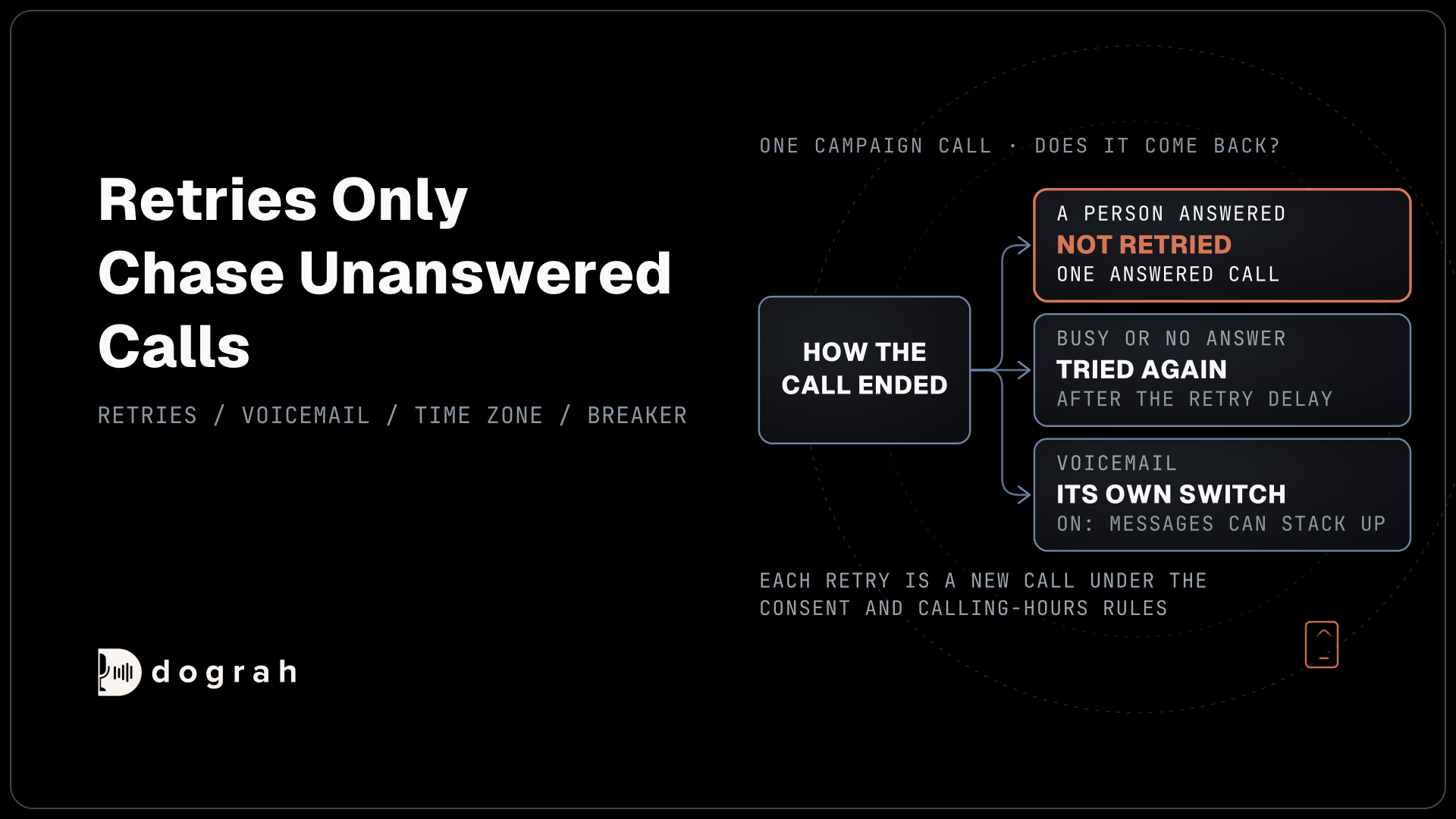
Under Enable Retries, which is on by default, you set the retries (0 to 10) in Max Retries. Retry Delay sets the wait between attempts, from 30 seconds to an hour. Retry On has three switches, Busy Signal, No Answer and Voicemail, and all three start on.
Dograh only retries calls that did not reach a person, so each contact gets one answered call per campaign. The exception is voicemail. If the Voicemail switch is on, a call that reached a voicemail box is tried again, which can mean several messages for one person if the agent leaves one each time. Each retry is also a new call under the consent and calling-hours rules, so it never fixes a list problem.
Check: Max Retries, Retry Delay and the three Retry On switches match a written retry policy, and anyone who opted out is excluded from future uploads.
Step 4: Choose what happens at a voicemail
Voicemail handling is set on the agent, not the campaign, and it is off by default. To use it, open the agent's Settings and switch on "Enable voicemail and screening handling". Under "When voicemail is detected", Disconnect the call is preselected, and Leave a message plays a text or recorded message instead.
Decide this together with the Voicemail retry switch from Step 3. Leave a message with voicemail retries on means one person can hear the same recording on several days, so pick one. A message left in an AI voice also needs the same consent as the call. Our post on AI cold calling bots explains how the agent tells a person from a machine and where that guess goes wrong.
Check: the agent's voicemail setting and the campaign's Voicemail retry switch give each contact at most the number of messages you intend.
Join the Dograh Community
Dograh is an OSS alternative to Vapi. Join our Slack community for queries, releases, best practices & community interactions.
Step 5: Split traffic to test a new script
A campaign can test scripts against each other while it runs. Under "Agents & traffic split", add a row for each version with Add agent, choose a numbered Version for each and set Traffic % so the total is 100. A campaign can split across up to five versions, and Split evenly shares the traffic out for you.
Pin numbered versions instead of "Latest published", because a version published mid-test would otherwise change what one side runs. Decide the outcome you will judge before the first call. Our guide on how to A/B test voice agent scripts shows how many answered calls each version needs and how to read the result.
Check: the Total shows 100%, each row names a numbered version, and you have written down the one outcome that decides the test.
Step 6: Keep the circuit breaker on
The circuit breaker pauses a campaign when too many calls fail, so a broken key or a bad prompt does not burn through your list. It is on by default. It trips when 50% or more of the calls in a 120-second window fail, once at least 5 calls have ended in that window, and you can change all three values under Circuit Breaker.
Know what it counts. A failure is a call that connected and then ended with an error in the AI pipeline. Busy lines, no answers and calls the carrier rejected do not count, so a list full of wrong numbers will not trip it. A provider error that says your key is invalid, unpaid or blocked pauses the campaign at once, without waiting for the threshold.
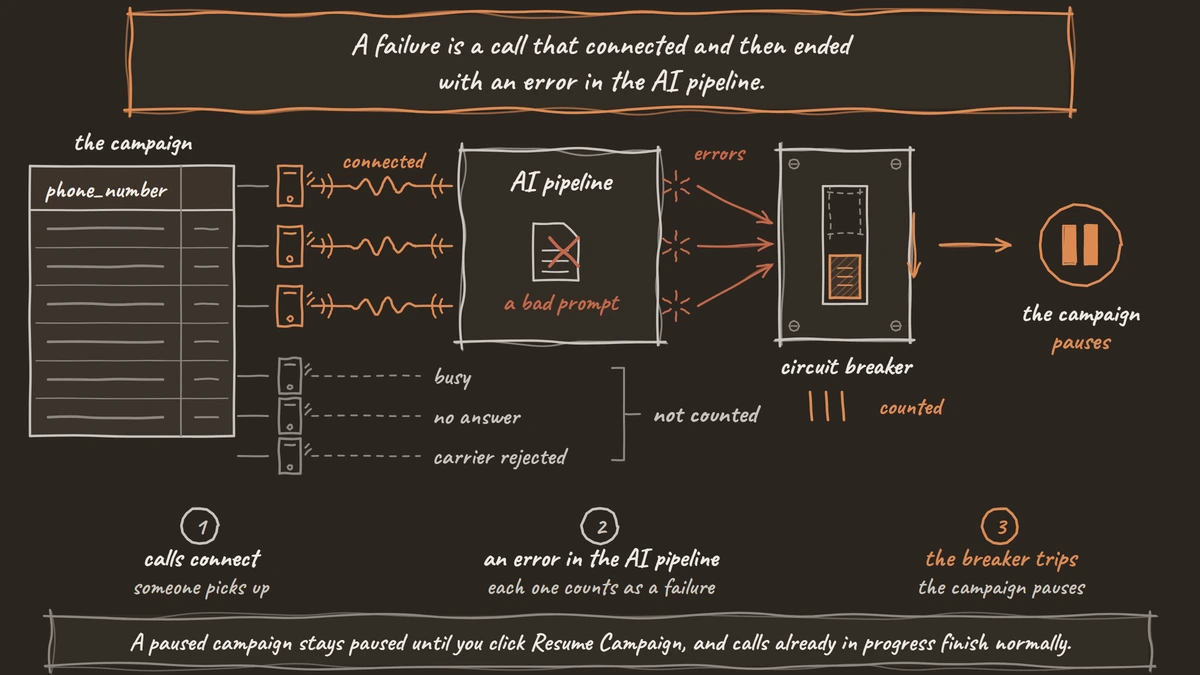
A paused campaign stays paused until you click Resume Campaign, and calls already in progress finish normally. Find the cause in the call traces of the failed calls before you resume, or the breaker will trip again on the next window.
Check: Circuit Breaker is on with Failure Threshold (%) at 50, Window (seconds) at 120 and Min Calls in Window at 5, or values you chose on purpose.
Before you ship it
Click Create Campaign, then Start Campaign on the campaign page, and watch the first hour closely. Pause Campaign stops new calls while keeping progress, and Download Report exports the calls for a date range. Set up call dispositions before launch, so each call ends with an outcome you can count.
On day one, read a handful of full calls, not just the numbers. Then run QA on a sample of the campaign's calls to catch openings that run long or objections the agent handles badly. Before you scale up, run through this list:
- The list holds only consented contacts, scrubbed against do-not-call lists.
- Each campaign covers one time zone with slots inside legal hours.
- Max Retries and the Retry On switches follow your written policy.
- Voicemail messages and voicemail retries cannot stack up.
- Any traffic split uses numbered versions and one deciding outcome.
- The circuit breaker is on.
Glossary
- Circuit breaker
- A campaign setting that pauses the campaign when the share of failed calls in a time window passes a threshold. In Dograh it is on by default at 50% over 120 seconds once 5 calls have ended, and it counts AI pipeline errors on connected calls, not unanswered calls.
- Traffic split
- A campaign setting that shares the contact list between up to five published agent versions by percentage, so you can test one script against another on real calls.
- Retry delay
- The wait before a contact who was busy, did not answer or reached voicemail is called again. In Dograh it is set per campaign, from 30 seconds to an hour.
- Calling window
- The hours a campaign may dial. For US sales calls that is 8 a.m. to 9 p.m. in the called person's local time, and Dograh time slots follow one time zone per campaign.