
To connect Twilio Elastic SIP Trunking to an AI voice agent, create a trunk, point its Origination URI at the agent platform, allow the platform's IP on Termination, then move your numbers onto the trunk. In Dograh, the open-source AI voice agent platform we build, the other end is Managed SIP, self-hosted or on Dograh Cloud.
Key Takeaways
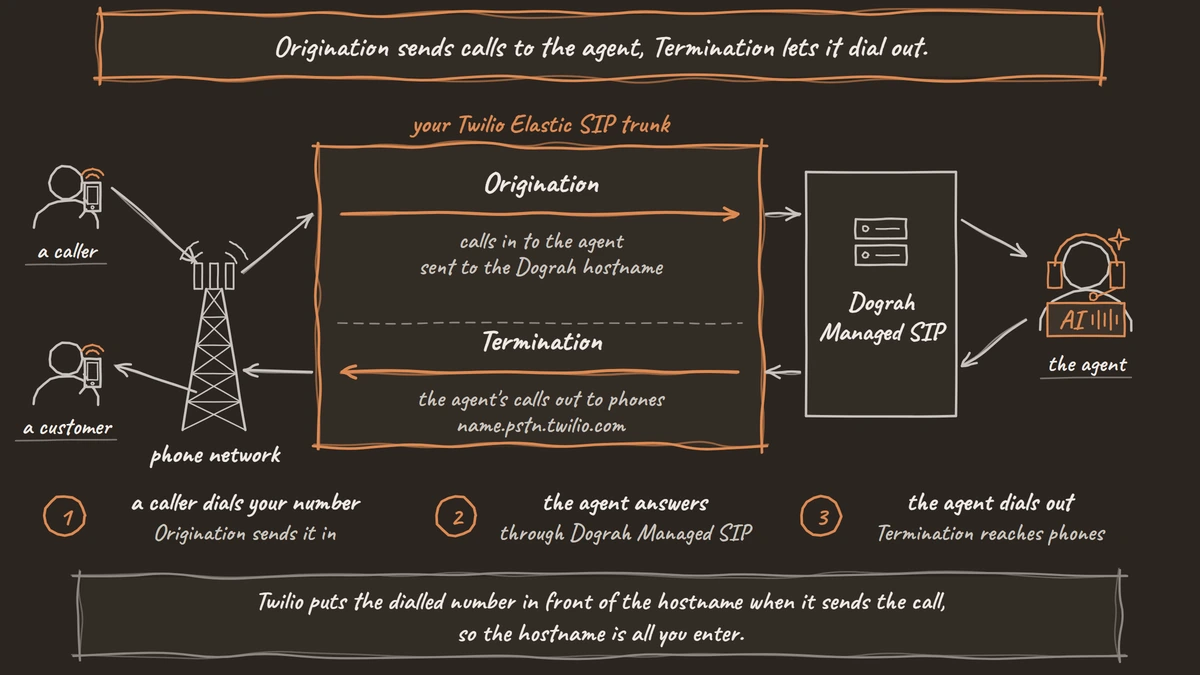
- Origination sends calls to the agent, Termination lets it dial out.
- Dograh's outbound calls need its origin IP in a Twilio IP access list.
- A number on a trunk stops using its Twilio voice URL.
This guide connects a Twilio Elastic SIP trunk to an AI voice agent in both directions, so callers reach the agent and the agent can dial out. Each Twilio console step is paired with its Dograh Managed SIP screen and ends with a check you can run.
Trunk or Programmable Voice first
Decide whether you need the trunk at all. Dograh's own Twilio connection uses Twilio Programmable Voice, with an Account SID and Auth Token, and is the shorter setup. The trunk route is worth it when you want Elastic SIP's per-minute rates on high volume or already run your numbers on a trunk. Our post on Twilio SIP trunking pricing works through that decision with the rates.
If you are still choosing between a provider account and a trunk, start with Telephony 101 for voice AI.
What you need before you start
You need a Twilio account with at least one phone number, and an agent saved in Dograh with no validation errors. Every organization has a telephony configuration called Dograh Cloudonix SIP, set up for you, with no Cloudonix account to open and nothing to pay on the Cloudonix side. Numbers and minutes are not sold on this side, so both stay on your Twilio bill.
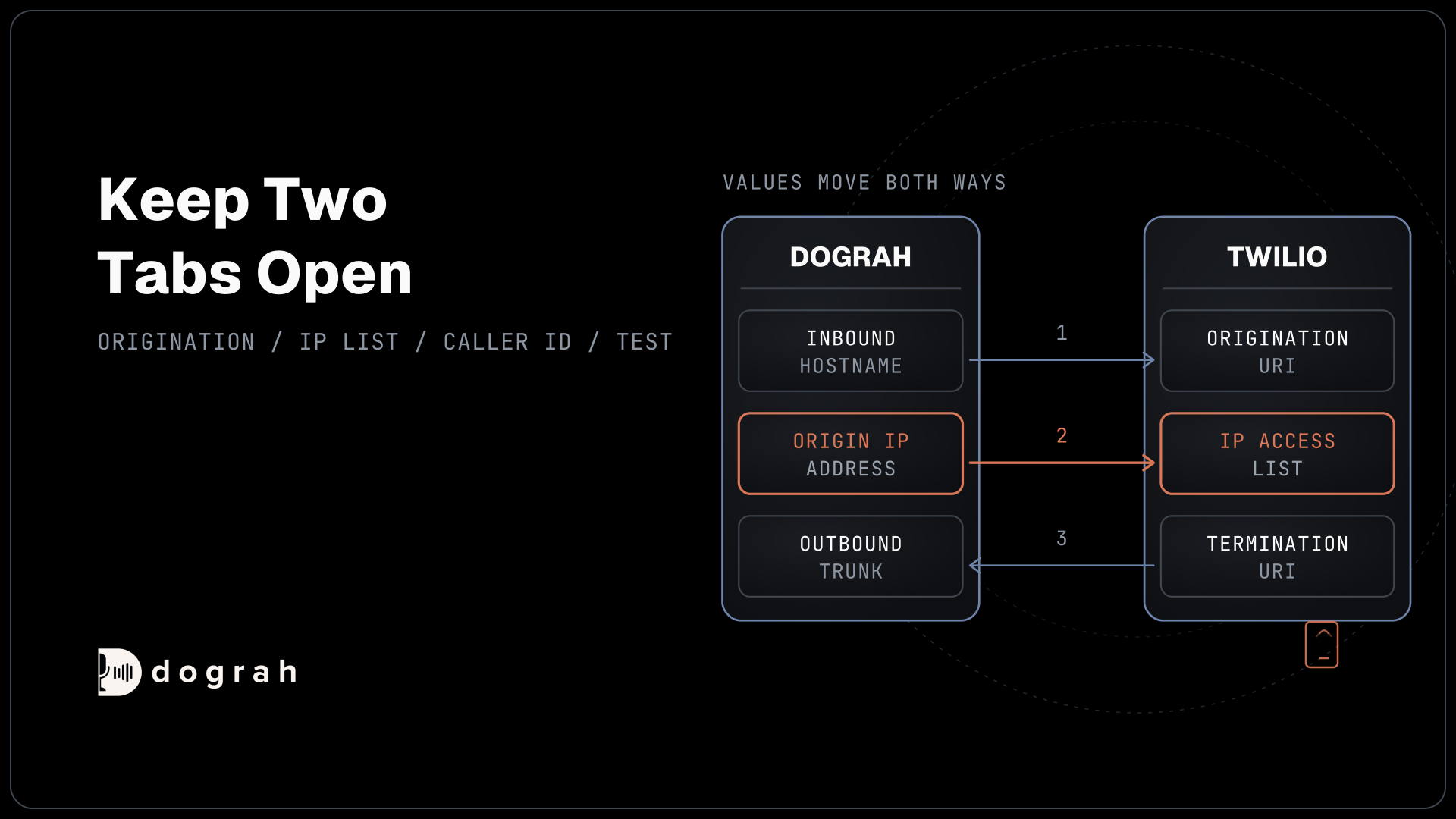
Keep two browser tabs open, one on the Twilio Console and one on Dograh, because values move between them in both directions.
Step 1: Read your SIP details in Dograh
In Dograh, open Telephony in the sidebar and choose Dograh Cloudonix SIP. On the SIP connectivity card, use Select Region to pick Global, India or UAE, whichever is closest to your callers. Every value on the card changes with the region, so set it first.
Copy three values. Under Inbound, the Hostname and the Ports, where Twilio will send calls. Under Outbound, the Origin IP address, where Dograh's calls will come from. The Dograh Managed SIP docs list the ports per region. On Global, SIP uses port 5060 and TLS uses 443.
Check: you have a hostname, a SIP port and an origin IP written down for the same region.
Step 2: Create the trunk in Twilio
In the Twilio Console, go to Elastic SIP Trunking, then Trunks, and create a new trunk with a friendly name you will recognise, such as "dograh-agent". Twilio's menu names change from time to time, so follow Twilio's Elastic SIP Trunking docs if a label has moved.
Leave Secure Trunking off on this trunk, and call recording off for now. You can come back to recording once a plain test call works.
Check: the trunk appears in your Trunks list with its General, Termination, Origination and Numbers settings.
Step 3: Send inbound calls to Dograh
Origination is the direction that carries calls from the phone network to your agent. In the trunk's Origination settings, add an Origination URI built from the Dograh hostname and SIP port, for example sip:<hostname>:5060. Twilio puts the dialled number in front of the hostname when it sends the call, so the hostname is all you enter.
You can add up to ten Origination URIs. Twilio tries the one with the lowest priority number first and shares calls by weight among equal priorities, so one URI with priority 10 and weight 10 is enough for a first test.
Twilio's trunk codecs that are generally available are PCMU and PCMA, per Twilio's codec list, which is the phone-quality 8 kHz audio Dograh takes on this route.
Check: the Origination URI is saved and points at the hostname and port for the region you picked in Step 1.

Open Source Alternative to Vapi / Retell
Self-hosted voice agent platform — no per-minute fees
dograh-hq/dograh
Star on GitHub
Step 4: Let Dograh dial out through Twilio
Termination is the direction that carries your agent's calls out to phones. In the trunk's Termination settings, choose a Termination SIP URI. Twilio builds it as <name>.pstn.twilio.com, and you pick the name. Copy the full hostname, since Dograh needs it in the next step.
Twilio requires at least one way to authenticate calls on Termination, an IP Access Control List or a Credential List. Dograh's outbound calls do not send a username and password. They are identified by the IP address they come from. So create an IP Access Control List that holds the Origin IP address from Step 1 and attach it to the trunk. Twilio enforces both checks if you also add a Credential List, which would block Dograh's calls, so use the IP list alone for this trunk.
Check: the Termination URI is saved and the trunk shows one IP Access Control List containing Dograh's origin IP.
Step 5: Add the outbound trunk in Dograh
Back on Dograh Cloudonix SIP, find the Outbound trunks card and choose Add trunk. Fill in a Name using letters, digits and hyphens, set SIP domain to the Termination URI from Step 4, and choose the same Region as Step 1. The dialog shows the origin IP that region uses, which should match the one in your Twilio list. Leave Enabled on and choose Save trunk.
You can add more than one outbound trunk later, for a second carrier or a failover, and each keeps its own region.
Check: the trunk appears on the Outbound trunks card as enabled, with your Twilio Termination URI as its SIP domain.
Step 6: Put your numbers on the trunk
On the Twilio side, add each number to the trunk from the trunk's Numbers settings, or open the number and choose SIP Trunking with this trunk under its voice settings. While a number sits on a trunk, Twilio ignores its voice URL, so a number runs on either the trunk or Programmable Voice, never both.
On the Dograh side, choose Add number on the Twilio trunk's row, so the trunk is filled in for you. Enter each number in E.164 format, a plus, the country code and the number with no spaces, such as +1415555XXXX. Then mark one as the Default caller ID for this configuration. Every outbound call on this route needs a caller ID, and a carrier can reject one it does not own, so use only numbers from this Twilio account.
Check: each number shows on the trunk's Numbers list in Twilio and in the Phone numbers card in Dograh, with one default caller ID.
Step 7: Route a number to the agent and test
In Dograh's Phone numbers card, edit the number that should be answered and set its Inbound workflow to your agent, then save. If the Setup checklist card on the configuration page still lists an open step, finish that step before you test.
Test both directions. For outbound, open the agent, choose Phone Call, select Dograh Cloudonix SIP, pick your caller ID, enter your own mobile number and start the call. For inbound, call the Twilio number from that mobile.
Check: the outbound call rings your phone with the agent speaking, the inbound call is answered by the agent, and both appear in the agent's call history.
Join the Dograh Community
Dograh is an OSS alternative to Vapi. Join our Slack community for queries, releases, best practices & community interactions.
Before you ship it
Register an emergency address for every number before real callers use the line. Twilio charges $0.75 a month per number for an address and $75 for a 911 call from a number with none, and Twilio's emergency calling setup covers the steps.
Call recording on the trunk is off by default and costs $0.0025 a minute if you turn it on. Dograh keeps its own call records, so decide whether you need Twilio's copy too.
Keep Secure Trunking off on this trunk. When it is on, Twilio rejects every call that is not encrypted, and the outbound leg from Dograh Managed SIP is not set up for TLS, so outbound calls would fail. A mismatch like this often shows up as calls that connect with no audio.
Transfer Call works on this route. The agent dials a person while the caller hears hold music and connects them once someone answers. The spoken introduction to the person picking up runs on Dograh's Programmable Voice connection, so use that connection if the introduction matters to you.
If you self-host and run your own Asterisk, the trunk can end on Asterisk instead, which hands calls to the agent through Asterisk ARI.
Hosting changes the platform line, not Twilio's. Self-hosted Dograh has no per-minute platform fee, but servers, model keys and phone minutes still cost money. Dograh Cloud charges a 1¢-a-minute platform fee.
To compare Twilio's trunk with other carriers before you commit, see our guide to SIP trunk providers.
Glossary
- Origination URI
- The SIP address a Twilio trunk sends incoming calls to. For an AI agent it is the agent platform's inbound hostname and port, and Twilio tries up to ten in priority and weight order.
- Termination URI
- The hostname a Twilio trunk receives outgoing calls on, in the form name.pstn.twilio.com. The agent platform sends its calls there to reach phones.
- IP Access Control List
- A Twilio list of IP addresses allowed to send calls through a trunk's Termination URI. Platforms that do not send credentials, like Dograh Managed SIP, are allowed this way.
- Secure Trunking
- A Twilio trunk setting that encrypts call setup with TLS and audio with SRTP. Once on, Twilio rejects every unencrypted call, so keep it off on a trunk that Dograh's outbound calls use.