
Install silero-vad, read the call recording at its 8 kHz rate and run get_speech_timestamps to list speech segments. Change one setting at a time, then stream the file through VADIterator in 32 ms chunks. Dograh, the open-source AI voice agent platform, runs Silero on every call, and you can self-host it or run it on Dograh Cloud.
Key Takeaways
- Run Silero at the call's own 8 kHz rate, not resampled to 16 kHz.
- Change one setting, rerun and compare segments before touching the next.
- VAD finds speech, and a separate turn check decides the caller is done.
This post is part of our guide to voice activity detection, where each turn problem on a phone call is matched to the one setting that fixes it. Here we run Silero VAD in Python on a real call recording and change those settings one at a time.
What you need before you start
You need a recent Python 3 and a phone call recording as a WAV file. Phone calls usually reach a voice agent as 8 kHz audio, while a browser test runs at 16 kHz, so use a real phone call if you can. Remove or mask anything personal before you share the file, and never commit a customer's call to a repository.
The code runs on a laptop CPU. It never calls a speech-to-text API. If you want to turn the speech you find into text, our speech-to-text API in Python tutorial streams the same kind of 8 kHz audio to one.
Step 1: Install Silero and load a call recording
Silero VAD is MIT licensed and installs from PyPI. The audio extra adds the backend that read_audio needs to open WAV files.
pip install "silero-vad[audio]"
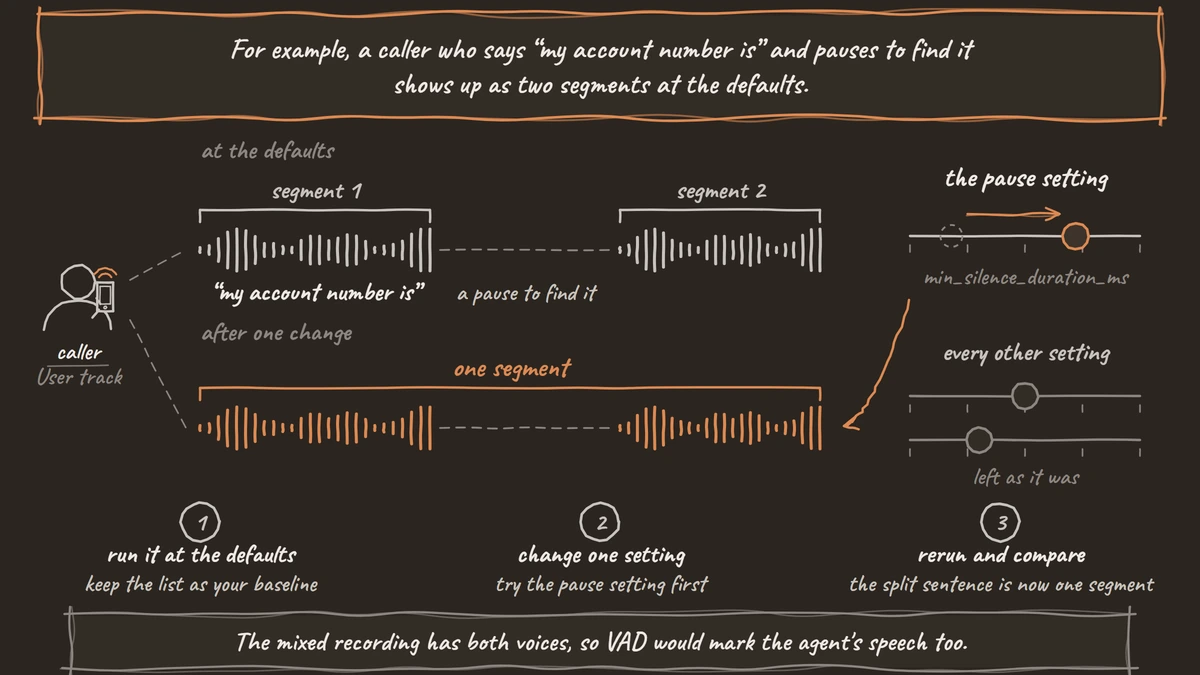
For the recording, any Dograh phone call works, because each call is saved as a run with its recordings. Open the call from Agent Runs, and the run page offers the mixed recording under Download, plus a Split Tracks card with separate User and Bot downloads. Take the User track, the caller's side alone. The mixed recording has both voices, so VAD would mark the agent's speech too. Self-hosted, the split tracks need call recording upload switched on, which it is by default.
from silero_vad import load_silero_vad, read_audio

model = load_silero_vad()
wav = read_audio("user-track.wav", sampling_rate=8000)
print(f"{len(wav) / 8000:.1f} seconds of audio")
read_audio turns the file into mono and resamples it to the rate you ask for. Passing 8000 keeps a phone recording at its own rate. Silero accepts only 8,000 or 16,000 Hz.
Check: the printed length matches the call's duration on the run page.
Step 2: Find the speech segments
get_speech_timestamps scores the audio in 32 ms windows, 256 samples at 8 kHz, and joins the windows it calls speech into segments. With return_seconds=True it reports start and end times in seconds.
from silero_vad import get_speech_timestamps

segments = get_speech_timestamps(
    wav, model, sampling_rate=8000, return_seconds=True
)
for s in segments:
    print(f"{s['start']:6.1f}s  to {s['end']:6.1f}s")
On a typical call, you see one segment for each thing the caller said, with gaps where the agent was talking. Keep this list. It is the baseline every later change gets compared with.
Check: play the recording and confirm the first three segments start when the caller starts speaking.
Step 3: Change one setting at a time
Every setting below has a default in Silero's get_speech_timestamps source. Change one, rerun Step 2 and compare the segments with your baseline.
| Setting | Default | What it does on a phone call |
|---|---|---|
threshold | 0.5 | A window scores above it to count as speech. Raise it when line hiss or breathing turns into segments. |
neg_threshold | threshold minus 0.15 | Once speech starts, it has to drop below this to stop. The gap keeps a quiet word from ending the segment. |
min_silence_duration_ms | 100 | How long a pause must last before a segment ends. Raise it when one sentence splits in two at a breath. |
min_speech_duration_ms | 250 | Segments shorter than this are dropped. Raise it to remove coughs and clicks. |
speech_pad_ms | 30 | Padding added to each side of a segment. Raise it when first or last syllables get cut. |
max_speech_duration_s | no limit | Splits very long segments at a pause. Useful for long monologues. |
For example, a caller who says "my account number is" and pauses to find it shows up as two segments at the defaults. Try the pause setting first.
segments = get_speech_timestamps(
    wav, model, sampling_rate=8000, return_seconds=True,
    min_silence_duration_ms=500,
)
Raising threshold on a noisy line works best with a matching neg_threshold, such as 0.6 and 0.45. Live voice frameworks name these settings differently, and our comparison of LiveKit and Pipecat VAD settings maps them across.
Check: the split sentence is now one segment, and no other segment changed much.

Open Source Alternative to Vapi / Retell
Self-hosted voice agent platform — no per-minute fees
dograh-hq/dograh
Star on GitHub
Step 4: Stream it in 32 ms chunks
A live agent never sees the whole file. It gets audio a few milliseconds at a time and has to decide as it goes. VADIterator does that. Feed it 256-sample chunks at 8 kHz and it returns a start or an end event when one happens, and nothing otherwise.
from silero_vad import VADIterator

vad = VADIterator(model, sampling_rate=8000, min_silence_duration_ms=500)
for i in range(0, len(wav), 256):
    chunk = wav[i:i + 256]
    if len(chunk) < 256:
        break
    event = vad(chunk, return_seconds=True)
    if event:
        print(event)
vad.reset_states()
Each {'start': ...} is the moment a live agent would hear the caller begin, and each {'end': ...} is where it would hear silence. Call reset_states() between files so one call's state does not carry into the next.
Check: the start and end events line up with the segments from Step 3 to within a few tenths of a second.
Before you ship it
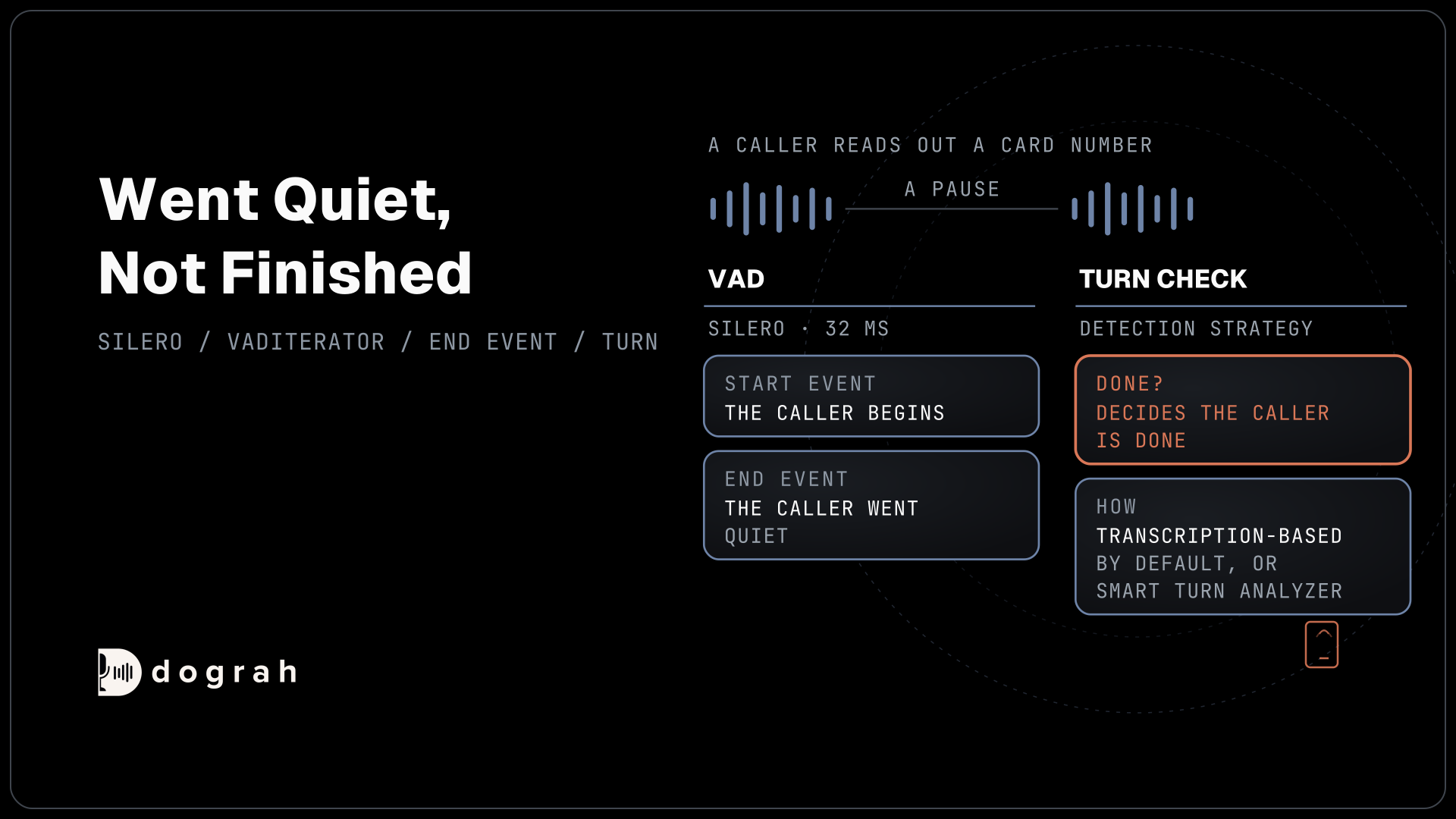
An end event means the caller went quiet, not that they finished. A caller reading out a card number pauses between groups, and an agent that answers every pause talks over them. Our post on barge-in, endpointing and turn-taking covers that second decision.
Dograh runs this same model on its calls. It uses Silero through Pipecat with a 0.2-second stop time, then decides the end of turn with the agent's Detection Strategy. Transcription-based is the default, a heuristic on the transcript, and Smart Turn Analyzer runs a turn model, with an Incomplete Turn Timeout of 2.0 seconds. Test against your recordings offline with the code above before changing either one.
The code in this post needs only your own machine. Self-hosted Dograh has no per-minute platform fee, but servers, model keys and phone minutes still cost money. Dograh Cloud charges a 1¢-a-minute platform fee.
Silero is one of several open models. Our comparison of open-source VAD models covers licences, sample rates and published benchmarks if you want to run the same steps on another one.
Join the Dograh Community
Dograh is an OSS alternative to Vapi. Join our Slack community for queries, releases, best practices & community interactions.
Glossary
- Voice activity detection
- Code that flags the stretches of audio where someone is speaking. On a call it tells the agent when the caller starts and stops talking, not what they said.
- Speech threshold
- The score a short audio window needs to count as speech. Silero scores each 32 ms window from 0 to 1 and uses 0.5 by default.
- neg_threshold
- The lower score speech must drop below before Silero ends a segment. The gap between it and the threshold stops quiet words from cutting a sentence short.
- End of turn
- The decision that the caller has finished and the agent may reply. VAD silence is one input to it, alongside the transcript or a turn model.