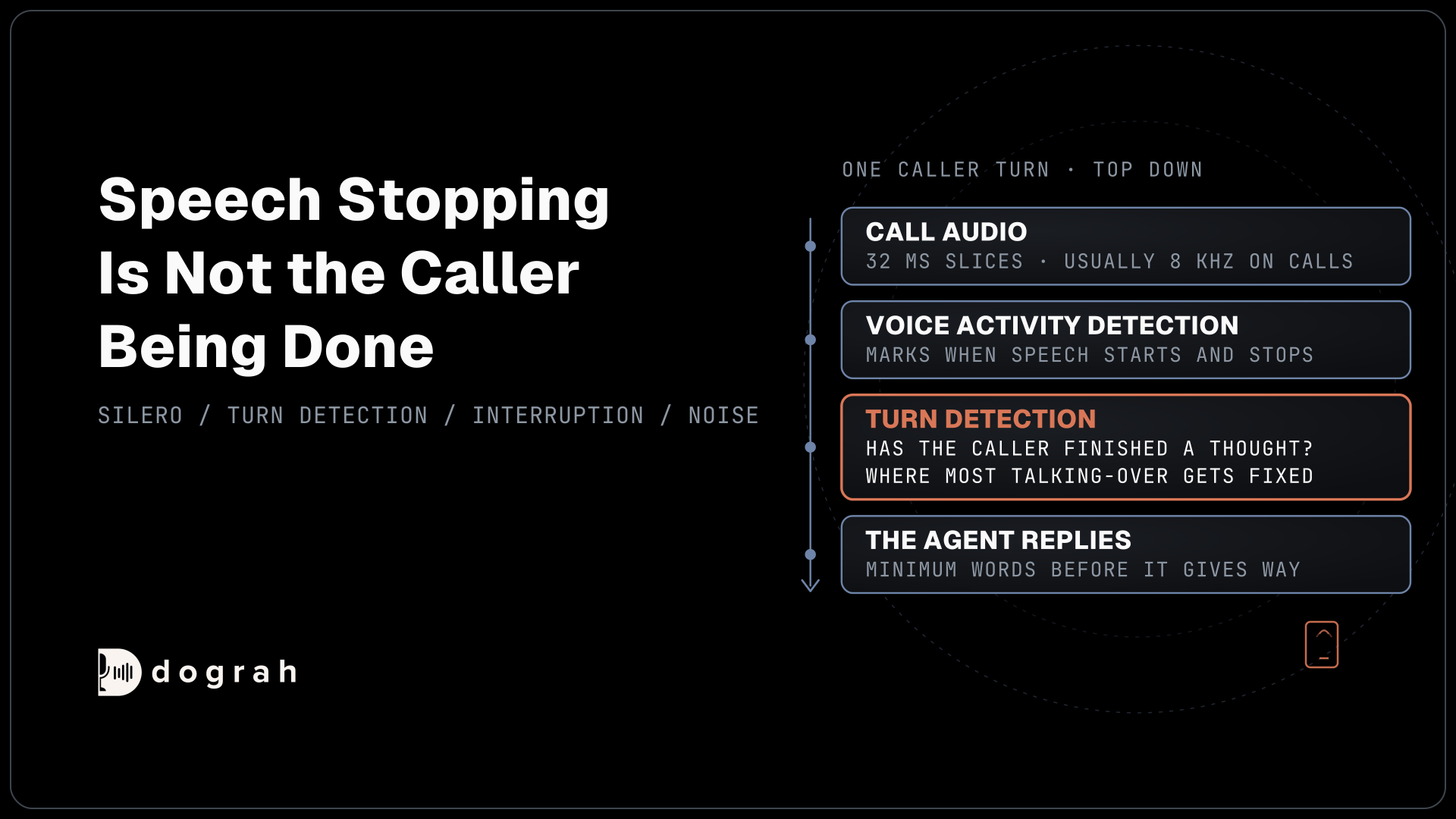

Voice activity detection (VAD) is the small model that listens to each slice of call audio and decides whether someone is speaking. It can tell when sound starts and stops. Whether the caller has finished a thought is a separate decision, made by turn detection, and that is where most talking-over and slow-reply problems get fixed.
Key Takeaways
- VAD marks when speech starts and stops. Turn detection decides when callers finish.
- Phone calls usually arrive as 8 kHz audio, so test VAD on a real line.
- Fix noise-triggered stops with a minimum word count before the agent gives way.
We explain how voice activity detection works on a call, where it ends and turn detection starts, and which setting fixes each phone-line symptom, and show how each part works in Dograh, the open-source AI voice agent platform we build. You can self-host it or run it on Dograh Cloud.
What voice activity detection does on a call
Voice activity detection (VAD) runs on every small slice of audio the caller sends and scores how likely it is to be speech. Silero VAD, the detector most open-source voice stacks use, is an MIT-licensed model of about 2 MB. It takes 32 milliseconds of audio at a time and returns a speech probability between 0 and 1, quickly enough to run on a single CPU thread. To try it yourself, voice activity detection in Python runs Silero on a real 8 kHz call recording and streams it in 32 ms chunks like a live agent.
A probability on its own starts and stops nothing, so the voice stack wraps it in timers. In Pipecat's VAD analyzer, speech starts once frames stay above a speech probability threshold of 0.7, and above a volume floor of 0.6, for 0.2 seconds. Speech stops after 0.2 seconds below that line. The start timer keeps a click from counting as a word, and the stop time keeps a breath between two words from ending speech.
Dograh runs on a fork of Pipecat and uses the same Silero detector, with a stop time of 0.2 seconds and Pipecat's defaults for the rest. These values are set in code. The settings that change what callers hear sit one layer up, in turn detection and interruption, and most of this guide is about them. Speech-to-speech models from OpenAI Realtime, Azure Realtime and Grok bring their own detection, so the local detector is skipped on those calls.
Speech stopping is not the caller being done
A caller who says "my account number is" and then reaches for the card has not finished, yet VAD marks speech as stopped 0.2 seconds into that pause. Deciding that the caller is done is a separate job, called end-of-turn detection or endpointing. An agent that answered every VAD stop would reply to half-sentences all day.
End-of-turn detection sits on top of VAD and adds patience. Dograh's default strategy, Transcription-based, waits for the speech-to-text transcript after the stop, with a short timeout of 0.6 seconds taken from Pipecat. The other strategy, Smart Turn Analyzer, runs a small audio model that hears whether a sentence sounds finished, and keeps waiting up to the Incomplete Turn Timeout when it does not. Our post on barge-in, endpointing and turn-taking compares the two in depth.
Hosted speech-to-speech APIs draw the same line. OpenAI's Realtime voice activity settings offer a server VAD mode, tuned with a threshold and a silence duration, and a semantic mode that judges from the words whether the user has finished, with an eagerness setting. Whichever stack you use, an agent that interrupts or lags is usually a turn problem first and a VAD problem second.
Why phone lines trip up voice detection
Phone calls add four problems that a quiet browser test rarely shows. The first is the mid-sentence pause from the last section. On the phone, callers stop to read a card or answer someone in the room, and each pause looks like the end of speech.
Noise is the second. A television in the next room carries real speech, so a good speech detector rightly scores it as speech. Silero's own quality metrics show how far detectors differ on audio with no speech at all: on a set of noise-only clips, Silero v6 judged 87% correctly and the older WebRTC detector none, both measured at 16 kHz. The researchers behind the LibriVAD benchmark still describe dependable speech detection as "a challenging task, especially under noisy, diverse, and unseen acoustic conditions".
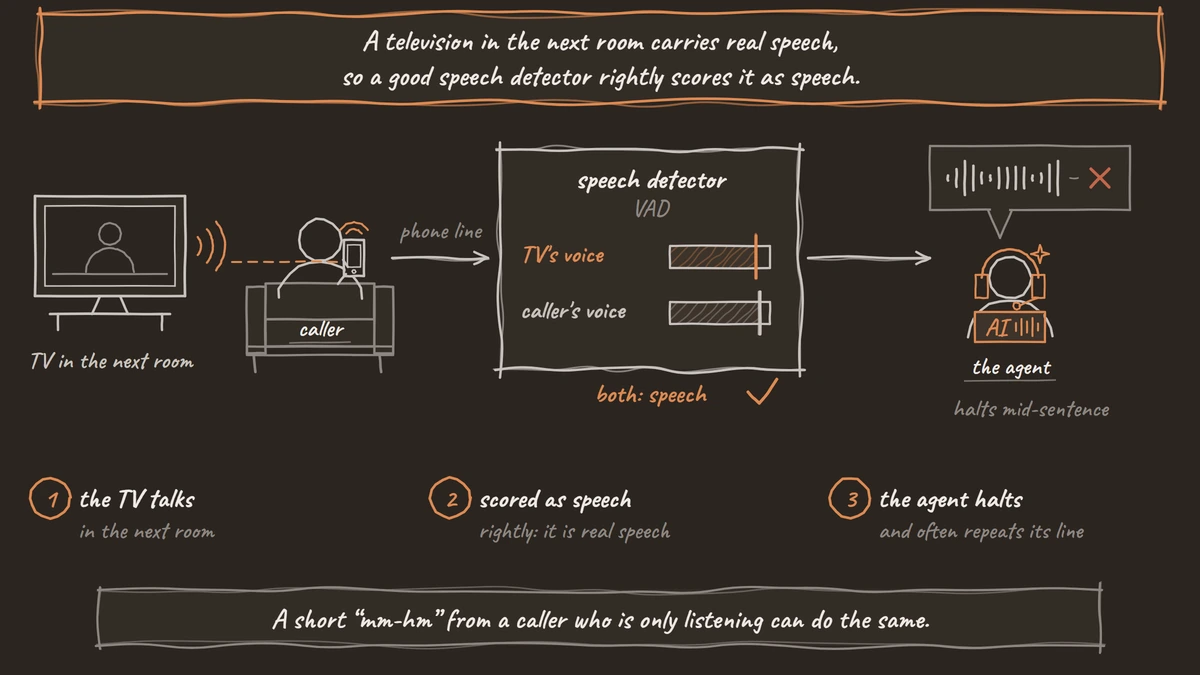
Barge-in is the third. When interruptions are allowed, the agent stops talking the moment the stack decides the caller has started. If a door slam or the TV counts as a start, the agent halts mid-sentence and often repeats its line. A short "mm-hm" from a caller who is only listening can do the same.
The fourth is the audio itself. Most phone calls still reach the agent as 8 kHz audio, while a browser demo runs at 16 kHz, so settings that feel right in a web test can misbehave on a real line. Silero accepts both rates, and Dograh runs detection at 8,000 or 16,000 Hz, taking the carrier's rate on phone calls. Pipecat's Silero wrapper also resets the model every two seconds, because its state drifts during long silence or noise, a drift its source code notes is strongest at 8 kHz.

Open Source Alternative to Vapi / Retell
Self-hosted voice agent platform — no per-minute fees
dograh-hq/dograh
Star on GitHub
Fix each symptom with one setting
Each symptom maps to one setting. On a cascade agent, which runs separate speech models around the language model, these settings sit in the agent's Settings under Turn Detection and Interruption, or on the step itself. Change one, place a test call, then move to the next.
| What callers hear | Likely cause | Setting to change in Dograh |
|---|---|---|
| The agent talks over a caller who paused mid-sentence | The turn ended at the first pause | Turn Detection: switch to Smart Turn Analyzer and raise Incomplete Turn Timeout (2 seconds by default, 0.5 to 10) |
| A long silence before every reply | The turn waits too long to end | Keep Transcription-based for short answers, or lower Incomplete Turn Timeout |
| The agent stops for a TV, a cough or a "mm-hm" | Any detected speech counts as an interruption | Interruption Strategy: Minimum words, then raise Minimum Words Before Interruption from 2 toward 10 |
| The caller cannot cut in at all | Interruption is off on that step, or the word count is too high | Turn Allow Interruption on for that step, or lower the word count |
| A caller's "hello?" cuts off the greeting | The greeting gives way after 2 words | Allow Greeting Interruption and Minimum Words to Interrupt on the Start Call node |
The noise row matters most on phone lines, and the word count is the guard there. A cough or a passing truck rarely makes two clear words, while "wait, no" does. Voice activity, the other Interruption Strategy, stops the agent on any detected speech and suits quiet lines only. Our post on accents and background noise covers noisy callers in more detail.
One choice changes the turn rows. If you pick a speech-to-text model that ends turns itself, such as Deepgram Flux or Cartesia's ink-2, Dograh follows that provider's turn endings in place of its own Turn Detection setting. Tune those models in their provider's terms, and keep the interruption rows as they are.
Lines the caller must hear in full
Some lines should never be cut off, such as a recording notice or a read-back of details to confirm. Allow Interruption is set on each step, and it starts on for every new Agent step. Turn it off on the step that carries such a line, and keep that line short, since the caller cannot cut in while it plays.
The greeting has its own pair of settings on the Start Call node. Allow Greeting Interruption is on by default, and Minimum Words to Interrupt, set to 2, decides how many words stop the greeting on a cascade agent. If your Greeting Text carries a notice that must play in full, such as telling callers the call is recorded, switch Allow Greeting Interruption off. Whatever the caller says during the greeting is then held until it finishes, so nothing is lost.
Join the Dograh Community
Dograh is an OSS alternative to Vapi. Join our Slack community for queries, releases, best practices & community interactions.
Which VAD voice agent stacks use
Silero is the common choice in open-source voice agent stacks. Pipecat ships it as its main analyzer, with Krisp's VIVA detector as an option, LiveKit ships it as a plugin, and Dograh uses it through Pipecat. The older WebRTC VAD, a statistical model from the WebRTC project, is lighter and still turns up in browser tools. Beyond those two, our comparison of seven open-source VAD models checks licences and sample rates, and only Silero and WebRTC VAD take 8 kHz phone audio natively.
The same model behaves differently because each framework picks its own defaults. LiveKit's Silero plugin fires at a speech probability of 0.5 and waits 0.55 seconds of silence before it marks speech as stopped, while Pipecat asks for 0.7 and waits 0.2 seconds. Our comparison of LiveKit VAD and Pipecat VAD settings lists every parameter and what to change for noisy phone lines.
The detector itself matters most on noise. WebRTC VAD is very fast and tells noise from silence well, yet Silero's tests find it poor at telling speech from noise, which is exactly the phone-line problem. Our post on WebRTC VAD vs Silero VAD looks at how each one detects speech and where each fails on 8 kHz audio.
A tuning order for a new phone agent
Start from the defaults, because they already suit most short-answer calls. In Dograh that means Transcription-based turn detection, the Minimum words strategy at 2 words, and interruptions on for each Agent step. Write down the two or three symptoms you hear in your first test calls before you touch anything.
Then work through the symptoms one at a time. If callers give long answers with pauses, such as an address or a description of a problem, switch to Smart Turn Analyzer and listen again. If the agent keeps stopping for noise, raise the word count by one and re-test. Turn interruptions off only on steps that must play in full, because an agent nobody can interrupt feels like a recording. Our page on turn-taking controls in an open-source voice agent lays out each setting next to the symptom it fixes.
Keep one rule throughout. Every change gets a fresh call over a real phone line, since a fix heard only in the browser has not been tested on 8 kHz audio.
How to find a turn problem in a real call
Tune on real calls, because a web test hides most of the problems above. Place test calls over a real phone line from a noisy room, with a TV on and a few deliberate mid-sentence pauses, then read what happened turn by turn.
The transcript shows the first sign. A caller's sentence split across two turns, with the agent answering the first half, means the turn ended too early. A long gap before every reply points the other way. Each call's View Trace button opens it in Langfuse with the speech-to-text, AI and voice time for every turn, so you can tell a slow model from a slow turn decision. Our guide to reading call traces walks through it.
Detection also costs time on every turn. The stop time and the turn timeout both sit inside the gap the caller hears before a reply, which our speech latency playbook counts against the full response budget. Because Dograh is open source, every default in this guide can be read in its code, so you always know which timer you are changing.
Each VAD question above has its own deep dive:
- LiveKit VAD vs Pipecat VAD: Every Setting and Its Default
- WebRTC VAD vs Silero VAD: Which Works on Phone Calls
- Voice Activity Detection in Python: A Working Example
- Open-Source VAD Models Compared for Phone Agents
Glossary
- End-of-turn detection
- The decision that a caller has finished speaking and the agent may reply. It sits on top of VAD, which only marks when sound stops, and it is where a mid-sentence pause is either waited out or mistaken for the end.
- Speech probability threshold
- The score above which a VAD frame counts as speech. Pipecat uses 0.7 and LiveKit's Silero plugin 0.5. A lower threshold catches soft voices but lets more noise through.
- Stop time
- How long a voice activity detector waits below its threshold before it marks speech as stopped. Dograh and Pipecat use 0.2 seconds, LiveKit's Silero plugin 0.55. It ends speech, not the caller's turn.
- Barge-in
- A caller speaking while the agent is talking, and the agent stopping to listen. On phone lines the hard part is telling a real interruption from a cough, a TV or a short 'mm-hm'.