
To stream a phone call to speech-to-text in Python, open a WebSocket, declare the audio as mu-law, 8,000 Hz, one channel, and send the bytes as they arrive. Interim results give partial text, and endpointing marks each turn's end. Dograh, the open-source AI voice agent platform we build, does this on every call, self-hosted or on Dograh Cloud.
Key Takeaways
- Send phone audio as it arrives, and tell the API it is 8 kHz mu-law.
- Show partial text in place, and print a full line when the turn ends.
- Test with a recorded call paced at real time before a live call.
This post is part of our guide to Voice AI Explained, where phone calls reach the agent as narrowband 8 kHz audio. Here we stream that audio to a speech-to-text API in Python, from a recording and then a live Twilio call, and show what Dograh sets up for you.
What you need before you start
You need Python 3.10 or later, the websockets library and a Deepgram API key. The code talks to Deepgram's streaming endpoint directly, because it accepts phone audio as it is, with no conversion. We use plain WebSockets instead of the deepgram-sdk package, since the SDK's interface has changed across major versions, and the raw protocol shows you exactly what goes over the wire.
Install the library and put your key in an environment variable, never in the code.
pip install "websockets>=14"
export DEEPGRAM_API_KEY="your-key-here"
What this does: It installs
websocketsand stores the key asDEEPGRAM_API_KEY, which the scripts read at start-up. On Windows PowerShell, set it with$env:DEEPGRAM_API_KEY = "your-key-here"instead. The code uses the newer asyncio client in websockets, so older versions fail on the import line.
Testing costs very little. Deepgram charges $0.0077 a minute for Nova-3 streaming in one language, and a new account gets a $200 credit that does not expire. As an example, a 5-minute test call is 5 x $0.0077, about 4 cents. For the live call in Step 4 you also need a Twilio number and a way to reach your laptop over a public wss:// address, such as a tunnel.
Check: pip show websockets prints the installed version.
Step 1: Put the call audio in the phone format
Start by making your test recording look exactly like a phone call. Twilio's Media Streams messages always carry audio/x-mulaw at a sample rate of 8000 on one channel, base64-encoded. Mu-law stores one byte per sample, so a second of call audio is 8,000 bytes, and 20 milliseconds is 160 bytes.
The ffmpeg command below turns any recording into that format, with -ar 8000 for the sample rate, -ac 1 for one channel and -f mulaw for raw mu-law bytes.
ffmpeg -i my-call.wav -ar 8000 -ac 1 -f mulaw call.ulaw
What this does: It resamples
my-call.wavto 8 kHz mono and writes raw mu-law bytes tocall.ulaw, the same bytes Twilio would send during a call.
You never need to convert mu-law to PCM yourself for this API. That matters on Python 3.13, which removed the audioop module older tutorials use for the conversion. Use a real call recording if you have one, because a clean studio clip hides the problems phone audio causes.
Check: the file is about 8,000 bytes for each second of audio, so a 30-second clip is about 240 KB.
Step 2: Open the socket with the phone settings
In our experience, most broken phone transcripts come from a wrong format setting. Leave out the encoding and sample rate and the API reads the bytes as the wrong kind of audio, so you get nonsense back with no error. These are the settings that matter for phone audio, all from Deepgram's streaming API reference.
| Setting | Value here | Why it matters on a call |
|---|---|---|
encoding | mulaw | Matches Twilio's bytes, so nothing is resampled |
sample_rate | 8000 | Phone audio is 8 kHz. A wrong rate garbles every word |
channels | 1 | Each call track is mono. 2 returns garbled text with no error |
interim_results | true | Sends partial text while the caller is still talking. Off by default |
endpointing | 300 | Milliseconds of silence that end a turn. The default is 10 ms |
smart_format | true | Adds punctuation and formats numbers. Off by default |
model | nova-3 | Deepgram's general streaming model |
keyterm | optional | Names and terms to listen for, up to 500 tokens, billed as an add-on |
Save the first half of stream_file.py below. It puts those settings in PARAMS, sends the key in an Authorization: Token header and reads the address from DEEPGRAM_URL.
import asyncio
import json
import os
import sys

from websockets.asyncio.client import connect

DEEPGRAM_URL = os.environ.get("DEEPGRAM_URL", "wss://api.deepgram.com/v1/listen")
PARAMS = (
    "model=nova-3&encoding=mulaw&sample_rate=8000&channels=1"
    "&interim_results=true&endpointing=300&smart_format=true"
)
CHUNK = 160  # 160 bytes of 8 kHz mu-law = 20 ms of audio

def open_deepgram():
    headers = {"Authorization": f"Token {os.environ['DEEPGRAM_API_KEY']}"}
    return connect(f"{DEEPGRAM_URL}?{PARAMS}", additional_headers=headers)
What this does:
open_deepgram()returns one WebSocket connection with the phone settings in the address.DEEPGRAM_URLdefaults to Deepgram's endpoint, so you can point the same code at a local test server without editing it.
Add the keyterm setting later for product names and jargon. Deepgram charges $0.0013 a minute for keyterm prompting on top of the base rate.
Check: with the key missing, the script stops at once with KeyError: 'DEEPGRAM_API_KEY', before anything goes over the network.

Open Source Alternative to Vapi / Retell
Self-hosted voice agent platform — no per-minute fees
dograh-hq/dograh
Star on GitHub
Step 3: Stream a recorded call as if it were live
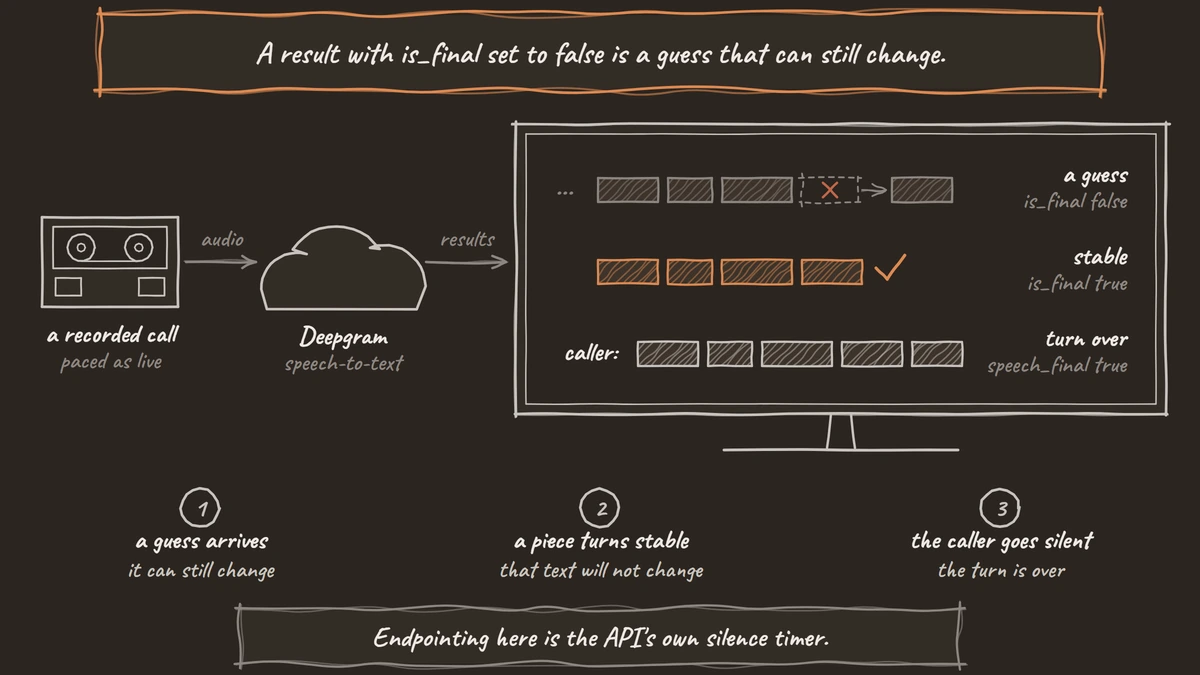
Send the file 160 bytes every 20 milliseconds, so the API sees the same pace as a live call. Each reply is a Results message with the text in channel.alternatives[0].transcript and two flags. A result with is_final set to false is a guess that can still change. With is_final true, that piece of text is stable. With speech_final also true, the caller has been silent for your endpointing time, so the turn is over. The rest of stream_file.py uses send_file, print_transcripts and main to show each guess in place and print one caller: line per turn.
async def send_file(ws, path):
    loop = asyncio.get_running_loop()
    next_send = loop.time()
    with open(path, "rb") as audio:
        while chunk := audio.read(CHUNK):
            await ws.send(chunk)
            next_send += 0.02  # pace it like a live call
            await asyncio.sleep(max(0, next_send - loop.time()))
    await ws.send(json.dumps({"type": "CloseStream"}))

def show(line, done=False):
    # \r rewrites the same terminal line until the turn is final
    print("\r" + line.ljust(80), end="\n" if done else "", flush=True)

async def print_transcripts(ws):
    turn = []
    async for message in ws:
        result = json.loads(message)
        if result.get("type") != "Results":
            continue
        text = result["channel"]["alternatives"][0]["transcript"]
        if not result["is_final"]:
            show("  ... " + " ".join(turn + [text]))
            continue
        if text:
            turn.append(text)
        if result["speech_final"] and turn:
            show("caller: " + " ".join(turn), done=True)
            turn = []
    if turn:
        show("caller: " + " ".join(turn), done=True)

async def main(path):
    async with open_deepgram() as ws:
        await asyncio.gather(send_file(ws, path), print_transcripts(ws))

if __name__ == "__main__":
    asyncio.run(main(sys.argv[1]))
What this does:
send_filepaces the bytes against the clock, so a 30-second call takes 30 seconds, then sendsCloseStream. Deepgram finishes the audio it holds, returns the last results and aMetadatamessage, and closes.print_transcriptscollects stable pieces inturnuntilspeech_finalarrives.
The pacing uses a running target time, not a plain 20 ms sleep, because small timer delays add up and a long file would drift slower than real time. Run it with python stream_file.py call.ulaw.
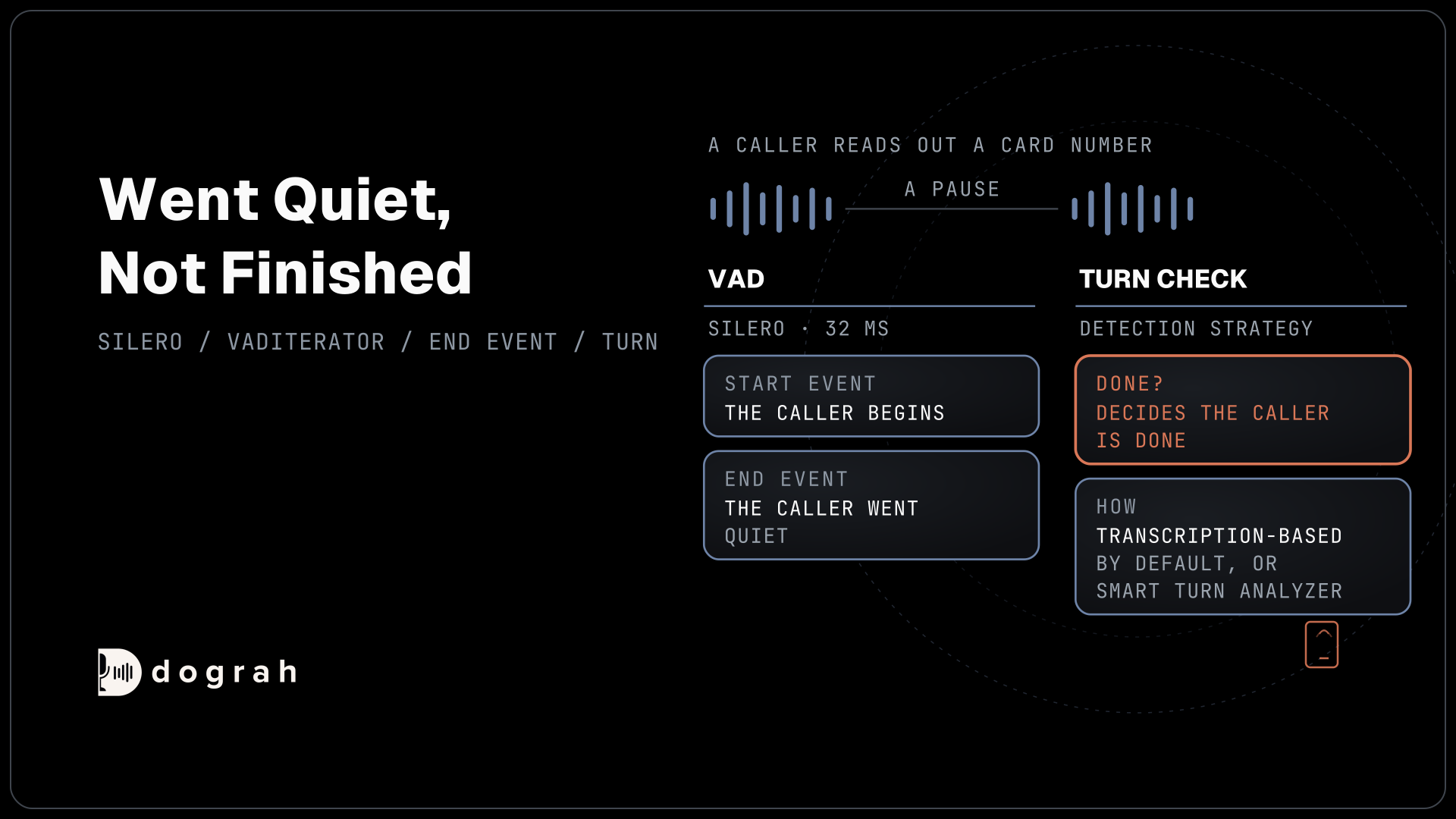
Endpointing here is the API's own silence timer. An agent usually also runs voice activity detection (VAD) on its side, which our voice activity detection example in Python covers. If you are unsure whether you need live or recorded transcription at all, live vs recorded speech-to-text explains the difference.
Check: a line starting with ... grows word by word while the recording plays, and each finished sentence ends up on its own caller: line.
Step 4: Stream a live Twilio call to the same code
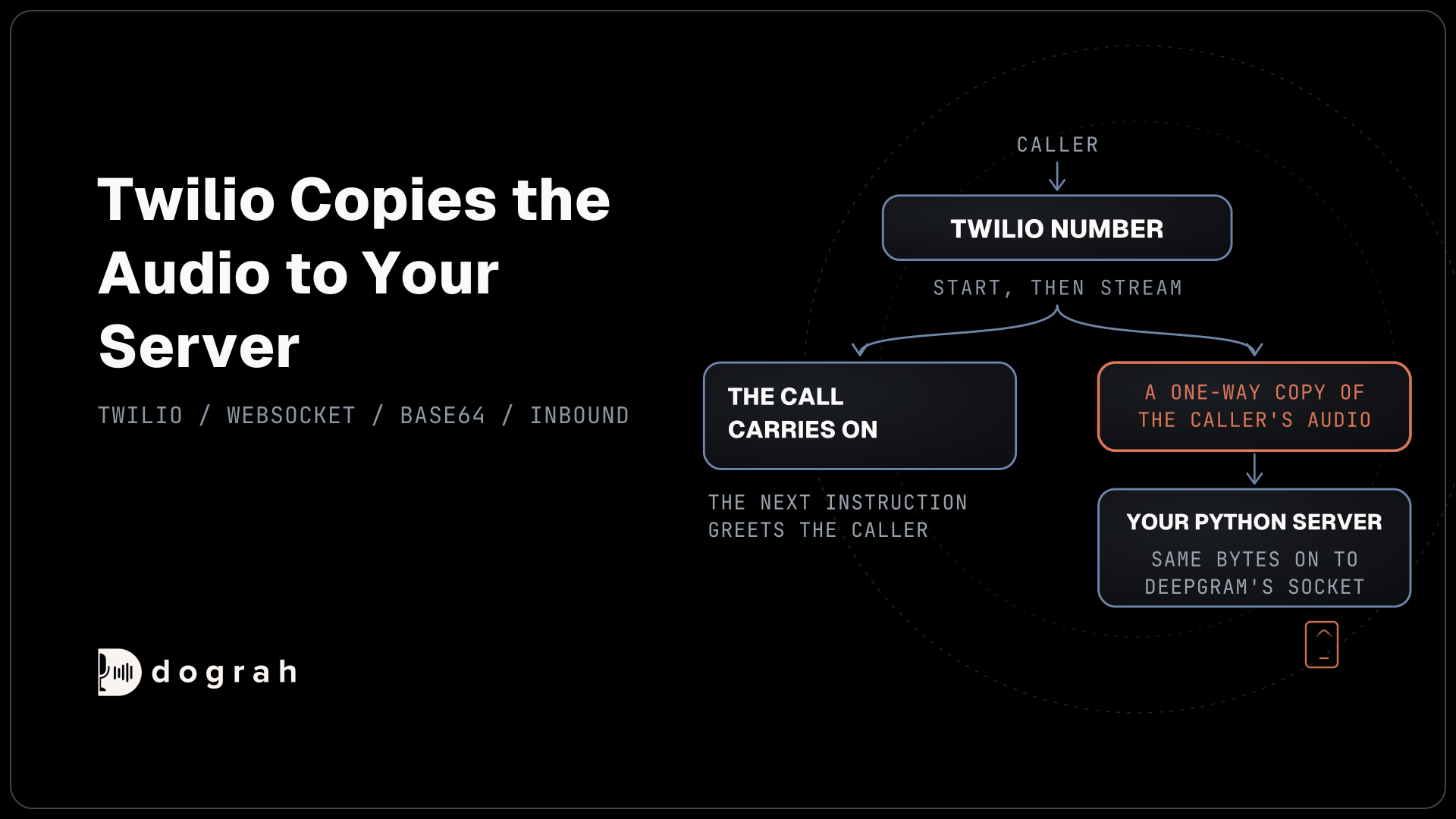
A live call needs only a small server that unwraps Twilio's messages. Twilio's Stream instruction, placed inside a Start tag, copies the call's audio to your WebSocket server and carries on with the next instruction. It sends only the caller's side by default and accepts only wss:// addresses. Point your Twilio number's voice webhook at TwiML like this, with your own tunnel address in url.
<Response>
  <Start>
    <Stream url="wss://your-tunnel.example.com/" />
  </Start>
  <Say>Hi, tell me why you are calling.</Say>
  <Pause length="60" />
</Response>
What this does: The Start and Stream pair forks the audio to your server, Say greets the caller, and Pause keeps the call open for a minute. Without an instruction after the stream, Twilio ends the call.
Save twilio_server.py next to stream_file.py. For each call it opens one Deepgram socket, decodes media.payload on the inbound track and stops on the stop event.
import asyncio
import base64
import json

from websockets.asyncio.server import serve

from stream_file import open_deepgram, print_transcripts

async def handle_call(twilio_ws):
    async with open_deepgram() as dg_ws:
        printer = asyncio.create_task(print_transcripts(dg_ws))
        async for message in twilio_ws:
            event = json.loads(message)
            if event["event"] == "start":
                print("call started:", event["start"]["callSid"])
            elif event["event"] == "media" and event["media"]["track"] == "inbound":
                await dg_ws.send(base64.b64decode(event["media"]["payload"]))
            elif event["event"] == "stop":
                break
        await dg_ws.send(json.dumps({"type": "CloseStream"}))
        await printer
What this does: Twilio's bytes go to Deepgram exactly as they came, minus the base64 wrapping. When the call ends,
CloseStreamflushes the last words before the handler returns, and theconnectedmessage Twilio sends first is skipped.
Finish the file with an entry point that listens on port 8080.
async def main():
    async with serve(handle_call, "0.0.0.0", 8080) as server:
        await server.serve_forever()

if __name__ == "__main__":
    asyncio.run(main())
What this does: It runs
handle_callonce for every Twilio stream that connects to port 8080. Start it withpython twilio_server.pyand expose port 8080 through your tunnel.
To have an agent talk back, wrap Stream in Connect instead. That stream is two-way, so your server can send audio into the call, and Twilio holds the rest of the TwiML until your server closes the socket. How the voice AI pipeline works follows that text on to the language model and the voice.
Check: call your Twilio number, for example +1415555XXXX. The terminal prints call started: and then a caller: line for each thing you say.
Join the Dograh Community
Dograh is an OSS alternative to Vapi. Join our Slack community for queries, releases, best practices & community interactions.
Before you ship it
The code above handles one clean call. A production service also reconnects when a socket drops and sends Deepgram's KeepAlive message if audio ever stops flowing. Then test with real call audio from real phones, because 8 kHz audio is where the misheard names show up. A caller who pauses mid-sentence also tells you whether 300 ms of endpointing is too eager, a trade-off our post on barge-in, endpointing and turn-taking walks through.
If Deepgram closes the socket at once, check the API key and the Authorization header. If transcripts come back as nonsense with no error, check encoding=mulaw, sample_rate=8000 and channels=1 first.
Dograh runs this whole path inside every call. Audio from a Twilio number arrives at 8,000 Hz, and the speech-to-text service is opened at that same rate, so nothing is resampled on the way in. Deepgram Nova-3 runs with endpointing at 100 ms while Dograh's own turn detection decides when the caller has finished. The words in your agent's Dictionary go to Deepgram as keyterms.
You choose the provider under Transcriber with your own key, and switching from Deepgram to AssemblyAI or a self-hosted model needs no code. After each call, View Trace shows the speech-to-text time for every turn.
To recap, send the bytes as they arrive, declare mu-law at 8,000 Hz on one channel, show interim text in place, and treat speech_final as the end of a turn.
Glossary
- Mu-law
- The G.711 way of storing phone audio as one byte per sample. At 8,000 samples a second it is 8,000 bytes per second, and it is the format Twilio Media Streams sends.
- Interim results
- Partial transcripts a streaming speech-to-text API sends while the caller is still talking. They can change, so show them as a draft and keep only the final text.
- Endpointing
- The silence timer that tells a streaming API a turn is over. At 300 ms, a result arrives with speech_final set once the caller has paused that long.
- Media Stream
- Twilio's feature that copies a call's audio to your WebSocket server as base64 messages. Start then Stream is one-way, and Connect then Stream lets your server send audio back.