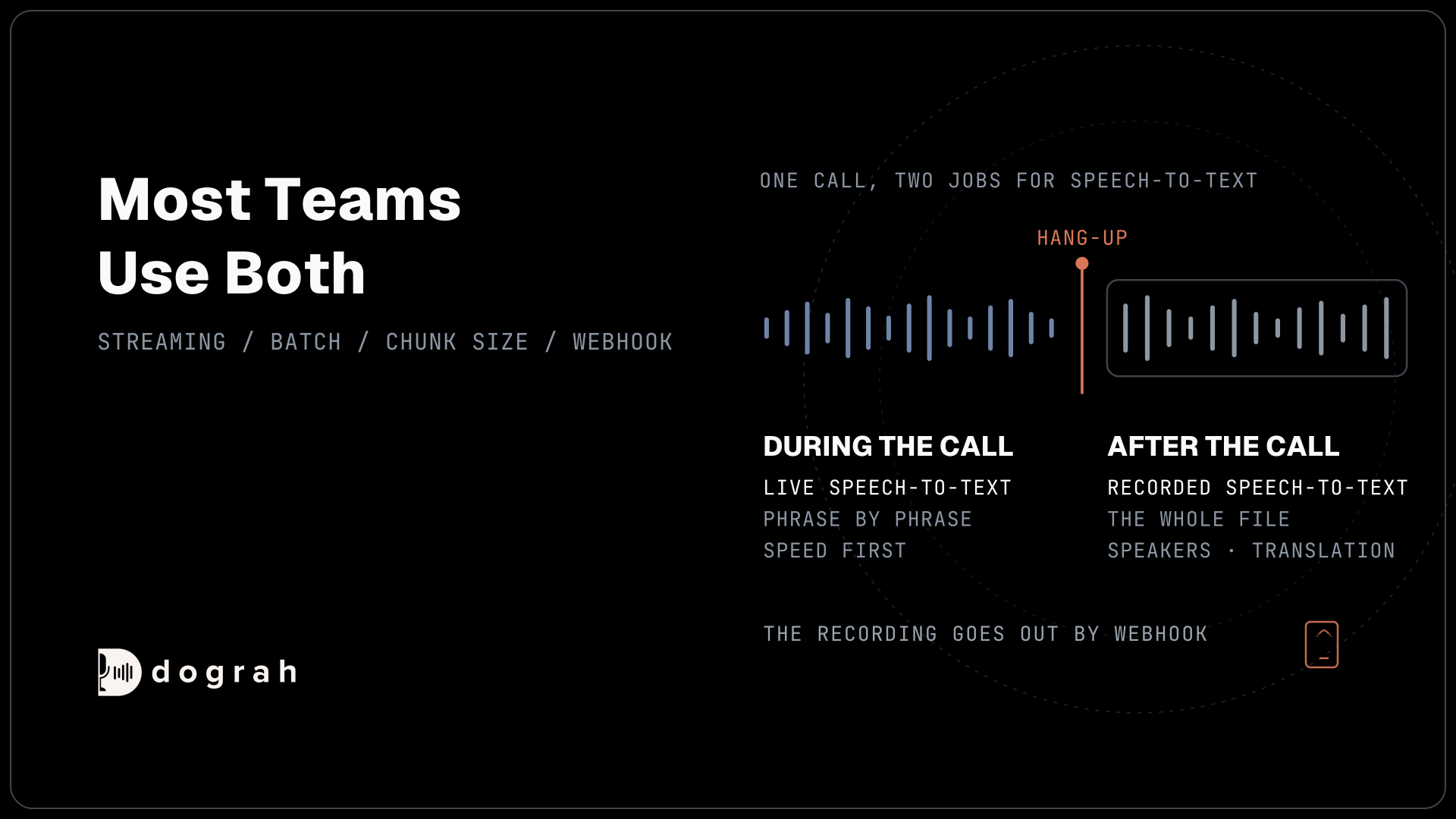

A voice agent needs live speech-to-text during the call, because it must hear the caller fast enough to reply within about a second. Recorded speech-to-text runs after the call on the saved audio, where accuracy and extras such as speaker labels matter more than speed. Most teams run one model on the call and another on the recordings.
Key Takeaways
- Live speech-to-text turns each phrase into text while the caller is still talking.
- Recorded speech-to-text reads the whole call later, with time for speakers and translation.
- Choose the live model per agent, then send recordings out by webhook.
Pick one speech model for everything, and either callers wait or call records come out thin. We split the two jobs, explain why live models stream and recorded ones take their time, use Nvidia's Nemotron pair as an example and show where each runs in Dograh. It sits within our guide to local, self-hosted models.
Two jobs for speech-to-text on one call
Speech-to-text does two different jobs around a voice agent call, and each job wants a different model. The first happens during the call. The agent has to know what the caller just said, so it can decide what to say back. That is live speech-to-text, and it sits at the front of every turn.
The second happens after the call. The recording is saved, and a model reads it from start to finish to produce the record your team works from. That is recorded speech-to-text, sometimes called batch transcription.
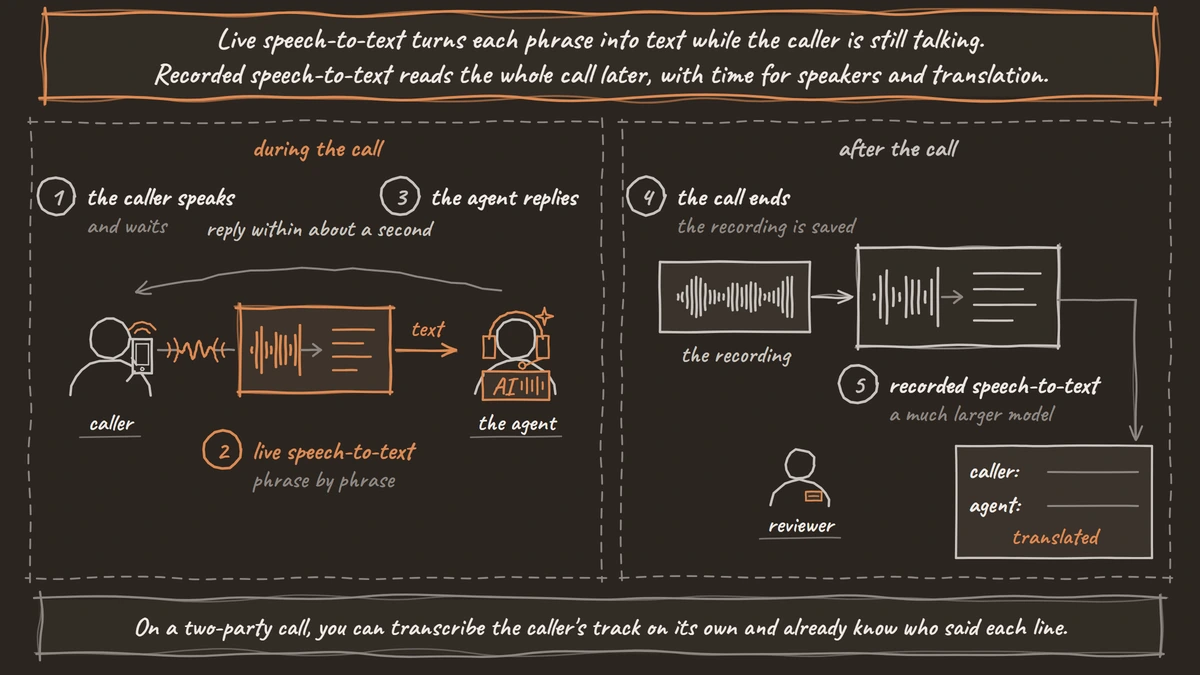
The live job is short on time and the recorded job is not. That one difference shapes everything else, from model size to the extras each can offer. If you want the full path one sentence takes on a call, our post on how the voice AI pipeline works follows it from the caller's words to the agent's reply.
Live speech-to-text has to keep up
Live speech-to-text is judged first on speed, because the caller is waiting for the agent to answer. Our rule of thumb is that a reply feels natural when the full round trip stays below about 800 milliseconds. Speech-to-text, more often than the language model, is the slowest part of that trip.
So live models stream. They send words back while the caller is still talking, phrase by phrase, and the agent starts thinking before the sentence is over. A model that waits for the full recording cannot do this, however accurate it is.
Live models also hear worse audio than you might expect. A browser demo feeds the model 16 kHz sound, but most phone calls still arrive as narrowband audio at half that, 8 kHz. In WildASR's tests, some speech models barely changed on G.711 phone audio while Qwen2-Audio's word error rate jumped from 5.8% to 48.3%. A browser test will not tell you which kind you picked.
Names and industry terms suffer most on a phone line. Adding them to a custom dictionary tells the live model to listen for them, which helps it get them right on the first try.
Recorded speech-to-text can take its time
Recorded speech-to-text is judged on accuracy and on the extras it adds, since nobody is waiting. It reads the whole file, so it can use what comes later in the call to settle a word it heard earlier.
That time buys features a live model rarely bothers with. A recorded pass can label which voice spoke each line, or translate a call into another language for a reviewer. It can also use a much larger model, because a few extra seconds per call cost nothing.
Some vendors now say streaming accuracy is close to batch accuracy. Even when that holds, the recorded pass still earns its place. Speaker labels and translation are review jobs that come after the call, whatever model ran on it.

Open Source Alternative to Vapi / Retell
Self-hosted voice agent platform — no per-minute fees
dograh-hq/dograh
Star on GitHub
Nvidia's two Nemotron models as an example
Nvidia's latest speech models show the split clearly, because it released one for each job. Nemotron 3.5 Transcribe is the recorded one. Its card calls it "an offline model" and says its internal chunking "does not make it a real-time streaming ASR service." It handles up to an hour of audio in 40 languages, with speaker tags and word timestamps, and it translates to and from English.
Nemotron 3.5 ASR Streaming 0.6B is the live one. Its card says it is designed for low-latency voice agent applications, and it has 600 million parameters. It reads audio in chunks you choose, from 80 to 1,120 milliseconds, and 32 of its 40 language-locales transcribe out of the box.
The chunk size is the live model's own trade-off. Small chunks return words sooner, and larger chunks give the model more sound to work with. You pick the point that suits your calls, without retraining. Our post on what Nemotron 3.5 Transcribe means for voice agents covers the recorded model in more depth.
Where each one runs in Dograh
The live model is a setting on each agent, and the recorded pass happens outside the call. That holds whether you self-host Dograh or run it on Dograh Cloud.
Dograh handles the call around the models, from the flow and tools to the phone line, while the models themselves are yours to choose. The live speech-to-text is the transcriber in the agent's model settings, under Model Configuration in the agent's Settings or as a default on the Models page. Built-in choices include Deepgram, AssemblyAI, Speechmatics, Soniox and Dograh's own transcriber. For a model on your own servers, Local Models (Speaches) points the agent at an OpenAI-compatible server you run.
After the call, the transcript from that live model is saved with the recording. A Webhook node at the end of the agent sends your system links to both, plus separate tracks for the caller and the agent. Your service fetches the audio and runs the recorded model on it. Fetch the files when the webhook arrives, since each link gives a download that works for an hour.
The separate tracks save work. On a two-party call, you can transcribe the caller's track on its own and already know who said each line.
Join the Dograh Community
Dograh is an OSS alternative to Vapi. Join our Slack community for queries, releases, best practices & community interactions.
Which one your voice agent needs
Every voice agent needs live speech-to-text, because the call cannot happen without it. Pick it for speed on phone audio in your callers' languages, and test it on a real phone line before launch.
Add a recorded pass when the live transcript stops being enough. Calls in languages your reviewers can't read, and QA that needs a speaker-labelled record, are the usual reasons. Then run both models on a week of real recordings and read where their transcripts disagree. Those lines show what each model gets wrong on your calls.
Glossary
- Live speech-to-text
- A streaming speech model that returns words while the person is still talking. A voice agent needs one on the live call so its reply can start within about a second.
- Batch transcription
- Transcribing a finished recording in one pass after the call. It can use the whole call as context and add extras such as speaker labels and translation, but it cannot answer a caller.
- Chunk size
- How much audio a streaming model takes in before it returns text. Nemotron 3.5 ASR Streaming 0.6B lets you choose from 80 to 1,120 milliseconds, trading reply speed for context.
- Narrowband audio
- Phone audio sampled 8,000 times a second, which drops the high sounds that tell letters like s and f apart. Most phone calls still reach a voice agent this way, so test speech models on a real call.