
To A/B test voice agent scripts in Dograh, publish two versions and put both in one campaign under "Agents & traffic split". Pin numbered versions and judge them on one disposition over answered calls. By our math, a 20% to 25% rise needs about 1,100 answered calls per version. You can self-host Dograh or run it on Dograh Cloud.
Key Takeaways
- Change one thing between versions, and decide the winning outcome first.
- Count answered calls instead of dials. Small tests only show big differences.
- Inbound lines have no built-in split, so test them one after the other.
This post is part of our guide to how to build an AI voice agent, where a split test is how you improve an agent after launch. Here we set up an A/B test of two agent scripts, step by step, in Dograh, our open-source AI voice agent platform.
What you need before you start
You need an outbound agent that already works, a contact list big enough for the test and call dispositions switched on. The split runs inside a campaign, so it compares versions on outbound calls.
Our example is a home-services company whose agent calls past enquiries to book a free estimate visit. Today about one answered call in five ends with a booking, and the team wants to try a shorter opening.
Dispositions are what the test counts. If your agent doesn't pick an outcome code at the end of each call yet, set that up first, as shown in How to Extract Structured Data From Calls.
Step 1: Change one thing between versions
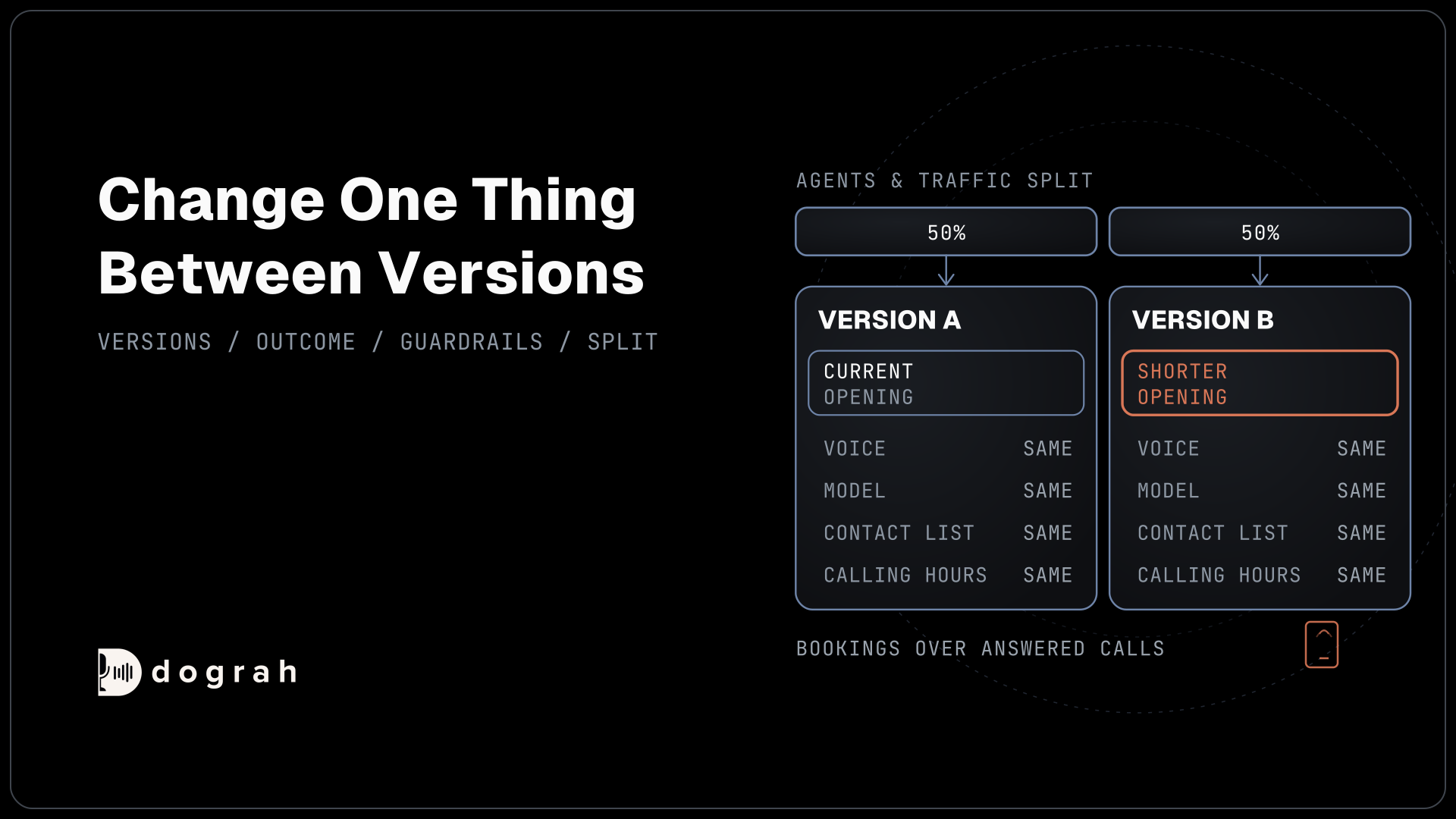
A test can only tell you about the thing you changed. If version B has a shorter opening and a new offer, and it wins, you won't know which one did it. So change one thing, such as the opening line or how the agent handles "I'm busy".
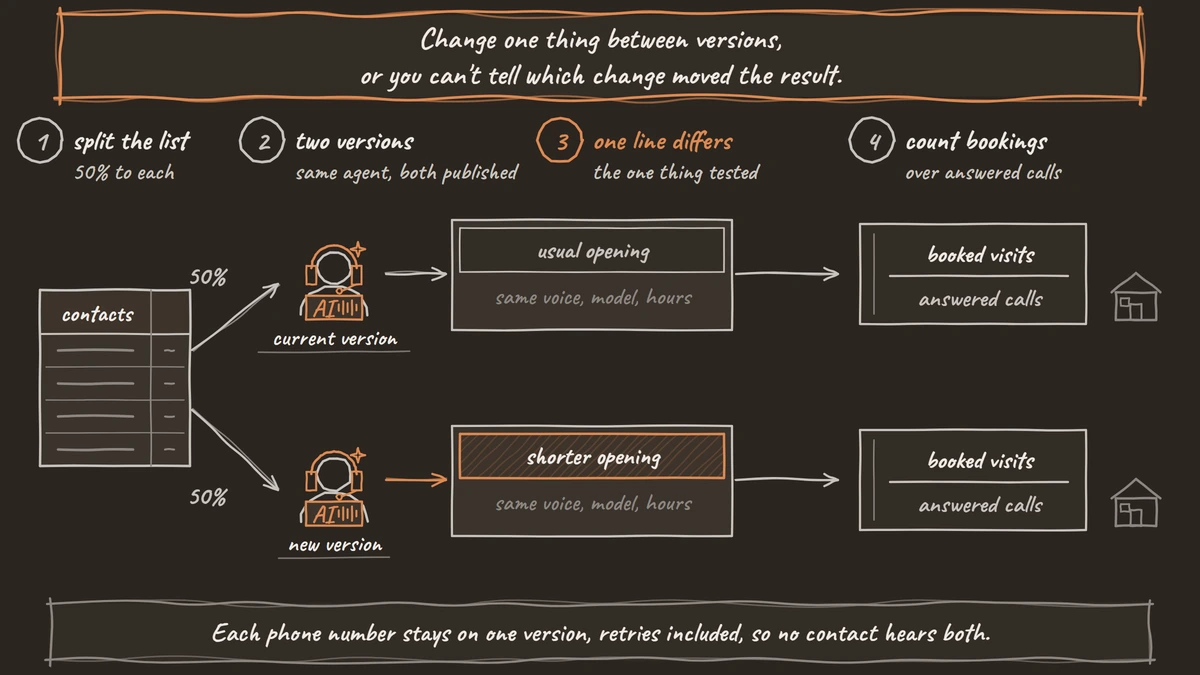
Make the change in the editor, test it in the browser, and click Publish version. Then note the version numbers of the current version and the new one. The split can use any published version, so you don't need a second agent.
Keep the voice, the model, the list and the calling hours the same for both. If the new version needs a model change too, test that separately.
Check: two published version numbers that differ in one thing only.
Step 2: Pick the outcome before the first call
Decide what "better" means before any calls go out, or you'll be tempted to pick whichever number looks good afterwards. Choose one primary outcome. For our example, it is the share of answered calls that end with the appointment_booked disposition.
The disposition is picked from your own list at the end of each call, so it is the same measure for both versions. The call dispositions page explains how the list works.
Then choose a few guardrails, numbers that must not get worse while the main one improves. Good ones for a calling agent are the share of do_not_call and not_interested outcomes and the number of transfers to a person. A QA node that scores calls, covered in Automated QA for Voice Agents, adds a quality check on top.
Check: you have written down the primary outcome and the guardrails before starting.

Open Source Alternative to Vapi / Retell
Self-hosted voice agent platform — no per-minute fees
dograh-hq/dograh
Star on GitHub
Step 3: Work out how many calls you need
Small tests only show big differences. The usual way to size a test compares two proportions at 95% confidence and 80% statistical power. We ran that calculation for our example. With a 20% booking rate, seeing it rise to 25% takes about 1,100 answered calls per version, and a rise to 30% needs about 290 per version.
That is why a test of 100 calls a side rarely settles anything at these rates. Put your own numbers into Evan Miller's sample size calculator. It uses a slightly different method and gives somewhat larger numbers, so treat 1,100 as a floor.
Size the list by answered calls. Hiya's 2026 State of the Call report found that 86% of calls from unknown numbers go unanswered. Check your own answer rate from past campaigns, and divide the answered calls you need by it to get the list size.
Run the test for at least one full week, even if you reach the numbers sooner. Answer rates and moods change by day of the week.
Check: you know how many answered calls each version needs and how many contacts that takes.
Step 4: Split the campaign between versions
The split lives on the campaign. Open Campaigns, click Create Campaign, and find "Agents & traffic split" on the Create New Campaign page. In the first row, choose your agent, set Version to the current numbered version and set Traffic % to 50. Click Add agent, choose the same agent, set Version to the new numbered version and give it 50. Split evenly does the same for any number of rows.
Pick numbered versions instead of "Latest published". The form notes that "Latest published" follows new releases, so publishing during the test would change what that side runs. Traffic % takes whole numbers that add up to 100, and a campaign can split across up to five versions.
Fill in the rest as usual: Telephony Configuration, the CSV and Advanced Settings. The CSV must include the variables every version uses. The campaigns overview covers those fields.
Each phone number always lands on the same version, retries included, so no contact hears both scripts. Avoid editing the split mid-test. Changes apply from the next batch and can move contacts between versions.
Check: the campaign page shows a Traffic split card with both versions at a 50% target.
Join the Dograh Community
Dograh is an OSS alternative to Vapi. Join our Slack community for queries, releases, best practices & community interactions.
Step 5: Read the results and pick a winner
The Traffic split card on the campaign page shows each version's Target, Actual share, Completed attempts and Outcomes, which counts the call dispositions. Click Refresh to update it while the campaign runs.
Read the Actual column with care. It counts every call attempt, including retries and unanswered calls, so it can drift from 50% without anything being wrong. For the decision, divide each version's appointment_booked count by its answered calls. Download Report on the campaign page exports the calls for a date range if you'd rather work in a spreadsheet.
Pick the winner only once both versions reach the call count from Step 3 and a full week has passed. Then check the guardrails. A version that books more visits and gets twice the do_not_call outcomes is not the winner. If the difference is smaller than the test could detect, keep the current version and try a bigger change.
Check: you have each version's booking rate over answered calls and its guardrails.
Testing an inbound line
Inbound calls have no built-in split. Each phone number points at one agent under Inbound workflow, so all calls to it run one version. The usual answer is a sequential test. Run the current version for one or two full weeks, publish the new one, then run it for the same length of time and compare.
A sequential test is weaker than a split, because anything else that changes between the two periods, such as a holiday or a marketing push, changes the result too. Keep the periods the same length and avoid known busy weeks. Our post on inbound vs outbound voice agents covers how numbers point at agents.
Before you ship it
Before you start any test, check these:
- Both versions are published and differ in one thing.
- The primary outcome and guardrails are written down.
- The list gives each version enough answered calls.
- Each split row uses a numbered version.
Glossary
- Traffic split
- A campaign setting in Dograh that shares a contact list between up to five published agent versions by percentage. Each phone number stays on one version, including retries.
- Numbered version
- A specific agent version chosen in the split instead of 'Latest published'. It keeps that side of the test fixed even if someone publishes a new version mid-test.
- Statistical power
- The chance that a test detects a real difference of the size you care about. At 80% power, a test sized for a 20% to 25% rise misses a real rise of that size one time in five.
- Guardrail
- A number that must not get worse while the main outcome improves, such as do-not-call requests or transfers. It stops a version from winning by pushing callers harder.