
AI voice agents for human handoff routing move a caller to the right person when the call needs one. The agent writes the details to the helpdesk first, then transfers to a number picked by a rule or by the contact center's own routing system. If nobody answers, the caller stays with the agent and is offered a callback.
Key Takeaways
- Tell the agent in the prompt when to transfer; a caller asking always qualifies.
- Write notes to the helpdesk with an HTTP API tool before every transfer.
- Plan the unanswered transfer: the caller stays with the agent, so offer a callback.
This post is part of our guide to AI voice agents for BPO and contact centers. The guide's section "Human handoff routing: the way to a person" starts from one fact: "Every client program needs a way out to a person, because many callers still want one." Here is how that handover runs in Dograh, an open-source, self-hostable voice agent platform, from the trigger to the call nobody picks up.
When the agent should hand over
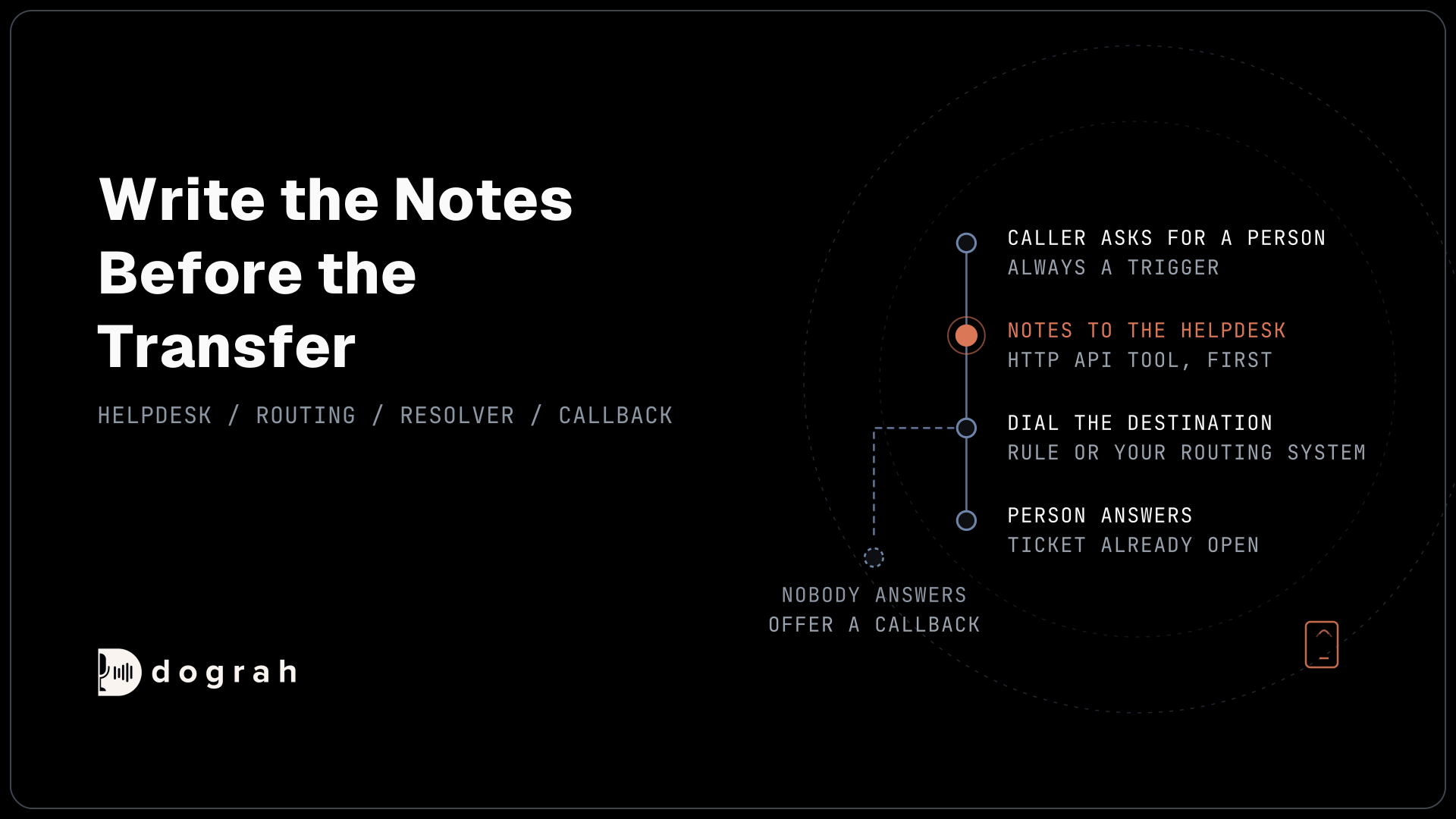
The prompt decides when a call goes to a person, so write the triggers down for each client program. A caller who asks for a person is always one of them.
Many callers will ask. In a OnePoll survey of 6,000 consumers for AnswerConnect, across the US, UK and Canada, 85% said they prefer a real person and 31% said they would hang up if connected to AI. An agent that argues with that request loses the caller.
Tell the agent in the prompt to transfer as soon as a caller asks for a person, or when the request is outside the program's list of calls the agent finishes. A caller who fails verification twice or sounds distressed goes to a person too. Write the same triggers into the tool's Description field, which tells the agent when to use it. Which calls stay with the agent is set out in AI Voice Agents for Tier-1 Call Deflection.
For reporting, set Call Disposition After Successful Transfer, such as transferred_to_billing. It is recorded only when the transfer succeeds, so each client program can count its handovers.
How Transfer Call connects the caller
Transfer Call works on Twilio, Telnyx and Asterisk ARI. It passes no summary by default; on Twilio it can play a short spoken introduction to both people. Write the details to your system with an HTTP API tool before the transfer.
Dograh calls the destination first and connects the caller only when someone answers. On Twilio and Telnyx the destination is a phone number, such as +1415555XXXX. On Asterisk ARI it is a SIP endpoint on the BPO's own Asterisk server, such as PJSIP/sales-queue, which suits floors that run their own phone system. A Pre-Transfer Message, as text or a recorded clip, can tell the caller what is happening before the dialling starts.
The spoken introduction is a switch in the tool, "Play a transfer introduction to both parties", and it is off by default. It runs on Twilio with a text-to-speech voice, is limited to 25 words and 15 seconds, and both people hear it. Speech-to-speech agents skip it. If it cannot be prepared in time, the transfer goes ahead without it. Put nothing in it that the caller should not hear. Browser test calls can't transfer, so test every transfer on a real phone line.
Write the notes before the transfer
The person who answers needs the notes before the caller says hello. Since Transfer Call passes no summary by default, the notes have to travel another way.
Tell the agent in the prompt to call an HTTP API tool first, which writes a ticket to the client's helpdesk with who the caller is, whether they passed verification, what they asked for and what the agent already tried. Then it transfers. The person on the floor opens the ticket and starts from where the agent stopped.
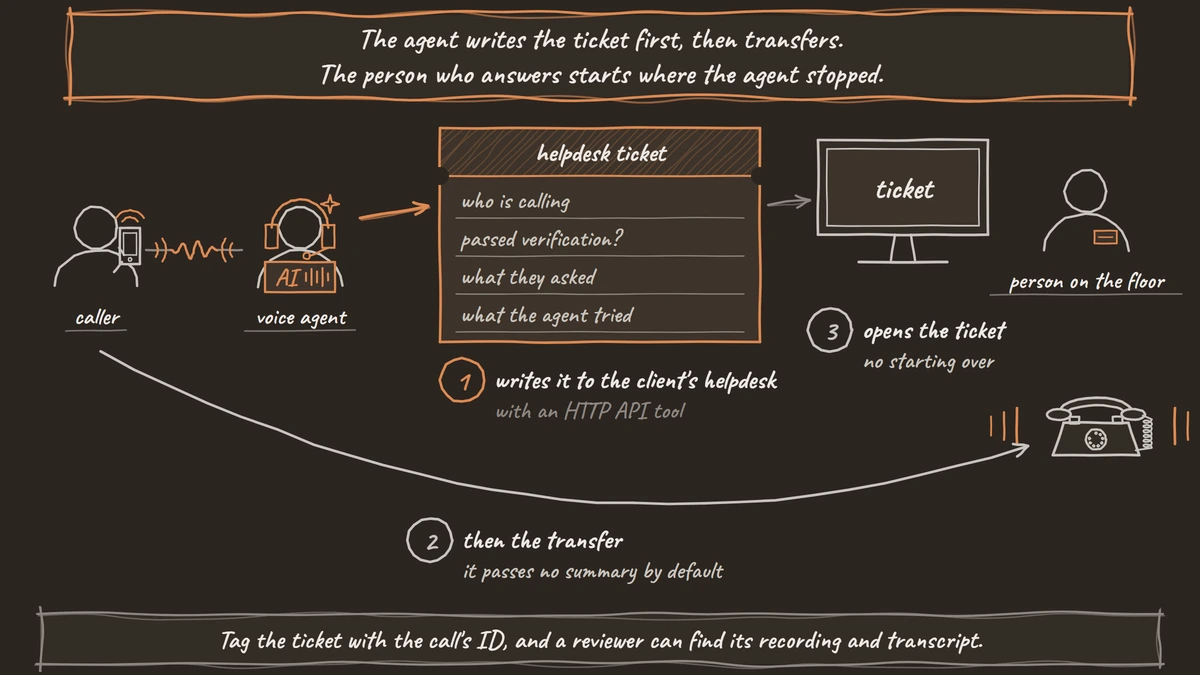
To tie the ticket to the call, add a Preset Parameter named workflow_run_id with the value {{initial_context.workflow_run_id}} to the tool. Anyone reviewing the ticket later can then find the recording and transcript of the same call. Write only what the client allows staff to see. The call itself never asks for a full account or card number, since recordings and transcripts keep whatever is said.
Human handoff routing: choose the destination
Every Transfer Call tool uses one destination source, and that choice is the routing. Dograh offers Static / Template, Context Mapping and the Dynamic HTTP Resolver.
Static / Template dials one fixed number or endpoint, or one built from call details, such as {{initial_context.transfer_destination}} from the client's record. It suits a program with a single support desk.
Context Mapping picks a destination from ordered rules on a value the call already holds, such as the client program or the caller's language. Rules run top to bottom and the first match wins, ignoring case. A field without a prefix reads the value gathered on the call first, then the one loaded at the start. If no rule matches, the optional fallback destination is used. With no fallback, the transfer fails before dialling and the agent can carry on with the caller. Routing by language this way pairs with AI Voice Agents for Multilingual Support Lines in BPOs.
The Dynamic HTTP Resolver asks the BPO's own system which number to dial, so the routing software can pick a team that is free at that moment. Dograh sends a POST with the values you choose, from the conversation or the call's context, and never the full transcript. Your system has to answer in one exact shape, with the destination under transfer_context:
{
  "transfer_context": {
    "destination": "+1415555XXXX",
    "custom_message": "I'm connecting you with our billing team now."
  }
}
What this does: It tells Dograh which number to dial, here the billing team, and the optional line to say before dialling. Without
transfer_context.destination, the transfer fails and the caller stays with the agent.
If the resolver fails, times out or returns no destination, the transfer fails and the agent stays with the caller. So have the BPO's system always return a number, falling back to a fixed one when no team is free.

Open Source Alternative to Vapi / Retell
Self-hosted voice agent platform — no per-minute fees
dograh-hq/dograh
Star on GitHub
When nobody answers the transfer
Plan for the transfer nobody picks up, because on a busy floor it will happen. If nobody answers, the caller stays with the agent; tell it in the prompt to offer a callback. The Transfer Timeout sets how long Dograh waits, 30 seconds by default and settable from 5 to 120.
Dograh has no built-in callback task, so the prompt also tells the agent to write the request to the client's system through an HTTP API tool, with the number and the time the caller chose. Many callers prefer it. In a Nextiva survey of 400 people, 75% said they would rather schedule a callback than wait. Our post on AI voice agents for after-hours coverage walks through the same unanswered case for on-call staff.
Some handovers need another agent, not a person, such as a billing agent for the same client. Transfer to Agent hands the caller to another Dograh agent with the conversation so far, on cascade agents. Our guide to AI receptionists explains why the handover is the part callers judge. Self-hosted Dograh has no per-minute platform fee (servers, model keys and phone minutes still cost); Dograh Cloud has a 1¢-a-minute platform fee.
Join the Dograh Community
Dograh is an OSS alternative to Vapi. Join our Slack community for queries, releases, best practices & community interactions.
Glossary
- Destination source
- How Dograh's Transfer Call tool picks where to send the caller: Static / Template, Context Mapping on a value from the call, or a Dynamic HTTP Resolver that asks your own system. Each tool uses one.
- Context Mapping
- Ordered rules that match a value the call holds, such as the client program or language, to a destination. The first match wins; an optional fallback covers values no rule matches.
- Dynamic HTTP Resolver
- A destination source that sends a POST to your endpoint during the call and dials the number your system returns under transfer_context.destination. If it fails, the caller stays with the agent.
- Transfer Timeout
- How long Dograh waits for the destination to answer, 30 seconds by default and settable from 5 to 120. When it runs out, the caller stays with the agent.