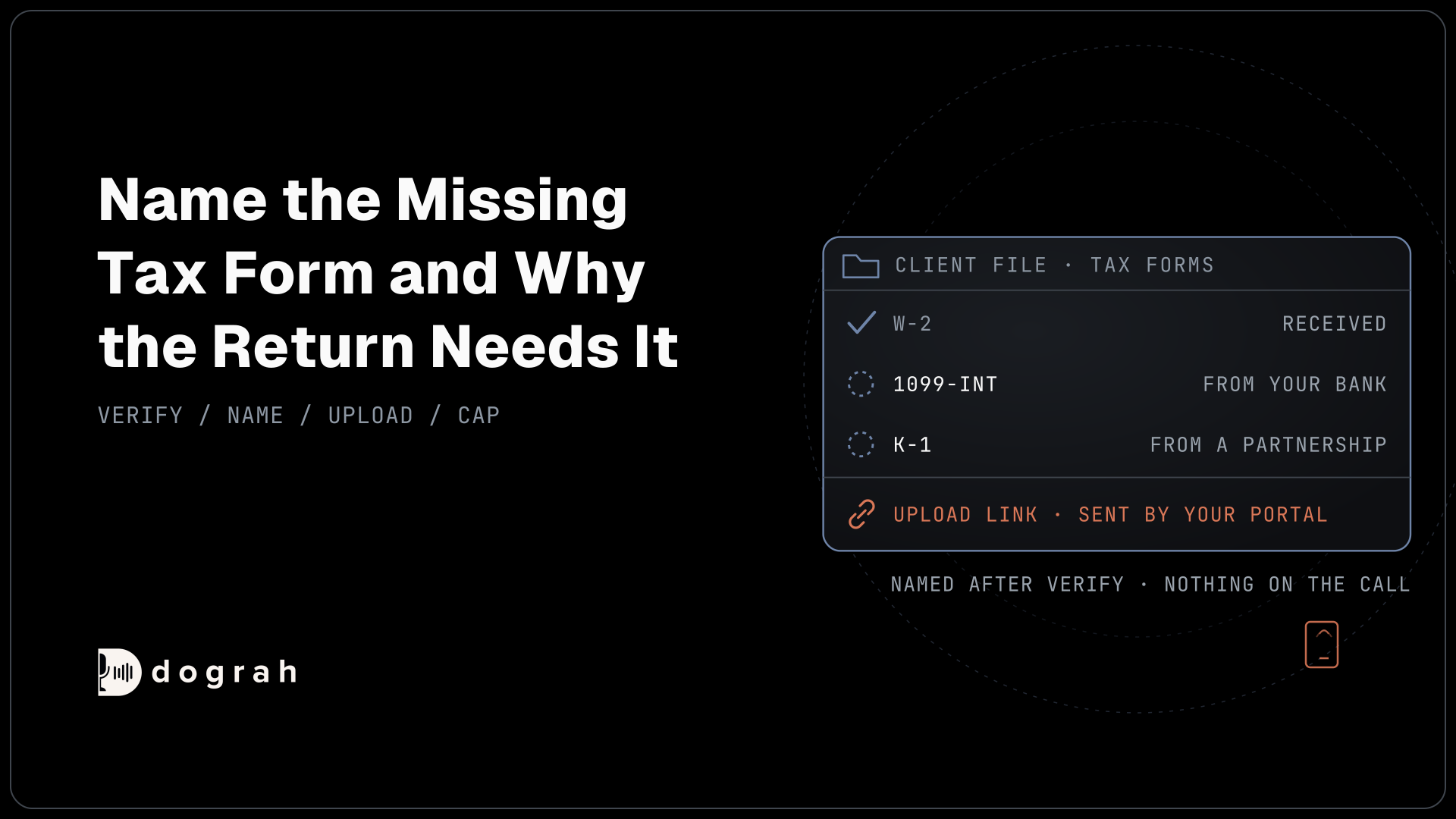

AI voice agents for document-collection reminders in accounting call clients whose tax documents are missing. After verifying the client, the agent names each missing form and why the return needs it, and the firm's portal sends a secure upload link by text or email. Nothing is collected on the call, and calls are capped per missing item.
Key Takeaways
- Name the exact missing form and why the return needs it.
- Documents never come through the call; the firm's portal sends the upload link.
- Cap calls per missing item, and stop the day the item arrives.
This post is part of our guide to AI voice agents for tax and accounting firms. The guide's section "During the season: documents and call overflow" sums up this call in one line: it "names the missing item and why the return needs it." Here is that call in full, run in Dograh, an open-source, self-hostable voice agent platform.
Why missing documents crowd the last two weeks
A return cannot be finished without its forms, so every late document pushes work toward the deadline. The IRS's weekly figures show tax professionals had e-filed 52.8 million returns by the first week of April and 72.8 million two weeks later. About 20 million returns went in those two weeks.
Clients rarely hold back a W-2 or a K-1 on purpose. They miss it because nobody told them clearly which form is needed and why. Some forms, such as a K-1 from a partnership, come from third parties on their own schedule, so the client may not know it exists. A reminder call that names the form and its reason fixes that far better than a generic "please send your documents" email.
Name the missing form and why, after verifying
The call reads the firm's own list of what is missing, then says it only to the right person. Pre-Call Data Fetch loads the client's missing items from the portal or practice management system once the call connects (on outbound calls, after the person answers). Write the prompt so the agent uses none of it until the client is verified.
That list is client tax information in its own right. The regulations under IRC 7216, in 26 CFR 301.7216-1, say tax return information "includes information that the taxpayer furnishes to a tax return preparer and information furnished to the tax return preparer by a third party." A W-2 from an employer or a 1099 from a bank is generally exactly that. Confirm your own position with counsel.
So the call runs greet, verify, disclose. The greeting carries the firm's name and the client's name only. A phone number finds the record but does not prove who answered, so the agent asks for a check the firm approves, such as date of birth. Then it names each item and its reason: "We still need the 1099-INT from your bank, so the interest can go on the return."
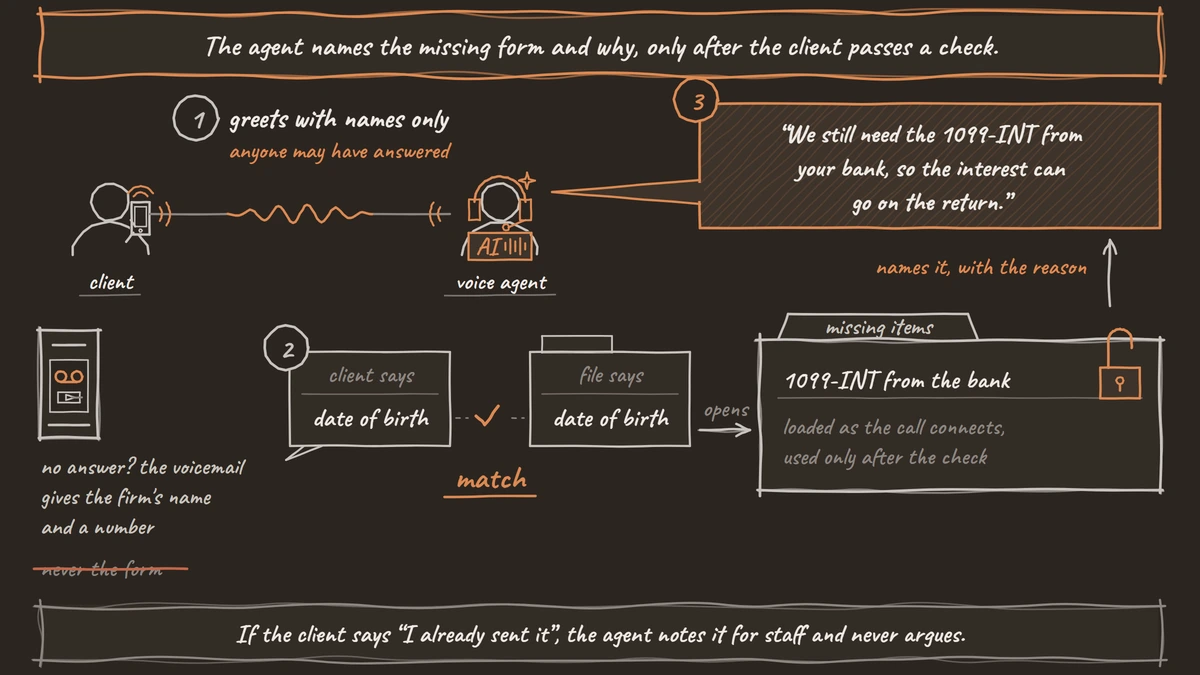
If the client says "I already sent it", the agent records that as stated and writes it to the file for staff to check, without arguing. Voicemail handling is off by default. Turn it on in Settings, and if you choose Leave a message, the message gives the firm's name and a callback number only, never the form or the tax year. Law firms run the same pattern for case documents, covered in document-collection reminders in law firms.

Open Source Alternative to Vapi / Retell
Self-hosted voice agent platform — no per-minute fees
dograh-hq/dograh
Star on GitHub
Documents never come through the call
The agent never takes a document on the call, whether as a photo or as numbers read off the form. Documents belong in a channel built to protect them. The FTC Safeguards Rule, at 16 CFR 314.4, tells a firm to "Protect by encryption all customer information held or transmitted by you both in transit over external networks and at rest." IRS Publication 4557 tells preparers to "Send only password-protected and encrypted documents if you must share files with clients via email or use Secure File Transfer Protocol (SFTP) to transmit files instead of email."
A phone line is no such channel. Recordings and transcripts keep whatever is said, so the call never asks for a full account, card or Social Security number; use a short check such as the last four digits, and send payment links by text or email from your own system. Tell the agent in the prompt to stop a client politely if they start reading a form aloud.
Instead, an HTTP API tool asks the firm's portal to send its secure upload link by text or email during the call. Dograh has no SMS tool and sends no texts itself, so the link always comes from the firm's own system.
The same pattern runs in claims document collection in insurance. Signing links work the same way in engagement letter and e-sign follow-up.
A cap that keeps the chase polite
Reminders work when they are few and stop on time, so the firm sets a cap and a stop rule. The portal's own emails go first. The call is the next step for items still missing after them.
Keep the cadence gentle, for example one call per missing item per week, stopping when the item arrives. Adding more calls as the deadline nears makes a document chase feel like debt collection. Campaigns have no per-contact call cap, so the firm's own list enforces it. Campaign retries count too. They run from 0 to 10, 2 by default, and can retry on no answer or voicemail, so keep them low for reminders.
A running campaign's contact list cannot be edited. Build each list from the portal's missing-items report right before launch. To stop calling someone mid-campaign, pause the campaign and start a new one from a corrected list. For lists that change daily, start calls from your own system with the API Trigger, so your system decides who is called.
Pre-Call Data Fetch helps here too. It re-reads the missing items when the call connects, so a form uploaded this morning is not asked for, and a client who has sent everything is thanked. It changes what the agent says, but it does not skip the call. Calling hours run in one time zone per campaign, so split the list by time zone, as tax deadline and extension reminders explains.
When a document won't make the deadline
Sometimes a form will not arrive in time, and the client asks what happens next. The agent records the situation, such as which form is late and when the client expects it, and writes it to the file for a preparer.
Whether to extend is a preparer's call, under the rule for every tax firm call. The agent never gives tax advice, and any question about the caller's own return goes to a preparer. Tell the agent that in the prompt. A model can still drift into "you'll probably need an extension", so the hand-off line plays as Transition Speech, fixed text or a recorded clip that Dograh plays when the call moves along a pathway. That pathway leads to a callback request written through an HTTP API tool.
To hand the call over instead, Transfer Call works on Twilio, Telnyx and Asterisk ARI. It passes no summary by default; on Twilio it can play a short spoken introduction to both people. Write the details to your system with an HTTP API tool before the transfer. If nobody answers, the caller stays with the agent; tell it in the prompt to offer a callback.
Consent generally comes before the first call. In its February 2024 declaratory ruling, the FCC said calls using AI-generated voices "require the prior express consent of the called party to initiate such calls absent an emergency purpose or exemption." Record that consent in the firm's system, and confirm your position with counsel. Dograh keeps no do-not-call list. When a caller opts out, an HTTP API tool writes it to your own list, and you remove those numbers before the next campaign upload. The do_not_call call tag records the request but never blocks a later call.
Self-hosted Dograh has no per-minute platform fee (servers, model keys and phone minutes still cost); Dograh Cloud has a 1¢-a-minute platform fee.
Join the Dograh Community
Dograh is an OSS alternative to Vapi. Join our Slack community for queries, releases, best practices & community interactions.
Glossary
- Missing-items report
- The list, from the firm's portal or practice management system, of forms each client still owes. Each campaign list is built from it right before launch, and Pre-Call Data Fetch re-reads it as the call connects.
- Secure upload link
- A one-client link from the firm's own portal for sending documents into an encrypted channel. During the call, an HTTP API tool asks the portal to send it by text or email.
- Tax return information
- Under the IRC 7216 regulations, information a client or a third party gives a preparer for a return. The list of a client's missing forms is generally part of it, so the agent reads it only after verification.
- Follow-up cap
- The firm's own limit on reminder calls, such as one call per missing item per week, stopping when the item arrives. Dograh Campaigns have no per-contact cap, so the firm's list enforces it.