
AI voice agents for account and billing support in SaaS answer the inbound billing line. They find the account by the calling number, verify the caller before naming an amount, and read charges and plans from the billing system. The billing provider sends invoices and card links. Refunds above policy and disputes go to a person, and cancellations are processed.
Key Takeaways
- A phone number finds the account; an approved check proves the caller.
- Card details never go through the call; the billing provider sends a secure link.
- Put the refund limit in your billing backend, not only in the prompt.
This post is part of our guide to AI voice agents for SaaS and subscription businesses. The guide's section "Keeping them happy: check-ins and billing support" puts this call in one line: "The account and billing support line is inbound". Here is that line in full, run in Dograh, an open-source, self-hostable voice agent platform.
What callers ask a SaaS billing line
Most billing calls are one of five requests, and the answer to each already sits in your billing system.
Callers want to know why they were charged, get a copy of an invoice, change their plan, update a card or cancel. A voice agent can handle the first four from your billing system and process the fifth, and a person takes anything that needs judgement.
Because the customer places the call, the outbound calling rules for AI voices generally do not apply to the line itself, since they restrict calls a business starts. An offer made inside a call the customer placed is generally outside those rules too, but a follow-up call you place to make that offer generally needs written consent; confirm your position with counsel. The same inbound pattern across other industries is in AI voice agents for inbound customer support.
Find the account, then verify the caller
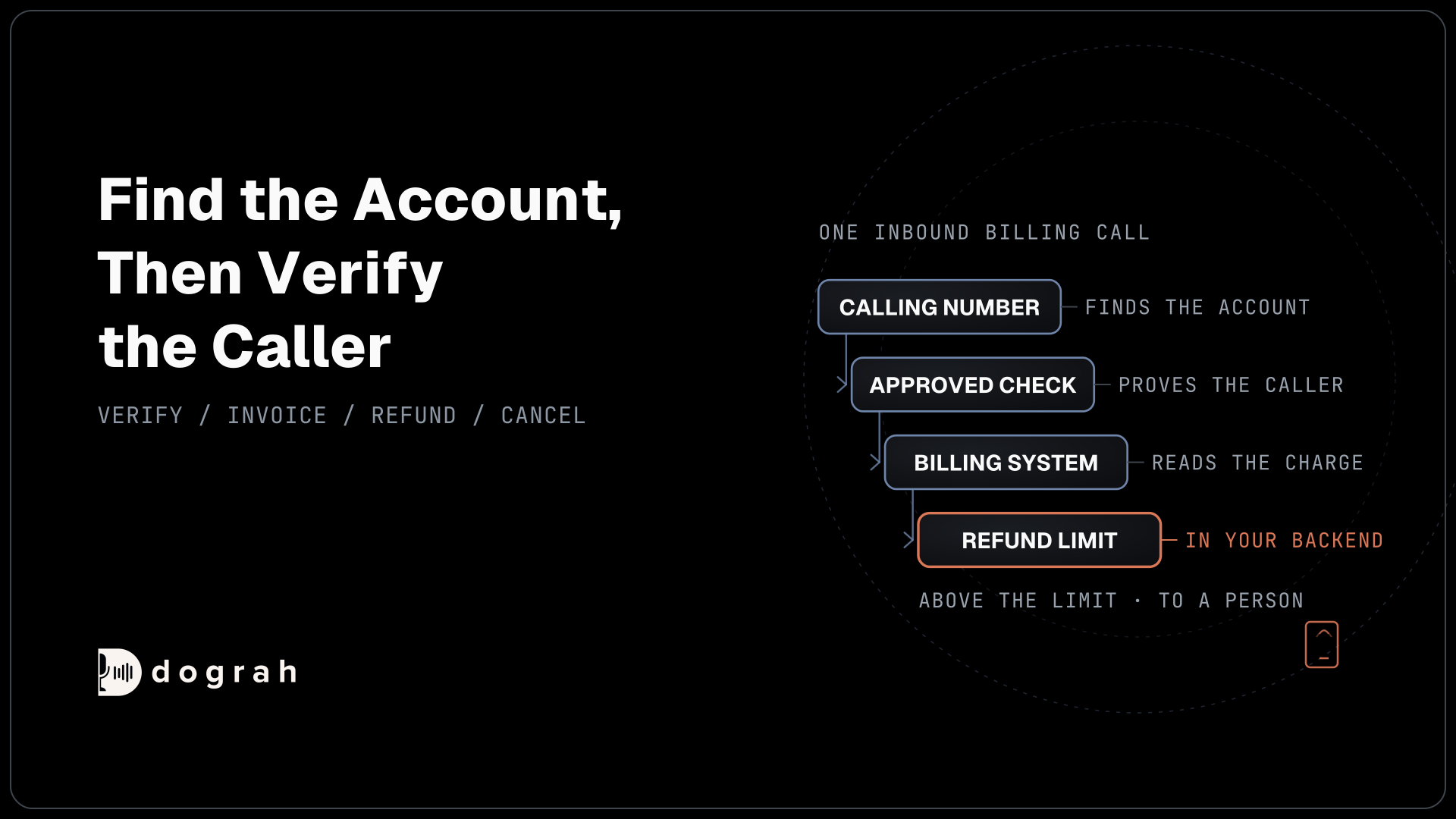
The agent finds the account before it says hello, but it names nothing until the caller passes a check.
Pre-Call Data Fetch, at the bottom of the Start Call node, set to Inbound calls only, sends the calling number to your endpoint as the call connects. Your backend returns the account it matches, such as the company name and the billing contacts. The greeting waits for that reply, and the caller hears ringing meanwhile, so keep the endpoint fast.
A phone number finds an account; it does not prove who is calling. Write the prompt so the agent uses none of the fetched data until the caller passes an approved check, such as the account email plus the number on their last invoice, checked against your billing system through an HTTP API tool. Recordings and transcripts keep whatever is said, so the call never asks for a full account, card or Social Security number; use a short check such as the last four digits, and send payment links by text or email from your own system.
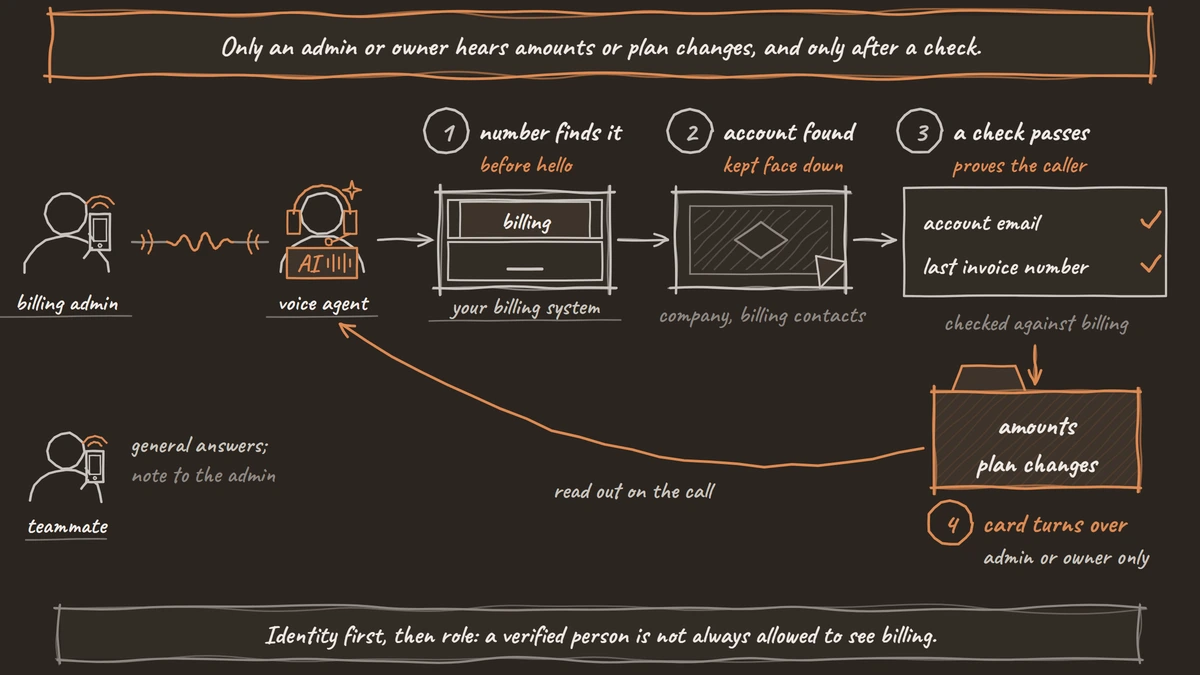
On B2B accounts, a verified person is not always allowed to see billing. Tell the agent in the prompt that only a billing admin or the account owner can hear amounts or change billing. Anyone else gets general answers, such as how invoices are sent, and the agent writes a note to your system so the admin can follow up.
Invoices, plan changes and card updates
Each billing answer is read from your billing system during the call, and each change is written back only after the caller confirms it.
For "why was I charged", an HTTP API tool asks your billing system for the charge and its line items, and the agent explains only what comes back, such as a proration after added seats. The tool's Custom Message, text or a recorded clip, plays once just before the tool runs, so the caller is not left in silence.
General policy questions, such as what each plan includes, come from your pricing pages and refund policy in the Knowledge Base.
For an invoice copy, the tool asks your billing provider to email it to the billing contact on file. For a plan change, the agent reads the new price exactly as the billing system returns it, asks the caller to confirm, and only then writes the change. To make that write safe to retry, add a Preset Parameter named workflow_run_id, type Number, with the value {{initial_context.workflow_run_id}} and Required on, so your system can ignore a duplicate.
Card updates never happen by voice. Dograh has no payment feature and no keypad (DTMF) tool. Instead, an HTTP API tool asks your billing provider to send its secure card-update link by email or text, and the customer types the card there. If a caller starts reading a card number, tell the agent in the prompt to stop them politely and offer the link. Our post on handling payment-sensitive (PCI) calls in a voice agent covers the wider rules.

Open Source Alternative to Vapi / Retell
Self-hosted voice agent platform — no per-minute fees
dograh-hq/dograh
Star on GitHub
Refunds, disputes and chargebacks go to a person
Money that leaves your account needs a limit the agent cannot talk its way past. So the limit lives in your backend.
Set your refund policy in the billing backend the HTTP API tool calls. Within the limit and the refund window, the endpoint issues the refund and returns a confirmation the agent reads back. Above it, the endpoint refuses, and the agent hands the request to a person. A prompt can be argued with; an endpoint that says no cannot.
Disputed charges, chargebacks, hardship requests and anything legal also go to a person. Transfer Call works on Twilio, Telnyx and Asterisk ARI. It passes no summary by default; on Twilio it can play a short spoken introduction to both people. Write the details to your system with an HTTP API tool before the transfer, such as the account, the charge and the request. If nobody answers, the caller stays with the agent; tell it in the prompt to offer a callback.
A failed charge the customer has not called about is a different call: your system starts it, outbound, after its own retries and emails. AI voice agents for failed-payment and dunning recovery in SaaS covers it.
Cancel requests: record, process, confirm
A caller who asks to cancel gets the cancellation, processed on the call. This section is general information, not legal advice.
The Restore Online Shoppers' Confidence Act (ROSCA) requires a seller charging through a negative option online to provide "simple mechanisms for a consumer to stop recurring charges". The FTC's March 2026 notice on subscription practices says complaints about negative option marketing reached "more than 90 per day in 2025", so a cancel request that stalls is exactly what draws them.
Tell the agent in the prompt to record the request, process it through your billing system with an HTTP API tool, or hand it to a person who can, and read back the date the plan ends as the billing system returns it. It makes no save offer and does not stall. On B2B accounts, the billing admin rule still applies. Anyone else gets a note sent to the admin, never a refusal to pass it on. The law behind this, including state automatic renewal laws, is covered in AI voice agents for subscription renewal reminders. Confirm your position with counsel.
Self-hosted Dograh has no per-minute platform fee (servers, model keys and phone minutes still cost); Dograh Cloud has a 1¢-a-minute platform fee.
Join the Dograh Community
Dograh is an OSS alternative to Vapi. Join our Slack community for queries, releases, best practices & community interactions.
Glossary
- Billing admin
- The person on a B2B account allowed to see invoices and change billing, as your billing system or CRM records it. The agent checks the role after verifying identity; other verified users get general answers and a note to the admin.
- Hosted card-update page
- A secure page run by your billing provider where the customer types a new card. The agent asks the provider to send its link by email or text, so no card number is spoken or recorded.
- Chargeback
- A payment reversed by the customer's card issuer after a dispute. It involves your payments team and evidence deadlines, so the agent writes the details to your helpdesk and hands the caller to a person.
- Pre-Call Data Fetch
- A Dograh setting at the bottom of the Start Call node that sends the calling number to your endpoint as the call connects. On a billing line it finds the account, which the agent uses only after the caller is verified.