
To deploy voice AI on Azure, create a VM with at least 4 vCPUs and 8 GiB on a Standard public IP, allow the web and TURN ports in its network security group, then run the setup on Docker. For teams that want to own their call stack, Dograh, the open-source AI voice agent platform, runs on Azure this way.
Key Takeaways
- A Standard public IP is static, so the HTTPS certificate survives VM restarts.
- Azure lets no inbound traffic in until a network security group rule allows it.
- Dograh can use Azure OpenAI deployments and Azure Speech on your own keys.
A voice platform on Azure needs a VM that stays up, a static address and open audio ports, and this guide covers only what Azure does differently. We go step by step through the VM and its network rules, then Azure models and the upkeep that stays with you.
What you need before you start
These steps follow the published Dograh and provider docs. Run them on a trial server before production. The Docker install and Dograh's setup script are the same on any cloud, so this post points to our AWS deployment guide for those two steps and spends its time on the Azure parts.
- An Azure subscription with quota for a 4 vCPU VM in your chosen region.
- The Azure CLI 2.0.30 or later, or Azure Cloud Shell, signed in with
az login. - Your own public IP address, so you can limit SSH to it.
- A phone carrier account such as Twilio, Telnyx or Plivo, and keys for the models you plan to use.
Why this VM needs a public IP
Azure has a managed route for voice agents, and it is worth knowing what it leaves to you. Microsoft's hosted voice agents run your own container behind a WebSocket, with sandbox sizes up to 2 vCPU and 4 GiB. Hosted agents do not provide a managed TURN service, so on that route your container runs the speech pipeline and you bring a TURN relay for browser audio. A managed voice wrapper can hand speech to Voice Live, but it is still your code behind it.
The VM route runs a whole platform instead. Dograh puts the call flow, the phone connection, Postgres, file storage, nginx and a TURN server on one VM, and it needs at least 8 GB RAM and 4 vCPUs for that.
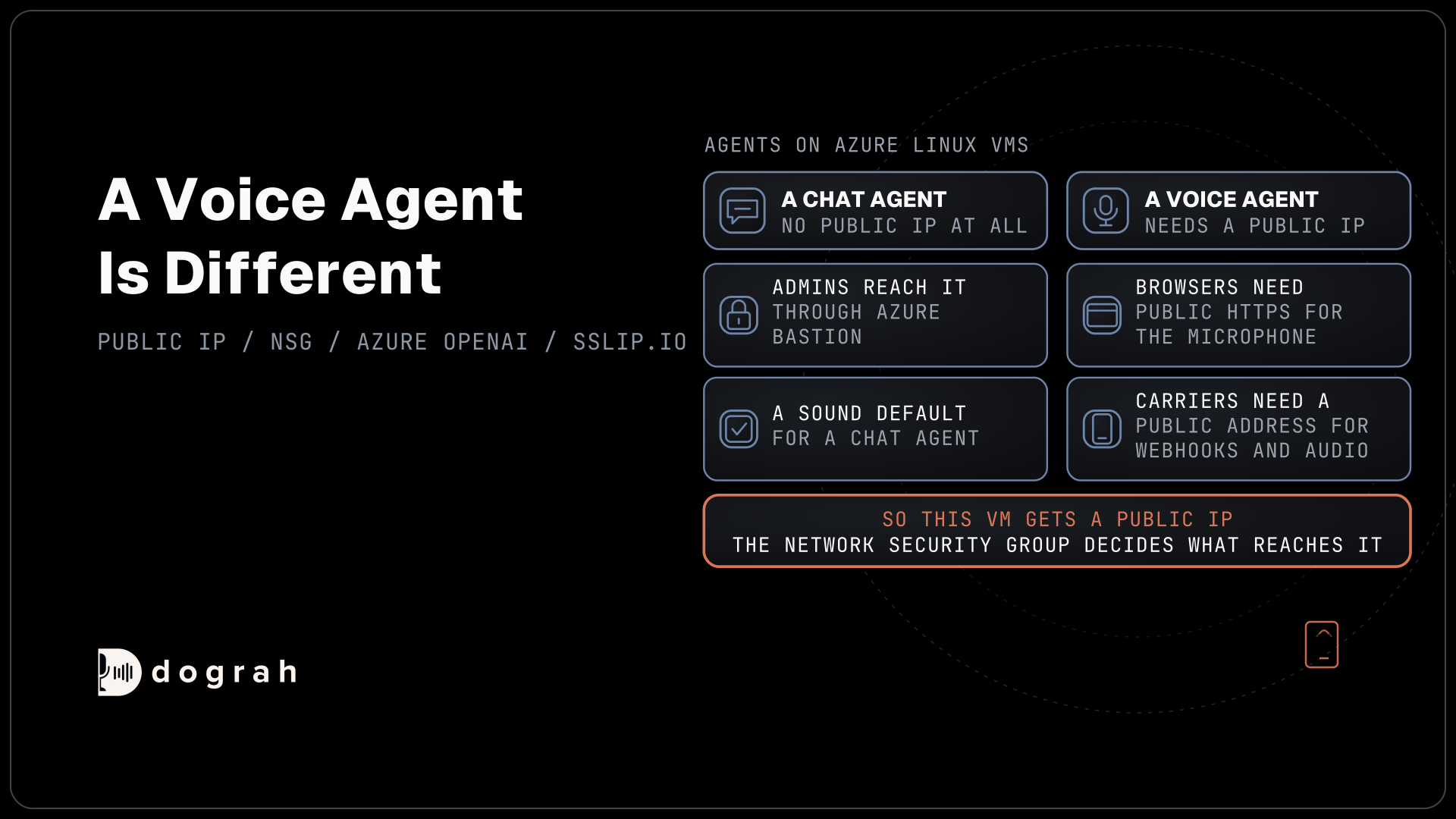
A Microsoft community post on running agents on Azure Linux VMs takes the opposite approach to networking. Its VM has no public IP at all, and admins reach it through Azure Bastion. That is a sound default for a chat agent. A voice agent is different, because browsers need public HTTPS for the microphone and carriers need a public address for their webhooks and audio. So this VM gets a public IP, and the network security group decides exactly what reaches it.
Step 1: Create the VM with 4 vCPUs and 8 GiB
Create a resource group first, then the VM inside it. Both commands come from Microsoft's Linux VM quickstart. The first sets MY_RESOURCE_GROUP_NAME and REGION and creates the group.
export RANDOM_ID="$(openssl rand -hex 3)"
export MY_RESOURCE_GROUP_NAME="myVMResourceGroup$RANDOM_ID"
export REGION=EastUS
az group create --name $MY_RESOURCE_GROUP_NAME --location $REGION
What this does: It creates a resource group named with a random suffix in East US. Everything for this deployment goes in it, so deleting the group later removes it all.
The quickstart's VM command does not set a size, so we add --size Standard_F4s_v2, a documented option of az vm create that gives 4 vCPUs and 8 GiB. --public-ip-sku Standard is already in Microsoft's line.
export MY_VM_NAME="myVM$RANDOM_ID"
export MY_USERNAME=azureuser
export MY_VM_IMAGE="Canonical:0001-com-ubuntu-minimal-jammy:minimal-22_04-lts-gen2:latest"
az vm create \
    --resource-group $MY_RESOURCE_GROUP_NAME \
    --name $MY_VM_NAME \
    --image $MY_VM_IMAGE \
    --admin-username $MY_USERNAME \
    --assign-identity \
    --generate-ssh-keys \
    --public-ip-sku Standard \
    --size Standard_F4s_v2
What this does: It creates an Ubuntu 22.04 VM with 4 vCPUs and 8 GiB, an SSH key in
~/.sshand a Standard public IP. It also creates a network security group for the VM, which Step 3 edits.
Leave room on the OS disk for Dograh's images, database and recordings. The community post above used a 64 GB disk for a much smaller agent runtime.
Check: the command prints "powerState": "VM running" and a publicIpAddress, and you can SSH in as azureuser.
Step 2: Keep the Standard public IP
On Azure, the address step is mostly done for you. Standard SKU public IP addresses are static, and Microsoft names TLS certificates linked to an IP address as a reason to want one. Basic SKU addresses were retired on 30 September 2025, so Standard is the only kind a new VM gets.
That matters because Dograh's setup issues its HTTPS certificate for the server's IP. With a static address, the certificate keeps working after you stop, resize or restart the VM. Keep the public IP resource as long as the deployment lives, since deleting it gives the next one a new address and needs a new certificate.
A Standard IP can also carry a DNS label, which gives a name in the form name.region.cloudapp.azure.com. You do not need one, because the setup script names the server through sslip.io on its own.
Check: az vm show --show-details --resource-group $MY_RESOURCE_GROUP_NAME --name $MY_VM_NAME --query publicIps --output tsv returns the same address after a VM restart.

Open Source Alternative to Vapi / Retell
Self-hosted voice agent platform — no per-minute fees
dograh-hq/dograh
Star on GitHub
Step 3: Allow Dograh's ports in the NSG
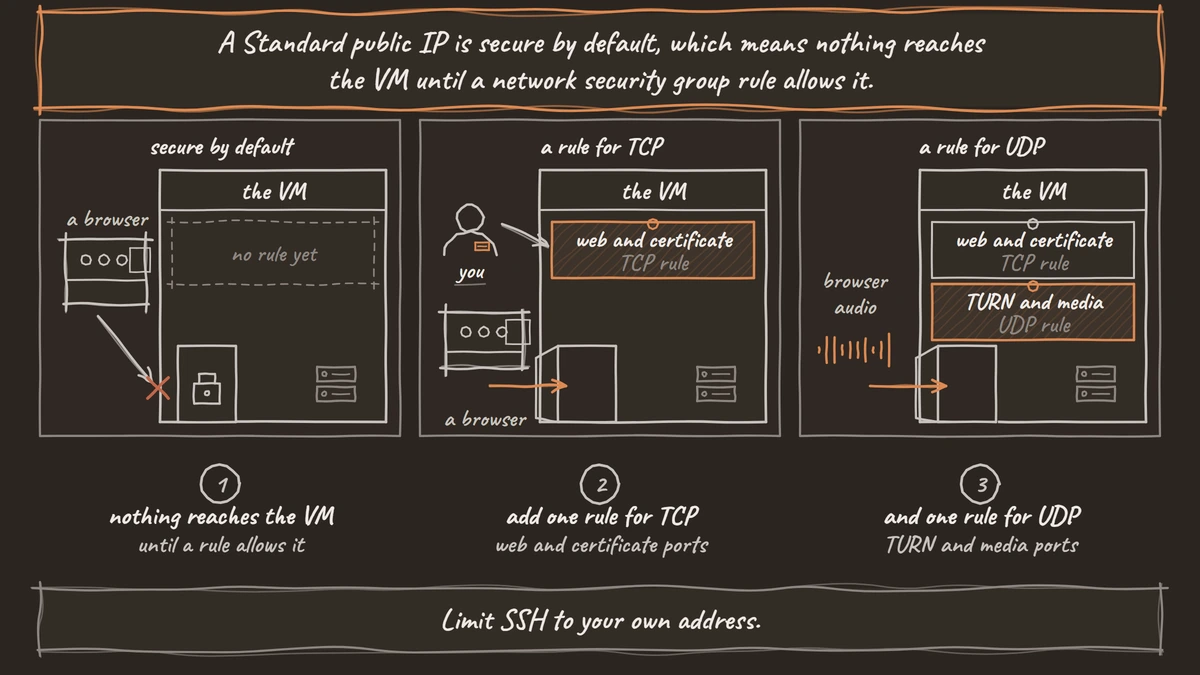
A Standard public IP is secure by default, which means nothing reaches the VM until a network security group rule allows it. Dograh needs TCP 80, 443, 3478 and 5349 and UDP 3478, 5349 and 49152 to 49200. The commands below follow the az network nsg rule reference and add one rule for TCP and one for UDP, each with its own --priority.
az network nsg rule create -g $MY_RESOURCE_GROUP_NAME --nsg-name MyNsg -n dograh-tcp --priority 1010 --destination-port-ranges 80 443 3478 5349 --access Allow --protocol Tcp
az network nsg rule create -g $MY_RESOURCE_GROUP_NAME --nsg-name MyNsg -n dograh-udp --priority 1020 --destination-port-ranges 3478 5349 49152-49200 --access Allow --protocol Udp
What this does: It opens the web and certificate ports and the TURN and media ports to inbound traffic. Replace
MyNsgwith the name of the security groupaz vm createmade in your resource group, and keep each priority unique between 100 and 4096.
Find the name with az network nsg list -g $MY_RESOURCE_GROUP_NAME --query "[].name" -o tsv. It is usually your VM name followed by NSG. az vm create also opens SSH on Linux by default. List the group's rules with az network nsg rule list -g $MY_RESOURCE_GROUP_NAME --nsg-name MyNsg, then narrow the SSH rule with az network nsg rule update and --source-address-prefixes set to your own address.
Check: the rule list shows dograh-tcp, dograh-udp and an SSH rule limited to your address.
Step 4: Install Docker and run Dograh's setup
From here the steps match any Linux server. SSH in, install Docker Engine from Docker's apt repository, then run setup_remote.sh from Dograh's remote server setup. Steps 4 to 6 of our AWS guide give every command with its source.
When the script asks for the server's public IP, enter the Standard public IP from Step 1. On a public IP it gets a Let's Encrypt certificate through sslip.io and starts the stack, so the address becomes a name such as 203-0-113-10.sslip.io. If the script warns that Let's Encrypt issuance failed, the TCP rule from Step 3 is missing or sits on the wrong NSG. Fix the rule, then run the certbot retry command the script prints.
The script offers 2 FastAPI workers by default. On a 4 vCPU VM you can enter 4, since Dograh's scaling guide suggests one per vCPU, capped at 8, and each takes roughly 300 to 500 MB of RAM.
Check: the dashboard opens at the printed https://...sslip.io address with no browser warning.
Join the Dograh Community
Dograh is an OSS alternative to Vapi. Join our Slack community for queries, releases, best practices & community interactions.
Step 5: Choose Azure models in Dograh
Running on Azure leaves the model choice open. The VM holds Dograh's call flow, tools and phone connection, while the speech and language models plug in as a layer you pick per configuration. Azure's options are set up in Providers and Models like any other.
For a language model, add an Azure OpenAI provider. In Azure OpenAI you deploy a model under a deployment name, and API calls use that name rather than the model's. So the Model field takes your deployment name, with gpt-4.1-mini as the default, and the endpoint takes https://<resource>.openai.azure.com.
For speech-to-speech, Azure OpenAI Realtime takes a realtime deployment such as gpt-realtime, the same endpoint and a voice such as alloy, in a Realtime mode configuration. Realtime mode also needs a separate language model for extraction and QA. For listening and speaking in a normal pipeline, Azure Speech Services covers both, with a region such as eastus and a voice such as en-US-AriaNeural. Our guide to Azure Speech for voice agents covers that setup and the voice choice in detail.
Check: run a Test Agent call with this configuration and confirm the agent hears you and replies. A wrong key, endpoint or deployment name shows up on that first call.
Step 6: Test in the browser, then on a phone
Build the first agent on the canvas with Create Agent and Blank Canvas, and pick your configuration in the agent's Model tab. Test Agent runs a Web Call, which proves the UDP rule, since browser audio is what a missing TURN range breaks. Then connect your carrier under Telephony, point a number at the agent and ring your own mobile with the Phone Call button.
Check: the web call has two-way audio and the agent answers a real phone call.
Before you ship it
Give the deployment a proper name and an owner. For your own domain, add an A record that points at the static IP and run the custom domain script from the folder where you ran setup. Set ENABLE_SIGNUP=false once your team has accounts, and telemetry can be switched off with ENABLE_TELEMETRY=false.
Upkeep sits with you on a VM. Snapshot the OS disk regularly, since Postgres and the recordings live on it, and plan upgrades with the update guide. Our post on how to update a self-hosted voice agent adds the backup and test-call routine around update_remote.sh.
On cost, a self-hosted Dograh VM carries no per-minute platform fee. You still pay Azure for the VM and its public IP, plus your model keys and the carrier's phone minutes, and your team owns the database, the certificate and each upgrade. Support comes from the open-source community, or from a custom SLA on an Enterprise plan. Teams that would rather not run a VM at all can use Dograh Cloud, which has a 1¢-a-minute platform fee, with models and phone minutes on top.
Glossary
- Network security group (NSG)
- Azure's firewall for a VM or subnet. Its rules, each with a priority from 100 to 4096, decide which ports and sources can reach the VM.
- Standard public IP
- Azure's current public address type. It is static and closed to inbound traffic until an NSG rule allows it, which suits a certificate tied to the IP.
- Deployment name
- The name you give a model when you deploy it in Azure OpenAI. API calls, and Dograh's Model field, use this name instead of the model's own.
- Resource group
- An Azure container for related resources. Putting the VM, its IP and its NSG in one group lets you delete the whole deployment at once.