
A dealer support line with a voice agent, such as one built on Dograh, answers dealers' and installers' product questions from your own manuals and warranty terms, and looks up warranty and order status by serial number. Coverage decisions, safety questions and anything your documents don't cover go to a product specialist, with a ticket written before the transfer.
Key Takeaways
- Load manuals and warranty terms as written, split by model.
- Warranty status comes from your record, found by a serial number read back.
- Coverage decisions and safety questions always go to a specialist.
A dealer calling the manufacturer is usually on a job with a customer watching. Below, we cover which documents to load, how serial number lookups work and when a call goes to a specialist, with each part set up in Dograh, the open-source AI voice agent platform we build.
Why dealers call the manufacturer
Dealers and installers call because something on the job does not match what they expected. An installer needs the clearance for a model they rarely fit. A service tech reads out an error code. A dealer asks whether a replacement part has shipped, or whether a customer's unit is still under warranty before they quote the repair.
Most of those answers already exist in a manual, a parts list or a record in your systems. The caller just cannot find them fast enough with a customer standing nearby. Manufacturers have started answering this around the clock. Screen Innovations, a maker of projection screens and window shades, launched a 24/7 support assistant for its dealers and installers in July 2026, trained on its product documentation and handing pricing and sales questions to its own team.
A phone line does the same job for dealers who would rather talk than type, and it works from a van or a crawl space. The design rule is simple. The agent answers from your documents and your records, and it hands anything that needs a decision to a person.
Build the knowledge base from manuals and warranties
The agent can only be as exact as the documents behind it, so the knowledge base is most of the work. Upload installation manuals, service guides, parts lists, error code tables and the warranty terms to the Knowledge Base. It accepts PDF, Word, TXT, Markdown and JSON files of up to 5 MB each, and you attach the files to the agent's node under Knowledge Base Documents.
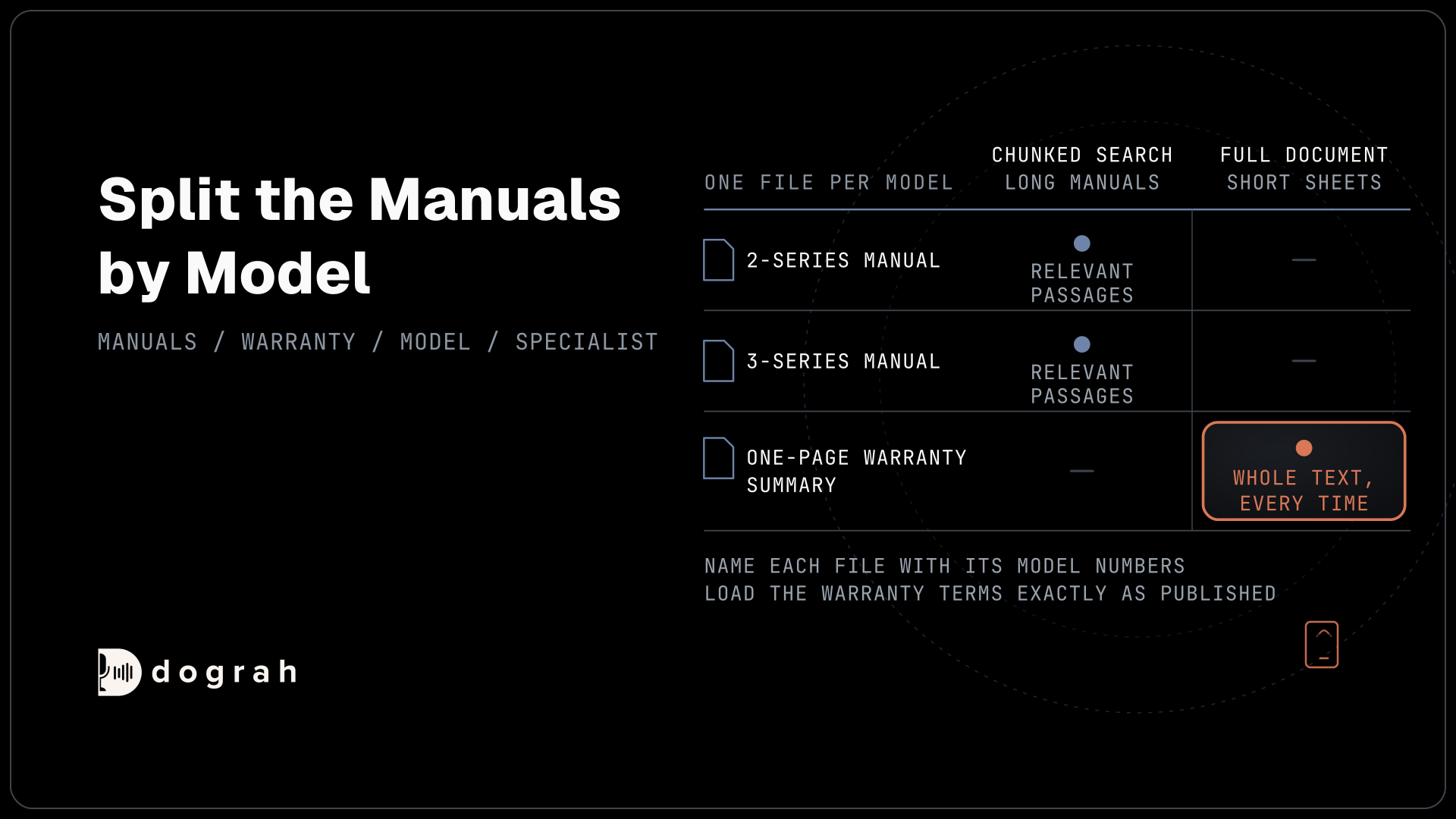
Split the manuals by model or product line rather than uploading one big binder. Error codes and clearances often change between product generations, and one file per model keeps a question about the 2-series from being answered out of the 3-series manual. Name each file with its model numbers so the agent picks the right one.
Choose the retrieval mode per file. Chunked Search suits long manuals, because only the relevant passages come back, and it needs an embedding key. Full Document suits short sheets, such as a one-page warranty summary, where the agent should see the whole text every time. Our post on how a voice agent answers from files explains when the agent looks something up.
Load the warranty terms exactly as published. For consumer products, the FTC's guide to federal warranty law explains that written warranties have to be available for buyers to read before they buy, so the wording already exists and has been checked. The agent should quote that text, not summarise it from memory.
Model numbers and part codes trip up speech-to-text, so add them to the Dictionary in the agent's Settings as one comma-separated list. Then "HX-240" is heard as a model number instead of a string of near-misses.
Look up warranty and order status by serial number
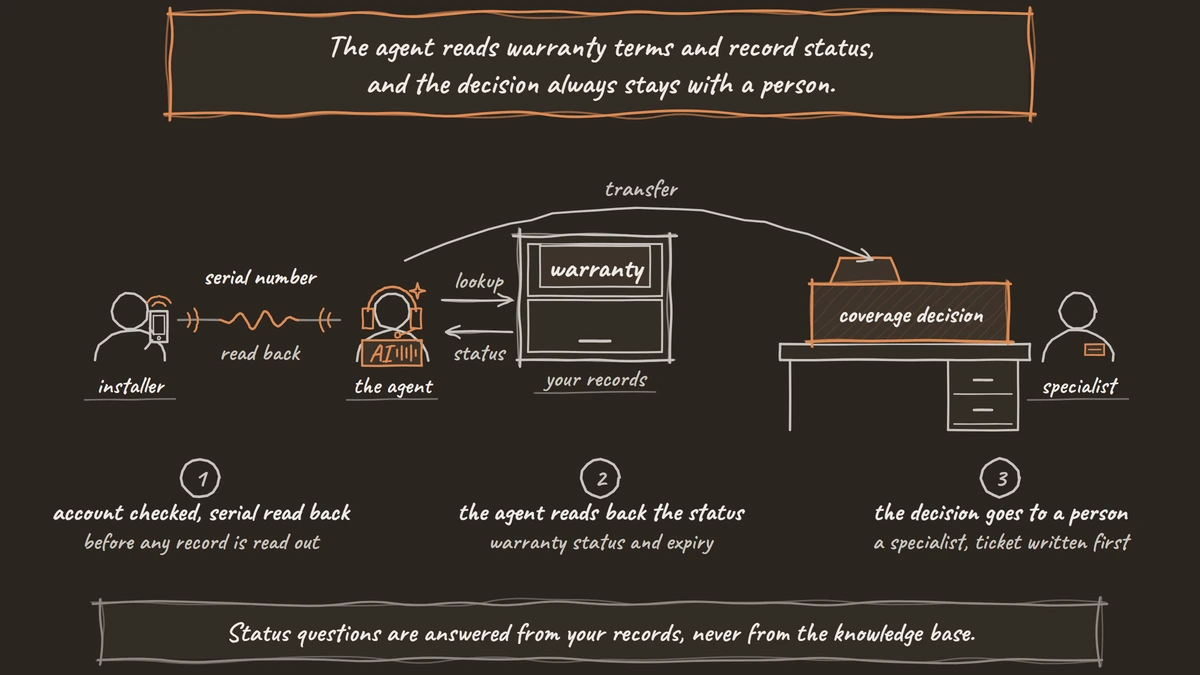
Status questions are answered from your records, never from the knowledge base. Before any record is read out, the agent confirms who it is talking to. Pre-Call Data Fetch can find the dealer's account from the calling number, set to Inbound calls only, but a phone number finds a record and does not prove who is calling. So the agent asks for the dealer account number and a second detail, such as the account's postcode, and checks both before going further.
Next comes the serial number. Callers read these off worn labels in bad light, so the agent repeats it back digit by digit and asks for a yes before it runs the lookup. An HTTP API tool then sends a GET request with the serial number to your warranty or order system, using a credential stored in Dograh, and reads back the registration date, warranty status and expiry, or the order's shipping status. Order questions work the same way with an order or purchase order number, and a dealer with several open orders hears them one at a time, newest first, so nothing gets lost in a long list.
Give the tool a short Messages line, such as "Let me pull that up," so a slow lookup does not leave the dealer in silence. The tool waits 5 seconds by default before it gives up. A timeout or an error comes back to the agent as a failed request and is not retried, so the prompt tells the agent what to say, for example that it will open a ticket and someone will call back with the status.

Open Source Alternative to Vapi / Retell
Self-hosted voice agent platform — no per-minute fees
dograh-hq/dograh
Star on GitHub
What the agent never decides
The agent reads warranty terms and record status, and the decision always stays with a person. A wrong answer on coverage costs a dealer a refused claim or costs you a repair you never agreed to pay for. Write the never list into the prompt plainly. The agent never says a claim is approved or covered. Exceptions, goodwill repairs and any reading of the terms for a case that is not spelled out stay with a person.
Safety questions go to a person too. If a caller describes a burning smell, sparks or a unit that should be shut down, the agent stops troubleshooting and moves straight to the transfer. Anything the documents do not answer is handled the same way. The agent says it does not have that in front of it and offers the specialist, instead of filling the gap with a guess.
The consumer side of warranty calls, where a company calls buyers about their plans, has its own consent and verification rules, covered in AI voice agents for warranty and extended-service plans.
When a call goes to a product specialist
A transfer is only useful if the specialist does not have to start the call again. Before the transfer, the agent writes a ticket through an HTTP API tool, with the dealer account, the model, the serial number, what the caller described and what has been tried. The tool posts to whatever ticket system you run, through that system's own API.
Then Transfer Call hands the dealer to a person on Twilio, Telnyx, Plivo, Cloudonix or Asterisk ARI. Dograh calls the specialist first, the dealer hears hold music while it rings, and the two are connected only once someone answers. Context Mapping can pick the destination from a field the agent gathered, such as product line, so a heating question rings the heating team and a controls question rings controls.
If nobody answers within 30 seconds, the default, the transfer comes back to the agent as failed and the dealer stays on the line with it. The agent says the ticket is open and a specialist will call back, and adds that to the ticket through the same tool. Transfers only run over a real phone call, so test this path from a phone.
Running the line on your own terms
Product manuals, dealer accounts and warranty records are business data many manufacturers would rather keep in-house. You can self-host Dograh on your own servers or run it on Dograh Cloud, and bring your own keys for any speech and language models or run open models on your own machines.
Self-hosted Dograh has no per-minute platform fee, but servers, model keys and phone minutes still cost money. Dograh Cloud charges a 1¢-a-minute platform fee. Your phone and model providers bill you separately at their own rates.
Each call's trace shows every lookup the agent made and what came back, so when a dealer disputes an answer, you can see whether it came from the record or the manual. Built-in QA can score a sample of calls each week, and its prompt can tag any call where the agent talked about coverage instead of transferring. A pre-recorded greeting in a familiar voice from your support team keeps the line sounding like yours.
Start with the most common calls, usually order status and error codes, and add warranty lookups once the serial number read-back works every time. Our tutorial on adding tool calls to a voice agent covers the tool setup screen by screen.
Join the Dograh Community
Dograh is an OSS alternative to Vapi. Join our Slack community for queries, releases, best practices & community interactions.
Glossary
- Chunked Search
- A Knowledge Base retrieval mode that splits a document into passages and returns only the ones relevant to a question. It suits long manuals and needs an embedding key, while Full Document hands over the whole file.
- Pre-Call Data Fetch
- A request Dograh sends to your system when a call connects, carrying the caller's number. It can find the dealer's account before the greeting, but it identifies a record and does not prove who is calling.
- Context Mapping
- A Transfer Call setting that picks the destination from a gathered field, such as product line. One agent can then send heating questions and controls questions to different specialist teams.
- Written warranties
- The published terms of a product's warranty. Because the wording already exists, the agent should quote it from the knowledge base and leave any decision about a specific case to a person.