
Custom vocabulary is a list of names and terms you give the speech-to-text model so it writes them correctly. Build it from words your agent actually misheard, keep it short and check the voice says each name right. For teams fixing misheard names, Dograh, the open-source AI voice agent platform, passes an agent's Dictionary words to five speech-to-text providers.
Key Takeaways
- A 2026 benchmark found prompting and boosting gave similar gains at large model scale.
- Build the list from words your agent actually misheard, not your whole catalog.
- A name heard right can still be said wrong, so check the voice too.
Brand names and product codes are the words a voice agent most often gets wrong, and they are the words callers care about. This guide covers how custom vocabulary works across providers and how to build the list, then turns to the speaking side and Dograh's Dictionary.
Two ways to bias a model toward your words
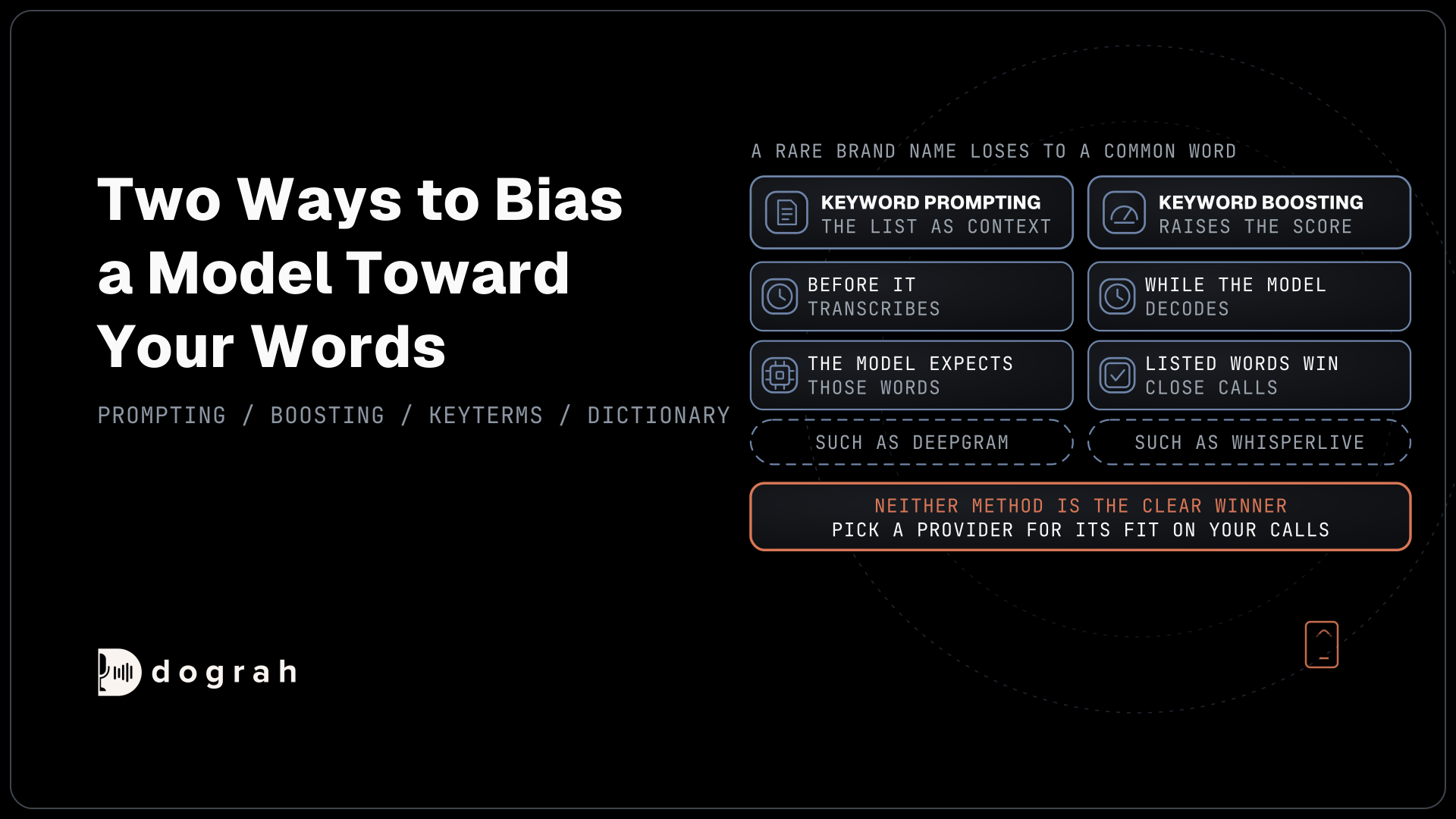
A general speech-to-text model picks the most likely words for the sounds it hears. A rare brand name loses to a common word that sounds close, so "Tretinoin" turns into something else. Custom vocabulary tilts that choice toward the words you list.
Providers do it in one of two ways. Keyword prompting gives the model the list as context before it transcribes, so it expects those words. Keyword boosting raises the score of listed words while the model decodes, so they win close calls.
Neither method is the clear winner. The Contextual Earnings-22 benchmark, published in March 2026 by researchers at the speech company Argmax and at UCLA, built six strong baselines across both approaches. It found they "reach comparable and significantly improved accuracy" once scaled from proof-of-concept tests to large systems. Its authors also note that general accuracy has plateaued on academic test sets, which is why they built a benchmark around custom terms. So pick a provider for its fit on your calls, not for the method it uses.
How each provider takes a vocabulary list
Every provider names the feature differently, and the limits differ more than the idea does. The table sets the main ones side by side, with the limits each provider publishes in its own docs.
| Provider | Feature name | What it takes |
|---|---|---|
| Deepgram (Nova-3, Flux) | Keyterm prompting | Up to 500 tokens per request, with 20 to 50 key terms advised |
| AssemblyAI | Keyterms | Up to 100 strings, replaceable mid-call from the next utterance |
| Speechmatics | Custom dictionary | Words with optional sounds-like spellings, no more than 1,000 advised |
| Soniox | Context | Terms plus general and free-text context, up to 8,000 tokens |
| Azure Speech | Phrase list | A runtime list, not a trained model change |
| WhisperLive | Hotwords | Words passed to faster-whisper's keyword boosting |
Two of those features go beyond a plain list. Speechmatics' custom dictionary lets each word carry a sounds-like hint, which helps when a name is said differently from how it is written. AssemblyAI's own API lets you replace the list during a call, so an app can load a caller's account names once it knows who is calling. On self-hosted Whisper, WhisperLive takes a comma-separated hotwords string, and our guide to Whisper streaming covers setting up a server like it.

Open Source Alternative to Vapi / Retell
Self-hosted voice agent platform — no per-minute fees
dograh-hq/dograh
Star on GitHub
Build the list from words your agent misheard
The common mistake is to paste in the whole product catalog. A Speechmatics guide on custom vocabularies says many teams approach them "from the wrong direction", and that "a better starting point is to look at real transcript mistakes".
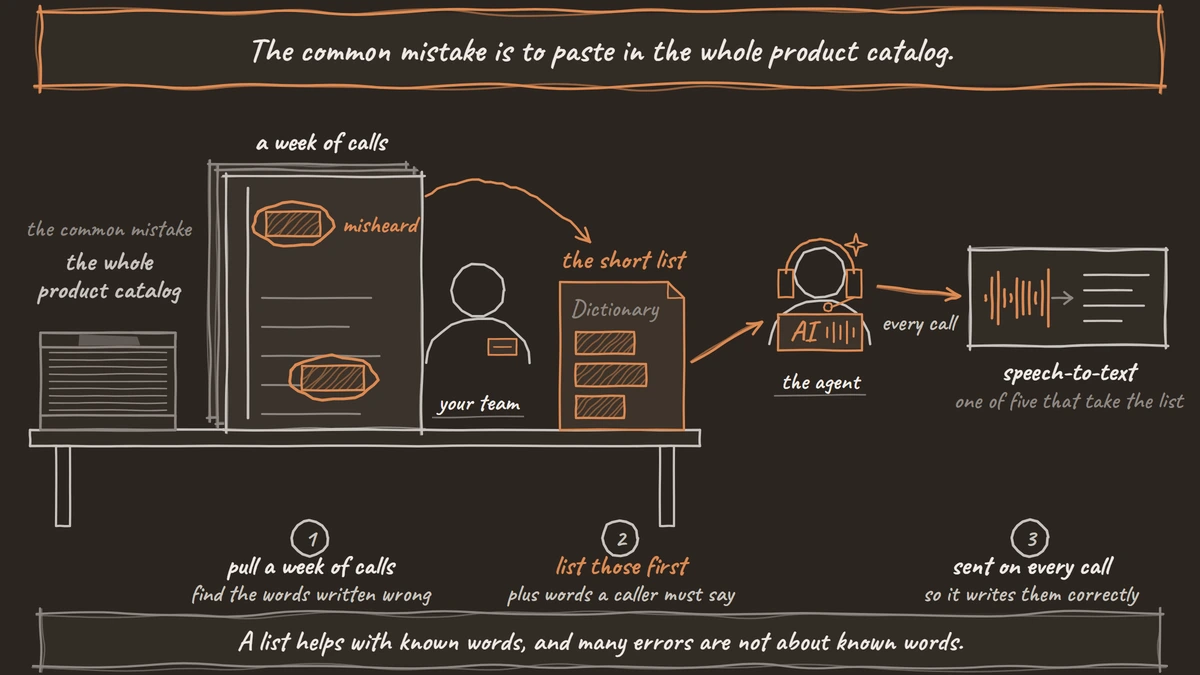
So start from your call transcripts. Pull a week of calls, find the names, products and terms the agent wrote wrong, and list those first. Add the words a caller must say for the call to succeed, such as plan names or a clinic's doctors, even if you have not seen them fail yet.
Then keep the list short. The same guide warns that "bigger is not always better" and that a long list gets harder to maintain and less effective. AssemblyAI adds that common words dilute the boost, so leave out anything an ordinary model already gets right. Test acronyms with care, since a short acronym can sound like a common word and start appearing where it does not belong.
Mistakes that quietly break a list
Some errors do not show up as errors. Deepgram's keyterm docs say that adding weights or intensifiers to a key term silently boosts nothing instead of failing, so the list looks fine and does no work. Key terms keep their formatting, including case and punctuation, so write each one exactly as you want it in the transcript.
Length is another quiet limit. Speechmatics drops dictionary entries longer than 6 words, and Deepgram caps the list at 500 tokens per request. If a long list stops helping, the newest entries may simply not be reaching the model.
Privacy is the last one. Deepgram notes that key terms appear in usage records, and it offers redact_usage=true to keep them out. If your list holds customer names or account details, check how your provider stores it before you send it.
Join the Dograh Community
Dograh is an OSS alternative to Vapi. Join our Slack community for queries, releases, best practices & community interactions.
The speaking side, a name heard and said right
A list fixes the transcript, and the agent still has to say the name back. Mistral's docs note that "the model hears sounds, not spellings", and a voice works the other way round. It guesses how to say a word from its spelling, and a rare brand name is exactly where it guesses wrong.
So treat speaking as its own fix. Voice providers that support a pronunciation lexicon or phoneme tags let you say how a word should sound, and Mistral's advice is to give each direction its own hint, the written name for transcription and its phonemes for the voice. Where a provider has no such feature, try another voice for the same agent, since voices differ in how they read unusual names.
For lines that never change, such as a greeting with the company name, a recording of a real speaker removes the guess altogether. Test every name on a phone call, since a name that sounds fine in a browser can blur at 8 kHz.
When a vocabulary list is the wrong fix
A list helps with known words, and many errors are not about known words. Account numbers, postal codes and email addresses are better handled by asking the caller to spell or repeat them and reading them back, as our guide to accents and background noise covers in its prompt rules.
Strong accents and noisy lines are a model problem more than a vocabulary problem. If the same common words fail across many calls, compare speech-to-text models on your own recorded calls before you add more terms.
Custom vocabulary in Dograh
Dograh runs the call flow, tools and telephony, while the speech-to-text model is one you pick, so the list has to reach that model. Its Dictionary is one comma-separated list in each agent's Settings, and every call of that agent sends the list to the speech-to-text provider. Five providers accept it, Deepgram (Nova-3 and Flux), Dograh's own speech-to-text, AssemblyAI, Soniox and Speechmatics.
Speechmatics receives each word as written, without sounds-like spellings, so write the entry in the form you want in the transcript. Other speech-to-text providers ignore the list, so if names matter on your calls, choose one of the five on the agent's Model tab, as part of its model configuration. The Dictionary card notes that it may incur extra cost depending on provider.
The full steps, from adding words to testing a change, are in our custom dictionary guide.
Glossary
- Keyword prompting
- Giving a speech-to-text model a list of expected words as context before it transcribes. Deepgram calls its version keyterm prompting.
- Keyword boosting
- Raising the score of listed words while the model decodes, so they win close calls against common words that sound alike.
- Sounds-like hint
- An extra spelling that shows how a listed word is said, such as Speechmatics' sounds_like field. It helps when speech and spelling differ.
- Pronunciation lexicon
- A voice provider's list that tells the voice how to say a word, often with phonemes. It fixes the speaking side, not the transcript.