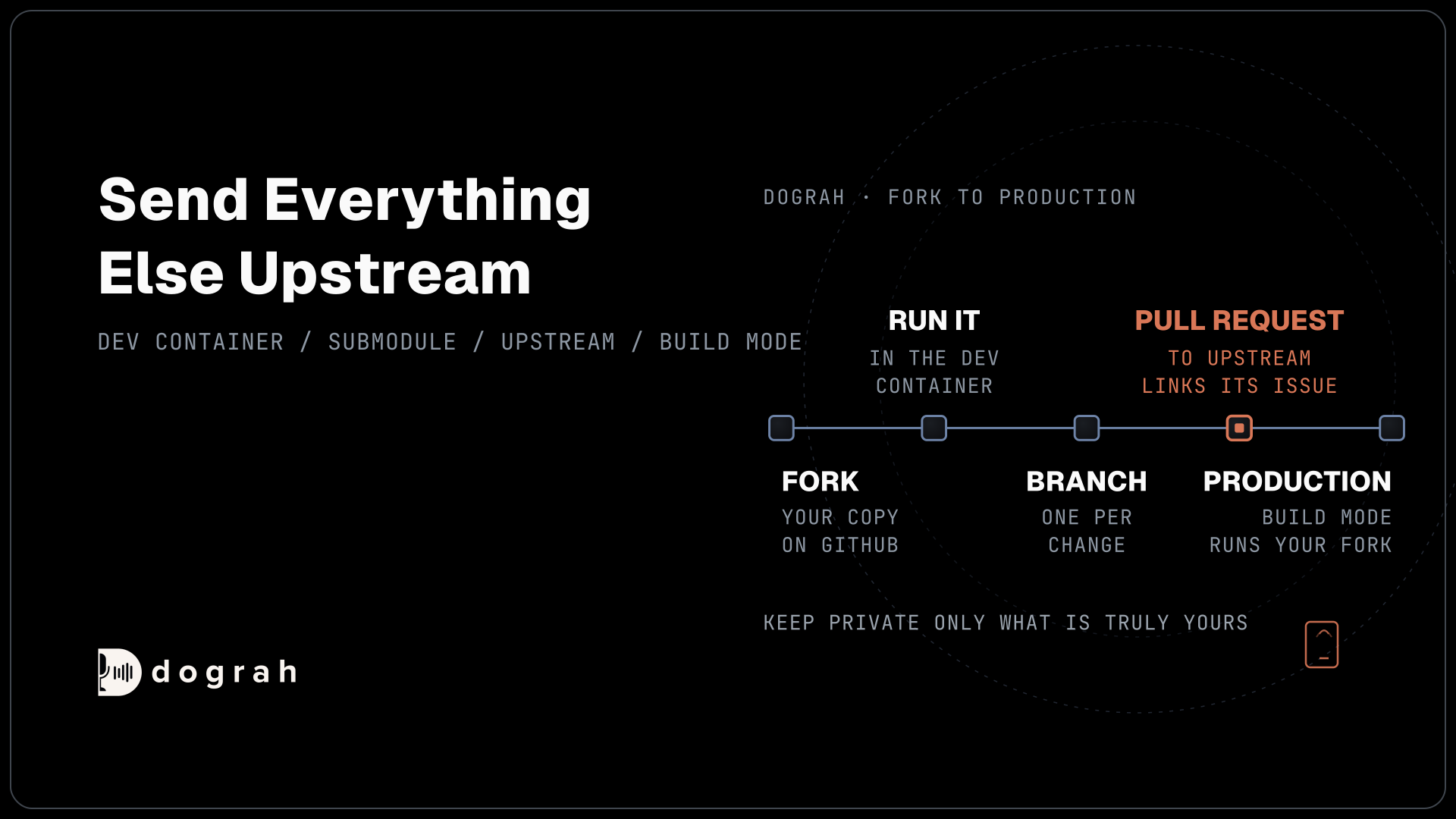

To contribute to an open-source voice AI project, fork the repository, run the full stack locally, make your change on a branch and open a pull request against the main project. In Dograh, a Dev Container starts the whole stack, and build mode runs your own fork. You can self-host Dograh or run it on Dograh Cloud.
Key Takeaways
- A Dev Container brings up the whole Dograh stack in one step.
- Provider and telephony pull requests must show a real call working.
- Keep private only what is truly yours, because each private change needs re-merging.
Forking a voice AI project takes a minute, while keeping that fork healthy through every new release takes real planning. We start Dograh's Dev Container, make a change on a branch, send it upstream as a pull request and run your own fork in production. It builds on our guide to open-source voice AI agents.
What you need before you start
You need a GitHub account, Git, a local Docker engine such as Docker Desktop, and VS Code with the Dev Containers extension. It also helps to know what you are about to run. Dograh is a Next.js web app in ui/, a FastAPI backend in api/, and a voice pipeline in pipecat/, which is a Git submodule pointing at Dograh's fork of Pipecat. Postgres, Redis and MinIO sit underneath for data, queues and recordings.
You will be in good company. GitHub's Octoverse 2025 report counts 518.7 million pull requests merged in 2025, up 29% on the year before, and 255,000 first-time open source contributors in March 2025 alone.
Step 1: Fork Dograh and run it locally
Fork the repository on GitHub, then clone your fork, not the original. The clone below uses your own GitHub handle in place of <YOUR_HANDLE>, so origin points at your fork from the start:
git clone https://github.com/<YOUR_HANDLE>/dograh
cd dograh
What this does: It copies your fork to your machine. Pushes go to your fork.
Open the folder in VS Code and run "Dev Containers: Reopen in Container". The first build takes several minutes. It starts Postgres, Redis and MinIO, creates the .env files and installs the UI packages. The development setup guide lists every step if you get stuck.
Start the backend from one terminal inside the container with start_services_dev.sh, then the UI from a second terminal with npm run dev:
bash scripts/start_services_dev.sh
cd ui && npm run dev -- --hostname 0.0.0.0
What this does: The first line starts the API and its workers and waits for the health check before it exits. The second runs the web app, so the builder opens at
http://localhost:3000.
If you cloned dograh-hq/dograh directly by mistake, run bash scripts/setup_fork.sh once. It asks for your fork's URL, points origin at it and adds the main project as upstream. If you work with Claude Code or Codex, Dograh's setup skill can run these steps for you and check that the stack is healthy.
Check: http://localhost:3000 opens the Dograh app, and you can create an agent and start a browser test call.

Open Source Alternative to Vapi / Retell
Self-hosted voice agent platform — no per-minute fees
dograh-hq/dograh
Star on GitHub
Step 2: Make your change on a branch
Create a branch for each change, so your main stays a clean copy of the project. Most edits take effect without a restart. Changes under api/ reload on their own, while the ARI manager, the campaign orchestrator and the arq worker need the backend restarted, which you do by running the start script again.
Rebuild the container only when .devcontainer/, the files in api/requirements*.txt or the pipecat/ submodule change. After you pull a commit that moves the submodule, run git submodule update --init --recursive, or you will keep running the old pipeline code.
The submodule matters if your change is in the audio path, such as turn-taking or a speech provider. That code lives in Dograh's Pipecat fork, and our post on Dograh vs Pipecat explains what each layer does. Backend logs stream with tail -f logs/latest/*.log, which is the fastest way to see your change in a live call.
Check: a browser test call runs through your change, and the backend log shows your code path with no errors.
Step 3: Send the change upstream
A change goes upstream as a pull request from your fork, and Dograh's contributing guide sets what each kind needs. For a bug fix, search the GitHub issues first. If nobody has reported it, open an issue with the deployment mode (self-hosted or cloud), the steps to reproduce and what you expected, then link it from the pull request with a closing keyword such as Fixes #123.
Provider and carrier changes carry stricter rules, because they are hard to review by reading code alone. A new speech, voice or language model provider must have been generally available, with a stable public API, for at least six months. The pull request must show a real Dograh workflow running through the new code, with redacted request logs, the test date and the Dograh commit SHA. A telephony provider needs a video of the setup, inbound and outbound calls, number provisioning and an attempt to add a number the account does not own.
Push your branch to origin and open the pull request against dograh-hq/dograh:main. Never push to upstream itself. A maintainer reviews and merges. Issues tagged good first issue are a gentle place to begin.
While the review runs, keep your fork current. The four commands below pull new commits from upstream into your main and push them to your fork:
git fetch upstream
git checkout main
git merge upstream/main
git push origin main
What this does: Your fork's
mainnow matches the project, so your next branch starts from the latest code. GitHub's guide to syncing a fork shows the same thing from the web page.
Check: the pull request targets dograh-hq/dograh:main and links its issue, and git remote -v lists your fork as origin and the main project as upstream.
Join the Dograh Community
Dograh is an OSS alternative to Vapi. Join our Slack community for queries, releases, best practices & community interactions.
Step 4: Run your fork in production
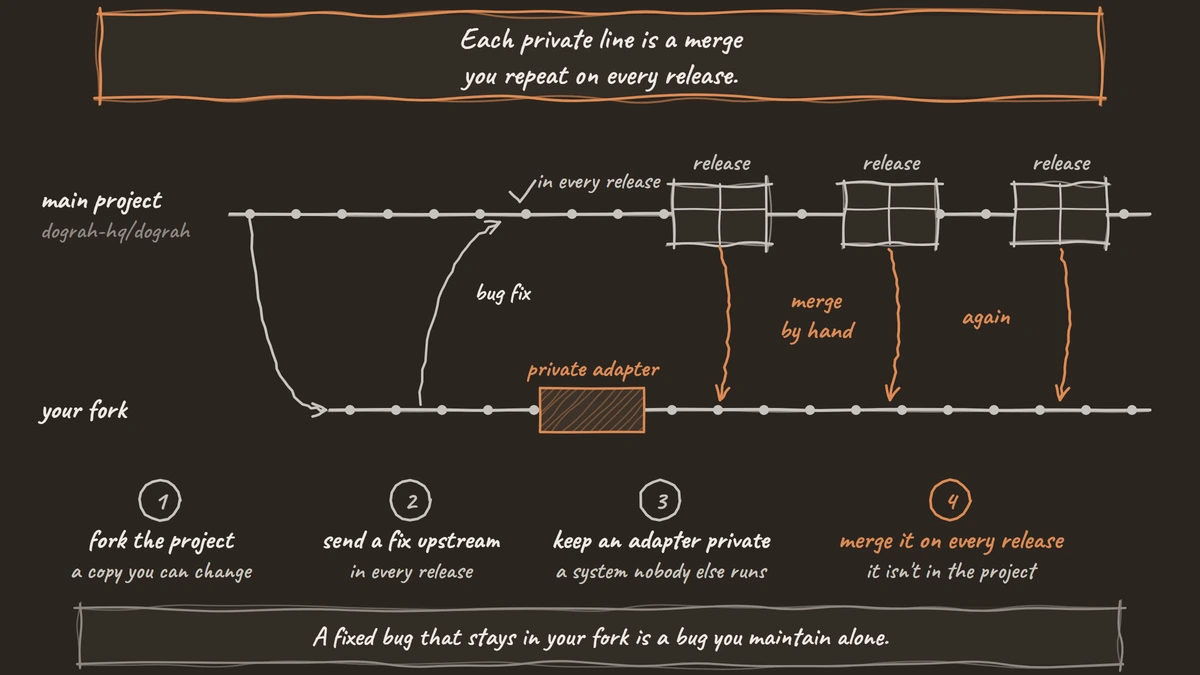
Some changes should stay yours, such as an adapter for an internal system, and the license allows that. You can keep changes private and run them for your own calls. If you pass the code or a built copy to someone else, the copyright notice and license text go with it, as our post on BSD-licensed voice AI explains.
To deploy your fork, run Dograh's remote setup script and pick build mode when it asks for the deployment mode. It asks for an owner, a repository name and a branch, so it can clone your fork, and it writes a docker-compose.override.yaml that builds the API and UI images from that code. The Docker deployment guide covers the prompts. After any code change, the command below rebuilds the images and restarts the containers:
cd dograh
sudo docker compose --profile remote up -d --build
What this does:
--buildrebuilds theapianduiimages from your fork's code, andup -drecreates the running containers so callers reach the new version.
Updates come through Git, not the update script, which refuses to run in build mode. Pull or merge the new release, run the submodule update and rebuild. Merge conflicts in files such as docker-compose.yaml or remote_up.sh are yours to resolve. Keep the secrets in .env, such as OSS_JWT_SECRET and POSTGRES_PASSWORD, unchanged across updates. The update guide lists them all. If you have no code changes, the prebuilt images in How to Self-Host a Voice AI Agent With Docker are simpler.
Check: sudo docker compose --profile remote ps shows the api and ui containers with a fresh created time, and a test call runs your change.
Before you ship it
Decide, change by change, what stays private. Keep a change in your fork only when it is truly yours, such as an adapter for a system nobody else runs. Send everything else upstream, because each private line is a merge you repeat on every release, and a fixed bug that stays in your fork is a bug you maintain alone.
A fork of Dograh touches the part that runs each call: the call flow, the tools and the telephony. The speech and language models sit in a separate layer you choose, so they stay whatever you picked.
Then test the change on a real phone number. Most phone calls reach the agent as 8 kHz audio, while a browser test runs at 16 kHz, so a change in the audio path can sound fine in the browser and fail on a phone line. With that done, your fork stays current and your own build runs real calls.
Glossary
- Upstream remote
- The Git remote that points at the original project, dograh-hq/dograh, while origin points at your fork. You pull new releases from upstream and never push to it.
- Git submodule
- A repository pinned inside another at a set commit. Dograh's voice pipeline lives in the pipecat submodule, so a pull that moves it needs git submodule update before the new code runs.
- Dev Container
- A development environment defined in the repository's .devcontainer folder. Opening the repo in it gives every contributor the same Python, Node, database and storage without installing them by hand.
- Build mode
- Dograh's deployment option that builds the API and UI images from a repository and branch you choose, instead of pulling official images. It is how a team runs its own fork in production.