
To connect a voice agent to GoHighLevel, create a Private Integration token in the sub-account, save it as a Bearer credential with HighLevel's Version header, start calls from a GoHighLevel workflow and book or take notes through HighLevel's API. Dograh, the open-source AI voice agent platform, works this way, and you can self-host it or run it on Dograh Cloud.
Key Takeaways
- One Private Integration token per client sub-account keeps each client's data apart.
- A GoHighLevel workflow can start each call through Dograh's API Trigger.
- Rotate tokens every 90 days and paste the new one into Dograh.
This post is part of our guide to how to build an AI voice agent, which covers recording what happened on every call. Here we connect Dograh to GoHighLevel for agencies and small businesses, step by step, from the token to a booked appointment and a note on the contact.
What you need before you start
You need an agent that passes a browser test, admin access to the GoHighLevel sub-account, and a Dograh API key from Developers in the sidebar (it starts with dgr_). An agency repeats the setup in each client's sub-account, and a small business does it once. Our guide to connecting a voice agent to your CRM explains the general pattern, applied here to three jobs:
| Job | When | How it runs |
|---|---|---|
| Start the call | A new lead arrives | GoHighLevel workflow, Custom Webhook action to Dograh's API Trigger |
| Book the appointment | During the call | HTTP API tool to HighLevel's appointments endpoint |
| Add a note to the contact | After the call | Webhook node to a small endpoint of yours |
Plenty of agencies put Make.com or n8n in the middle, and that works. Calling HighLevel directly leaves fewer moving parts per client, and on a self-hosted install every client's token stays on your own servers.
Check: you can name the calendar the agent books into and the sub-account it belongs to.
Step 1: Create a Private Integration token
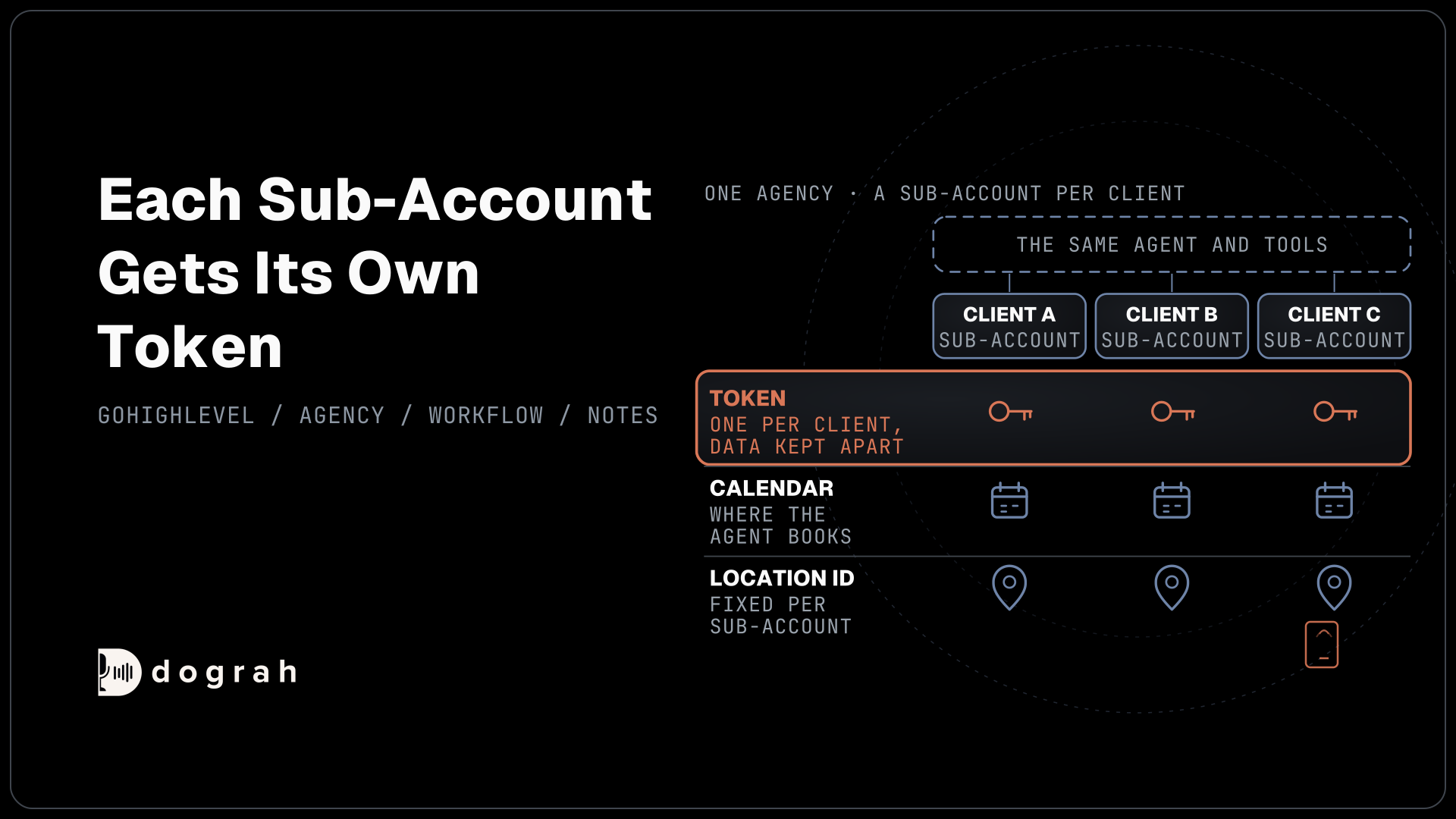
Each sub-account gets its own token, which keeps one client's contacts out of reach of another client's agent. In the sub-account, open Private Integrations, click Create new Integration, pick the scopes and copy the token. This post needs contacts.readonly, contacts.write and calendars/events.write. If the menu item is missing, switch it on in Labs first.
The token is a fixed Bearer token, so it goes straight into Dograh. Open Credentials, click Add Credential, choose Bearer Token and paste it, naming it after the client, such as ghl-brightsmile-dental.
HighLevel tokens never refresh on their own, and HighLevel recommends rotating them every 90 days. After a rotation both tokens work for 7 days, time enough to paste the new one into the credential. Every HighLevel request also carries a Version header. Add Version: v3 under Custom Headers on each tool, and match it to the version shown on HighLevel's page for the endpoint you call.
Each app gets 100 requests per 10 seconds and 200,000 a day for each sub-account, under HighLevel's rate limits.
Check: the credential shows under Credentials with a name that says which client it belongs to.
Step 2: Start the call from a GoHighLevel workflow
New leads go cold fast, so let the GoHighLevel workflow that sees the lead start the call. Add an API Trigger to the Dograh agent and copy its production URL, which runs the published version. In GoHighLevel, add a Custom Webhook action to a workflow, for example one that fires when a form is submitted. Set it to POST to that URL with an X-API-Key header holding your Dograh key, and give it a raw JSON body that puts the lead's number in phone_number and the contact ID in initial_context:
{
  "phone_number": "{{contact.phone}}",
  "initial_context": {
    "ghl_contact_id": "{{contact.id}}",
    "first_name": "{{contact.first_name}}",
    "location_id": "<the sub-account's location ID>"
  }
}
What this does: GoHighLevel fills its merge fields for the lead, and Dograh calls that number with the contact ID and first name already loaded. The agent never has to search HighLevel for this caller, and
{{initial_context.ghl_contact_id}}is ready for Steps 3 and 4.
While you test, use the trigger's test URL, which runs the latest draft, and see our post on API triggers for what else to put in initial_context. Inbound callers need a lookup instead, where Pre-Call Data Fetch calls a small endpoint of yours that runs HighLevel's find-by-phone search with the country code included.
Check: submitting your own test form rings your phone, and the agent greets you by first name.

Open Source Alternative to Vapi / Retell
Self-hosted voice agent platform — no per-minute fees
dograh-hq/dograh
Star on GitHub
Step 3: Book the appointment during the call
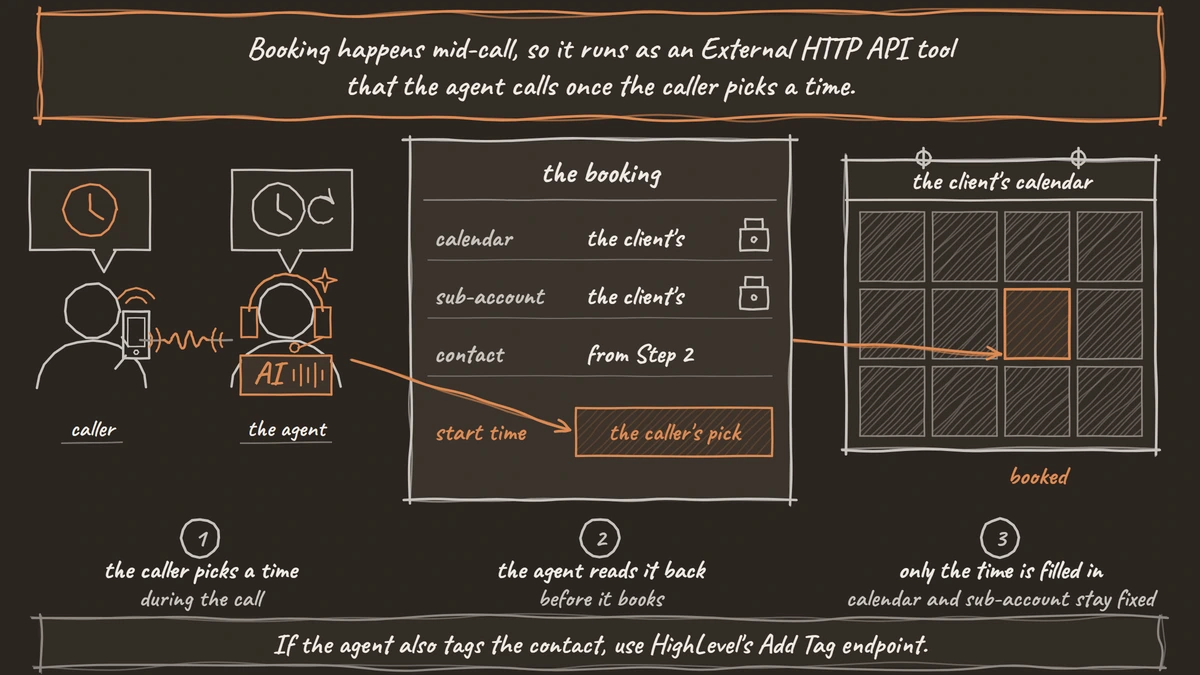
Booking happens mid-call, so it runs as an External HTTP API tool that the agent calls once the caller picks a time. Set HTTP Method to POST and Endpoint URL to https://services.leadconnectorhq.com/calendars/events/appointments. Choose the client's Bearer credential on the Authentication tab and add the Version header under Custom Headers. On the Parameters tab, add Preset Parameters calendar_id and location_id with the client's fixed values and an LLM Parameter start_time. Then switch on Tool Body Template and place them in the fields HighLevel requires:
{
  "calendarId": "{{calendar_id}}",
  "locationId": "{{location_id}}",
  "contactId": "{{initial_context.ghl_contact_id}}",
  "startTime": "{{start_time}}"
}
What this does: It books the slot the caller chose on the client's calendar, for the contact from Step 2. The agent supplies only
start_time, while the calendar and sub-account stay fixed, so a confused turn can never book into another client's calendar.
The prompt asks for start_time as a full date and time with the time zone offset, and has the agent read the time back before it books. The tool waits 5 seconds and does not retry, so the prompt also says what to tell the caller if HighLevel errors. A line under When the tool starts in the Messages card, such as "Let me put that in the calendar", covers the pause.
If the agent also tags the contact, use HighLevel's Add Tag endpoint. Sending tags in a contact update replaces every tag the contact has, which can knock a lead out of the client's other workflows.
Some hot leads are better handed to a person than booked. For those, Transfer Call works on Twilio, Telnyx, Plivo, Cloudonix and Asterisk ARI. Dograh calls the closer first and connects the caller only when someone answers, and a busy or unanswered line comes back to the agent so the call carries on.
Check: Test Tool, run against a test contact, puts one appointment on the right calendar.
Step 4: Add a note when the call ends
After the call, a Webhook node posts the result to one fixed URL, a small endpoint of yours, which builds HighLevel's note path from the contact ID. Send the contact ID in contact_id and the outcome code in outcome through the node's Payload Template:
{
  "run_id": "{{workflow_run_id}}",
  "contact_id": "{{initial_context.ghl_contact_id}}",
  "outcome": "{{gathered_context.call_disposition}}",
  "duration_s": "{{cost_info.call_duration_seconds}}",
  "transcript_url": "{{transcript_url}}"
}
What this does: Once the call ends, it gives your endpoint the contact and everything the note will say.
The handler below, using FastAPI and httpx, writes the note with the client's token in GHL_TOKEN and skips any run_id it has already logged:
import httpx, os
from fastapi import FastAPI, Request

app = FastAPI()
GHL = "https://services.leadconnectorhq.com"
logged: set[str] = set()  # keep this in a database table in production

@app.post("/dograh/call-ended")
async def call_ended(request: Request):
    event = await request.json()
    if event["run_id"] in logged:
        return {"ok": True}
    note = (f"Voice agent call, {event['duration_s']} s. Outcome: {event['outcome']}. "
            f"Transcript: {event['transcript_url']}")
    headers = {"Authorization": f"Bearer {os.environ['GHL_TOKEN']}", "Version": "v3"}
    async with httpx.AsyncClient(timeout=10) as client:
        reply = await client.post(f"{GHL}/contacts/{event['contact_id']}/notes",
                                  json={"body": note}, headers=headers)
    reply.raise_for_status()
    logged.add(event["run_id"])
    return {"ok": True}
What this does: It writes one note per call on the contact, with the length, the outcome and the transcript link. An error from HighLevel turns into an error reply to Dograh, so the Webhook node tries again, and the stored run ID stops a retry from writing a second note.
HighLevel's note endpoint needs only body, which makes a note the simplest call log in a sub-account. Protect the handler with an API Key credential on the Webhook node.
Check: a finished test call leaves exactly one note on the contact, even if you send the same webhook twice.
Join the Dograh Community
Dograh is an OSS alternative to Vapi. Join our Slack community for queries, releases, best practices & community interactions.
Testing it and choosing where it runs
Call the agent from a real phone and open its View Trace to see each HighLevel request and reply. Agencies repeat the check in every sub-account, and our guide to starting an AI voice agent agency covers keeping clients apart on the Dograh side.
Self-hosting suits agencies whose clients want call data on servers the agency controls, with every client's token there too. On your own hardware, Dograh adds no per-minute platform fee, though servers, model keys and phone minutes still have to be paid for. Dograh Cloud adds a 1¢-a-minute platform fee, with 10 concurrent calls included on pay as you go. Self-hosting also makes the server, the database and the upgrades the agency's to run, with community support in Slack on open source and custom SLAs on Enterprise.
Set up one client end to end first. After that, only the token, the calendar and the location ID change per client.
Glossary
- Private Integration token
- A fixed HighLevel access token created inside an agency or sub-account with the scopes you pick. It never refreshes on its own, and HighLevel recommends rotating it every 90 days.
- Sub-account
- One business inside GoHighLevel, also called a location, with its own contacts, calendars and workflows. An agency gives each client a sub-account and each sub-account its own token.
- Version header
- A header every HighLevel API request carries to pick the API version. It has to match the version on HighLevel's page for the endpoint being called.
- API Trigger
- A Dograh node that gives an agent a URL other systems can POST to with a phone number and initial_context, starting an outbound call. The production URL runs the published version.