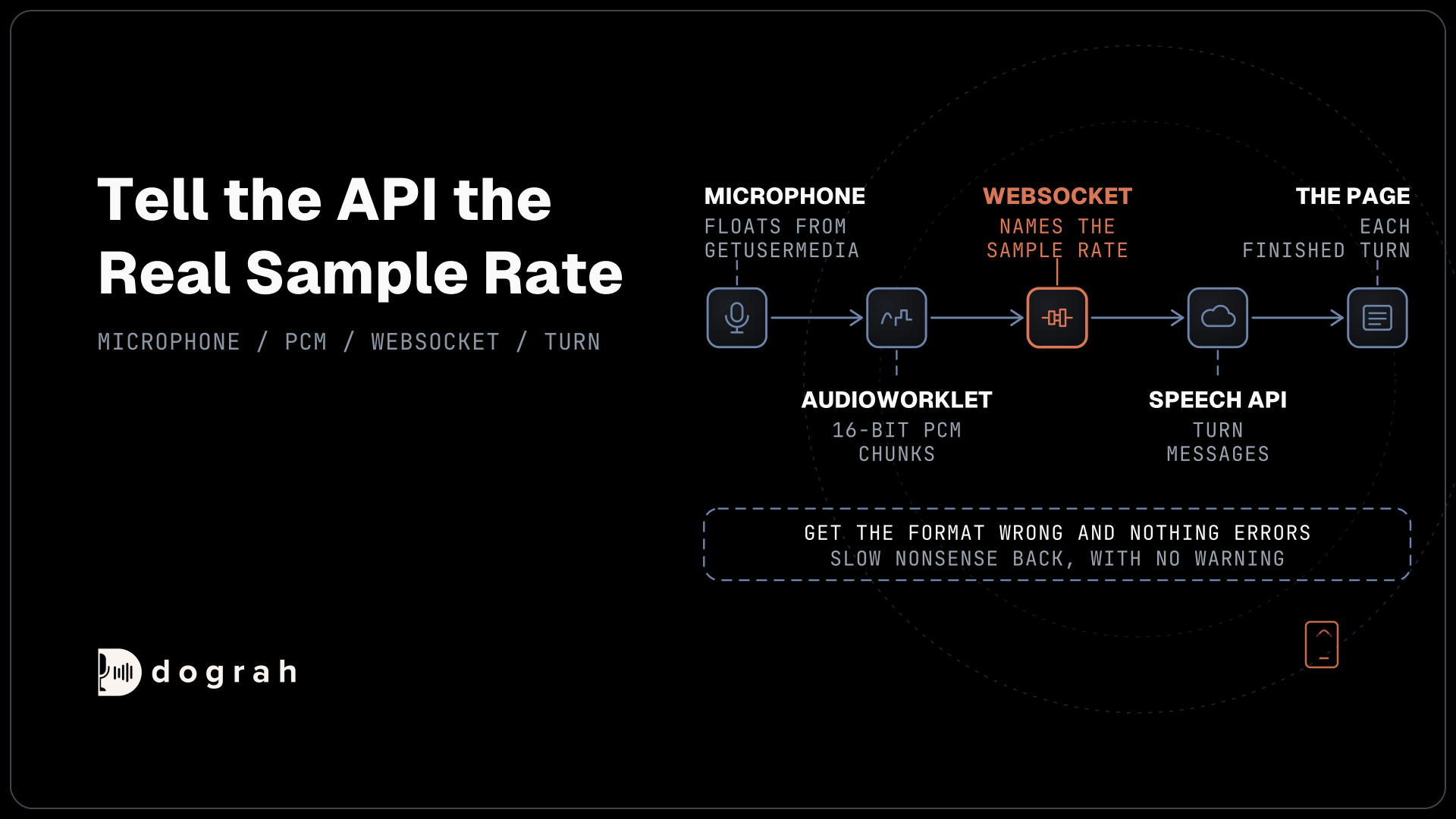

To stream speech-to-text in JavaScript, mint a temporary token on your server, capture the microphone as 16-bit PCM in an AudioWorklet, and send 50 ms chunks over a WebSocket that names the sample rate, printing each finished turn. Dograh, the open-source AI voice agent platform we build, runs this step on every call, self-hosted or on Dograh Cloud.
Key Takeaways
- Keep the API key on your server and give the browser a short-lived token.
- Tell the API the real sample rate, or it hears the wrong audio.
- Reconnect with a fresh token, and send Terminate so billing stops.
A voice app has to show the words while the person is still talking. Below we stream a browser microphone to AssemblyAI with five small files, add reconnects and a recorded-file test, then show how Dograh, our open-source AI voice agent platform, turns that step into a setting.
Web Speech API or a streaming API
The browser already has a free speech recognizer, and for some apps it is enough. The Web Speech API needs no key and no server, so a voice search box or a quick prototype can run on it in an afternoon. The trade is control. Chrome sends the audio to Google and Safari to Apple, Firefox barely supports it, and you cannot add your own vocabulary or choose the model.
A voice app that acts on what someone said needs more than that. It needs to know when the person has finished a turn and to behave the same in every browser, and your team needs a clear answer about where the audio goes. A streaming speech-to-text API covers those needs, at the price of a key to protect and a socket to manage. The rest of this post handles both.
What you need before you start
You need Node.js 22 or later, a recent Chrome, Edge or Safari, an AssemblyAI API key and ffmpeg for the test in Step 5. Node 22 ships a global WebSocket and fetch, so there is nothing to install from npm. AssemblyAI also has an official assemblyai package that wraps the same socket, but the raw protocol shows you exactly what goes over the wire. The code follows AssemblyAI's streaming API reference line by line, and you should run it against your own key before you build on it.
Streaming is billed on session time, from the moment the socket opens until it closes, so a socket left open costs money while nobody speaks. AssemblyAI's pricing page lists Universal-3.6 Pro Realtime, the default model, at $0.45 an hour and Universal-Streaming at $0.15 an hour, and new accounts get $50 of credit. As an example, a 10-minute test on the default model is 10/60 x $0.45, about 7.5 cents. Our post on how AssemblyAI's session billing adds up covers the add-ons.
Put the key in an environment variable before you start, for example export ASSEMBLYAI_API_KEY="your-key", or $env:ASSEMBLYAI_API_KEY = "your-key" in PowerShell.
Check: node --version prints v22 or higher.
Step 1: Keep the key on a small Node server
The browser must never hold your real API key, because anyone can read it from the page. Instead your server swaps the key for a temporary streaming token and hands that to the page. The function below sends the key in the authorization header, asks for product streaming, and sets two different clocks in expires_in_seconds and max_session_duration_seconds.
// token.mjs: swaps your real key for a short-lived streaming token
export async function mintToken() {
  const reply = await fetch("https://token.assemblyai.com/v1/token", {
    method: "POST",
    headers: {
      authorization: process.env.ASSEMBLYAI_API_KEY,
      "content-type": "application/json",
    },
    body: JSON.stringify({
      product: "streaming",
      expires_in_seconds: 60,            // time allowed to open the socket
      max_session_duration_seconds: 3600 // longest session this token allows
    }),
  });
  if (!reply.ok) throw new Error(`token request failed: ${reply.status}`);
  return (await reply.json()).token;
}
What this does: It returns a token the browser can use for 60 seconds to open one socket, and that socket may then stay open for up to an hour. The first number is a redemption window, so a long conversation does not need a new token every minute.
The server below serves the three browser files and answers /token with a fresh token each time. It uses only Node's built-in http module.
// server.mjs: serves the page and hands it a temporary token
import { createServer } from "node:http";
import { readFile } from "node:fs/promises";
import { mintToken } from "./token.mjs";

const FILES = {
  "/": ["index.html", "text/html"],
  "/app.js": ["app.js", "text/javascript"],
  "/pcm-worklet.js": ["pcm-worklet.js", "text/javascript"],
};

createServer(async (req, res) => {
  try {
    if (req.url === "/token") {
      res.writeHead(200, { "content-type": "application/json" });
      res.end(JSON.stringify({ token: await mintToken() }));
      return;
    }
    const file = FILES[req.url];
    if (!file) return res.writeHead(404).end();
    res.writeHead(200, { "content-type": file[1] });
    res.end(await readFile(new URL(file[0], import.meta.url)));
  } catch (err) {
    console.error(err);
    res.writeHead(502).end();
  }
}).listen(3000, () => console.log("open http://localhost:3000"));
What this does: It runs on port 3000, so the page loads from localhost, which browsers treat as a secure context for the microphone. Any failure while minting a token comes back as a 502 and the key never leaves the server.
The other common pattern is a relay, where the browser sends audio to your server and your server forwards it. That works too, but every second of audio then passes through your machine twice. A token lets the browser talk to the API directly.
Check: run node server.mjs, open http://localhost:3000/token and you see a JSON object with a token field.
Step 2: Turn the microphone into 16-bit PCM
The browser gives you microphone audio as 32-bit floats, and the API wants 16-bit integers. getUserMedia asks the person for permission and returns the microphone stream, and it works only on HTTPS or localhost. An AudioWorklet then runs your conversion on the audio thread, away from the page's main thread, so a busy page does not drop samples.
The processor below clamps each sample to the range -1 to 1, scales it to a signed 16-bit value and posts a chunk every chunkSamples samples.
// pcm-worklet.js: turns microphone samples into 50 ms chunks of 16-bit PCM
class PcmWorklet extends AudioWorkletProcessor {
  constructor(options) {
    super();
    this.size = options.processorOptions.chunkSamples;
    this.chunk = new Int16Array(this.size);
    this.filled = 0;
  }

  process(inputs) {
    const samples = inputs[0][0]; // first input, first channel
    if (!samples) return true;
    for (const value of samples) {
      const s = Math.max(-1, Math.min(1, value));
      this.chunk[this.filled++] = s < 0 ? s * 0x8000 : s * 0x7fff;
      if (this.filled === this.size) {
        this.port.postMessage(this.chunk.buffer, [this.chunk.buffer]);
        this.chunk = new Int16Array(this.size);
        this.filled = 0;
      }
    }
    return true;
  }
}

registerProcessor("pcm-worklet", PcmWorklet);
What this does: Each posted chunk is little-endian 16-bit PCM on one channel, which is what AssemblyAI calls
pcm_s16le. Transferring the buffer hands it to the main thread without a copy.
The chunk size is the sample rate divided by 20, which is 50 ms of audio. AssemblyAI recommends chunks of 50 to 100 ms and accepts anything from 20 ms to a second. At 16,000 Hz that is 800 samples, or 1,600 bytes.
We keep the AudioContext at its own rate, often 48,000 Hz, instead of forcing 16,000. AssemblyAI accepts any sample rate from 8,000 to 96,000 Hz, and some browsers refuse to connect a microphone to a context running at a different rate. Sending the context's real rate avoids that, at the cost of a little more upload per second.
Check: in Step 3, log audioCtx.sampleRate once. It should match the sample_rate you send.

Open Source Alternative to Vapi / Retell
Self-hosted voice agent platform — no per-minute fees
dograh-hq/dograh
Star on GitHub
Step 3: Stream the audio and print each turn
Now the page opens the socket, sends the chunks and shows the text. The streaming API reference takes the settings as query parameters, and the important ones are sample_rate, encoding, speech_model and the token from Step 1, because a browser socket cannot set an authorization header.
The page itself is two buttons and two text areas.
<!doctype html>
<meta charset="utf-8">
<title>Live captions</title>
<button id="start">Start</button>
<button id="stop">Stop</button>
<pre id="lines"></pre>
<p id="live"></p>
<script type="module" src="/app.js"></script>
What this does:
#linescollects finished turns and#liveshows the turn still in progress. Start has to be a click, because browsers only let an AudioContext run after the person interacts with the page.
The first half of app.js starts the microphone, wires up the worklet and opens the socket. showTurn reads each Turn message and checks end_of_turn.
// app.js: microphone in, text out
const lines = document.querySelector("#lines");
const live = document.querySelector("#live");
let audioCtx, mic, ws;
let stopped = true;
let retries = 0;
const backlog = []; // audio captured while the socket is down

async function start() {
  stopped = false;
  mic = await navigator.mediaDevices.getUserMedia({ audio: { channelCount: 1 } });
  audioCtx = new AudioContext();
  await audioCtx.audioWorklet.addModule("/pcm-worklet.js");
  const node = new AudioWorkletNode(audioCtx, "pcm-worklet", {
    processorOptions: { chunkSamples: Math.round(audioCtx.sampleRate / 20) },
  });
  node.port.onmessage = (event) => sendAudio(event.data);
  audioCtx.createMediaStreamSource(mic).connect(node);
  node.connect(audioCtx.destination); // keeps the node running, outputs silence
  await connect();
}

async function connect() {
  const { token } = await (await fetch("/token")).json();
  const params = new URLSearchParams({
    sample_rate: String(audioCtx.sampleRate),
    encoding: "pcm_s16le",
    speech_model: "universal-3-6-pro",
    token,
  });
  ws = new WebSocket(`wss://streaming.assemblyai.com/v3/ws?${params}`);
  ws.binaryType = "arraybuffer";
  ws.onopen = () => {
    retries = 0;
    while (backlog.length) ws.send(backlog.shift());
  };
  ws.onmessage = (event) => showTurn(JSON.parse(event.data));
  ws.onclose = (event) => {
    if (!stopped && event.code !== 1000) reconnectLater();
  };
}

function showTurn(msg) {
  if (msg.type !== "Turn") return;
  if (msg.end_of_turn) {
    lines.textContent += msg.transcript + "\n";
    live.textContent = "";
  } else {
    live.textContent = msg.transcript;
  }
}
What this does: While someone talks, AssemblyAI sends several
Turnmessages for the same turn, and#liveshows the latest. When one arrives withend_of_turnset to true, the text moves into#linesas a finished line.
Get the format wrong and nothing errors. Send 48 kHz audio while the URL says 16,000 and the API reads the bytes at the wrong speed, so you get slow nonsense back with no warning. That is why sample_rate comes straight from audioCtx.sampleRate.
Check: press Start, allow the microphone and say a sentence. The grey line changes as you talk, and the finished sentence drops into the list above it.
Step 4: Reconnect when the socket drops
Wi-Fi drops and laptops go to sleep, so a long session will lose its socket at some point. The second half of app.js keeps the app alive through that. sendAudio buffers chunks while the socket is down, reconnectLater waits and tries again, and stop ends the session cleanly.
function sendAudio(chunk) {
  if (ws?.readyState === WebSocket.OPEN) ws.send(chunk);
  else if (backlog.length < 40) backlog.push(chunk); // keep at most 2 seconds
}

function reconnectLater() {
  if (retries >= 6) {
    live.textContent = "Connection lost. Press Start to try again.";
    return;
  }
  const wait = Math.min(10_000, 500 * 2 ** retries++);
  setTimeout(() => connect().catch(reconnectLater), wait);
}

function stop() {
  stopped = true;
  if (ws?.readyState === WebSocket.OPEN) ws.send(JSON.stringify({ type: "Terminate" }));
  mic?.getTracks().forEach((track) => track.stop());
  audioCtx?.close();
}

document.querySelector("#start").onclick = start;
document.querySelector("#stop").onclick = stop;
What this does: Each try fetches a fresh token, and the wait doubles from half a second up to 10 seconds, with 6 tries before the app gives up. Forty 50 ms chunks hold the last 2 seconds of speech, which are sent first once the socket is back.
The backlog is short on purpose. Words from 2 seconds ago are still useful, while a minute of stale audio would arrive long after the moment it belonged to.
Terminate matters for the bill. It tells AssemblyAI to finish the open turn and close the session, and the last finished line still arrives before the socket closes. Without it, a socket nobody closes keeps the session running, and AssemblyAI ends sessions on its own only after three hours.
Check: while talking, switch Wi-Fi off for a few seconds and back on. The live line pauses, then carries on, and the words you said during the drop appear once the socket is back.
Step 5: Test it with a recorded file
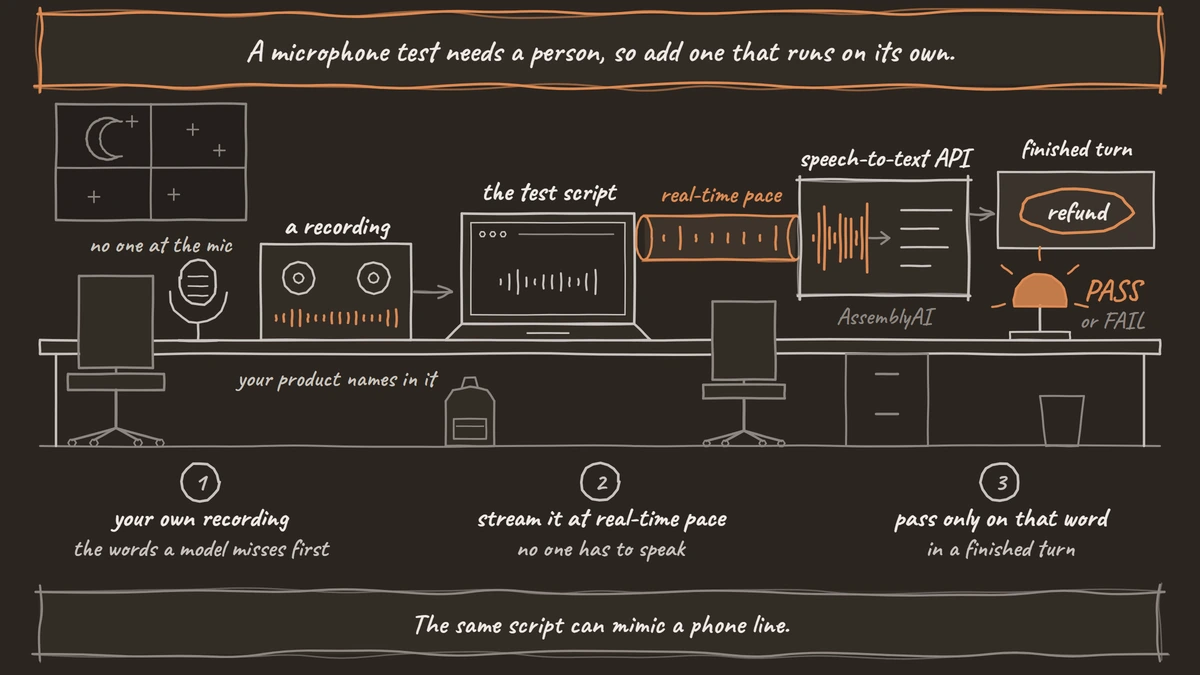
A microphone test needs a person, so add one that runs on its own. The script below streams a recorded file at real-time pace and passes only if a finished turn contains a word you expect. First turn any recording into raw 16 kHz, 16-bit mono PCM.
ffmpeg -i sample.wav -ar 16000 -ac 1 -f s16le sample.pcm
What this does: It resamples
sample.wavto 16,000 Hz on one channel and writes the bare samples tosample.pcm, with no file header for the API to misread.
Save test.mjs next to token.mjs. It reuses mintToken, sends 1,600-byte chunks every 50 ms and exits with code 0 or 1.
// test.mjs: node test.mjs sample.pcm "word you expect"
import { readFile } from "node:fs/promises";
import { mintToken } from "./token.mjs";

const [file, expected] = process.argv.slice(2);
const audio = await readFile(file); // raw 16 kHz, 16-bit, mono PCM
const CHUNK = 1600;                 // 50 ms of that audio
const sleep = (ms) => new Promise((resolve) => setTimeout(resolve, ms));
const finals = [];

const params = new URLSearchParams({
  sample_rate: "16000",
  encoding: "pcm_s16le",
  speech_model: "universal-3-6-pro",
  token: await mintToken(),
});
const ws = new WebSocket(`wss://streaming.assemblyai.com/v3/ws?${params}`);

ws.onopen = async () => {
  for (let i = 0; i < audio.length; i += CHUNK) {
    const piece = Buffer.alloc(CHUNK);    // the last piece is padded with silence
    audio.copy(piece, 0, i, i + CHUNK);
    ws.send(piece);
    await sleep(50);                      // real-time pace
  }
  ws.send(JSON.stringify({ type: "Terminate" }));
};

ws.onmessage = (event) => {
  const msg = JSON.parse(event.data);
  if (msg.type === "Turn" && msg.end_of_turn) {
    finals.push(msg.transcript);
    console.log("final:", msg.transcript);
  }
};

ws.onclose = () => {
  const passed = finals.join(" ").toLowerCase().includes(expected.toLowerCase());
  console.log(passed ? "PASS" : "FAIL");
  process.exit(passed ? 0 : 1);
};
What this does: Run
node test.mjs sample.pcm "refund"and it prints every finished turn, then PASS or FAIL. The exit code lets a CI job fail the build when a change breaks transcription.
Padding the last chunk with silence keeps every chunk at 50 ms, inside AssemblyAI's 20 ms minimum. Use a recording with your own product names in it, since those are the words a general model misses first.
The same script can mimic a phone line. Convert with -ar 8000 -f mulaw, set encoding to pcm_mulaw and sample_rate to 8000, and send 400-byte chunks. Our tutorial on streaming a phone call in Python goes deeper into 8 kHz mu-law audio.
Check: with a clip that says your expected word, the script prints at least one final: line and PASS.
Join the Dograh Community
Dograh is an OSS alternative to Vapi. Join our Slack community for queries, releases, best practices & community interactions.
Before you ship it
The demo is open to anyone who can reach /token, so put that route behind your own login before it goes online. Then test on the devices your users really have. A microphone in a browser is clean wideband audio, while most phone calls still reach an agent as 8 kHz audio, so text that looks perfect in the browser can get worse on a phone line. How much worse depends on the model and the phone path, which is why the 8 kHz test above is worth running.
Plan for limits too. AssemblyAI allows 100 new streams a minute on pay as you go, and every other part of a voice app has its own ceiling. Our post on STT and TTS concurrency limits explains when several API keys help.
To recap, keep the key on the server, send 16-bit PCM at the rate you declare, show partial text in place, reconnect with a fresh token, and always send Terminate.
When a platform makes this a setting and where it runs
Inside a voice agent, every step above is plumbing that has to be right on every call. Dograh does that work itself. On a Twilio, Telnyx or Plivo number the call audio arrives at 8,000 Hz, and Dograh opens the speech-to-text stream at that same rate, so nothing is resampled or mislabeled. The key sits in your server-side provider connection, never in a browser. AssemblyAI is one of the built-in speech-to-text providers, with the u3-rt-pro model, and the words in your agent's Dictionary go to it as keyterms_prompt.
Changing provider needs no code. Add your key under Providers with Add Provider, and the key field takes more than one key. Then, under Models, choose Add Configuration, pick the BYOK mode and set the STT tab to AssemblyAI or another provider. In the agent's Model tab, pick that configuration, so two copies of an agent can run different providers on the same test calls. Dograh's own turn detection then decides when the caller has finished, a trade-off our post on barge-in, endpointing and turn-taking explains. After each call, View Trace shows the speech-to-text time for every turn.
Where the audio goes depends on the provider you pick. With your own AssemblyAI key, the call audio still reaches AssemblyAI, and only an open model you host, connected through an OpenAI-compatible server, keeps it inside your network. You can self-host it with Docker Compose or use the managed cloud version. Self-hosted Dograh has no per-minute platform fee, but servers, model keys and phone minutes still cost money. Dograh Cloud charges a 1¢-a-minute platform fee. Running it yourself means the server, the database and upgrades are yours, with community support on the open-source version and custom SLAs on Enterprise.
Glossary
- AudioWorklet
- A browser interface that runs your own audio code on the audio thread instead of the page's main thread. Here it converts microphone floats into 16-bit chunks without dropping samples when the page is busy.
- Temporary token
- A short-lived credential your server mints with the real API key and hands to the browser. AssemblyAI's tokens must be redeemed within 1 to 600 seconds and can cap the session length.
- pcm_s16le
- Raw audio as signed 16-bit samples in little-endian byte order, with no file header. It is AssemblyAI's default encoding, so the declared sample rate is the only thing telling the API how fast to read it.
- End of turn
- The point where the speech-to-text service decides a person has finished speaking. AssemblyAI marks it with end_of_turn set to true on a Turn message, and a voice agent replies only after it.