
Amazon Connect's own AI agents run inside its $0.038 Connect Customer voice minute, with AWS choosing the models for many features. Your own agent takes calls through a carrier number, after a Connect transfer, or by answering first and handing people over. Dograh, the open-source AI voice agent platform we build, runs that agent, self-hosted or on Dograh Cloud.
Key Takeaways
- Connect's AI agents bill inside the $0.038 Connect Customer voice minute.
- A Transfer to phone number block sends callers on to your agent's number.
- An agent that answers first leaves Connect's minutes to calls people take.
Amazon Connect can run AI agents of its own, and it can also pass callers to an agent you build. We cover what Connect's AI includes, the two phone-number routes into your own agent, where a SIP trunk fits and one call priced three ways. The last section covers Dograh.
What Amazon Connect's AI agents cover
Amazon Connect, which AWS now calls Connect Customer, has AI agents that talk to callers directly. AWS's guide to AI agent self-service describes agents that serve customers over voice and chat and pass them to a person when needed. The recommended setup is agentic self-service, where an orchestrator AI agent calls tools through MCP. The older self-service setup gets no new features.
Model choice sits mostly with AWS. Connect's AI is built on Amazon Bedrock, and for many features Connect fully manages the underlying AI, including which model runs. Connect's pricing details put the voice service on the Connect Customer tier at $0.038 a minute, billed per second with a 10-second minimum. That rate includes Amazon Polly's generative voices and Amazon Nova Sonic. You can also plug in a third-party speech-to-text or voice provider, which then bills you on its own.
Connect can bring in an outside AI agent too, over the agent-to-agent (A2A) protocol. AWS's setup guide for external AI agents lets that agent talk to the caller directly, at $0.01 per minute of streamed audio on top of the voice minute. The setup is API-only and works on the Connect Customer tier only. It needs an Amazon Lex V2 bot with a Nova Sonic locale, and AWS asks you to work with your account team on latency and audio quality first. A phone number is the simpler way in, and it works with any agent that can answer a call.
Connect's AI or your own agent, side by side
The table puts AWS's own facts next to an agent you run on a carrier number, with Dograh as the example. The concurrency row comes from Connect's service quotas.
| Row | Connect's own AI agents | Your own agent on a carrier number (Dograh) |
|---|---|---|
| How calls reach it | Inside your contact flow | Connect transfers to its number, or it answers first |
| Models | Bedrock, with AWS choosing the model for many features. Polly and Nova Sonic voices, or third-party speech | Any LLM, speech-to-text and voice with your own keys, or open-weight models on your servers |
| Price per minute | $0.038 voice on Connect Customer, plus telephony | 1¢-a-minute platform fee hosted, none self-hosted, plus your carrier and models |
| Calls at once | 10 per instance by default, raised by quota request | 10 by default, raised by you when self-hosted or on request on Cloud |
| Hand-off to people | Escalates inside Connect | Transfer Call to a number claimed in Connect |
| Where it runs | AWS, where some features may use cross-region inference | Your own servers or Dograh Cloud |
Connect answers, then dials your agent
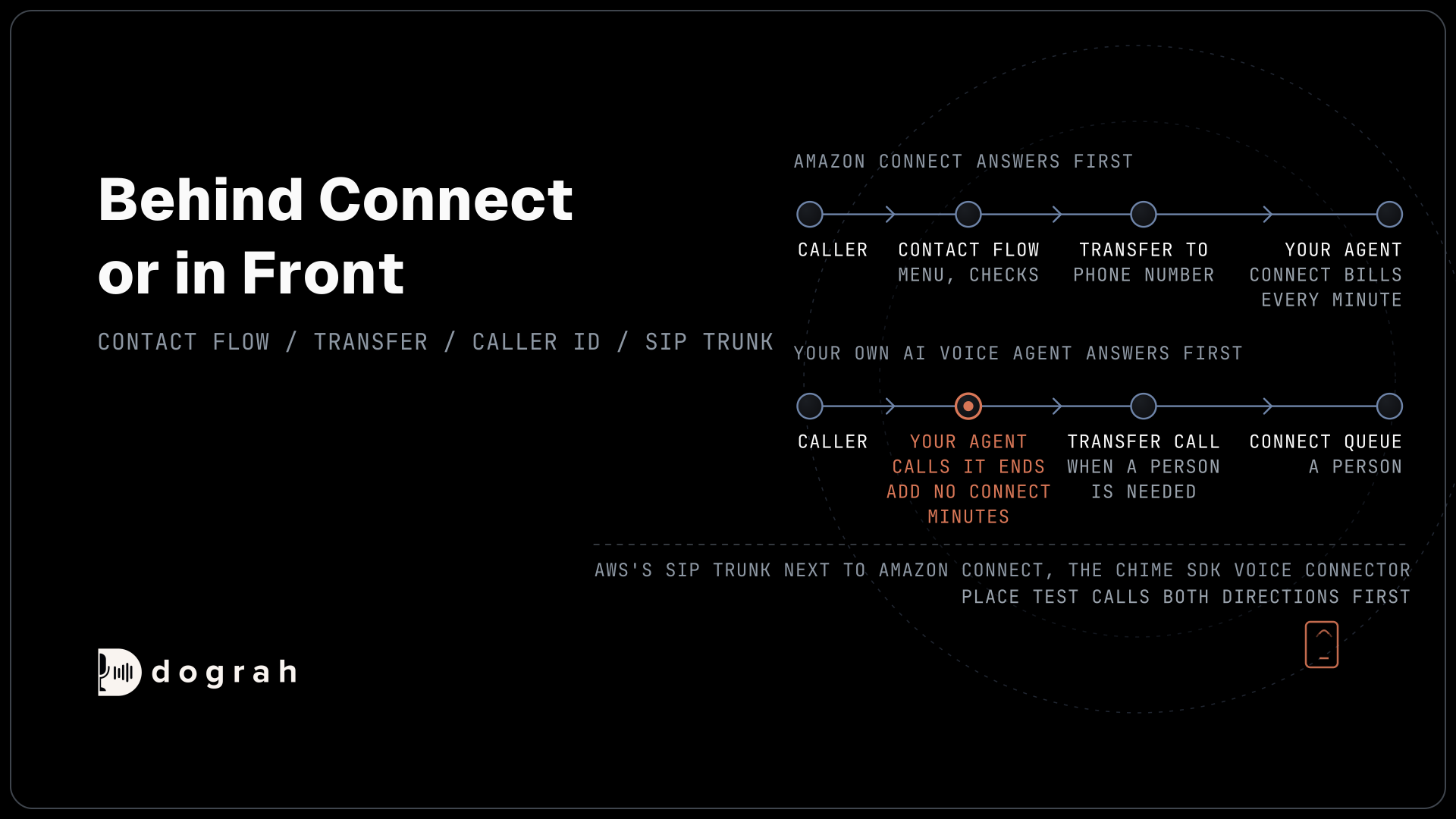
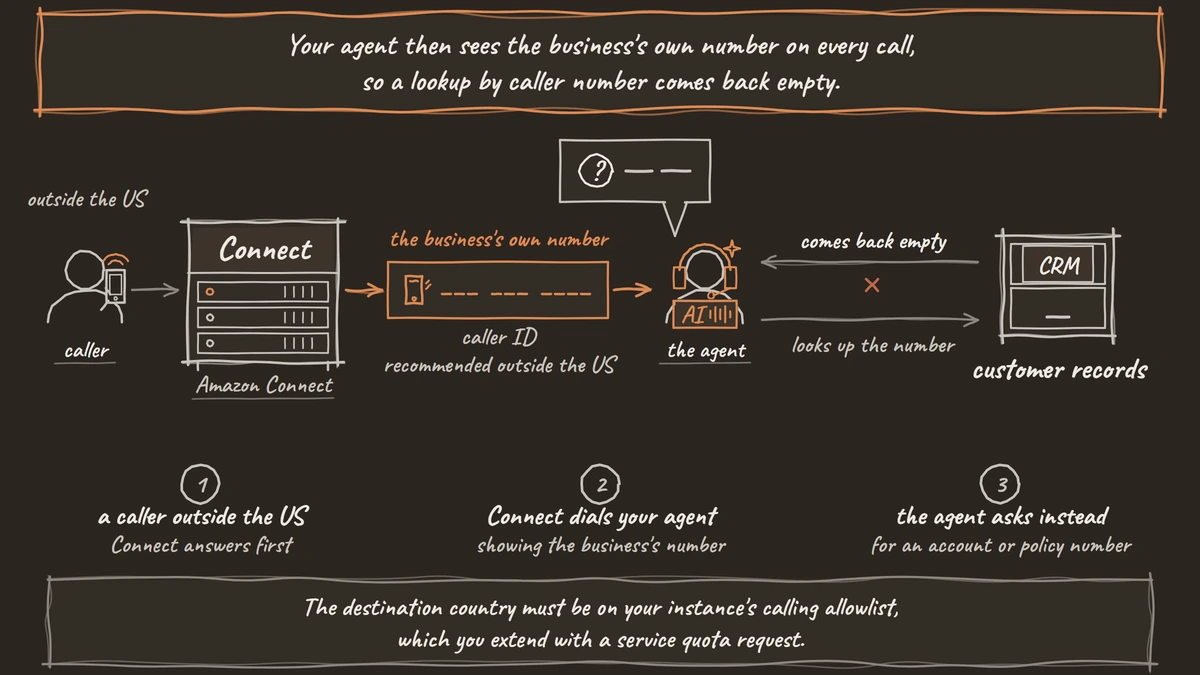
The plainest route keeps Connect in front. Your contact flow answers and runs the menu or checks you already have. Then a Transfer to phone number block sends the caller to the number your agent answers on. The block works for voice only and branches on Success, Call Failed, Timeout and Error, so a failed transfer can fall back to a queue. The destination country must be on your instance's calling allowlist, which you extend with a service quota request.
Caller ID decides what your agent knows when it picks up. With no custom caller ID set, Connect shows the caller's own number to the external party. Your agent can look that number up before it speaks, because Pre-Call Data Fetch on the Start Call node sends the caller's number to your endpoint as soon as the call connects. A number finds a record but does not prove who is calling, so the agent still confirms identity with an approved check, such as a date of birth, before it shares anything personal.
Outside the US this changes. AWS recommends choosing one of your Connect numbers as the caller ID there, and in Australia it must be a Connect-provided number. Your agent then sees the business's own number on every call, so a lookup by caller number comes back empty. Plan another way to identify callers before you route them, such as asking for an account or policy number after the greeting.
One more setting is worth a test call. "Resume flow after disconnect" returns the caller to your Connect flow if the external party ends the call first. That could let your agent end its side and drop the caller back into a Connect queue. Try it on a few test calls before you depend on it.

Open Source Alternative to Vapi / Retell
Self-hosted voice agent platform — no per-minute fees
dograh-hq/dograh
Star on GitHub
Your agent answers first, Connect takes the rest
The other route turns the order around. The carrier number your callers dial points straight at your agent, and Connect only sees the calls that need a person. Callers the agent finishes never touch Connect, so they add no Connect minutes.
When a person is needed, the agent uses Transfer Call to dial a number claimed in Connect, and that number's inbound flow puts the caller in the right queue. Dograh dials the Connect number while the caller hears hold music and connects them once Connect answers. A no-answer, busy line, failure or timeout comes back to the agent as transfer_failed, and the call carries on with the agent. Transfer Call works on Twilio, Telnyx, Plivo, Cloudonix and Asterisk ARI, so put the agent's number on one of those.
The Connect side receives the call without notes attached. If your team needs context, an HTTP API tool can write the caller's details to your CRM or ticket system just before the transfer. Our post on AI receptionist call transfer walks through that hand-off step by step.
This route also gives you one place to change the agent. Connect keeps its queues, routing and the desktop your people use, and the agent's prompts and tools live outside it, where you can edit and republish without touching a contact flow.
Where a SIP trunk fits
AWS sells a SIP trunk too, and some teams would rather keep calls on SIP than send them across the public phone network. The Amazon Chime SDK Voice Connector is AWS's SIP trunking service. On the receiving side, Dograh Managed SIP gives each organization a SIP domain that accepts a trunk from your carrier or your own PBX.
Pairing the two is a SIP-to-SIP setup, where encryption and number formats must match on both ends. Place test calls through that pair, both directions, before it carries real traffic. For the SIP and session border controller detail, see our guide to connecting Cisco, Avaya or Teams Phone to an AI voice agent.
Until that pair is proven on your own calls, the phone-number routes above do the same job with less setup. If you are choosing a carrier for the agent's number, Telephony 101 for voice AI covers numbers, carriers and trunks.
One 5-minute call, priced three ways
Here is one worked example, built from the example rates AWS prints for its US West (Oregon) region and from Dograh's price line. It is a 5-minute inbound US call on a local number, before taxes and before the models you choose.
On Connect's own AI agent, the voice service is 5 x $0.038 = $0.19 and inbound telephony is 5 x $0.0022 = $0.011, so $0.201 for the call. The number adds $0.03 a day. Polly and Nova Sonic voices sit inside that rate, and a third-party speech provider would bill on top.
If Connect answers and transfers at once to your agent, AWS still bills the call. Connect counts voice usage for the whole time a call is active in the service, and AWS's own example of a call passed to another department keeps the inbound leg open for the whole outbound call. That gives $0.19 for voice, $0.011 inbound and 5 x $0.0048 = $0.024 for the outbound leg, so $0.225 on AWS. Your agent's carrier minutes, Dograh Cloud's 5 x $0.01 = $0.05 platform fee and the models come on top.
If your agent answers first and finishes the call, Connect bills nothing for it. The call costs your carrier's minutes, the $0.05 platform fee on Dograh Cloud and the models. For a call the agent hands to a person, Connect's voice and inbound charges start when it reaches Connect, and the transfer leg bills on your agent's carrier.
The order matters more than the cents. An agent behind Connect pays Connect for every minute the agent talks. An agent in front keeps Connect's minutes for the calls your people take.
Join the Dograh Community
Dograh is an OSS alternative to Vapi. Join our Slack community for queries, releases, best practices & community interactions.
Running the agent on Dograh
In either route, running the agent yourself hands you the parts Connect manages for you. You pick the language model, speech-to-text and voice with your own keys, or run open-weight models on your own servers. Self-hosted Dograh has no per-minute platform fee, but servers, model keys and phone minutes still cost money. Dograh Cloud charges a 1¢-a-minute platform fee.
Where the call data lives follows from those choices. Self-hosting with open-weight models keeps the audio, recordings and transcripts on your own servers. With your own keys for hosted models, the audio still goes to those providers, so read their data terms the way you would read AWS's.
The voice can mix pre-recorded clips of a real person for the lines the agent says most, with a cloned voice as the fallback for the rest. Every call has a trace that shows the speech-to-text, AI and voice time for each turn. QA scores each step of test and live calls, on a share of calls you choose.
Capacity starts at 10 calls at once, the same as Connect's default quota. Self-hosted Dograh runs 10 by default and you raise it with one setting, while your servers and carrier set the real ceiling. Dograh Cloud's pay-as-you-go plan includes 10, with more on request. For the same question on another contact centre suite, see Genesys Cloud AI vs open-source voice agents.
Glossary
- Contact flow
- The set of steps Amazon Connect runs on each call, such as menus, checks and queues. A flow can send the caller to an outside number with a Transfer to phone number block.
- Transfer to phone number block
- A Connect flow block that sends a voice call to a number outside your instance. It branches on Success, Call Failed, Timeout and Error, and shows the caller's own number unless you set a custom caller ID.
- Agent-to-agent (A2A) protocol
- The protocol Connect uses to bring an outside AI agent into a live contact. A voice agent that streams its own audio costs $0.01 a minute on top of Connect's voice minute, and setup is API-only on the Connect Customer tier.
- Amazon Chime SDK Voice Connector
- AWS's SIP trunking service. It can carry calls over SIP instead of the public phone network, and any SIP-to-SIP pairing with another platform should be tested on real calls first.