
An AI voice agent for an IT helpdesk or MSP answers support calls, writes the ticket into your PSA during the call, reads ticket status back after verifying the caller and puts P1 incidents through to the on-call technician. It never resets a password or MFA. Dograh, an open-source AI voice agent platform, can run this line.
Key Takeaways
- Write the ticket into the PSA during the call, then read its number back.
- A phone number finds the contact. It does not prove who is calling.
- The agent never resets a password or MFA. It opens a ticket instead.
Support lines hear the same calls every day, plus the occasional one placed by an attacker. Below, we cover ticket intake, status updates, why password and MFA resets stay off the call, and handoffs to the right technician. Then we show how each part runs in Dograh.
The calls an IT support line takes
Most calls to an internal helpdesk or an MSP fall into a handful of kinds, and the agent should finish only the ones that need no judgment. A laptop will not join the Wi-Fi, a new starter needs an account, a printer has stopped, someone wants to know what is happening with last week's ticket, or the whole office has lost the server. An MSP hears all of these for many clients at once, often on separate numbers.
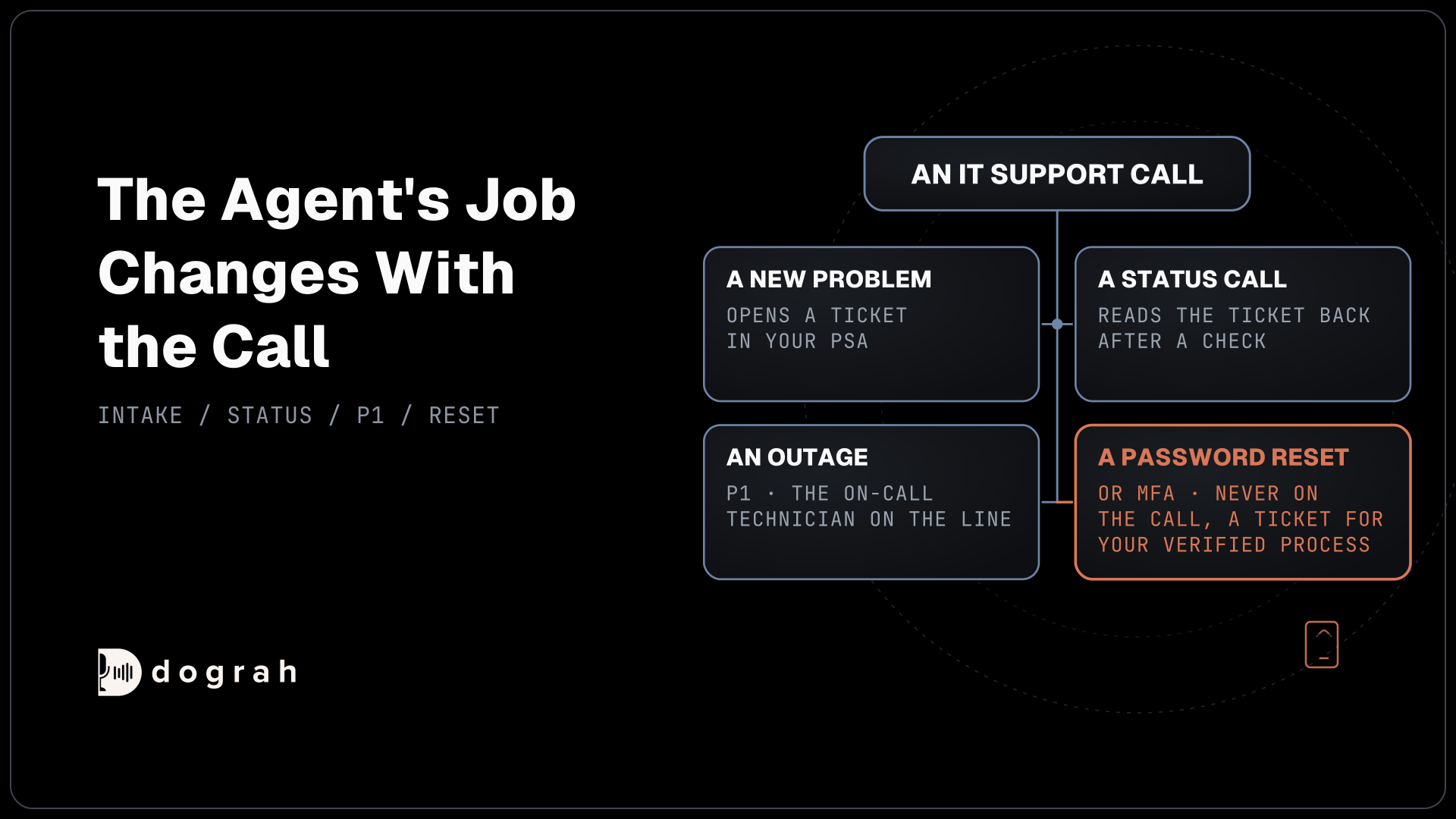
The agent's job changes with the call. On a new problem it takes the details and opens a ticket. On a status call it reads the ticket back. On a P1 it gets a technician on the line quickly. It never changes anything in the client's systems that grants access.
Measuring which calls the agent really finished is its own topic, and our post on AI voice agents for tier-1 call deflection covers how to count solved calls rather than calls that never reached a person.
Ticket intake while the caller is still talking
A good ticket is written before the call ends, with the fields a technician needs to start work. That means the client company, the contact's name and callback number, the device or asset tag, what happened and when it started. Ask how many people are affected, because that one answer usually decides the priority.
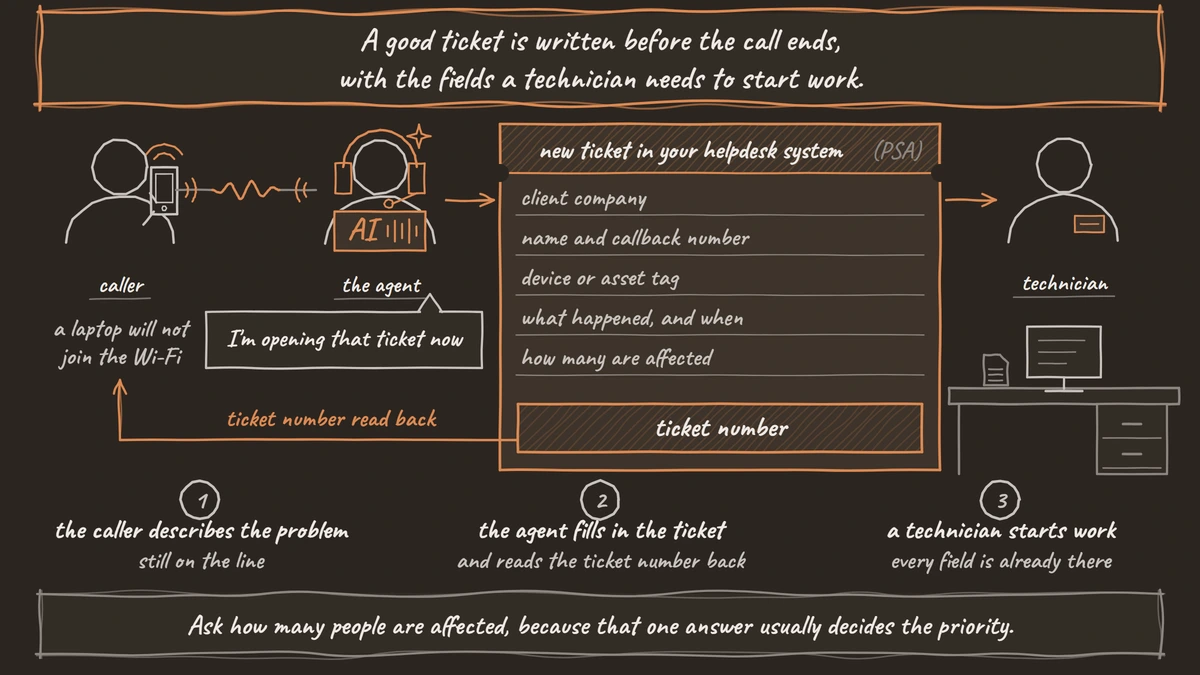
An HTTP API tool posts the ticket to your PSA or helpdesk API during the call, and the agent reads the new ticket number back. Dograh writes tickets through HTTP API tools or MCP tools, so any PSA or helpdesk with an API can take them. The tool's Messages setting can play "I'm opening that ticket now" while the PSA answers.
An HTTP API tool waits 5 seconds by default and makes a single attempt. If the PSA is slow or down, the agent tells the caller the details are saved and a technician will follow up. A Webhook node at the end of the call then sends the same details again, and it retries temporary failures automatically. Add the call's workflow_run_id to both requests so the PSA can ignore a second copy.
After hours, most tickets wait for the morning queue. The agent should say so plainly, with the time the desk opens, so the caller does not sit by the phone expecting a technician tonight.
Every route Dograh has into a business system is covered in our guide to connecting a voice agent to your CRM, and a PSA uses the same ones.
Status calls: find the ticket, then verify
The fastest status call starts before the greeting. With Pre-Call Data Fetch on Inbound calls only, your endpoint receives both the caller's number and the dialed number as the call connects. Your endpoint returns the likely contact and their open tickets, and the caller hears ringing until it answers.
The dialed number matters for an MSP. Each client can have its own number pointing at the same agent, and that number arrives as to_number, so the agent knows which client's line rang. Our post on managing multiple clients on one voice AI platform covers the rest of a many-client setup.
Matching a caller's number to a contact is a lookup, not proof of identity. Before naming a ticket's contents, the agent checks the ticket number the user received by email, or another check the client's policy allows. Then it reads the status and the last update as the PSA holds them, with the technician's name if one is assigned. It never promises a fix time the PSA does not show.
An internal helpdesk has an easier check, since every caller is an employee in the company directory. The agent can ask for an employee ID or another value the directory holds, compared by your endpoint, and never by reading the stored value aloud.

Open Source Alternative to Vapi / Retell
Self-hosted voice agent platform — no per-minute fees
dograh-hq/dograh
Star on GitHub
Password and MFA resets never happen on the call
The one request the agent must never complete is a password or MFA reset, because the phone is how attackers get them. CISA's advisory on Scattered Spider describes actors who phone IT helpdesk staff to get passwords reset or MFA tokens moved, often after an earlier call to learn the reset steps.
The cost can be large. Clorox's lawsuit against Cognizant, reported by The Record, alleges that helpdesk staff reset an employee's password and MFA without verifying the caller, and it seeks $380 million. Cognizant disputes the claims.
So the agent takes the request, opens a ticket marked as a reset request, and routes it to your own verified reset process. That might be the client's self-service portal or a technician who checks the person under the client's policy. If the agent transfers the caller, it goes to that technician, never to a queue that resets on request. It does not confirm whether a username exists or describe the checks a technician will use, since that is exactly what a first scouting call is after.
QA backs the rule up. A QA prompt can flag any call where the agent promised a reset or read out account details, and you set the share of calls it reviews. For how strong the checks behind a reset should be, NIST's digital identity guidelines are where most security teams start.
Safe handoffs to the on-call technician
A P1 needs a person quickly, and the agent's job is to find the right one. Define P1 narrowly in the prompt, such as an outage that stops the whole office, or a suspected security incident. Define it too broadly and technicians get woken for printers.
Transfer Call works on Twilio, Telnyx, Plivo, Cloudonix and Asterisk ARI. Its Context Mapping option picks the destination from a value the agent gathered, such as priority or client, using ordered rules where the first match wins and an optional fallback. A Dynamic HTTP Resolver can instead ask your on-call system who is on shift and dial that number. On your own Asterisk, the destination can be a SIP endpoint such as PJSIP/1001.
Dograh rings the technician first while hold music plays for the caller, and puts the two together once the technician picks up. No answer, a busy line, a failed call or a timeout comes back to the agent as a failed transfer, and the call continues. The agent can then page the next person through an HTTP API tool and tell the caller what happens next.
Because the ticket is written first, the technician can open it the moment they answer. Twilio lines can also play a short spoken introduction to both people before they are joined. Our post on AI voice agents for after-hours coverage covers the escalation list for nights when the on-call phone is not answered.
Join the Dograh Community
Dograh is an OSS alternative to Vapi. Join our Slack community for queries, releases, best practices & community interactions.
Keeping client calls on your own servers
Many MSP clients ask where their call recordings go, and self-hosting gives a short answer. Run Dograh on your own servers and the recordings and transcripts stay there. For clients that forbid third-party AI, run open-weight models next to it. Bringing your own keys to a commercial model moves the contract, not the data, because the audio still reaches that provider.
Self-hosted Dograh has no per-minute platform fee, but servers, model keys and phone minutes still cost money. Dograh Cloud charges a 1¢-a-minute platform fee. Client API keys sit in your own database, so protect access and backups as you would any client credential, and use a separate team per client on Cloud, keeping in mind that everyone in a team has full access to it. Dograh's BSD 2-Clause license also lets an MSP run its own copy under its own name and logo, as long as it keeps the license notice.
When a call goes wrong, the trace shows the time spent on speech-to-text, the AI and the voice for every turn. Start with status calls for one client, where the agent only reads, then add intake once the tickets look right.
Glossary
- PSA (professional services automation)
- The system an MSP uses to run tickets, time and billing across clients. The agent writes new tickets into it through its API and reads status from it during status calls.
- Vishing
- Voice phishing, where an attacker phones staff and pretends to be someone else. Calls to IT helpdesks asking for password or MFA resets are a common form, which is why the agent never performs them.
- Context Mapping
- A Transfer Call option in Dograh that picks the destination from a value gathered on the call, such as client or priority. Rules run in order, the first match wins, and an optional fallback catches the rest.
- P1 incident
- The top priority level on a helpdesk, used for outages that stop many people working or for suspected security incidents. A narrow P1 definition keeps the on-call technician from being woken for routine faults.