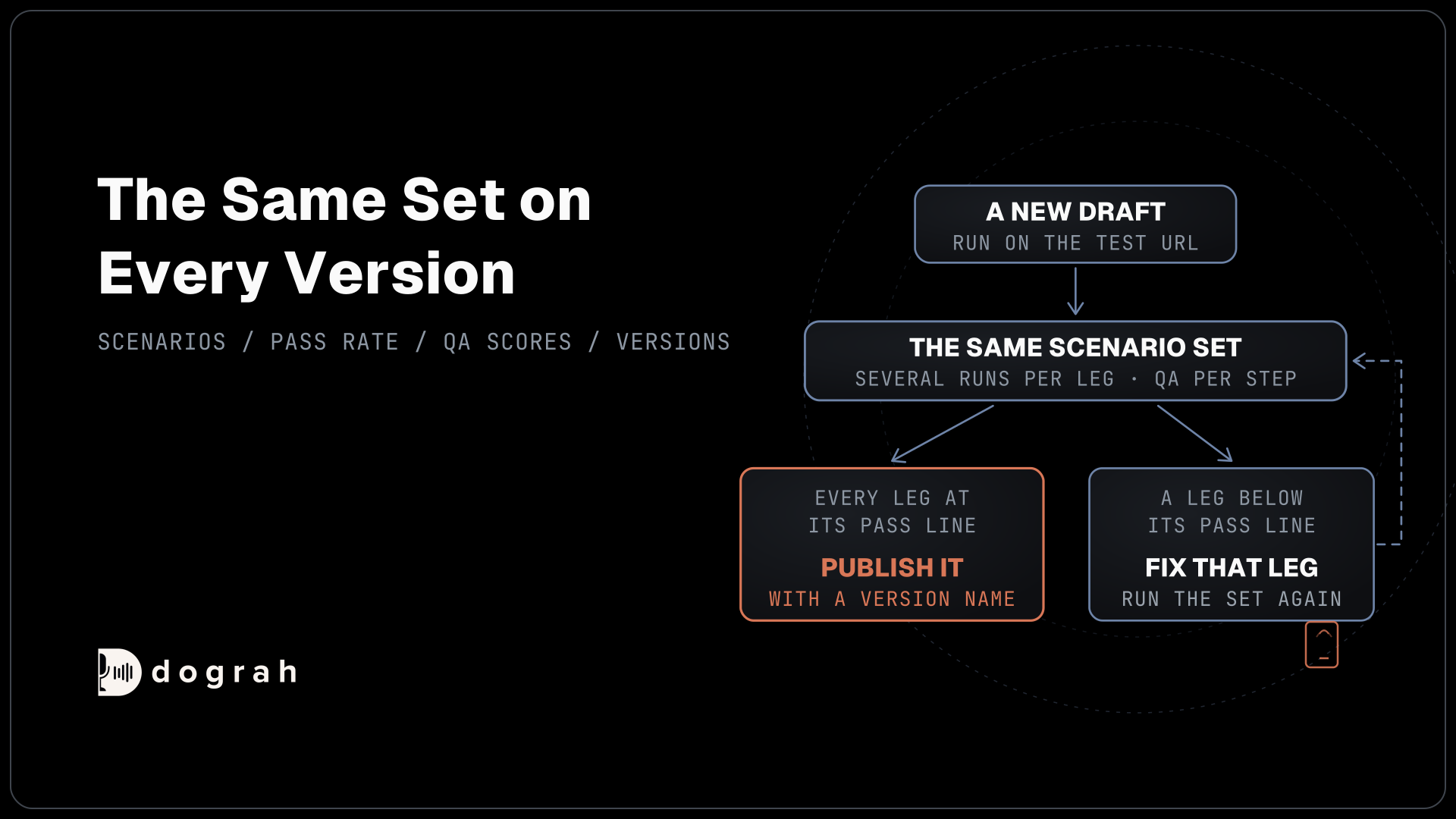

A voice agent is ready when a fixed set of scenarios passes at the rate you chose, leg by leg, over several runs, and its per-step QA scores hold at or above your baseline. One clean call proves little, because the same model gives different answers to the same request. Re-run the whole set on every new version.
Key Takeaways
- Judge readiness by pass rate per leg over several runs.
- Score each step of the call, because one call score hides the failing step.
- Re-run the same scenario set on every version before you publish it.
This post is part of our guide to voice AI for developers, where an agent counts as ready only when the numbers say so. We cover the scenario set, the pass rate per leg, per-step QA scores and the re-test after every change, with the settings Dograh provides for each.
Why one good test call proves little
Language models do not give the same answer twice, even when they are set up to. Thinking Machines Lab sent one prompt 1,000 times to a model at temperature 0 and got 80 distinct completions. A voice agent adds speech recognition, timing and interruptions on top of that spread.
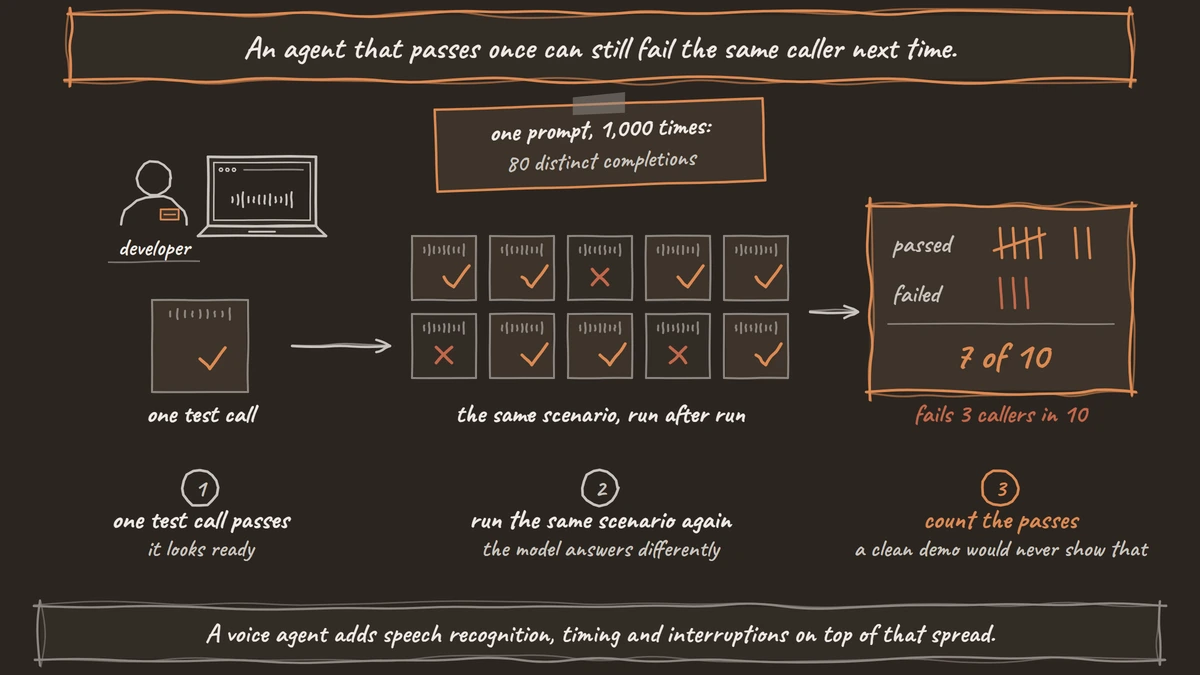
Voice benchmarks show the cost. The EVA-Bench study tested 12 voice agent systems on 213 scenarios and found none scored above 0.5 on both task accuracy and caller experience. It also measured a median gap of 0.44 between succeeding on at least one of several tries and succeeding on all of them. An agent that passes once can still fail the same caller next time.
Long calls make it worse. Across more than 200,000 simulated conversations, Laban and colleagues found that model performance in multi-turn conversations averaged 39% below single-turn, and most of the drop came from unreliable answers.
Build a fixed scenario set
Write the scenarios down before you test, and keep them fixed between versions. For each leg of the call, such as the greeting, the verify step, the booking or the transfer, list the normal path, the edge cases and the failures you care about. Then write the pass line for each one, such as "books the slot the caller asked for and reads it back once".
Include the callers you will really get. Add a fast talker, a caller who interrupts, a long silence and a caller on a noisy line. EVA-Bench found that accent and noise changes alone shifted scores by up to 0.314. Speech-to-text slips too. NVIDIA's model card for Parakeet TDT 0.6B v2 reports 8.23% word error at a 5 dB signal-to-noise ratio, against 6.05% on clean audio.
Put test values in the Variables tab at the top of the agent editor, such as a customer name or an appointment time. Set direction to outbound there to test the outbound path. Our checklist of tests to run before go-live covers which test to run first.

Open Source Alternative to Vapi / Retell
Self-hosted voice agent platform — no per-minute fees
dograh-hq/dograh
Star on GitHub
Count the passes for each leg
Run each scenario several times and count the passes. Ten runs per leg is a practical start. A leg passes when it meets its pass line on the share of runs you chose. A leg that passes 7 times in 10 fails 3 callers in 10, and a single clean demo would never show that.
Count per leg, because a call is only as good as its weakest step. If the greeting passes 10 of 10 and the booking passes 6 of 10, the booking prompt or its tool needs work, and the rest of the flow can stay as it is.
Test Chat makes repeats fast. Open Test Agent in the editor header, choose Test Chat, and each agent turn has Rerun this turn and Edit and rerun this turn, so you can repeat one leg without starting the call again. Text skips speech recognition, so run the audio cases in Test Audio and on a real phone call as well.
Score each step with QA
A single score for a whole call hides the step that failed. Dograh's QA node splits each call by step and scores every part on its own, with tags, a 1-10 score, sentiment and a summary. It runs on editor test calls as well as live calls, so your test runs produce the same scores as production.
Check three settings before a test round. Minimum Call Duration (seconds) defaults to 15, so a QA node skips shorter test calls and gives them no score at all. Lower it for short test scenarios, then set it back before launch. Sample Rate (%) defaults to 100, which suits testing. Include Voicemail Calls is off. The default tags include DEAD_AIR, ASSISTANT_IN_LOOP and HEARING_ISSUES, and you can rewrite the System Prompt to add your own.
Your baseline is the per-step score from the version you trust. Our guide to automated QA for voice agents covers the node setup in full.
Join the Dograh Community
Dograh is an OSS alternative to Vapi. Join our Slack community for queries, releases, best practices & community interactions.
Re-run the same set on every version
Every edit is a draft until you publish, so test the draft before it takes calls. The API Trigger's test URL runs the latest draft, while the production URL keeps running the published version. When the draft passes, click Publish and add a Version name and a Change description, so each result ties to a version.
Keep the results outside the editor. The Webhook node's payload carries annotations, which hold the QA results, so your system can store per-step scores next to the version that produced them. Then compare the two versions step by step. A prompt fix for one leg often moves the score of another.
For larger scenario sets, Tuner simulations call your agent over SIP, play a caller from a generated scenario and score the result. Inbound calls run the published version, so publish before you simulate.
After launch, the same numbers become production metrics. Our guide to measuring voice agent quality covers those.
Why fixed thresholds mislead
Vendor guides often publish one table of pass marks, such as a word error rate under 5% or a task completion rate above 75-90%. Those figures come from the vendor's own customers and call types, and they rarely say which.
A booking line for a dental clinic and a claims line for an insurer fail in different places. Set your own baseline from the first full round of runs, write it next to each leg, and raise it as the agent improves. Dograh's per-step scores give you that baseline from your own calls.
Glossary
- Leg
- One step of a call flow with its own job, such as the greeting, verifying the caller or booking a slot. Testing per leg shows which step fails.
- Pass rate per leg
- The share of runs in which a leg meets its written pass line. A leg that passes 7 of 10 runs fails 3 callers in 10.
- Reliable pass (pass^k)
- Passing a scenario on every one of k tries, instead of on at least one. The gap between the two shows how much a single good run overstates an agent.
- Per-step QA score
- A score given to one step of a call on its own, with tags and a summary. It shows which step slipped when a whole-call score would hide it.