
Sarvam covers Indian-language voice agents from end to end. Saaras speech-to-text hears 22 Indian languages plus English, Bulbul voices speak 10 or 11 depending on the model, and speech-to-text costs ₹0.49 a minute. For teams building on Indian phone numbers, Dograh, the open-source AI voice agent platform, runs Sarvam on your key, self-hosted or on Dograh Cloud.
Key Takeaways
- Saaras hears 23 languages, while Bulbul v4 Flash speaks 10 and Bulbul v3 speaks 11.
- Malayalam and Odia callers need Bulbul v3, since v4 Flash leaves them out.
- In Dograh, pick saaras:v3 in the Model field and test on 8 kHz calls.
Indian callers switch languages mid-sentence over 8 kHz phone lines, which is the case Sarvam builds for. Below we cover Sarvam's speech-to-text, voices and language model, mixed speech and latency, the rupee bill, then we talk about running it in Dograh on Exotel or Vobiz numbers and keep the data in India.
What Sarvam offers a phone agent
Sarvam sells every model a cascaded voice agent needs, each one trained for Indian languages. Sarvam's model list gives Saaras v4 as its latest and default speech-to-text model, with Saaras v3 still active, and both cover 23 languages, 22 Indian languages plus English. Each can return a plain transcript or switch to modes for translation, transliteration and code-mixed text.
On the voice side, Bulbul v4 Flash is the newest model, with more than 200 persona voices across 10 languages, and it treats English-Hindi as a language of its own. Bulbul v3 is still the API default and covers 11 languages with more than 30 speakers, Malayalam and Odia among them. For the conversation itself, Sarvam-105B offers a 128K-token context with reasoning switched on, while Sarvam-105B Conversations drops reasoning for a 32K context, and both handle 11 languages.
Which languages each Sarvam model covers
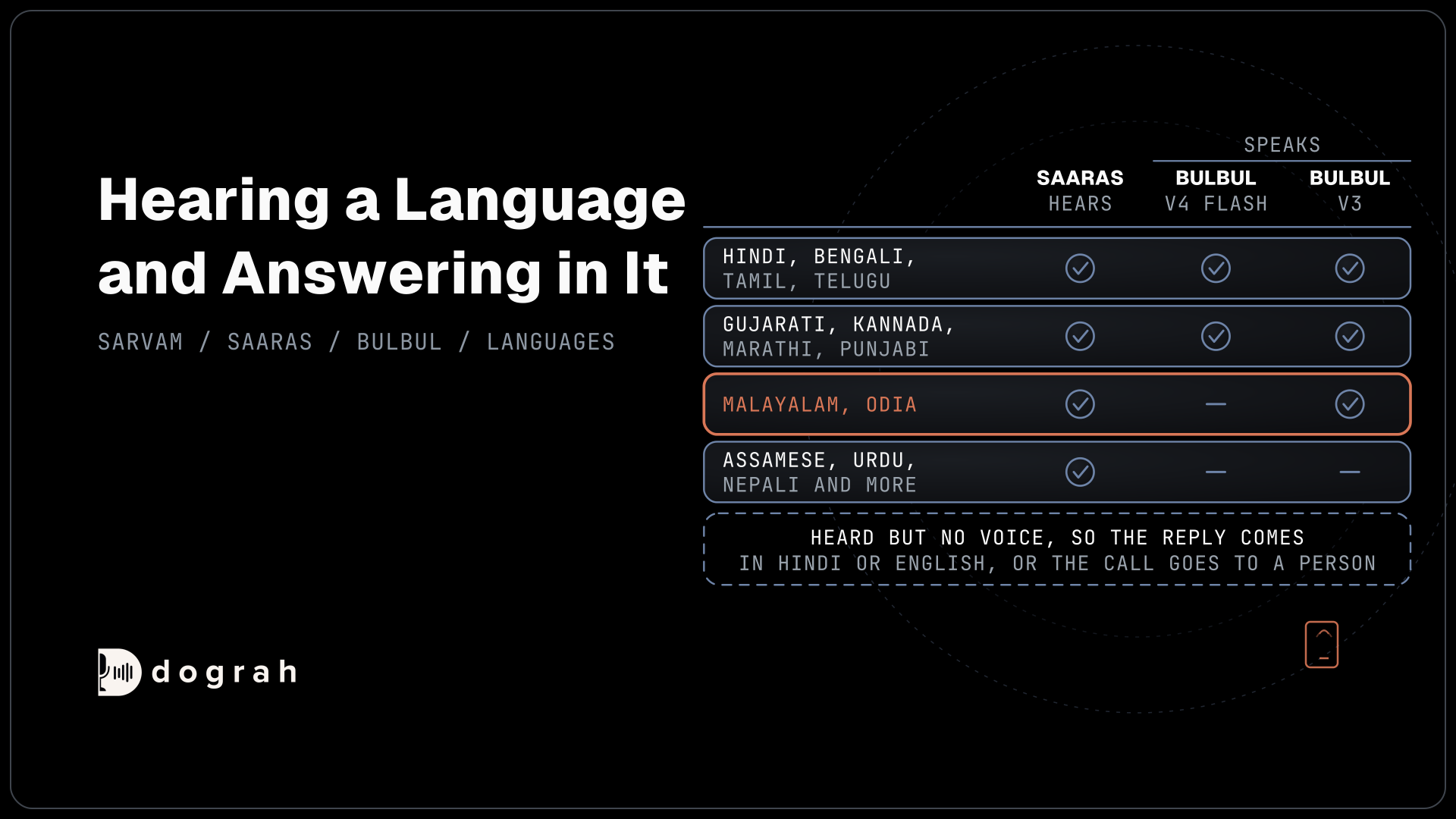
Hearing a language and answering in it are separate questions, and Sarvam's models give different answers. The table puts the speech-to-text and voice lists side by side.
| Language | Saaras v3 and v4 (speech-to-text) | Bulbul v4 Flash (voice) | Bulbul v3 (voice) |
|---|---|---|---|
| Hindi, Bengali, Tamil, Telugu | Yes | Yes | Yes |
| Gujarati, Kannada, Marathi, Punjabi | Yes | Yes | Yes |
| Malayalam, Odia | Yes | No | Yes |
| English | Yes | Yes | Yes |
| English-Hindi as its own language | Through the codemix output mode | Yes | No |
| Assamese, Urdu, Nepali, Konkani, Kashmiri, Sindhi, Sanskrit, Santali, Manipuri, Bodo, Maithili, Dogri | Yes | No | No |
The last row is the one to plan for. An agent can understand a caller in Assamese or Maithili but has no Bulbul voice to answer in that language, so the reply comes in Hindi or English, or the call goes to a person. Our post on multilingual support lines in BPOs shows how to give each language its own agent.
Mixed languages, 8 kHz audio and latency
Sarvam makes strong claims about real phone calls, and they are worth checking on your own line. On its speech-to-text page, Sarvam says the model understands "when speakers switch between Hindi, English, and regional languages mid-sentence" and handles "real call center audio" at 8 kHz with background noise and more than one speaker, with a median latency under 250 ms. Its voice page says Bulbul v4 Flash outputs 8 kHz audio directly and starts speaking in under 250 ms. Treat those figures as Sarvam's own targets until your test calls confirm them.
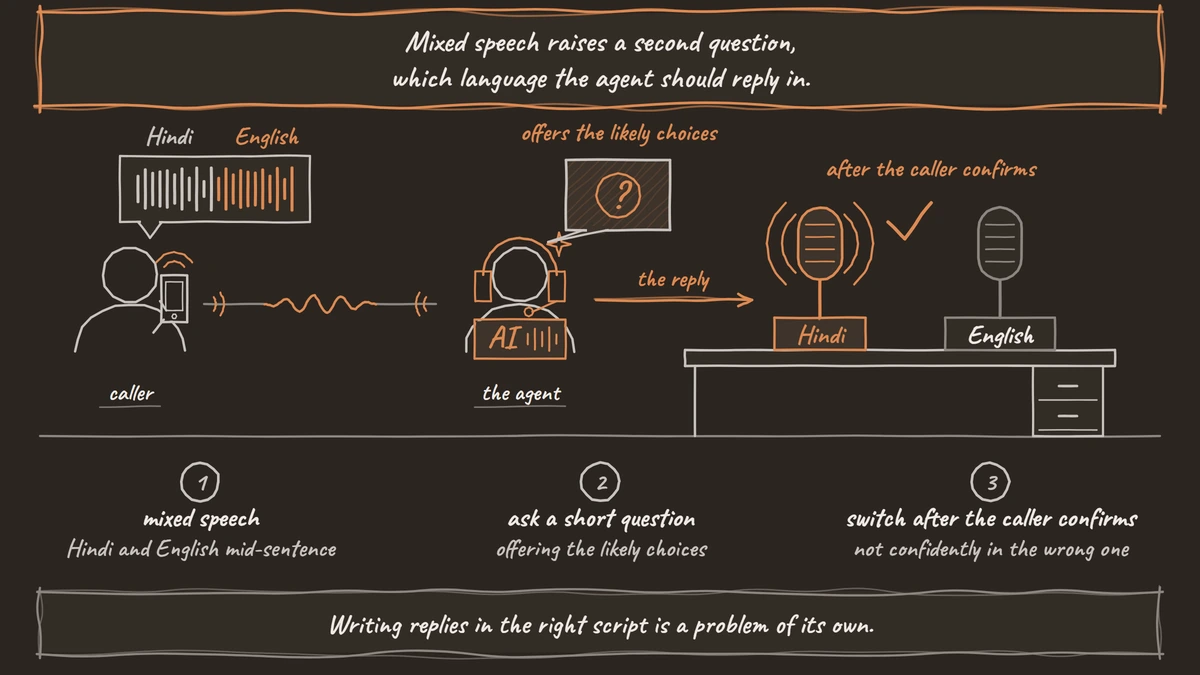
Mixed speech raises a second question, which language the agent should reply in. When the agent is unsure of the caller's language, it should ask a short question offering the likely choices and switch only after the caller confirms, rather than carry on confidently in the wrong one. Writing replies in the right script is a problem of its own, covered in our post on multilingual TTS for voice agents.
For a developer calling Sarvam directly, the streaming speech-to-text API accepts WAV or raw 16-bit PCM only, at a sample rate you declare, with 8000 and 16000 as its examples. Sarvam recommends 16 kHz, and for 8 kHz phone audio the rate has to match on both the connection and each request. Many carriers stream mu-law, so the audio has to be decoded to PCM before it reaches Sarvam. A newer saaras:v3-realtime model, still in beta, adds interim transcripts for live agents.

Open Source Alternative to Vapi / Retell
Self-hosted voice agent platform — no per-minute fees
dograh-hq/dograh
Star on GitHub
What Sarvam costs in rupees
Sarvam's API pricing bills speech-to-text by the minute and voices by the character, all in rupees. Real-time speech-to-text costs ₹0.49 a minute on pay as you go, falling to ₹0.45 on Pro, ₹0.41 on Growth and ₹0.38 on Business. Bulbul v3 costs ₹3 per 1,000 characters on pay as you go. Sarvam's two price pages show different v4 Flash rates, so check your dashboard before you budget. Sarvam-105B charges ₹15 per million input tokens and ₹60 per million output tokens. New accounts get ₹100 of credit.
As an example, take a 3-minute Hindi payment reminder in which the agent speaks about 1,500 characters on Bulbul v3. Speech-to-text is 3 x ₹0.49 = ₹1.47 and the voice is 1,500 x ₹3 per 1,000 characters = ₹4.50, so ₹5.97 a call, or ₹5,970 for 1,000 calls, before the language model and the phone line. The monthly plans, from ₹9,999 for Pro to ₹1,99,999 for Business, bring those rates down once volume covers the fee.
Setting up Sarvam in Dograh
Sarvam is built into Dograh for all three layers, on your own Sarvam key. Under Providers in the sidebar, choose Add Provider, pick Sarvam and paste the API key. Then open Models, choose Add Configuration and select BYOK, the mode where you pick the LLM, STT and TTS providers yourself, and set Sarvam on each tab you want it for.
On the STT tab, pick saaras:v3 in the Model field. Language starts at unknown, which lets Sarvam detect the language, or you can fix one code such as hi-IN or ta-IN, and with saaras:v3 the list adds codes such as as-IN for Assamese and ur-IN for Urdu. Dograh opens the speech-to-text stream at the call's own sample rate, which is 8,000 Hz on Exotel and Vobiz numbers.
On the TTS tab, Model offers bulbul:v3, the default, or bulbul:v4-flash. The Voice list follows the model, starting at shubh on v3 and shubh_enhi_ads on v4 Flash, and a custom voice ID is accepted too. Language defaults to hi-IN, and Speed runs from 0.5 to 2.0. Any line played as a pre-recorded clip skips the Sarvam voice, so a recorded greeting uses no characters. On the LLM tab, sarvam-105b-conversations is the default and sarvam-105b is the reasoning option.
Greeting Text plays before Dograh can hear the caller's language, so write it in both, for example "Namaste, hello". After that, place test calls from the kinds of phones your callers use, because 8 kHz audio is where misheard names and amounts show up first.
Join the Dograh Community
Dograh is an OSS alternative to Vapi. Join our Slack community for queries, releases, best practices & community interactions.
Exotel or Vobiz numbers for Indian calls
Exotel and Vobiz are both built into Dograh as carriers, and both deliver calls at 8 kHz. On the Telephony page, choose Add configuration and pick Exotel with its Account SID, API Key and API Token, or Vobiz with its Auth ID and Auth Token. Then add your numbers and set each one's Inbound workflow to the Sarvam agent. Exotel needs AgentStream switched on and KYC cleared before an ExoPhone carries live calls, which our Exotel setup guide walks through.
When a caller on these numbers needs a person, the agent records a callback request, and an HTTP API tool writes it to your helpdesk or CRM during the call. The caller hangs up knowing someone will ring back. Our post on Hindi AI voice agents for collections covers the RBI calling rules for that kind of line.
For lines where callers often need staff on the spot, a Plivo number fits, since Plivo's pay as you go plan covers India and Transfer Call works on it. Dograh rings the destination first and only connects the caller after someone picks up. A no-answer, a busy line or a failed transfer sends the call back to the agent, and the conversation carries on. The Sarvam agent stays the same whichever carrier rings it.
Keeping call data in India and what hosting costs
Where call audio goes depends on the models you run as well as where the platform sits. Dograh runs the call flow, tools and telephony as the orchestration layer, while you choose the speech and language models as their own layer. With Sarvam on your own key, audio goes to Sarvam, which says on its voice page that "All data processed in India". Bringing your own key moves the contract to you, while the audio still reaches the provider, so keeping every second of a call on your own servers in India takes a self-hosted install there with open-weight models running beside it.
Sarvam bills its rupee rates to your own Sarvam account either way. Self-hosted Dograh has no per-minute platform fee, but servers, model keys and phone minutes still cost money. Dograh Cloud charges a 1¢-a-minute platform fee. Docker Compose runs a self-hosted install on a server with at least 8 GB of RAM and 4 vCPUs, with 10 calls at once by default and a setting to raise it. The server, the database and upgrades then sit with your team, with community support on the open-source edition and custom SLAs on Enterprise.
Start with saaras:v3 and the Bulbul model that covers your callers' languages, then run a week of real calls on one number. If the transcripts hold up on 8 kHz audio in your top two languages, the rest of the build is prompts and tools.
Glossary
- Code-mixed speech
- Speech that moves between two languages inside one sentence, such as Hindi and English. Saaras has a codemix output mode, and Bulbul v4 Flash treats English-Hindi as its own language.
- Saaras
- Sarvam's speech-to-text model family. Saaras v4 is Sarvam's current default and Saaras v3 is still active, both covering 23 languages.
- Bulbul v4 Flash
- Sarvam's newest voice model, with more than 200 persona voices in 10 languages. Sarvam says it outputs 8 kHz audio directly for phone lines.
- Bring your own key (BYOK)
- Running a model provider on your own account inside the platform. The contract and the bill move to you, and call audio is still processed by that provider.