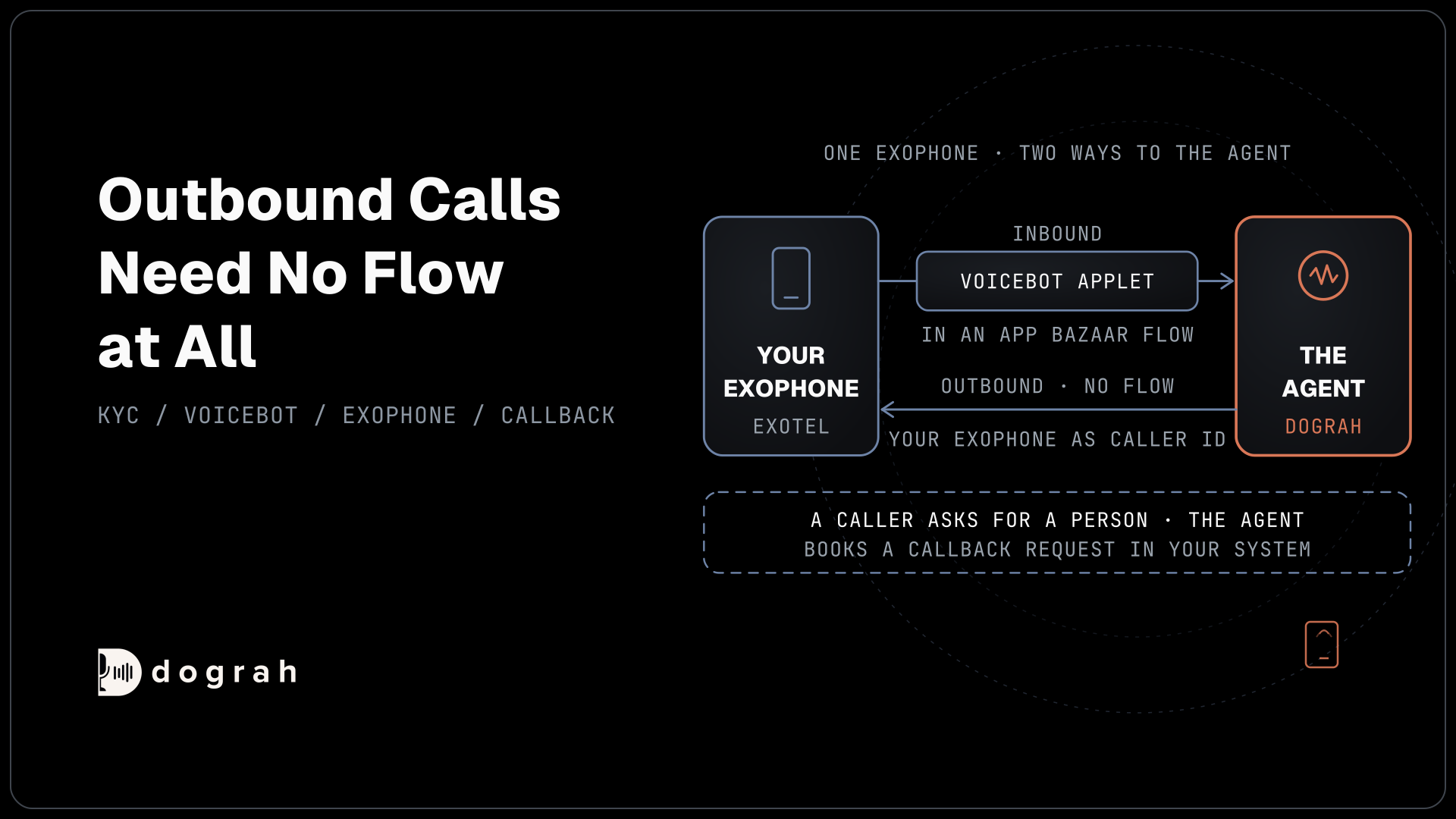

To run an AI voice agent on Exotel, ask Exotel to switch on AgentStream, clear KYC, and add your API credentials in Dograh, the open-source AI voice agent platform. Inbound calls reach the agent through a Voicebot applet, and outbound calls need no flow. You can self-host it or run it on Dograh Cloud.
Key Takeaways
- Exotel must switch on AgentStream, and KYC must clear first.
- Inbound uses a Voicebot applet. Outbound calls need no flow.
- On Exotel numbers, callers who need a person get a callback request.
This setup sits within our guide to SIP trunk providers compared, which runs from picking a carrier to the trunk your agent answers on. Here an Exotel number goes from account checks to a live AI voice agent in Dograh, with test calls in both directions.
What you need before you start
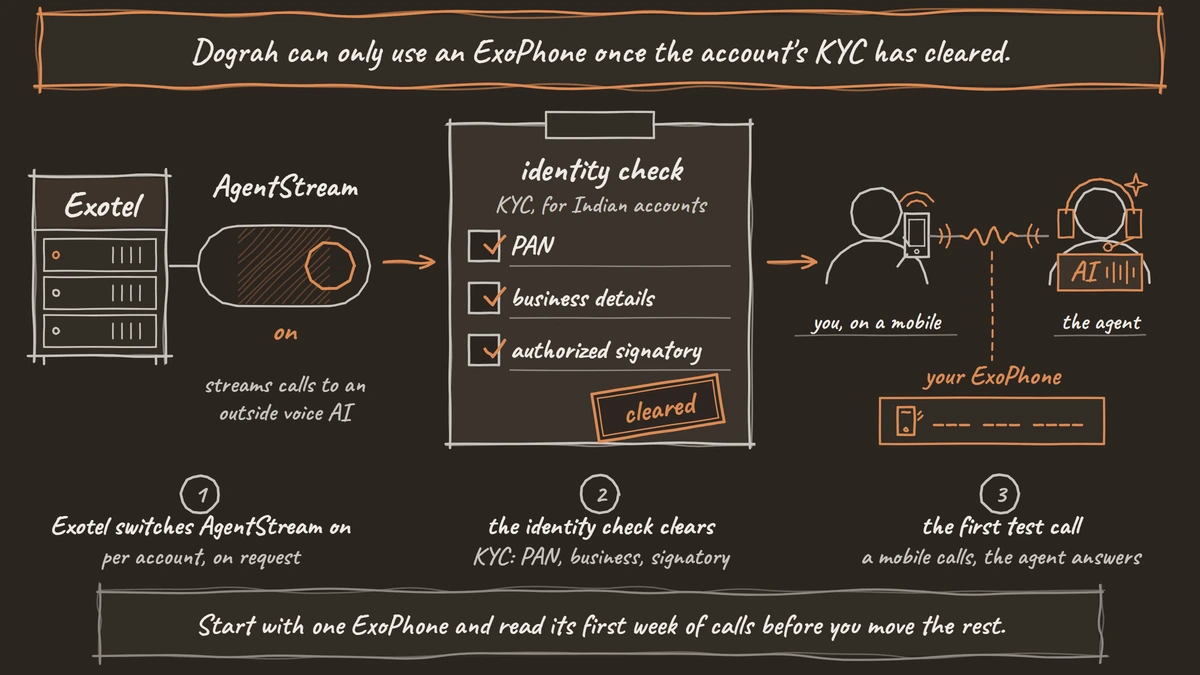
Exotel switches AgentStream, its feature for streaming calls to an outside voice AI, on per account. Ask hello@exotel.com to enable it. AgentStream is sold outside Exotel's phone system plans, so its price comes from Exotel's sales team.
Dograh can only use an ExoPhone once the account's KYC has cleared. For Indian accounts, Exotel's KYC process has three stages, confirming the PAN, the business details and an authorized signatory, starting from My Account and then Company Info. Exotel puts the form at about 3 to 5 minutes.
Have at least one ExoPhone ready too, plus one agent built in Dograh, on Cloud or on your own install.
Step 1: Copy the API credentials
In the Exotel dashboard, open Settings and then API Settings. Copy the Account SID, the API Key and the API Token. Note which region the account sits in, because India accounts use the Mumbai API and others use Singapore.
Check: you have all three values and know the account's region.
Step 2: Add Exotel in Dograh
Open Telephony in the Dograh sidebar, choose Add configuration and pick Exotel. Fill in Account SID, API Key and API Token. API Base URL defaults to https://api.in.exotel.com for India accounts, so change it to https://api.exotel.com only for an account outside India. Save the configuration.
Then use Add phone number and enter your ExoPhone in E.164 form, such as +9180XXXXXXXX, and mark it with Set as default caller ID. Dograh checks that the account owns the number and refuses one it cannot find. That usually means the base URL points at the wrong region or KYC has not cleared yet. The Exotel setup page lists the same checks.
Check: the number saves without an ownership error and shows as the default caller ID.

Open Source Alternative to Vapi / Retell
Self-hosted voice agent platform — no per-minute fees
dograh-hq/dograh
Star on GitHub
Step 3: Build the inbound flow with a Voicebot applet
Inbound calls reach the agent through a flow. In Exotel's App Bazaar, create a flow and add a Voicebot applet. Set its URL to https://<your-dograh-host>/api/v1/telephony/inbound/run, which is api.dograh.com on Dograh Cloud or your backend domain when you self-host. Choose HTTP Basic authentication with the same API Key and API Token, and set the Sample Rate to 8000.
Leave the URL without a ?sample-rate= parameter. The applet setting is enough, and adding the parameter breaks the audio. Exotel's Voicebot applet reference explains the other options, which this setup leaves at their defaults. Save the flow and assign your ExoPhone to it.
Check: the ExoPhone shows the new flow as its incoming call flow in Exotel.
Step 4: Assign the agent and test both directions
Back in Dograh, open Phone numbers, edit the ExoPhone, choose the agent under Inbound workflow and save. Call the ExoPhone from a mobile, and the agent should answer.
Outbound calls need no flow at all. Dograh places them through Exotel's Connect Voice AI API and sends your ExoPhone as the caller ID. To test, open the agent, choose Phone Call, select the Exotel configuration, enter a mobile number and press Start Call.
Check: an inbound call reaches the agent, an outbound call rings the mobile with your ExoPhone as the caller ID, and both show in the agent's call log.
Plan for callers who ask for a person
Transfer Call runs on Twilio, Telnyx, Plivo, Cloudonix and Asterisk ARI. On Exotel numbers, the agent takes the caller's details and books a callback request in your system instead, so the caller ends the call knowing when someone will call back.
Set that up with an HTTP API tool that writes the name, number and reason to your helpdesk or CRM. Then write the prompt so the agent offers the callback whenever a caller asks for a person and confirms the details before ending the call.
Lines where callers often need staff on the spot belong on a route with live transfers, such as Plivo, Twilio, Telnyx or the India region of Managed SIP, all in the same Dograh account. Our Vonage setup guide follows the same pattern for agents that finish calls themselves.
Join the Dograh Community
Dograh is an OSS alternative to Vapi. Join our Slack community for queries, releases, best practices & community interactions.
Before you ship it
Exotel delivers 8 kHz audio to the agent, against 16 kHz in a browser demo, so test with real calls from a mobile and a landline before customers call. Names and phone numbers spoken in Indian English or Hindi deserve a careful listen.
Choose speech models for the languages your callers use. Sarvam's speech-to-text, language model and text-to-speech are available in Dograh on your own keys, and the Language Hints in the agent's Model tab include Hindi. Our guide to multilingual TTS for voice agents covers voices across languages.
In each call's trace you can see what speech-to-text heard and the time every turn took. Self-hosted Dograh has no per-minute platform fee, but servers, model keys and phone minutes still cost money. Dograh Cloud charges a 1¢-a-minute platform fee. Exotel bills its plan and AgentStream separately.
Start with one ExoPhone and read its first week of calls before you move the rest.
Glossary
- AgentStream
- Exotel's feature for streaming a live call to an outside voice AI over a WebSocket. Exotel switches it on per account and prices it outside its phone system plans.
- Voicebot applet
- The App Bazaar applet that hands an inbound call to a voice AI. For Dograh it points at the inbound run URL, signs in with HTTP Basic using the Exotel API key and token, and runs at 8000 Hz.
- ExoPhone
- A phone number rented from Exotel. Dograh checks that the account owns it before saving, which fails until KYC has cleared or when the API region is wrong.
- App Bazaar
- Exotel's flow builder, where applets such as greetings, menus and the Voicebot applet are chained into a call flow and assigned to an ExoPhone.