
Google Cloud Speech-to-Text suits phone agents through its telephony model, the one Google documents for 8 kHz phone audio, streamed over the V2 API. Standard models cost $0.016 a minute. For teams comparing it on their own calls, Dograh, the open-source AI voice agent platform, runs it on your Google key, self-hosted or on Dograh Cloud.
Key Takeaways
- Pick Google's telephony model for 8 kHz phone audio, in global, us or eu.
- A Google stream closes after 5 minutes, so long calls need a fresh one.
- In Dograh, type telephony in the STT Model field and compare on real calls.
Phone audio is narrower than a browser demo, and that decides which Google model to use. Below we cover the V2 models, the streaming limits, languages by region and the bill per call, then we talk about setting Google up in Dograh and comparing it on the same calls.
Which Google model fits phone audio
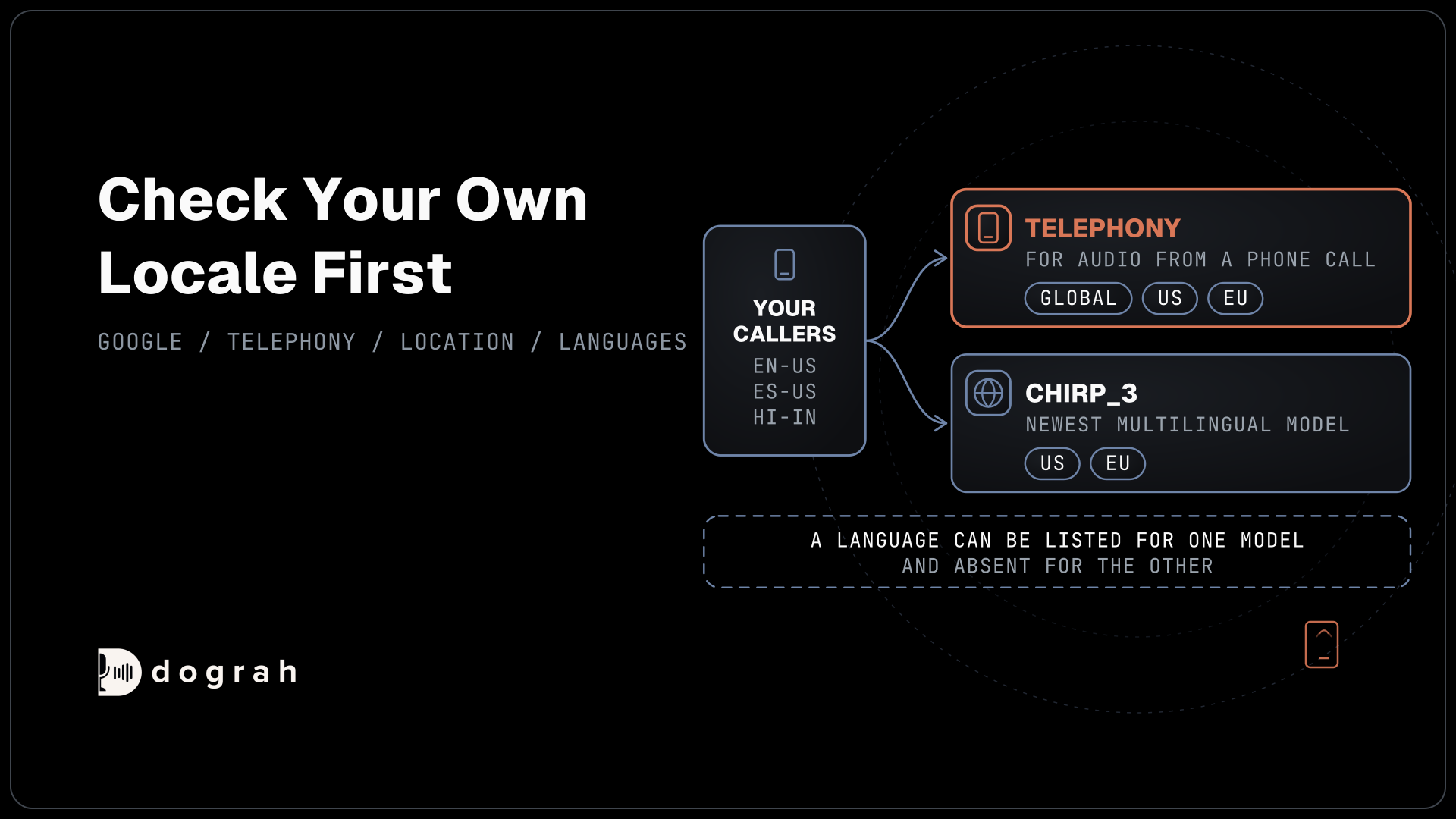
Google's V2 API offers three current models, and one of them is described for phone calls. Google's model table says to use telephony "for audio that originates from an audio phone call, typically recorded at an 8 kHz sampling rate", with customer service and kiosks as its intended jobs. chirp_3 is Google's newest multilingual model, which Google says is more accurate and faster than earlier Chirp models, and chirp_2 is the older large model for streaming and batch.
| Model | What Google builds it for | Where it runs (en-US) | Live streaming |
|---|---|---|---|
telephony | Phone-call audio, usually 8 kHz | global, us and eu | Yes |
chirp_3 | Newest multilingual model, with automatic language detection | us and eu multi-regions | Yes |
chirp_2 | Large multilingual model for streaming and batch | Selected regional locations | Yes |
The phone model matters because of what the line does to sound. Most phone calls still reach the agent as 8 kHz audio, while a browser demo runs at 16 kHz. In our experience the error rate on a phone call can be up to three times higher than on a web call, though the gap depends on the speech model and the phone path, so it has to be tested. The older names latest_long and latest_short still appear among the standard models on Google's pricing page, while the current table by location lists telephony and chirp_3.
Streaming limits on a live call
A live agent needs streaming recognition, and Google sets firm limits on it. Google's quotas page says a stream can remain open for up to 5 minutes and caps each request inside the stream at 25 KB of audio. A project also gets 300 concurrent streaming sessions per region, shared by every app that uses that project.
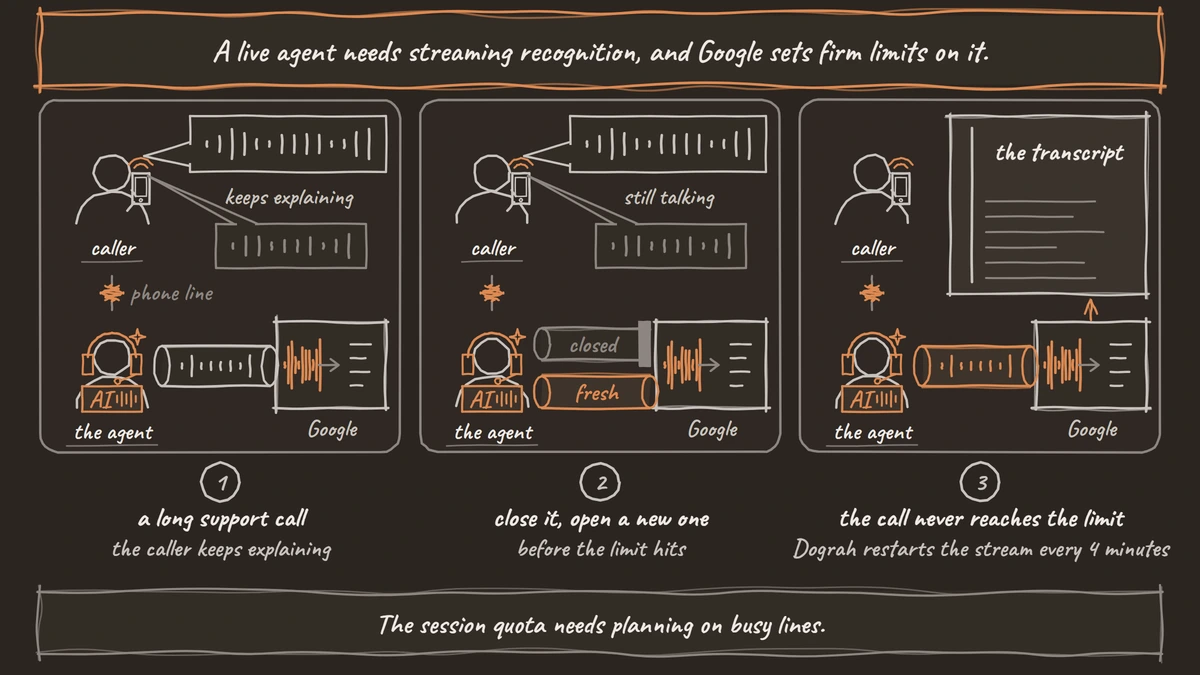
The 5-minute limit is the one a phone agent feels, because plenty of support calls run longer. Your code has to close the stream before it hits the limit and open a new one, without dropping the words the caller says in between. The 25 KB cap is easy to live with. One second of 8 kHz audio in 16-bit linear PCM is 16,000 bytes, so a request can hold about 1.6 seconds, far more than the 20 to 100 ms chunks a live agent sends.
The session quota needs planning on busy lines. An outbound campaign and a test environment in the same project draw from the same 300, so a separate project for testing keeps them apart. Speaker labels are not part of the stream either, since Chirp 3 offers diarization only for recorded audio sent in batch. On a phone agent that rarely matters, because the caller's side of the call carries one voice.
Languages and regions for Google speech-to-text
Which languages you get depends on both the model and the location. Chirp 3 runs in the us and eu multi-regions, with more planned, and detects the dominant language by itself when you pass auto as the language code. It accepts speech adaptation with up to 1,000 phrases, such as product or street names, and a denoiser that reduces background music and traffic but cannot remove other people talking nearby.
The phone model reaches more locations. For en-US, es-US and hi-IN, Google's supported-languages table lists telephony in global, us and eu, while chirp_3 appears only in us and eu. Check your own locale in that table before you choose, because a language can be listed for one model and absent for the other. If your callers are in Europe and you want requests to go to an EU endpoint, both models are listed in the eu multi-region.

Open Source Alternative to Vapi / Retell
Self-hosted voice agent platform — no per-minute fees
dograh-hq/dograh
Star on GitHub
What Google speech-to-text costs per call
Google bills recognition by the minute of audio, with tiers that drop as monthly volume grows. Google's pricing page lists V2 standard models at $0.016 a minute for the first 500,000 minutes in a month, $0.01 up to 1 million, $0.008 up to 2 million and $0.004 above that, counted per account. Each request is rounded up to the next second, and each audio channel is billed separately, so send the caller's side as one mono stream rather than a stereo mix.
As an example, take 2,000 inbound calls a month at 4 minutes each. That is 8,000 minutes, and 8,000 x $0.016 comes to $128, or about $0.064 a call for speech-to-text alone. The language model, the voice and the phone line come on top. The pricing page names its standard models by IDs such as latest_long, phone_call and chirp, so check which line your model is billed under in your Google Cloud billing report after the first test calls.
Dynamic batch recognition costs $0.003 a minute, but it works on recordings after the call, so it suits call analytics and not a live agent. For scale, Soniox lists real-time audio at $0.12 an hour, about $0.002 a minute, and Deepgram lists Nova-3 at $0.0048 a minute, a promotional rate down from $0.0077.
When another speech-to-text provider does better
Speed is where Google trails in the one open benchmark that includes it. Pipecat's streaming benchmark plays 1,000 conversational samples at real-time pace, and Google's latest-long model scored a pooled word error rate of 2.46%, with a median of 878 ms from the end of speech to the final transcript. Soniox stt-rt-v6 scored 0.71% at 266 ms, Deepgram nova-3-general 1.37% at 247 ms, and Google's own gemini-3.5-transcribe-live 1.97% at 458 ms.
Two limits apply to those rows. The samples are not described as phone audio, and neither telephony nor chirp_3 is in the table, so they say nothing direct about the model this post recommends. The latency gap still deserves attention. A natural reply needs the whole turn, from the caller's last word to the agent's first sound, inside about 800 ms, and speech-to-text is usually the slowest part of that turn.
Google is a sensible pick when your company already runs on Google Cloud and wants one bill, with US or EU endpoints for call audio. If your test calls come back slow or full of misheard names, try a provider built around streaming agents, such as the one in our post on Soniox speech-to-text for voice agents. Our review of the best speech-to-text APIs, tested on voice agent calls compares the wider field.
Join the Dograh Community
Dograh is an OSS alternative to Vapi. Join our Slack community for queries, releases, best practices & community interactions.
Setting up Google speech-to-text in Dograh
Google is one of the built-in speech-to-text providers in Dograh, and the setup spans two screens. Under Providers in the sidebar, choose Add Provider, pick Google and name the connection. Paste the full service-account JSON into Credentials, or leave it empty on a self-hosted server that already has Application Default Credentials. Location sits on the same connection, global by default, and it must be us or eu before chirp_3 will run.
Next, open Models, choose Add Configuration and select BYOK, the mode where you pick your own LLM, STT and TTS providers. On the STT tab, choose Google, type telephony in the Model field, which accepts names that are not in its list, and set Language to your callers' BCP-47 code, en-US by default. In the agent editor's Model tab, choose that configuration as a preset, then publish the agent so live calls use it. Run one test call and read the transcript before you rely on it. Our post on Google Cloud Text-to-Speech for voice agents covers the voice side of the same Google account.
During a call, Dograh streams the caller's audio to Google's V2 API as 16-bit linear PCM at the call's own sample rate, which is 8,000 Hz on Twilio, Telnyx, Plivo, Cloudonix, Exotel, Vobiz and Asterisk ARI numbers. Interim results and automatic punctuation are on. The stream restarts every 4 minutes, so a long call never reaches Google's 5-minute limit.
Comparing on your calls and where Dograh runs
The speech-to-text model is one setting per agent, which makes a fair comparison quick to set up. Add a second Google connection with Location set to us or eu, duplicate the model configuration under Models, and switch the copy to chirp_3 or to another provider entirely. Point a copy of the agent at each configuration, then call both with the same script, or play the same recorded caller audio into the phone, from a mobile and a landline.
After the calls, open each call's trace with View Trace. It splits every turn into speech-to-text, AI and voice time, so you can tell a slow model from one that simply mishears. Then read the transcripts beside the recordings and count the names, numbers and addresses each model got wrong.
Google bills the speech minutes to your own Google Cloud account, whichever way you run the platform. Self-hosted Dograh has no per-minute platform fee, but servers, model keys and phone minutes still cost money. Dograh Cloud charges a 1¢-a-minute platform fee. A self-hosted install takes 10 calls at once by default, a limit you can raise, and Docker Compose brings it up on a server with at least 8 GB of RAM and 4 vCPUs. The server, the database and upgrades are then your team's job, with community support on the open-source edition and custom SLAs on Enterprise.
Start with telephony in the global location, run twenty real calls, and only then try chirp_3 or another provider against the same script. The model that gets your callers' names right on an 8 kHz line is the one to keep.
Glossary
- Telephony model
- Google's V2 speech-to-text model for audio from phone calls, which Google says is typically recorded at an 8 kHz sampling rate. Its identifier is telephony.
- Streaming session limit
- The longest a single streaming recognition request can stay open. On Google it is 5 minutes, so a longer call needs the stream closed and reopened.
- Multi-region location
- A Google Cloud location such as us or eu that spans several regions. Chirp 3 streams only from the us and eu multi-regions.
- Pooled word error rate
- Total transcription errors divided by total reference words across a whole test set. Pipecat's benchmark reports it per provider, alongside the time to the final transcript.