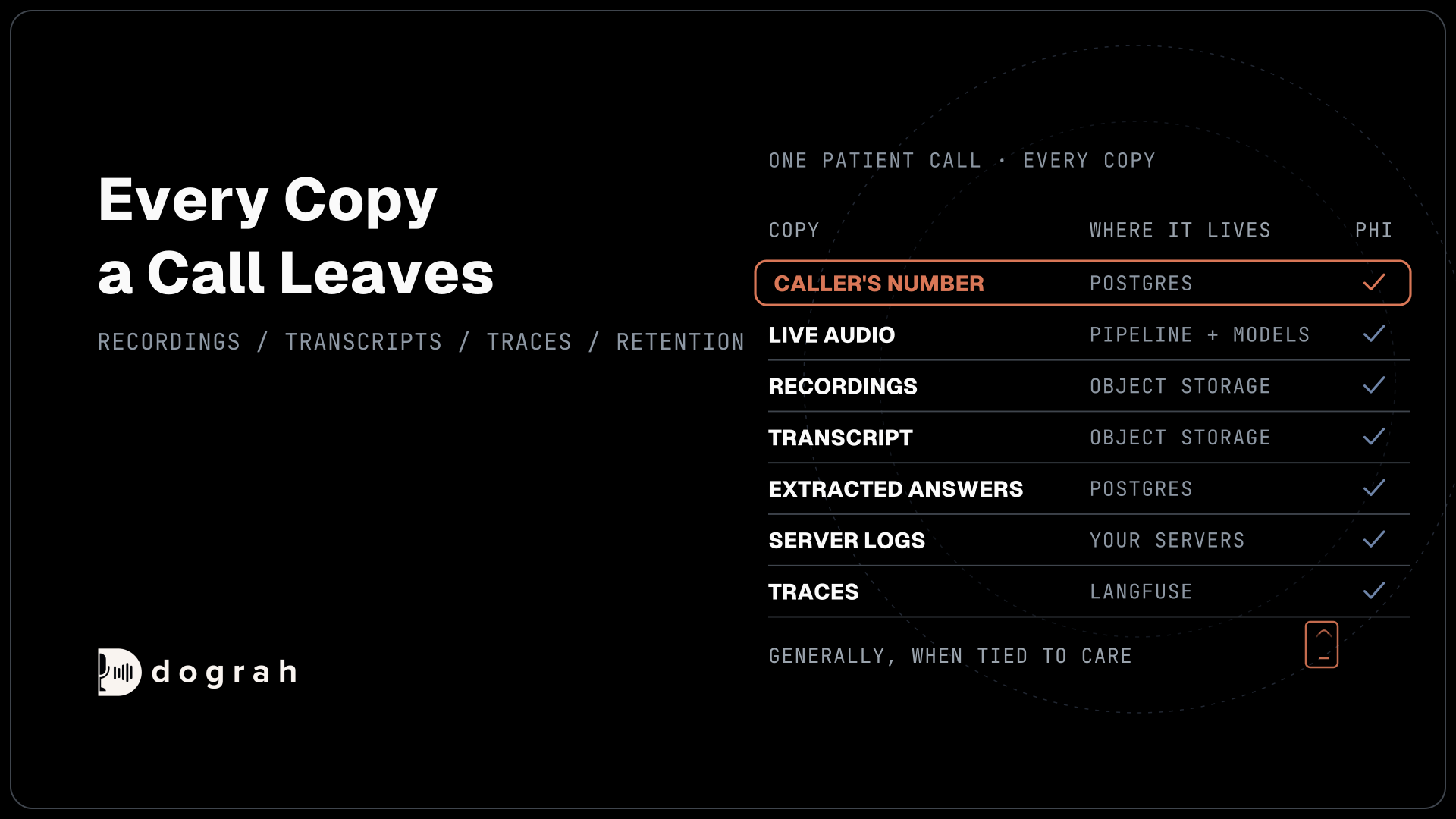

Generally, any part of a voice agent call that ties a patient to their care or payment is PHI. That includes the live audio, the caller's phone number, recordings, transcripts, extracted answers, logs and traces. In a self-hosted Dograh install, each copy sits in object storage, a Postgres database or log files you run.
Key Takeaways
- The caller's number and voice are HIPAA identifiers before any symptom is named.
- One call leaves copies in storage, the database, logs, traces and webhooks.
- Collecting less beats cleaning up, since transcripts are stored as spoken.
Delete the recording of a patient call and copies can still sit in logs and the database. We list every place a self-hosted Dograh install keeps a call, the copies teams forget, why asking for less beats cleanup, and how retention works. It builds on our guide to voice AI in healthcare privacy.
Why a phone call is PHI from the first ring
A healthcare call is PHI from the start, because the Health Insurance Portability and Accountability Act (HIPAA) covers spoken words as well as saved files. HIPAA's definition of protected health information includes health information "whether oral or recorded in any form or medium", and payment information counts too. A provider's voice agent handles it the moment a patient speaks.
The caller's number reaches the system before any name or date of birth, and it already counts. HIPAA's de-identification rule lists telephone numbers and voice prints among the identifiers that must go before data stops being PHI. A call log showing that a number rang a cardiology line is already identifiable health information, so treat the caller's number as PHI from the first ring.
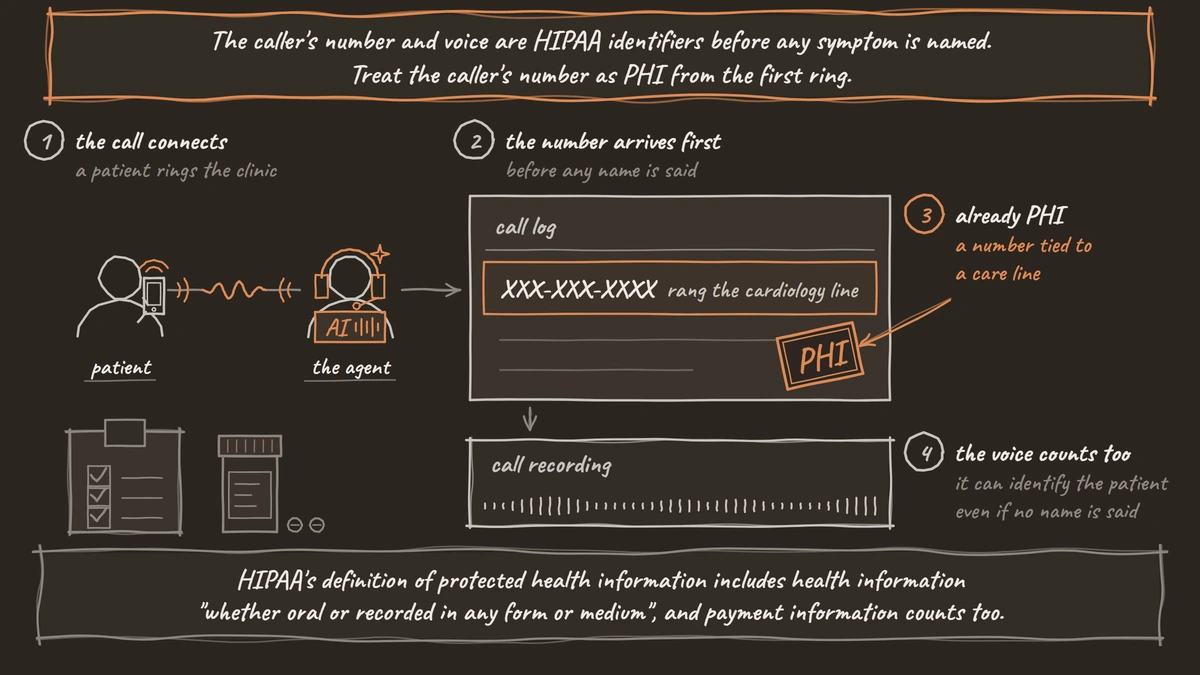
The same goes for the voice. A recording keeps the patient's voice, which can identify them even if no name is said.
Every copy a call leaves, and where it lives
A single call in a self-hosted Dograh install leaves copies in three kinds of places: object storage, the Postgres database and log files. With the Docker install, object storage is the bundled MinIO, or your own S3 bucket if you set one.
| Copy | What it holds | Where it lives when you self-host |
|---|---|---|
| Live audio | Everything both sides say | The call pipeline, plus each hosted speech or language provider you use |
| Recordings | Three WAV files: the full call, the caller's side, the agent's side | Object storage, under recordings/ |
| Transcript | The conversation as text | Object storage, under transcripts/ |
| Pre-call data and numbers | What your system returned as the call connected, the caller's and called numbers | Postgres, the call's initial context |
| Extracted answers | Fields the agent pulled from the call | Postgres, the call's gathered context |
| Call logs and QA results | Events from the call and any QA review | Postgres, the call record |
| Server log files | Tool inputs, and more at DEBUG | Your servers' log directory |
| Traces | Prompts, replies and tool calls | The Langfuse project you connect, if any |
| Webhook payloads | Fields and links you choose to send | The system that receives them |
The extracted answers come from an AI step that runs after the call ends. It records what the caller said, as they said it, so a misheard date of birth is stored as misheard. Check anything clinical against your own records.

Open Source Alternative to Vapi / Retell
Self-hosted voice agent platform — no per-minute fees
dograh-hq/dograh
Star on GitHub
The copies teams forget
The recording and transcript are obvious. The copies that cause surprises are the ones nobody opens. Server logs come first. Dograh's server logs can hold call content. At the INFO level Docker sets, every tool call's inputs are logged. At DEBUG, the code default outside Docker, the logs also hold extracted fields and the text the agent speaks. Treat the log files as PHI, restrict who can read them and keep them on your own storage.
Traces are the second. If you connect Langfuse, each call's trace holds the prompts, the model's replies and every tool request and response, which our post on call traces for debugging walks through. Dograh sends traces only when you add Langfuse credentials, and they go to that project alone.
Webhook payloads land in other systems, such as your EHR or CRM, which become part of the PHI map. Pre-call data is easy to miss as well. Fields your prompts never use are not sent to the model, but they are stored with the call record. Telemetry is the last one. A self-hosted install sends anonymous usage telemetry by default, so for a healthcare install, set ENABLE_TELEMETRY=false and remove POSTHOG_API_KEY.
Ask for less instead of cleaning up
The surest way to protect a copy is never to create it. HIPAA's minimum necessary standard asks providers to limit PHI to what a task needs, and on a voice agent that is a design choice made before the first call. Dograh stores transcripts and recordings as spoken, so whatever the agent asks for is kept.
A few habits keep the copies small. Have pre-call data return a record reference, not a chart, and let a tool fetch details after the caller is verified. Name only the extracted fields the next step needs. Ask for the shortest proof that works, such as date of birth and the last digits of an account number, never a full Social Security number. Our post on verifying patient identity shows a check that keeps the record out of the agent entirely.
Join the Dograh Community
Dograh is an OSS alternative to Vapi. Join our Slack community for queries, releases, best practices & community interactions.
Retention and deletion are your process
Dograh keeps recordings and transcripts until you delete them. Set your own retention schedule on your storage, such as a lifecycle rule on the bucket, and apply the same period to the call records in Postgres and the log files. Server logs rotate on their own, but check that their retention matches your policy.
When you self-host, you delete a call's record, recording and transcript through your own process on your own database and storage. Write that process down before the first patient call, because a deletion request should reach every copy in the table above, including traces and webhook receivers.
Every one of those systems also needs the Security Rule's technical safeguards, such as access controls and audit controls. Our post on HIPAA-compliant voice AI with self-hosting covers which vendors still see the call. Use this map as general information, and confirm with counsel which copies your records policy has to keep and for how long.
Glossary
- Identifier (HIPAA)
- A detail that can tie health information to a person, such as a telephone number or a voice print. Data stays PHI until every listed identifier is removed, so a call log with a number is PHI.
- Minimum necessary standard
- HIPAA's requirement to limit PHI to what a task needs. On a voice agent it shapes which questions the agent asks and what each tool returns.
- Object storage
- File storage organised in buckets, such as MinIO or Amazon S3. A self-hosted Dograh install keeps call recordings and transcripts there.
- Trace
- A step-by-step record of one call's model and tool activity, including prompts and replies. Dograh sends traces to Langfuse only when you connect a project.