
Open-source Cognigy alternatives are divided into a full platform you run, frameworks you build on and licensed platforms with open-source roots. Teams that want to own the platform can pick Dograh, the open-source option, self-hosted or on Dograh Cloud. LiveKit Agents and Pipecat are the frameworks, and Rasa is the licensed platform.
Key Takeaways
- Cognigy installs need a license and reach Cognigy's billing server, even on-prem.
- Self-hosted Dograh keeps recordings and transcripts in your own database and storage.
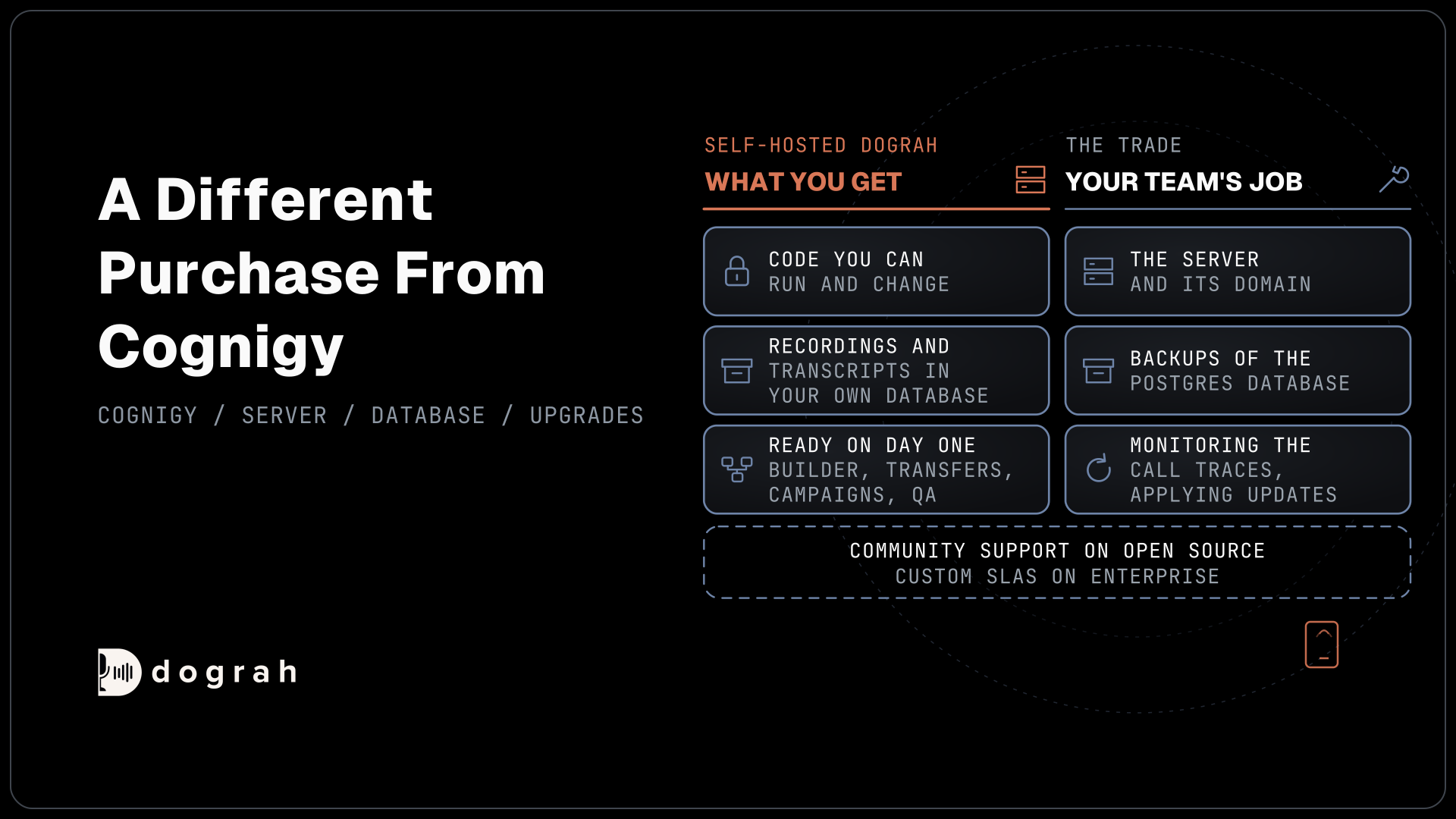
- Self-hosting means your team owns the server, the database and the upgrades.
Cognigy sells only SaaS to new customers, and its code stays closed. This post is for teams that want to run the code themselves. We compare the open options, show where call data lives in each setup, rebuild one contact-center flow in Dograh and list the real work.
Open-source Cognigy alternatives in one table
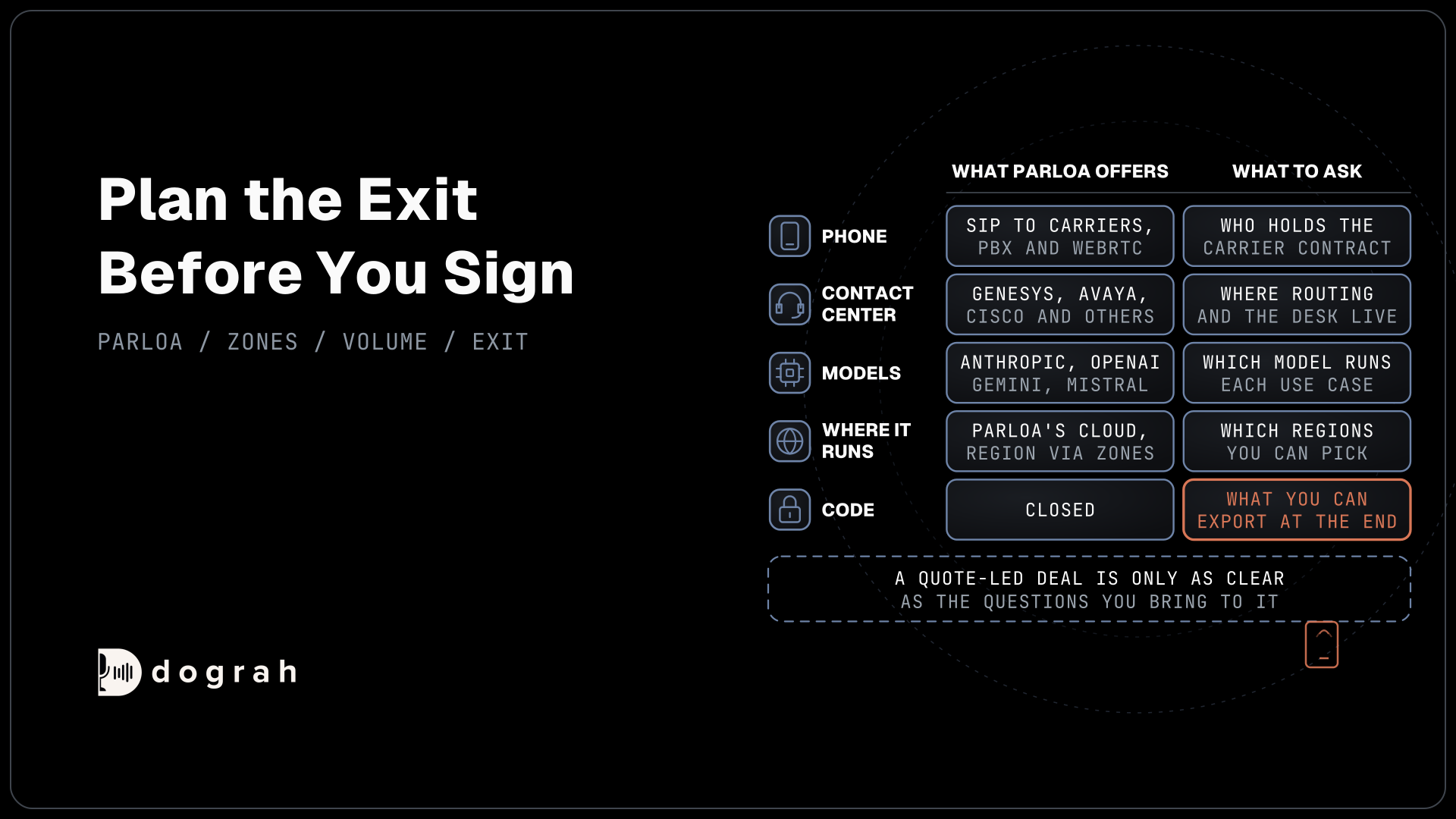
Going open source is a different purchase from Cognigy. You get code to run and change yourself, and the running becomes your team's job. Even Cognigy's own self-managed route is closed now, and what a Cognigy install needs for existing customers includes a license key and a live connection to Cognigy's billing server.
| Option | License | Where calls run | What you pay | Ready on day one | Call data |
|---|---|---|---|---|---|
| Cognigy (baseline) | Closed, licensed | Cognigy SaaS or NiCE CXone regions. Existing on-prem installs stay linked to Cognigy's billing server | By quote, per billable conversation | Yes, a full suite | In the region you buy. Logs out through OData, flows in encrypted snapshots |
| Dograh | BSD 2-Clause | Your own servers, on-prem on Enterprise, or Dograh Cloud | Self-hosted, no per-minute platform fee. Dograh Cloud, 1¢/min platform fee. Models and phone at their own rates | Yes, with the builder, transfers, Campaigns, QA and traces | In your own database and storage when self-hosted |
| LiveKit Agents | Apache-2.0, turn-detection models under the LiveKit Model License | Your own servers, or LiveKit Cloud | Free to self-host | No, your team builds the product | Wherever your team builds it to go |
| Pipecat | BSD-2-Clause | Your own servers, or Pipecat Cloud | Free to self-host | No, your team builds the product | Wherever your team builds it to go |
| Rasa | Licensed platform. Rasa Open Source, Apache-2.0, is in maintenance mode | Self-managed on-prem or private cloud, or Rasa's managed service | Free Developer Edition with limits. Enterprise by quote | Chat-led, with a voice connector bought separately | On your servers when self-managed |
Only one open row arrives ready to answer a contact-center call. The frameworks are sound foundations, and a team that picks one should plan for the product work between a demo and a production phone line.
Dograh: open code you run yourself
Dograh is open source under BSD 2-Clause, and the repository holds the whole platform, from the agent builder to the phone connections. One Docker Compose file starts the stack, with Postgres for runs and transcripts, MinIO for recordings, Redis, nginx, a TURN server, the API and the UI. A permissive license means the code you deploy today stays yours to run, whatever happens to the company behind it.
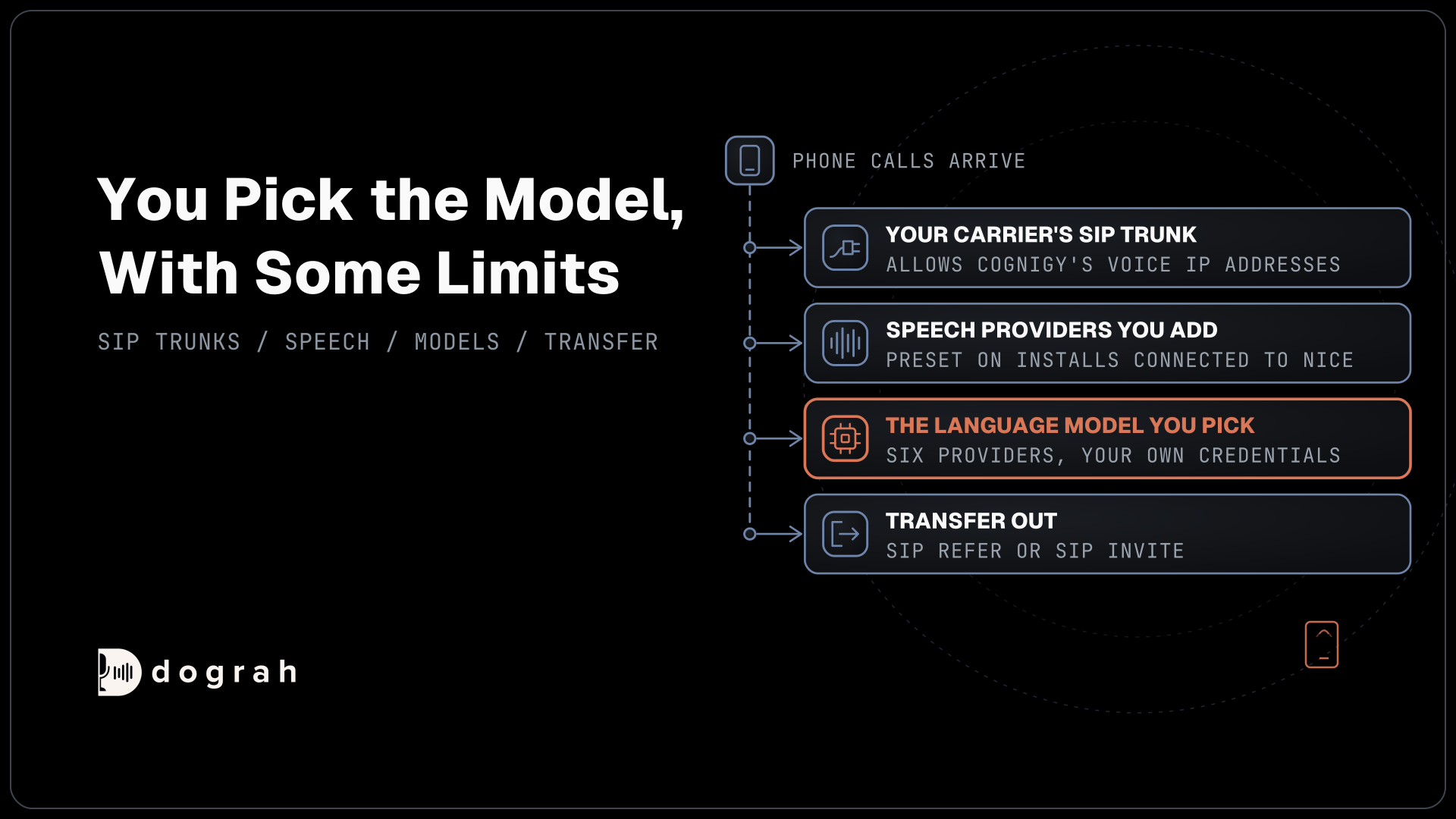
Dograh runs the call flow, the tools and the phone connection as the orchestration layer, and the speech and language models sit in a separate layer you choose for each agent. Pick Dograh's models, your own provider keys or open-weight models on your own hardware through an OpenAI-compatible server. Seven speech-to-speech options are also built in, from OpenAI Realtime to Gemini Live.
Hosting choices set the bill. Running Dograh on your own servers carries no per-minute platform fee, but servers, model keys and phone minutes still cost money. Dograh Cloud charges a 1¢-a-minute platform fee for teams that would rather skip the server. The trade for self-hosting is upkeep, since the server, the database and the upgrades are yours, with community support on open source and custom SLAs on Enterprise.
The server needs at least 8 GB of RAM and 4 vCPUs, and no GPU unless it also hosts the models. A self-hosted install runs 10 calls at once by default, a limit you can raise, and on-prem deployment inside your own data perimeter comes with the Enterprise plan. Our post on the open-source alternative to Vapi explains how the platform and the models split between a plain server and GPUs.

Open Source Alternative to Vapi / Retell
Self-hosted voice agent platform — no per-minute fees
dograh-hq/dograh
Star on GitHub
Where your call data lives in each setup
Where the caller's words end up is often the real reason a Cognigy team looks at open source. Three setups cover most of the choices. On Cognigy SaaS, conversations sit in the Cognigy or CXone region you buy, in a shared environment by default, and the audio also reaches whichever speech and language providers you configure. With self-hosted Dograh on your own provider keys, the platform, recordings and transcripts sit on your servers, while the audio still travels to each model provider, so bring your own key (BYOK) moves the contract and not the data. With self-hosted Dograh and open-weight models on your own machines, the audio stays inside your network from the first ring to the last word.
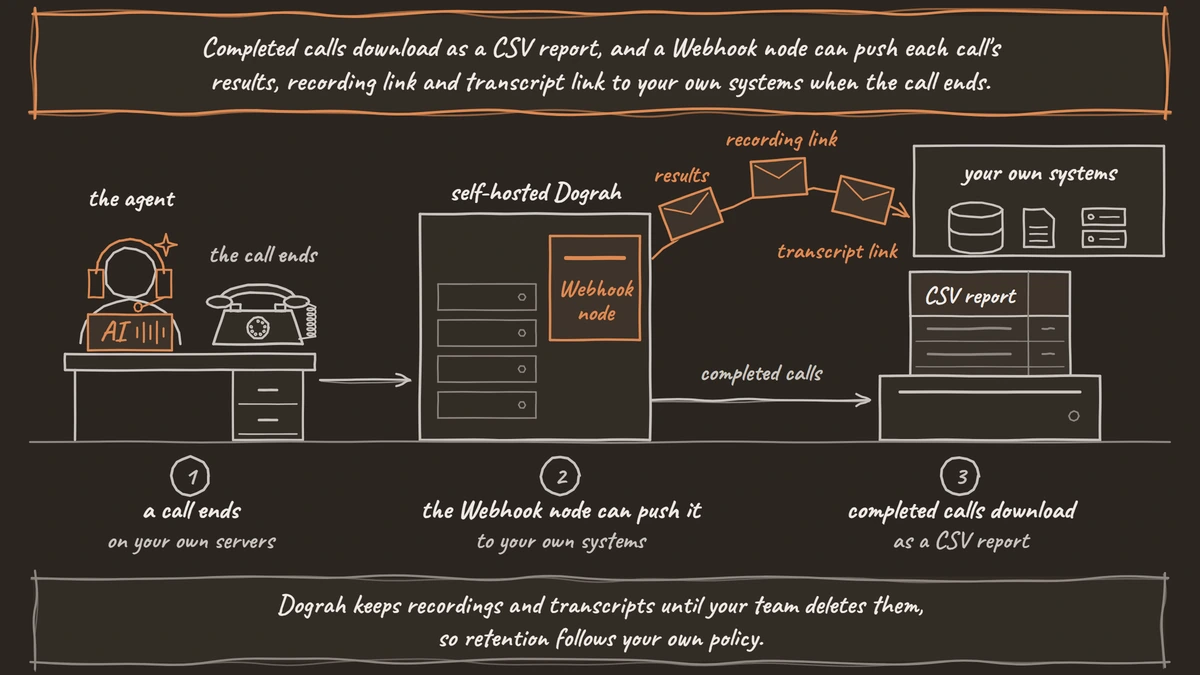
Getting data out is just as direct. Completed calls download as a CSV report, and a Webhook node can push each call's results, recording link and transcript link to your own systems when the call ends. Dograh keeps recordings and transcripts until your team deletes them, so retention follows your own policy.
Rebuilding a Cognigy voice flow in Dograh
A typical Cognigy voice flow looks the caller up, answers or acts, and hands off to a person when needed. Each of those steps has a Dograh part you set up yourself.
Start in the Agent Builder. On the "Create an agent" page you describe the flow, answer a few questions and check the "Your agent requirements" card before choosing "Approve & build", and "Test agent" saves it and publishes version 1. Keep your Cognigy flow export open beside it, since it is the written spec for the rebuild. A self-hosted install uses the builder with a Dograh Service Key, or you build the same flow on the canvas.
The lookup moves to Pre-Call Data Fetch, which calls your CRM with the caller's number once the call connects, so the greeting can use the record. Actions during the call, such as checking an order or booking a slot, become HTTP API tools pointed at the same systems Cognigy called. Brand names and product terms go into the Dictionary in the agent's Settings.
The handoff is where a contact center notices the change. Dograh calls the queue or agent number first and connects the caller only when someone answers, on Twilio, Telnyx, Plivo, Cloudonix or Asterisk ARI. If the line is busy, unanswered or fails, the caller stays with the agent. QA then scores each step of every test and live call, so you can compare the rebuilt flow with the old one.
Open frameworks: LiveKit Agents and Pipecat
The other open options, LiveKit Agents and Pipecat, are both developer frameworks. Pipecat is the BSD-2-Clause Python framework Dograh is built on, and LiveKit Agents is Apache-2.0, with turn-detection models under a separate LiveKit Model License. To match what a Cognigy team uses every day, your developers write the phone wiring, the builder, the call history and the QA. Our comparison of open-source voice AI frameworks goes through each.
Rasa: a licensed platform with open-source roots
Rasa is the name many teams expect here, and it needs an honest label. The README for Rasa Open Source says the Apache-2.0 project is in maintenance mode and points to Hello Rasa and CALM as the future. That newer platform is licensed, with a free Developer Edition for one bot and up to 1,000 external conversations a month, and Enterprise by quote, self-managed or as a managed service. Voice comes through an IVR connector to AudioCodes VoiceAI Connect, sold as an additional purchase. Rasa suits a chat-led team that wants a self-managed platform under a commercial license.
Join the Dograh Community
Dograh is an OSS alternative to Vapi. Join our Slack community for queries, releases, best practices & community interactions.
When staying on Cognigy makes sense
Some teams are better served by staying. If nobody on staff wants to run servers or apply upgrades, Cognigy's SaaS takes that work away. It also covers chat, WhatsApp and SMS from one platform and gives human agents Copilot and Live Chat, and it is built into NiCE CXone. If you already run a licensed on-prem install, it keeps getting updates. Our Cognigy review covers who it fits.
What moving off Cognigy takes
Plan the move as a short project with a clear order, starting with what you can carry. Cognigy snapshots are encrypted and open only in Cognigy, so they are no use as an export. Keep the flow itself, the prompts and the lexicons as the spec, and pull conversations, sessions and analytics through Cognigy's OData endpoint before the contract ends.
Next, stand up Dograh on a server, give the install its own domain with TLS, and connect your carrier. Cognigy takes calls over SIP trunks from your own carrier, so the trunk and numbers already sit in your account. Then write down the jobs that are now yours, which are backups of the Postgres database, monitoring the call traces and applying each update to a newer image.
Then run both. Point one queue or one after-hours line at the new agent, leave Cognigy on the rest, and test every transfer over a real phone call, since browser test calls cannot transfer. Move the next line only once the first holds up.
Picking your open-source Cognigy alternative
If open code and your own servers are why you are looking, Dograh comes first, as the one open option that takes calls on day one, with on-prem on Enterprise when you want a contract behind it. If your developers want to build their own product, start from LiveKit Agents or Pipecat. If you want a self-managed chat platform under a commercial license, Rasa fits that. And if a hosted rate is enough, our roundup of Cognigy alternatives covers the hosted platforms.
Before you commit, rebuild one Cognigy flow and run it on a test number for a week. The install, the bill and the call data are all in front of you from the first call.
Glossary
- Snapshot
- Cognigy's packaged copy of an agent project. Snapshots are encrypted and usable only in Cognigy, so a move keeps the flow export as the spec instead.
- OData endpoint
- Cognigy's read-only data feed for conversations, sessions, analytics and goals. It is the way to pull call history out before a contract ends.
- Orchestration layer
- The voice agent layer that runs call flow, turn-taking, tool calls and the phone connection. Speech and language models are chosen separately, in their own layer.
- Bring your own key (BYOK)
- Bringing your own model provider account into the platform. You keep the contract and the bill, yet the call audio still goes out to that provider.