
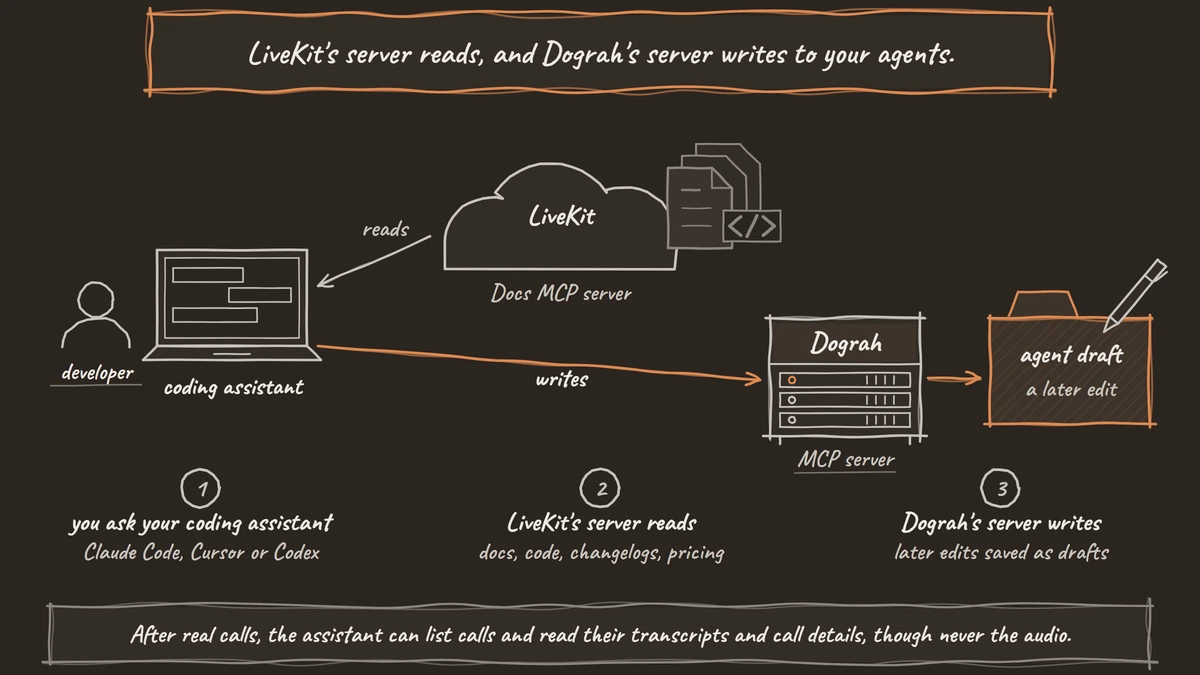
LiveKit's MCP server is a free docs server. Its seven tools let a coding assistant search LiveKit's docs, code, changelogs and Cloud pricing while it writes your agent code. Dograh, the open-source AI voice agent platform we build, runs an MCP server that creates and edits the agents themselves, self-hosted or on Dograh Cloud.
Key Takeaways
- LiveKit's MCP server reads docs, code, changelogs and pricing. It changes no agents.
- Dograh's MCP server creates agents, saves edits as drafts and reads call transcripts.
- Secrets stay in Dograh's own screens. The assistant only passes a credential ID.
This post is part of our guide to the best open-source voice AI platforms, where LiveKit Agents is the Apache-2.0 framework you build in code. Below, we go through LiveKit's MCP server and its other coding-agent tools, then set them beside Dograh's MCP server in one table.
What LiveKit's MCP server does
LiveKit's MCP server gives a coding assistant fast, current answers about LiveKit while you write code. It sits at docs.livekit.io/mcp, speaks Streamable HTTP, and LiveKit describes it as free. If the protocol is new to you, our post on what MCP is and how it connects voice agents to your tools explains servers, clients and tools first.
LiveKit's Docs MCP reference lists seven tools. Three of them read the docs, giving an overview of each section, full pages as markdown and a keyword search. Two read code and releases, with a search across LiveKit's public GitHub repos and the changelog for any SDK. One returns LiveKit Cloud pricing, including plans and inference model prices. The last one sends feedback on a docs page, and that is the only thing the server writes.
So the server answers questions like "what is the current way to add a function tool in the Python SDK" with the real page and code. Setup steps cover Cursor, Claude Code, VS Code, Codex, Gemini CLI, Google Antigravity and Copilot CLI, and any other client can add the URL.
LiveKit's other tools for coding agents
The MCP server is one part of a larger kit for developers who write LiveKit agents in Python or Node. LiveKit's coding agent page adds an lk docs command that gives the same docs search in the terminal, and Agent Skills that "teach coding agents how to build, test, and ship voice agents". One lk skills install command sets up the skills and the MCP server for several assistants at once.
Two pieces help most in daily work. lk agent init creates a project from a Python or Node starter. lk agent debugger runs your agent locally so the assistant can test it one turn at a time. By default it uses no audio and no LiveKit room, so a test turn costs only your own model and tool calls, and an --audio flag brings speech in when you need to test transcription or turn-taking.
That kit is well suited to a team building its own voice product on LiveKit. The agent still lives in your code, though. Hosting, phone numbers, call history and quality review remain your team's job.
What Dograh's MCP server can change
Dograh's MCP server works on the running agent itself. A coding assistant connected to it can build a complete phone agent from a description, change one later, attach tools and read what callers said. It connects with a Dograh API key in the X-API-Key header, at app.dograh.com or at your own backend when self-hosted, and the MCP server setup covers Claude Code, Codex, Claude Desktop and Cursor.
A new agent created this way is published as version 1 straight away, so test it before a phone number points at it. Every later edit is saved as a draft, and the published version keeps answering calls until you click Publish version in the app. Dograh checks each save and returns the line to fix, so a broken agent never gets saved.
The assistant can also create the tools an agent uses. These are an HTTP API tool, End Call, Transfer Call, a handoff to another agent, a calculator and an MCP Server tool. For a tool that needs a login, it passes only the ID of a credential someone already saved in the app. The secret itself is typed into Dograh's Credentials screen and never passes through the assistant.
After real calls, the assistant can list calls and read their transcripts and call details, though never the audio. Our walkthrough of spinning up a voice agent from Claude Code or Codex shows that loop from the first prompt to a prompt fix.

Open Source Alternative to Vapi / Retell
Self-hosted voice agent platform — no per-minute fees
dograh-hq/dograh
Star on GitHub
The two MCP servers side by side
The difference is what each server is allowed to touch. LiveKit's server reads, and Dograh's server writes to your agents.
| LiveKit Docs MCP server | Dograh MCP server | |
|---|---|---|
| Built for | Writing LiveKit code in Python or Node | Building and editing phone agents |
| Reads | Docs pages, public LiveKit code, SDK changelogs, Cloud pricing | Agents as code, tools, credentials list, documents, calls, transcripts, Dograh docs |
| Writes | Docs feedback only | New agents (live as version 1), drafts of edits, new tools |
| Secrets | None needed | Referenced by credential ID, typed only in Dograh |
| Past calls | Not covered | Call list and transcripts, no audio |
| Where it runs | LiveKit's hosted URL | Dograh Cloud, or your own server when self-hosted |
| License of the product around it | LiveKit Agents Apache-2.0 | Dograh BSD 2-Clause |
MCP inside the call, on both platforms
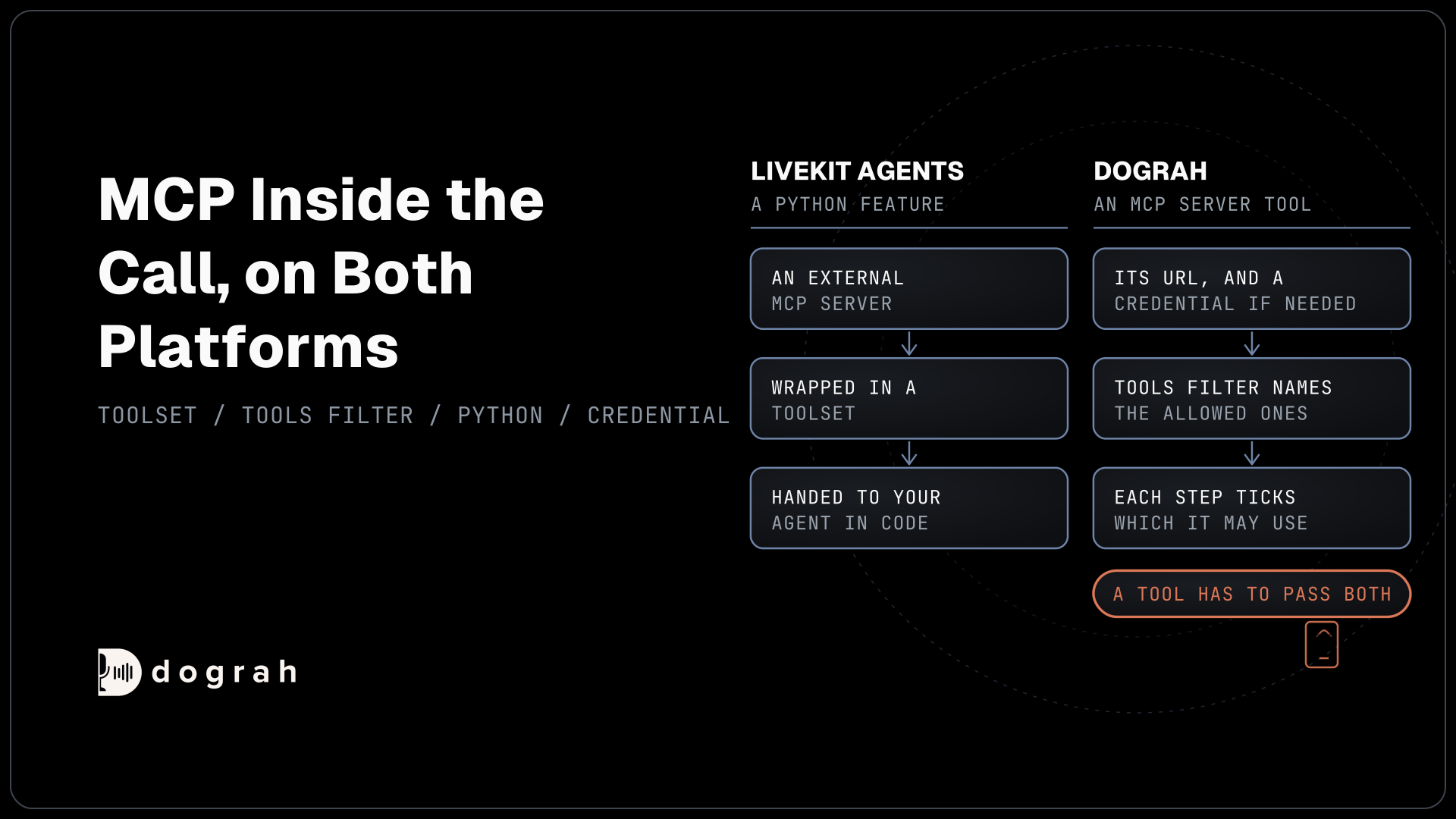
Both platforms also use MCP the other way round, with the voice agent calling someone else's server during a call. In LiveKit Agents this is a Python feature. You wrap an external MCP server in a toolset and hand it to your agent in code.
In Dograh you add an MCP Server tool with the server's URL and a credential if it needs one, and Dograh fetches its tool list. A Tools Filter names which remote tools are allowed, and each step of the call flow ticks which of those it may use. A tool has to pass both before the model on that step can call it, which keeps a booking step from reaching a refund tool.
Which MCP server fits your team
Pick by what you want the assistant to do. If your developers write LiveKit agents in code, LiveKit's server and Agent Skills keep the assistant accurate on the current SDK, and the local debugger lets it test turns without audio.
If you want the assistant to build the phone agent, improve it from real transcripts and leave every change as a draft for a person to publish, Dograh's server does that job. The agent it builds runs with telephony, Transfer Call, per-step QA and full call traces already in place. You choose the models too, from Dograh's own to any provider with your own keys or open-weight models on your servers.
The platform is open-source under BSD 2-Clause, so you can run it yourself or use the managed cloud. Self-hosted Dograh has no per-minute platform fee, but servers, model keys and phone minutes still cost money. Dograh Cloud charges a 1¢-a-minute platform fee. The bill depends on where you run it.
Our comparison of Dograh vs LiveKit covers the rest of the choice, from licenses to phone calls.
Join the Dograh Community
Dograh is an OSS alternative to Vapi. Join our Slack community for queries, releases, best practices & community interactions.
Glossary
- Docs MCP server
- An MCP server that serves a product's documentation and code to coding assistants. LiveKit's reads docs, public repos, changelogs and Cloud pricing, and its only write is feedback on a docs page.
- Agent Skills
- LiveKit's packaged instructions that teach coding assistants how to build, test and ship voice agents with the LiveKit Agents SDK. They install with one lk skills install command.
- Draft
- An unpublished copy of a Dograh agent. Edits saved through the MCP server land here, and the published version keeps taking calls until someone clicks Publish version in the app.
- Tools Filter
- The allowlist on a Dograh MCP Server tool that names which of a remote server's tools a voice agent may use. Each step of the call flow then picks from that list.