
A Hindi and Hinglish voice agent needs speech-to-text that keeps English words inside Hindi sentences, a voice that reads its lines well, and a test on real phone audio. Sarvam, Deepgram, Azure, Google and ElevenLabs all list Hindi. Dograh, the open-source AI voice agent platform, lets you swap them per agent on your own keys, self-hosted or on Dograh Cloud.
Key Takeaways
- Hinglish accuracy has no single published number, so test on your own calls.
- When the language is unclear, ask a short question and switch after confirmation.
- In Dograh, pick saaras:v3 for Sarvam and check which script transcripts use.
Hinglish trips up voice agents in small ways, such as an English word inside a Hindi sentence or a number said in English. We cover what mixing does to each layer and which models list Hindi, then we talk about how to test them and run one in Dograh.
What Hinglish does to each layer
Hinglish moves between Hindi and English inside a single turn. A caller says "mera order cancel karna hai", gives a date in English, then switches back to Hindi for the reason. Each layer of a cascaded agent handles that differently, so it pays to look at them one by one.
Speech-to-text has the hardest job. It has to catch the English noun in the middle of a Hindi sentence, keep numbers and amounts right, and decide which script to write. One model returns Hindi in Devanagari with English words in Latin letters, and another writes everything in Devanagari or in romanized Hindi. Both can carry the same meaning and still break a step that expects one format.
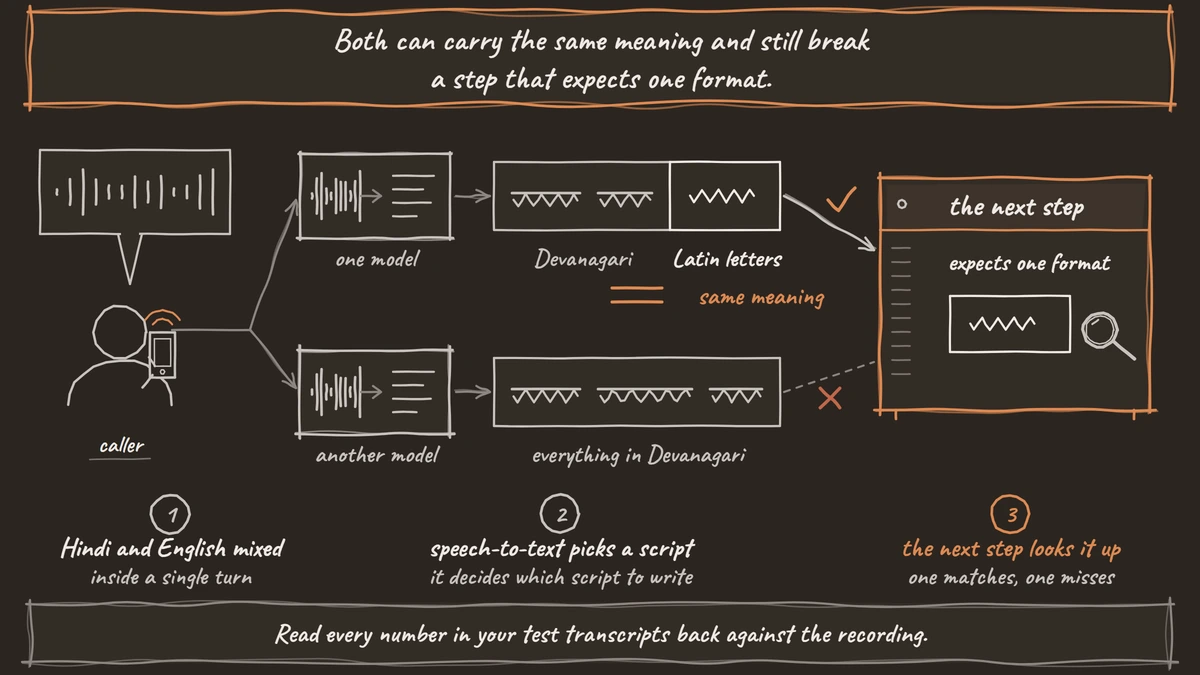
Numbers are where Hinglish agents fail quietly. Callers switch to English for amounts and dates even in the middle of a Hindi sentence, and Indian number words such as lakh and crore follow their own grouping. "Do lakh pachas hazaar" and "two lakh fifty thousand" are the same amount, and a transcript that gets either wrong sends the wrong figure to your system. Read every number in your test transcripts back against the recording.
The language model is the forgiving layer. It reads Devanagari, Latin script or a mix, and it can be told in the prompt which script to answer in. The voice is the layer callers judge, and it reads whatever script the language model writes. Our post on Hindi and Hinglish on the same call covers how that script choice changes what the voice says, so decide it before you pick a voice.
Speech-to-text that lists Hindi
Most large speech-to-text providers list Hindi, and fewer name mixed speech as a feature. The table lists each option from the provider's own language page or the settings Dograh passes it.
| Provider | Hindi | Mixed Hindi and English | In Dograh |
|---|---|---|---|
| Sarvam Saaras v3 and v4 | 23 languages incl. Hindi | Codemix output mode | saaras:v3 on your key |
| Deepgram Nova-3 and Flux multilingual | Hindi listed on both | Flux takes Hindi and English language hints | Also runs Dograh's own auto-detect |
| Azure Speech | hi-IN | Not named as a feature | hi-IN in the list |
| Google Speech-to-Text | hi-IN | Not named as a feature | hi-IN in the list |
| ElevenLabs Scribe | Hindi listed | Not named as a feature | Yes, on your key |
| Soniox, Speechmatics, Smallest AI, Cartesia ink-whisper | Hindi in Dograh's options | Not named as a feature | Yes, on your key |
| Voxtral Mini 3B (open weights) | One of 8 languages | Not named as a feature | Through an OpenAI-compatible server you run |
Sarvam is the one provider here that names mixed output as a mode. Its speech-to-text modes include codemix, which writes English words in English and Hindi words in Devanagari, so "मेरा phone number है" comes back as spoken. Sarvam's model list now gives Saaras v4 as its default, with modes that include codemix.
There is no single accuracy figure to rank these by. Tata Communications notes that code-switching has no universal accuracy rate, because results move with the language mix, the topic and the audio. We agree, which is why the next sections end in a test rather than a ranking. NVIDIA's Parakeet TDT 0.6B v3, a common open choice for European languages, does not list Hindi, so it is out for this job.
Voices that speak Hindi
Hindi voices are easier to find than Hinglish ones. Sarvam's Bulbul v3, the default in its API, speaks 11 languages including Hindi, and Bulbul v4 Flash lists English-Hindi as a language of its own, with more than 200 persona voices. Azure Speech has standard and HD hi-IN voices, and ElevenLabs lists Hindi on its Multilingual v2 and Flash v2.5 models.
Open voices exist too. Kokoro-82M ships four Hindi voices, and Chatterbox's multilingual model, under the MIT license, lists Hindi among its languages and can clone a voice. Both run on your own servers behind an OpenAI-compatible endpoint.
No provider here promises natural mixed-language speech, and we would not either. A voice that reads Hindi well can still stumble on an English brand name in a Devanagari sentence, or say an amount the wrong way. Listen to the shortlist reading your agent's real lines on a phone before you choose.

Open Source Alternative to Vapi / Retell
Self-hosted voice agent platform — no per-minute fees
dograh-hq/dograh
Star on GitHub
A Hinglish test plan on phone audio
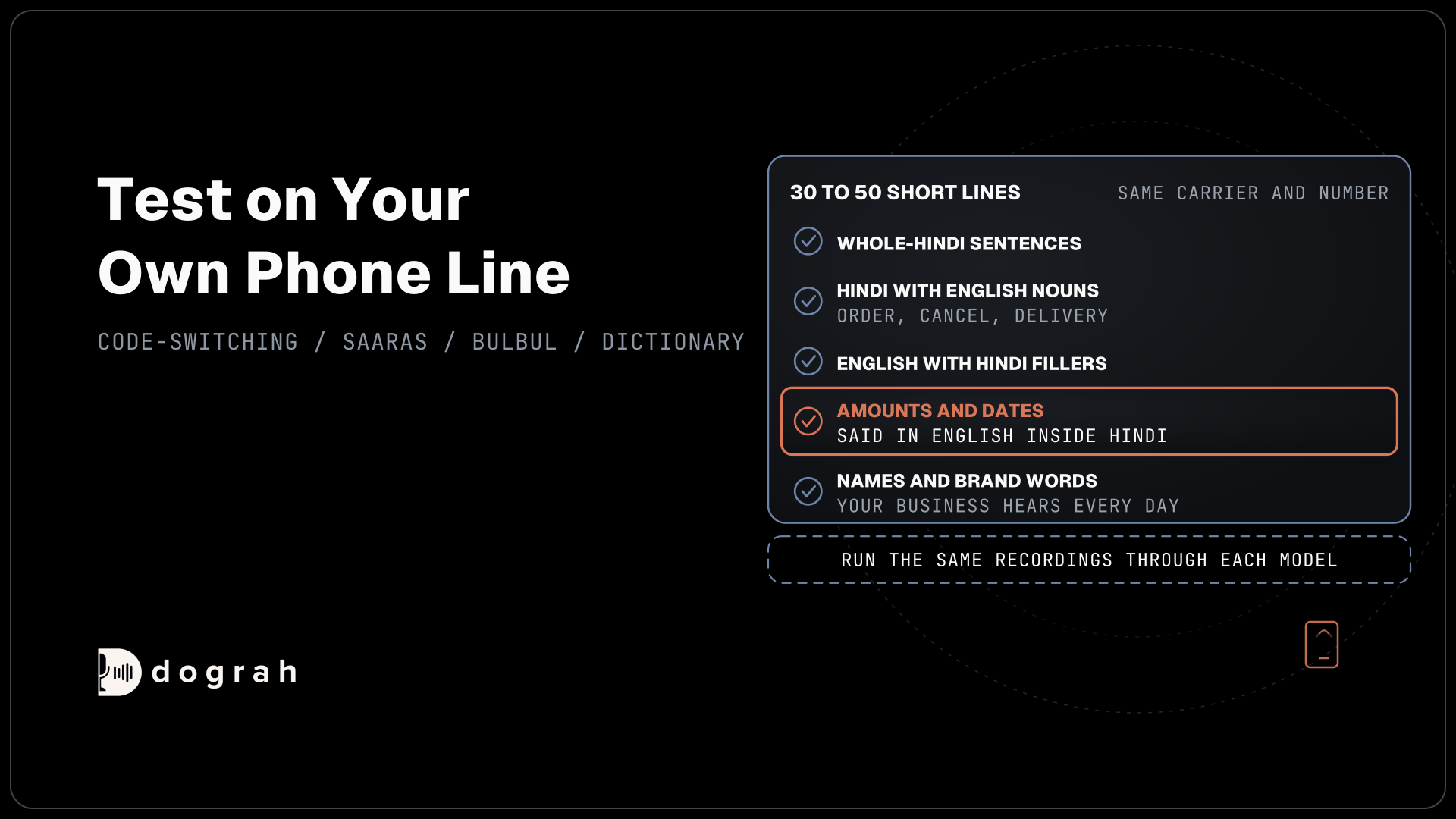
The test that matters is your own callers on your own phone line. Here is a plan we wrote for it, and it fits in a day or two of work. Record 30 to 50 short lines from real callers or staff, through the same carrier and number the agent will use, so the audio has the same 8 kHz quality and the same noise.
Mix five kinds of line. They are whole-Hindi sentences, Hindi sentences with English nouns such as "order", "cancel" or "delivery", English sentences with Hindi fillers, amounts and dates said in English inside Hindi, and the names and brand words your business hears every day. Run the same recordings through each speech-to-text model you are considering.
Score each transcript twice. The first score asks whether the meaning survived, read by someone who speaks Hindi. The second asks whether the script is what the next step expects, since a tool that looks up "cancel" will miss "कैंसल". A model can pass the first test and fail the second.
Then test the voice. Have the shortlisted voices read twenty of the agent's real replies over the same phone line, and ask Hindi-speaking listeners which sound natural. After launch, keep a Hindi speaker reading the flagged calls, since a transcript can look clean and still carry the wrong meaning.
When the agent is unsure of the language
A wrong guess about language costs more than a short question. When the agent is not sure whether a caller wants Hindi or English, it should ask, for example "Hindi ya English?", and switch only after the caller confirms. If the caller needs a language the agent cannot handle reliably, the safest step is a handover to a person.
The prompt sets the reply language once the caller has chosen. Tell the language model which language and script to answer in, such as Hindi in Devanagari with English product names kept in English, so the voice gets text it can read. Keep that rule in the prompt of every node where the agent speaks to the caller.
The greeting plays before the agent has heard the caller, so write it in both languages, for example "Namaste, hello". Our post on language switching mid-call covers the ask-and-confirm pattern in detail. On numbers that support it, Transfer Call can then pass the caller to a person. Dograh calls the destination first and connects the caller only when someone answers.
Join the Dograh Community
Dograh is an OSS alternative to Vapi. Join our Slack community for queries, releases, best practices & community interactions.
Setting up Hindi and Hinglish in Dograh
In Dograh, models are chosen per agent, in the editor's Model tab, through a model configuration with LLM, STT and TTS tabs. Dograh's own speech-to-text can run with Language set to "Multilingual (Auto-detect)" and Hindi and English ticked under Language hints, which runs Deepgram Flux multilingual. For a Hindi-only line, set Language to Hindi.
For Sarvam, add your own key and pick saaras:v3 in the STT Model field, with Language left at unknown for detection or set to hi-IN. Sarvam's own default is now Saaras v4. Dograh runs saaras:v3 in Sarvam's standard transcribe mode, so run the test plan and check which script comes back. On the TTS tab, bulbul:v4-flash offers the English-Hindi voices with "enhi" in their names, such as simran_enhi_customer, and sarvam-105b-conversations is the default Sarvam language model. Our guide to Sarvam AI for Indian-language voice agents covers its pricing and 8 kHz details.
Brand and product words go in Dictionary in the agent's Settings. It boosts Dograh's own speech-to-text, Deepgram, AssemblyAI, Soniox and Speechmatics, and it is not sent to Sarvam, so with Sarvam check those words in the test plan and in the prompt. For Indian numbers, our walkthrough on connecting Indian numbers through Vobiz covers the setup. On Vobiz and Exotel numbers, a caller who needs a person leaves a callback request that an HTTP API tool writes to your system, while Transfer Call works on Twilio, Telnyx, Plivo, Cloudonix and Asterisk ARI.
Dograh is the orchestration layer that runs the call flow, tools and telephony, and the speech and language models are a separate layer you choose. Hosting that layer yourself means no per-minute platform fee. You still pay for servers, for Sarvam or other model keys and for phone minutes, and your team runs the database and upgrades. Support for the open-source version comes from the community, with custom SLAs on Enterprise. Dograh Cloud takes the hosting off your hands for a 1¢-a-minute platform fee.
Glossary
- Code-switching
- Moving between two languages inside one conversation or one sentence, as Hinglish speakers do. It is the hardest case for speech-to-text on a call.
- Codemix mode
- A Sarvam speech-to-text output mode that writes English words in Latin letters and Hindi words in Devanagari, as the caller said them.
- Language hints
- A Dograh and Deepgram Flux setting that biases speech-to-text toward the languages you tick, such as Hindi and English, without excluding others.
- Devanagari
- The script Hindi is written in. A transcript in Devanagari and one in romanized Hindi can mean the same and still break a lookup.