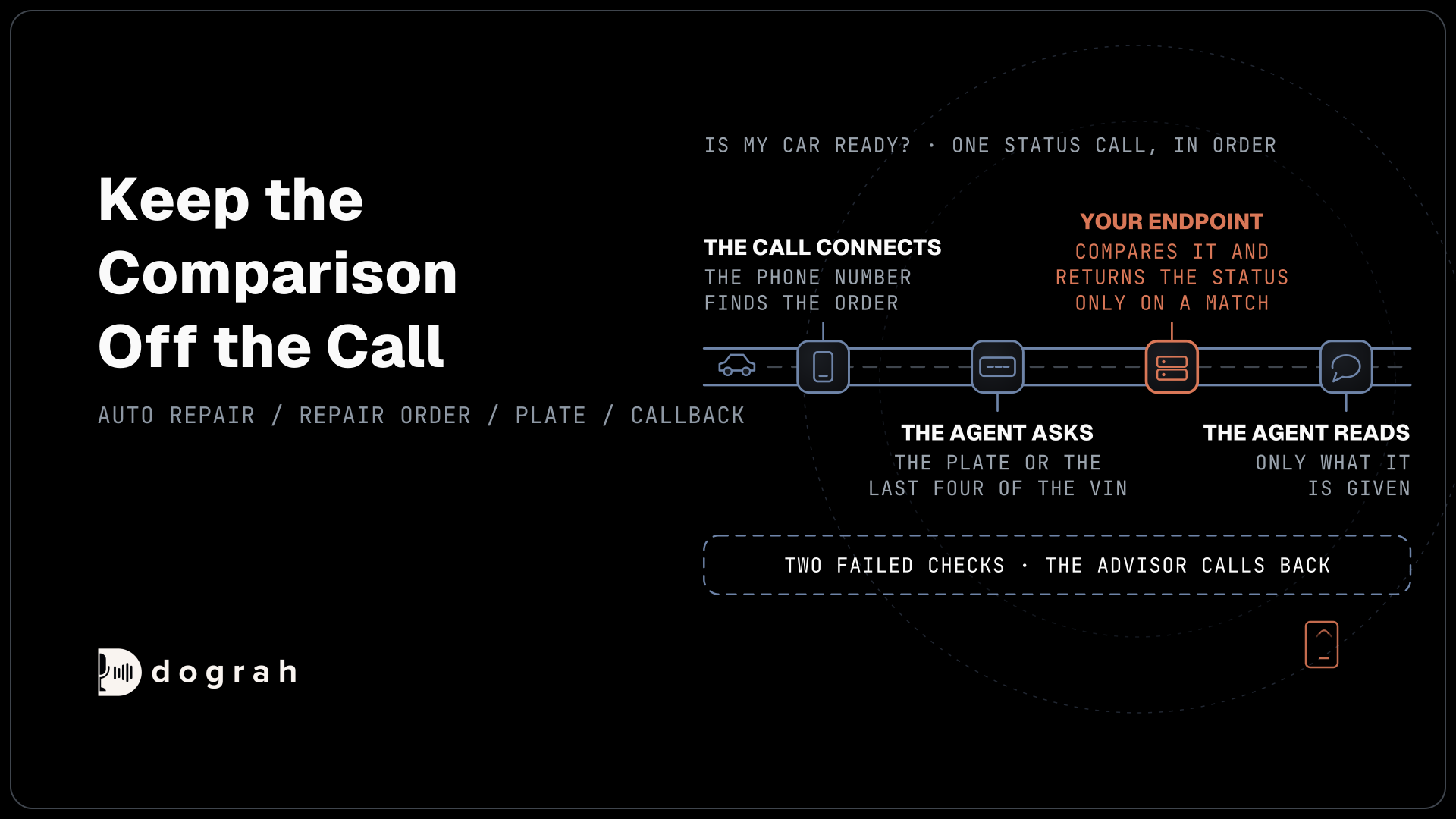

A voice agent answers "is my car ready?" by finding the caller's repair order, checking the plate or VIN, then reading the status from your shop software through an HTTP API tool. Anything unclear ends with an advisor callback. You can build it on open-source Dograh, self-hosted or on Dograh Cloud.
Key Takeaways
- The phone number finds the repair order. The plate or VIN proves the caller.
- Return a customer-safe status label, never the shop's internal code.
- Slow lookups get a spoken start message, never silence.
Status calls are short and frequent, and they go wrong the moment an agent guesses. Below, we design the lookup, what your endpoint returns, the words callers hear for each status and the fallback when the shop system is slow, then set it up in Dograh.
Why status calls still come in
The best status call is one the customer never needs to make, because the shop texted first. Shops that send updates at check-in, at inspection and at pickup get fewer calls. Some still come, from customers who missed the text, want a time, or simply prefer to ask, and those are the calls the agent answers.
Our guide to AI voice agents for auto repair shops and car rental desks covers the whole front desk, from bookings to extra work. This post goes one level down into the status lookup, because that is where an agent either reads the truth or makes something up.
The same status field drives both directions. The value that answers an inbound question can also start an outbound "your car is ready" call, which the last section covers.
What the lookup needs to return
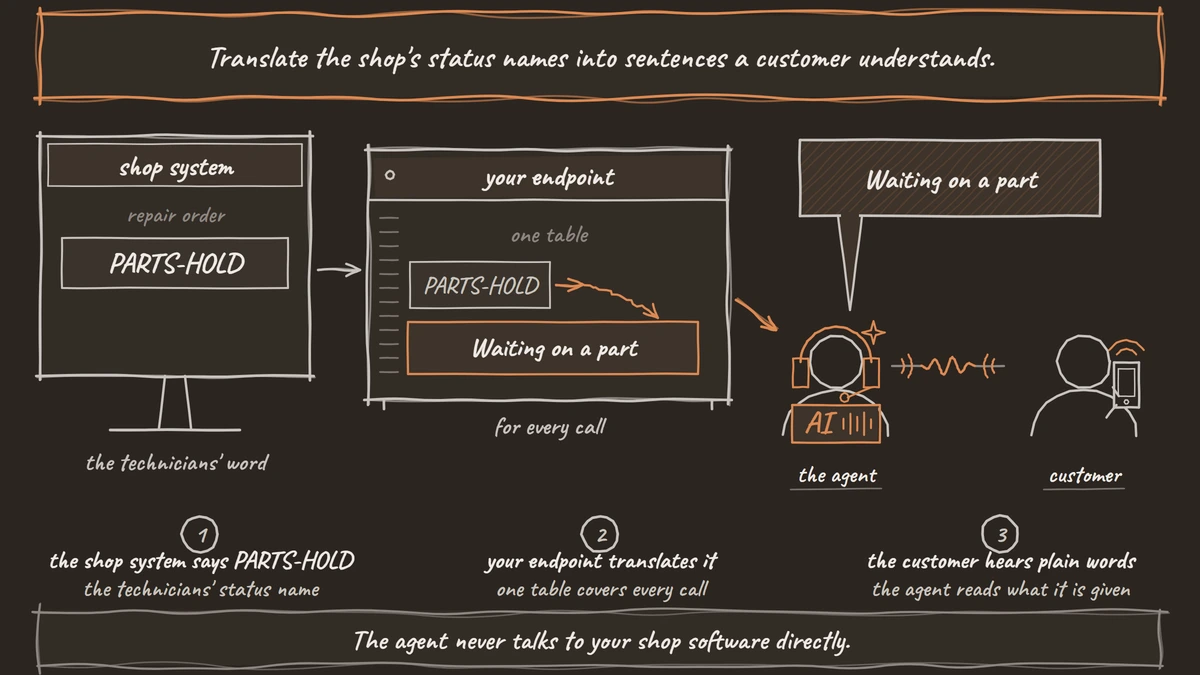
The agent never talks to your shop software directly. It talks to a small endpoint you run, and that endpoint calls the shop system's API. That layer is where you decide what the agent is allowed to know. Keep its reply to the repair order ID, the vehicle in plain words, a customer-safe status label, the promised date only when the system holds one, and the advisor's first name.
Shopmonkey is a good example of the work behind it. Its public API uses a bearer token, and only admins can create API keys. A repair order carries a workflow status ID, so the endpoint reads the order and then the workflow status to get its name. Tekmetric gives API access by application through its integrations page, so plan for that approval before you build.
Translate the shop's status names into sentences a customer understands. A status the technicians call "PARTS-HOLD" becomes "Waiting on a part". Do the translation in the endpoint, where one table covers every call, and the agent only reads what it is given.
Finding the order before the greeting
Look up the caller's open orders as the call connects, so the agent knows what to ask about. Pre-Call Data Fetch, set to Inbound calls only, sends the caller's number and the number they dialed to your endpoint, and the reply fills the call's starting context. The greeting waits for it, and the caller hears ringing in the meantime, so keep this endpoint fast.
At this point return only what the agent needs to ask the next question, such as the order IDs and the make of each car. Keep plates, VINs and status for later. A phone number finds the order. It does not prove who is calling, since a spouse, a colleague or a stranger can ring from that phone.
Several cars on one number are common for families and small fleets. Return each one as a list, and have the agent ask which car the call is about, by make and color, once the caller has passed the check in the next section. If no order matches the number, the agent asks for the repair order number or the name on the order and books an advisor callback when that fails too.

Open Source Alternative to Vapi / Retell
Self-hosted voice agent platform — no per-minute fees
dograh-hq/dograh
Star on GitHub
Verify, then read the status
The order of a status call is greet, verify, then disclose. Before naming the car's fault or its status, the agent asks for the plate number or the last four characters of the VIN. It never reads either one out first and asks the caller to confirm.
Keep the comparison off the call. The HTTP API tool sends the order ID and what the caller said, and the endpoint compares it with the plate on file and returns the status only on a match. The agent never holds the right answer, so it cannot leak it, and a wrong guess returns nothing useful.
Two failed checks end the self-service path. The agent says the advisor will call back, writes a callback request to the shop system and closes the call politely. It does not hint at which part of the answer was wrong.
Reading the status with an HTTP API tool
The status read is one HTTP API tool with the GET method. Its Preset Parameters fill values the agent does not need to say, such as the order ID from the starting context, and GET sends them as query parameters. Add the caller's answer as a parameter the agent fills in, and put your endpoint's key in the tool's Authentication credential.
Your endpoint's reply after a successful check can be as small as this, with the status_label already in customer words and promised_date empty when the system holds none:
{
  "match": true,
  "vehicle": "2019 Honda Civic",
  "status_label": "Waiting on a part",
  "promised_date": "Thursday",
  "advisor": "Maria"
}
What this does: It gives the agent only what it may say. Because
promised_datecomes from the shop system, the agent can say Thursday, and when the field is empty the prompt tells it to offer a callback instead of naming a day.
Cover the wait with the tool's Messages. A start message plays while the request runs, and delayed updates can play if it is still running after a set time. Record these lines in the shop's own voice, since text lines do not play on speech-to-speech models.
The tool waits 5 seconds by default before it gives up, and it makes one attempt. On a timeout or an error, the agent receives an error result, and the prompt decides what it says next.
What the agent says for each status
Each status label should map to one thing to say and one next step, so two callers asking about the same job hear the same answer. Write the table below into the prompt as a starting point and adjust it to your shop's own statuses.
| Status label | What the agent says | Next step |
|---|---|---|
| In progress | The car is being worked on, with the promised date if the system holds one | Offer an advisor callback for detail |
| Waiting on a part | The part is on order, with the expected date only if returned | Offer a callback when the part arrives |
| Waiting on your approval | The advisor needs to talk the caller through extra work | Book an advisor callback, never take approval on the call |
| Ready for pickup | The car is ready, with the shop's pickup hours | None, or transfer to the counter |
| No match or error | The agent cannot see the order right now | Write a callback request |
Questions about warranty cover, a changed price or what a part does go to the advisor. The agent records the question and books the callback. When the caller wants a person now, Transfer Call works on Twilio, Telnyx, Plivo, Cloudonix and Asterisk ARI. Dograh calls the advisor's line first and connects the caller only when someone answers. If nobody does, the call comes back to the agent and it books the callback.
Join the Dograh Community
Dograh is an OSS alternative to Vapi. Join our Slack community for queries, releases, best practices & community interactions.
When the shop system is slow or down
Shop software goes down at the worst times, and the agent needs a fallback that does not depend on it. If the status read fails, the agent says it cannot see the order right now and offers an advisor callback. If the callback request also fails to write because the same system is down, the agent can still promise the callback, and the Webhook node sends the call's details to your endpoint after the call. Webhook nodes retry a temporary failure automatically, up to five attempts, so a short outage does not lose the request.
Find slow lookups in the call trace, which shows the speech-to-text, AI and voice time for each turn alongside the tool call. Then test with real orders before launch, one per status, including a car with no promised date and a number with two cars. A QA prompt can then flag any live call where the agent gave a date the system did not return.
Calling the customer when the car is ready
The ready call starts in the shop system. When a repair order's status changes to ready, the shop system calls Dograh's API Trigger with the customer's number and the order details, and the agent places the call. Our post on API triggers shows the request. A pickup text comes from the shop system or its messaging provider.
Get consent at drop-off. Under the Telephone Consumer Protection Act (TCPA), a call to a mobile number in an artificial voice, which includes an AI voice, needs the person's prior express consent, as the Federal Communications Commission's calling rules set out. A line on the drop-off form covers it, and our post on pharmacy order status calls shows the same read-and-verify pattern in another trade.
Running Dograh yourself carries no per-minute platform fee, though the servers, model keys and phone minutes are still paid for. Dograh Cloud's platform fee is 1¢ per minute, a separate charge on each call minute. Running it on your own servers keeps customer records next to your shop data, and it makes the server, the database and the upgrades your job. The open-source version is supported by the community on Slack and GitHub, and Enterprise adds custom SLAs.
Glossary
- Repair order
- The shop system's record of one job on one vehicle, holding the work, the status and any promised date. A status call reads one repair order, never a guess about it.
- Customer-safe status label
- A plain sentence such as "Waiting on a part" that your endpoint returns in place of the shop's internal status name. The agent reads only this label, so internal codes never reach the caller.
- Preset Parameter
- A value an HTTP API tool sends on every request without the agent saying it, such as the order ID from the call's starting context. On a GET request it is sent as a query parameter.
- Pre-Call Data Fetch
- A Dograh setting that sends the caller's number to your endpoint as the call connects and loads the reply before the greeting. It finds the caller's orders but does not prove who is calling.