
AI appointment reminder script templates cover five outcomes, confirm, reschedule, cancel, no answer and voicemail. The live versions verify who answered before naming the appointment, and none names the visit type. Calls need consent unless an exemption applies. With Dograh, the open-source AI voice agent platform, Campaigns send them from your list, on your own servers or on Dograh Cloud.
Key Takeaways
- Verify who answered before you name the appointment or the provider.
- A healthcare voicemail under the FCC exemption carries a toll-free opt-out number.
- Dograh Campaigns fill each call from your list's columns and retry missed calls.
A reminder can tell whoever picks up more than the patient would want. We start with consent and calling hours, then give five reminder versions that keep private details out. Then we talk about how Dograh Campaigns send them with time slots, retries and each contact's details.
Consent and calling hours for reminder calls
Reminder calls with an AI voice need consent like any other automated call. Under the Telephone Consumer Protection Act (TCPA), the FCC's ruling on AI-generated voices treats an AI voice as an artificial voice, so these calls need the called person's prior express consent unless an exemption applies. Outside healthcare, a reminder to a mobile number generally needs that prior express consent. An offer added to the call turns it into telemarketing, which needs written consent, so the templates carry no offers.
Healthcare providers can also rely on an exemption in the FCC's calling rules, but only when every condition is met together. The call goes only to the wireless number the patient gave, costs the patient nothing and is for set healthcare purposes such as an appointment reminder. It states the provider's name and contact details at the start, carries no marketing or billing content, follows HIPAA privacy rules and runs about a minute or less. It is limited to one message a day and three a week per patient, offers an opt-out in every message and honors opt-outs immediately. On voicemail that opt-out is a toll-free number.
A provider calling on the patient's prior express consent takes a different route, and our post on patient consent for automated healthcare calls explains both. The federal 8 a.m. to 9 p.m. rule is written for sales calls, so keep reminder calls in daytime hours at the patient's location and check your state's rules, which our post on outbound calling rules for voice agents lists. Have counsel confirm your consent records, hours and these templates before launch.
What every reminder keeps private
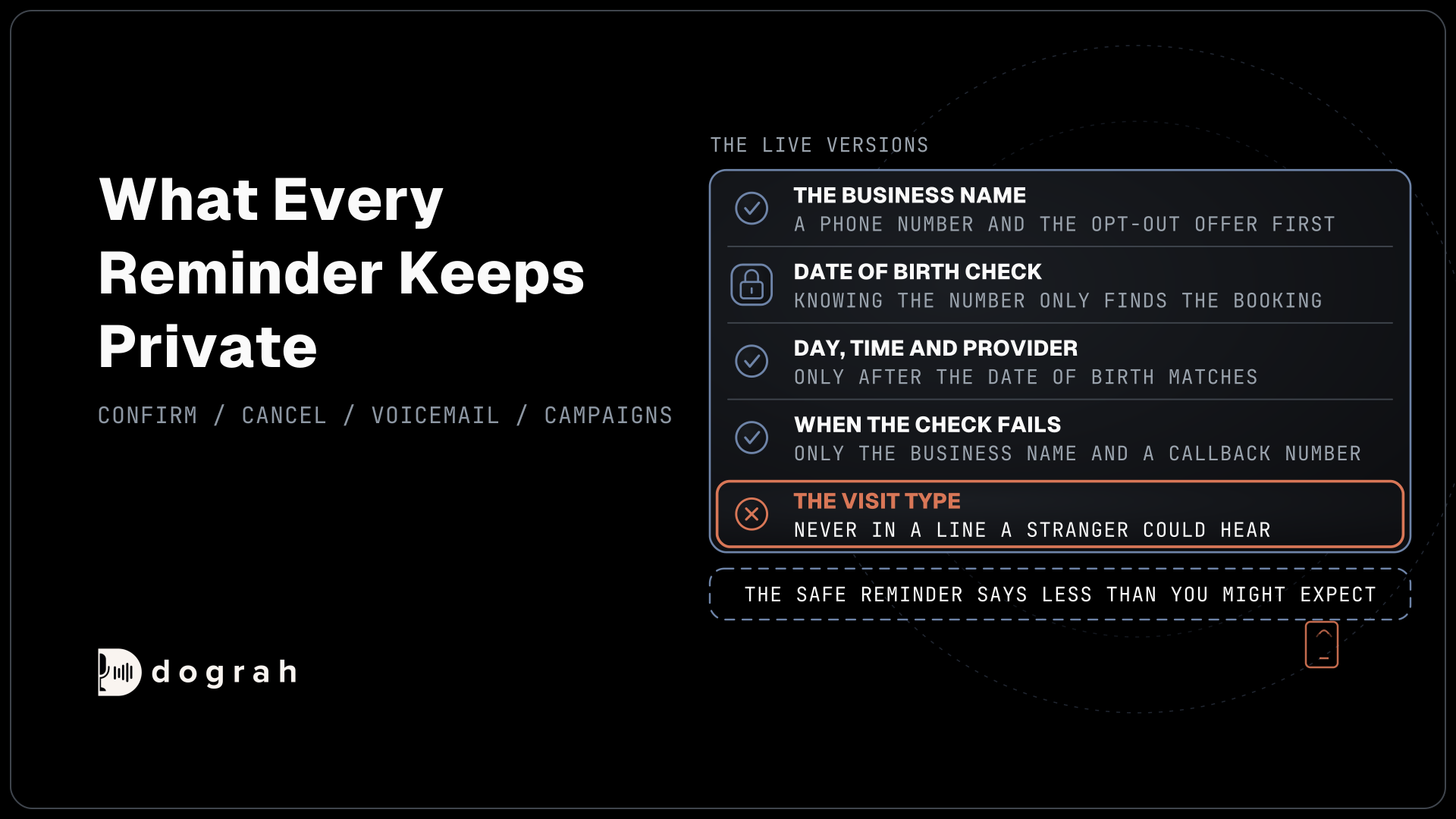
The safe reminder says less than you might expect. Knowing the number only finds the booking. It says nothing about who picked up, so the agent confirms identity with an approved check, such as the patient's date of birth, before it names the day, time or provider. The visit type, the provider's specialty and any test or treatment never appear in a line a stranger could hear.
When the check fails, the agent gives only the business name and a callback number. This line is an example we wrote, as are all the templates below, for a clinic called Northside Clinic.
"I'm sorry, I can't share the details on this call. Please ask {{first_name | the patient}} to call Northside Clinic at +1415555XXXX. Thank you."
The same rule holds outside healthcare. A salon reminder that names a service on a shared family phone can still embarrass someone, so every template here uses "your appointment".
Template 1: confirm
The confirm call is the one most patients get. The opening is fixed text, so it names the clinic, gives a number and offers the opt-out. The variables come from your list through template variables. first_name has a fallback after the bar, so a missing name is never spoken as a gap, and the other columns have to be filled on every row.
"Hi, this is the automated assistant for Northside Clinic, calling for {{first_name | the patient}} about an upcoming appointment. Our number is +1415555XXXX. If you'd rather not get these calls, just say so and we'll stop. Is this {{first_name | the patient}}?"
The block below is guidance for the step that runs after the greeting.
Task: confirm one appointment.
1. Ask for the patient's date of birth and check it against {{date_of_birth}}.
   Never name the appointment before it matches. After two failed tries, give
   the clinic's number and close.
2. Say the appointment is on {{appointment_day}} at {{appointment_time}}
   with {{provider_name}}. Never say the visit type.
3. Ask if that still works.
Yes: say it's confirmed and close.
Wants to move it: go to the reschedule step.
Wants to cancel: go to the cancel step.
Says stop calling: confirm, then end the call.
What this does: Tells the agent to give the day, time and provider only after the date of birth matches, and never the visit type. Each answer leads to one clear next step.
Template 2: reschedule
A reminder that makes moving easy does more work than an extra reminder. The MGMA Stat poll of August 2026 found 32% of medical groups saw higher no-show rates than in 2025, and MGMA noted that "More reminders are unlikely to help if forgetting is not the main reason patients miss." So the reschedule step offers real times on the call.
Task: move the appointment to a new time.
Ask which days suit them better.
Call check_availability and offer at most two times from the result.
When they choose, read back the new day and time and wait for a yes.
Then call reschedule_appointment.
If the tool fails: say you couldn't change it on this call and that the
clinic will call back. Never say it's done.
Close: say the new time once more and say goodbye.
What this does: Asks the agent to read the new time back and change nothing before a yes, and tells it not to report a failed change as done.
The two tools read open times and write the change in your scheduling system. Our tutorial on how to build an AI appointment scheduler sets them up, including a Preset Parameter that lets your system spot a second booking request from the same call.

Open Source Alternative to Vapi / Retell
Self-hosted voice agent platform — no per-minute fees
dograh-hq/dograh
Star on GitHub
Template 3: cancel
A cancel call should be quick and free of pressure. The agent confirms the cancellation, offers to rebook once and talks about fees only if your policy is loaded into the agent.
Task: cancel the appointment.
Confirm: "Just to check, you'd like to cancel your appointment on
{{appointment_day}}?"
If yes, call cancel_appointment, then offer once to book a new time.
If they decline, say it's cancelled and close.
Mention a cancellation fee only if the clinic's policy in the knowledge base
covers it. Never make one up.
What this does: Tells the agent to cancel only after a clear yes, offer one rebooking and mention a fee only when your policy lists one.
Template 4: no answer
Many reminder calls are never picked up, and plenty of people let calls from numbers they don't know ring out, so call from a number patients know is yours. The no-answer version is a setting more than a script.
In the campaign, Enable Retries with Retry On No Answer calls back after the Retry Delay, up to Max Retries, which is 2 by default. Under the healthcare exemption's one-a-day limit, set Max Retries to 0 and run Redial Campaign the next day instead. Redial Campaign copies the first campaign's rows, so it needs no new file, and calls the contacts whose last call ended in voicemail, no answer or busy, all three ticked by default.
The next-day call opens with the same greeting as the first, which already works for a second try. A campaign calls every row it gets, so your list has to hold each patient inside one a day and three a week.
Template 5: voicemail
The voicemail is fixed and short, because anyone near the phone can hear it. It names the business, says it is about an appointment and gives a number, and it never names the patient's visit.
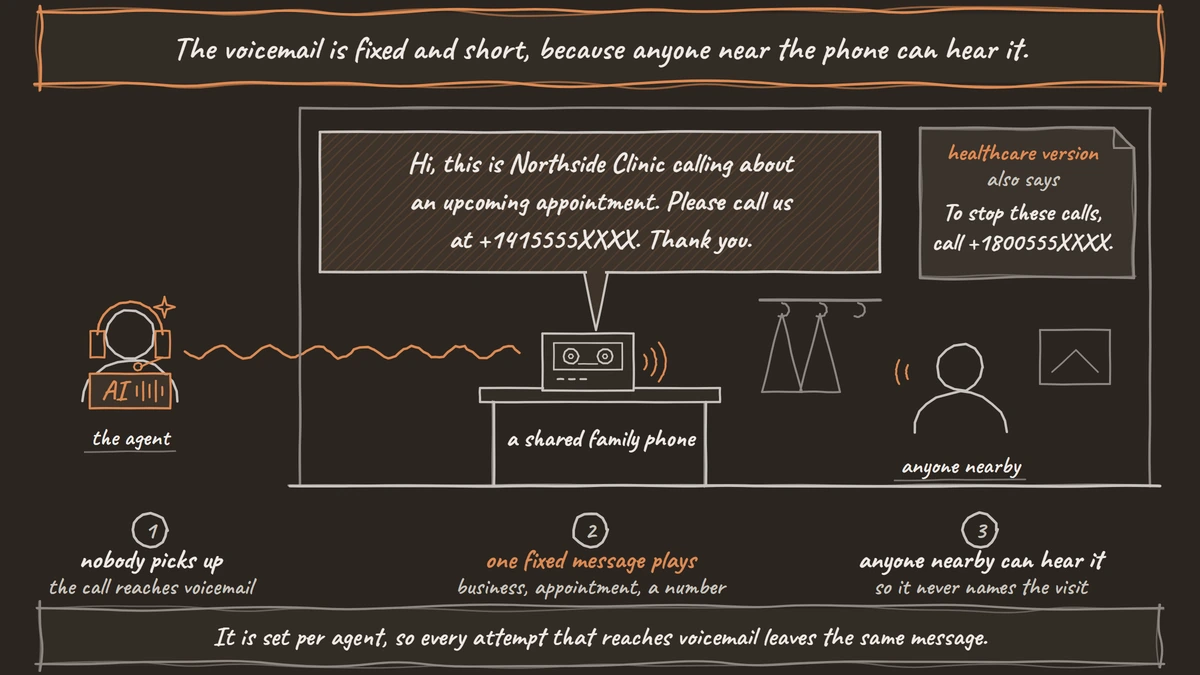
General version, "Hi, this is Northside Clinic calling about an upcoming appointment. Please call us at +1415555XXXX. Thank you."
Healthcare version under the exemption, "Hi, this is Northside Clinic calling about an upcoming appointment. Please call us at +1415555XXXX. To stop these calls, call +1800555XXXX. Thank you."
Voicemail handling is off by default. Turn it on in the agent's Settings with Enable voicemail and screening handling, then set When voicemail is detected to Leave a message and type the message. It is set per agent, so every attempt that reaches voicemail leaves the same message.
Join the Dograh Community
Dograh is an OSS alternative to Vapi. Join our Slack community for queries, releases, best practices & community interactions.
Sending the reminders with Campaigns
The templates run as a campaign from a list you upload. The CSV needs a phone_number column, and every other column becomes a variable, such as first_name, date_of_birth, appointment_day, appointment_time and provider_name. Leave the visit type out of the file, so it can never reach a call.
Campaigns set the Call Schedule with one Timezone and weekday Time Slots, so a list that spans time zones gets split into one campaign per zone. Max Concurrent Calls keeps the front desk from getting a wave of reschedules at once. Without time slots, a campaign dials continuously once started, so always set them.
Opt-outs come by voice. A path for "stop calling" ends the call with a fixed confirmation, and an HTTP API tool on that path writes the number to your do-not-call list, so your system drops it before the next list goes out. Call dispositions are off until you turn them on, and even a do_not_call tag never stops a campaign from dialing a row, so the list you upload decides who gets called. Our guide to AI voice agents for appointment reminders and confirmations covers the daily campaign loop around these templates.
Where the reminder data lives
Campaigns are part of Dograh's open-source code, so a clinic can run the whole reminder flow on its own servers and keep call records there. The speech and language providers still receive the call audio and text unless those models run on your servers too. Running it yourself still means paying for servers, model keys and phone minutes. Your team also looks after the database and upgrades.
Before you ship it
Test each version before a patient hears it. In the Variables tab at the top of the editor, set direction to outbound and fill in the list columns, then use Test Chat to walk confirm, reschedule, cancel, a wrong date of birth and "stop calling".
Then start a campaign with your own number as the only row. Answer it once, decline it once to see the retry after the Retry Delay, and let it reach voicemail to hear the message. Time the healthcare call, which should run about a minute or less. Publish a version once every path behaves.
Glossary
- Healthcare exemption
- An FCC rule that lets healthcare providers make certain automated calls without prior express consent, only when every condition is met, including one message a day, three a week and an opt-out in each message.
- Prior express consent
- A person's agreement to receive automated calls at a number, usually given by sharing that number for the purpose of the call, such as a booking.
- Redial Campaign
- A Dograh campaign action that calls again the contacts whose last call ended in voicemail, no answer or busy, useful for a next-day reminder.
- Retry Delay
- The wait a Dograh campaign leaves before calling a missed contact again, from 30 seconds to an hour.