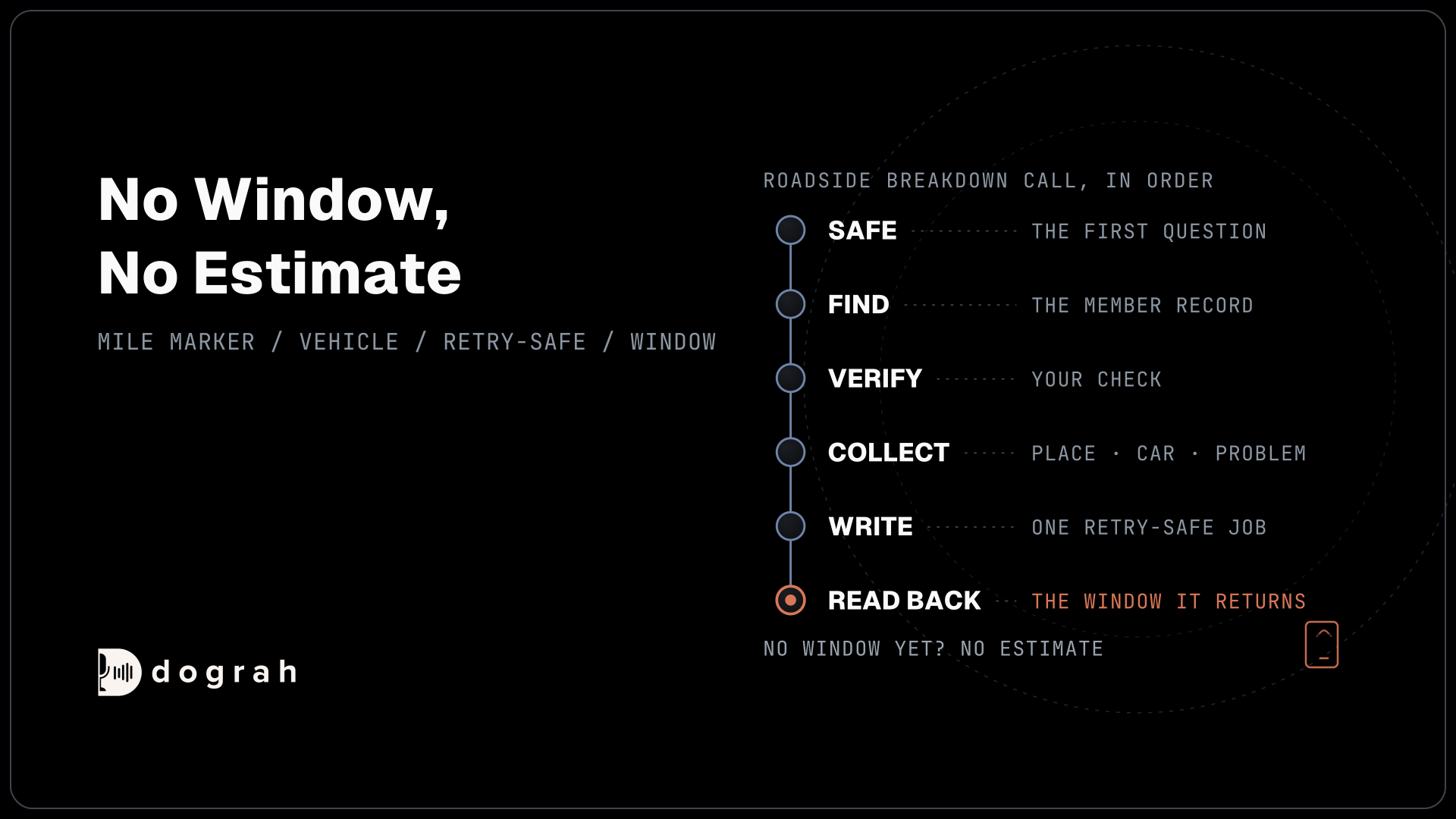

AI voice agents for roadside assistance intake and dispatch run the whole breakdown call. After the safety question and a member check, the agent collects the location, vehicle and problem, writes the job to the dispatch system, and reads back the arrival window that system returns. If there is no window yet, it gives no estimate.
Key Takeaways
- Location questions change with the place: highway, city street or garage.
- One retry-safe request writes the job, so a resend never sends two trucks.
- No arrival window from the system means no time from the agent.
This post is part of our guide to AI Voice Agents for Roadside Assistance, where every call starts with the safety question. Below, we cover the intake questions, the job and the arrival window. Then we set up the call in Dograh, the open-source AI voice agent platform we build.
How the breakdown call runs, in order
The intake call runs in a fixed order: safe, find, verify, collect, write, read back. The safety question comes first because the car may be in a live lane. The Emergency Responder Safety Institute's 2025 struck-by data counts 11 tow operators and 3 road service technicians among the responders killed by passing vehicles that year. An unsafe spot with no injury goes straight to a dispatcher, and the guide above covers that pathway and the 911 line.
For everyone else, the agent finds the member. Pre-Call Data Fetch sends the calling number to your system as the call connects and loads the matching record. That number finds the record but does not prove who is calling, so the prompt keeps the plan details unspoken until the caller passes your company's check, such as the membership number plus the ZIP code on the account. Our post on personalizing calls with CRM context shows the setup in detail.
A failed check does not end the call. The agent still takes the breakdown, says nothing about the plan, and flags the job for a dispatcher to confirm coverage.
Where the car is and what it needs
Location is the hardest field, and the questions change with the place. On a highway, the agent asks for the road, the direction of travel and the nearest mile marker or exit. In town it asks for the street and the nearest cross street. In a parking garage it asks for the garage, the level and the bay. If the caller does not know, a landmark they can see is better than nothing.
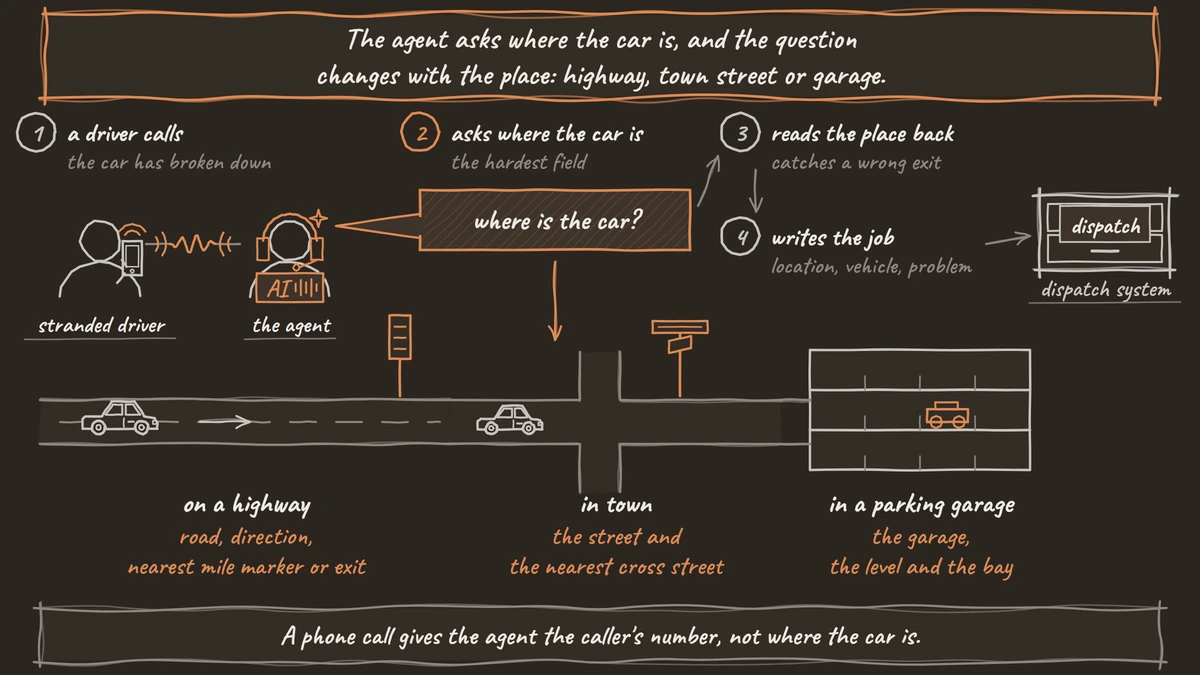
A phone call gives Dograh the caller's number, not their position. If your company has a location-share link, your own system texts it, and the agent asks it to through an HTTP API tool during the call.
Then the agent asks about the vehicle and the problem: make, model and color, what happened, and whether the car can still be driven. A flat tire with a usable spare needs a different truck from a car that will not start. It also asks where a tow should go, if the plan allows a choice, and how many people need a ride.
Each answer is saved as a variable. Extraction is an AI step, so the agent records each answer as the caller stated it, and the transcript and recording stay the exact record. Tell it in the prompt to read the location back before it writes the job, because a wrong exit number sends a truck to the wrong place.

Open Source Alternative to Vapi / Retell
Self-hosted voice agent platform — no per-minute fees
dograh-hq/dograh
Star on GitHub
Writing the job to the dispatch system
Once the details are confirmed, one request writes the job. An HTTP API tool sends a POST to your dispatch system's job endpoint with the location, vehicle, problem, destination and member ID. There is no built-in connector for towing or dispatch software, so the tool points at your system's own API, or at a small service your team builds in front of it.
A request can arrive twice, for example when a slow reply makes it look as if the first one failed. Add a Preset Parameter named workflow_run_id with the value {{initial_context.workflow_run_id}} to the tool. Your dispatch system sees the same workflow_run_id and keeps one job, so a stranded driver never gets two trucks, or none because someone deleted the wrong copy.
The tool waits 5 seconds by default, and you can raise the Timeout (ms) field if your system is slow. It does not retry on its own, and an error goes back to the agent. Tell the agent in the prompt to say the job is being passed to a dispatcher and then transfer the call. Our post on extracting call data to your CRM covers field mapping in more depth.
Reading the arrival window back
The agent says only the arrival window your dispatch system returns. After the job is written, a second HTTP API tool sends a GET for it, and the agent reads back the window and the type of truck on its way.
This tool hands your system's whole response to the language model, so the endpoint decides what the agent can say. Return the window, the truck type and the job number. Leave out the driver's mobile number, other members' jobs and internal notes, because anything the agent receives, it can repeat.
If the system has no window yet, because no truck has accepted the job, the agent says so. A dispatcher will confirm the time, and the driver will get a call when it is set. Tell it in the prompt never to estimate one itself. A time made up by the model is a promise nobody in dispatch made.
A short Custom Message on the tool, such as "Let me check on that for you", plays before the request so the line is not silent during the lookup.
Join the Dograh Community
Dograh is an OSS alternative to Vapi. Join our Slack community for queries, releases, best practices & community interactions.
When the window changes, or never comes
Arrival times move, so the dispatch system starts the next call, never the agent. When a truck accepts the job or the window changes, your system calls the API Trigger with the driver's number and the job details, and Dograh rings the driver at once. Our post on API triggers shows the request.
On that call, the agent checks it has the right person, reads the new window and asks whether anything has changed, such as the car starting after all. A cancellation is written back to the job through the HTTP API tool, so the truck stops.
After every call, a Webhook node sends the extracted details, the call recording and the transcript link to your system, retrying temporary failures on its own. If the driver asks for a person, or the window passes with no truck, Transfer Call hands the call to the dispatcher on duty. It works on Twilio, Telnyx, Plivo, Cloudonix and Asterisk ARI. Dograh calls the dispatcher first and connects the driver only when someone answers. On Twilio, it can play a short spoken introduction to both people before connecting them. No summary travels by default, so the agent writes the reason to the job first.
Glossary
- Mile marker
- A numbered sign along a highway that gives the distance from a fixed point. With the road and direction, it is often the only way a caller can say where the car is.
- Retry-safe request
- A request carrying an ID, here workflow_run_id, that lets the dispatch system spot a second copy and keep one job. It stops a resend from sending two trucks.
- Arrival window
- The time range the dispatch system sets for a truck to reach the driver. The agent reads it back and never estimates one itself.
- HTTP API tool
- A tool that sends a request to your dispatch system's own API during the call. One writes the tow job, and a second reads back the arrival window the agent speaks.