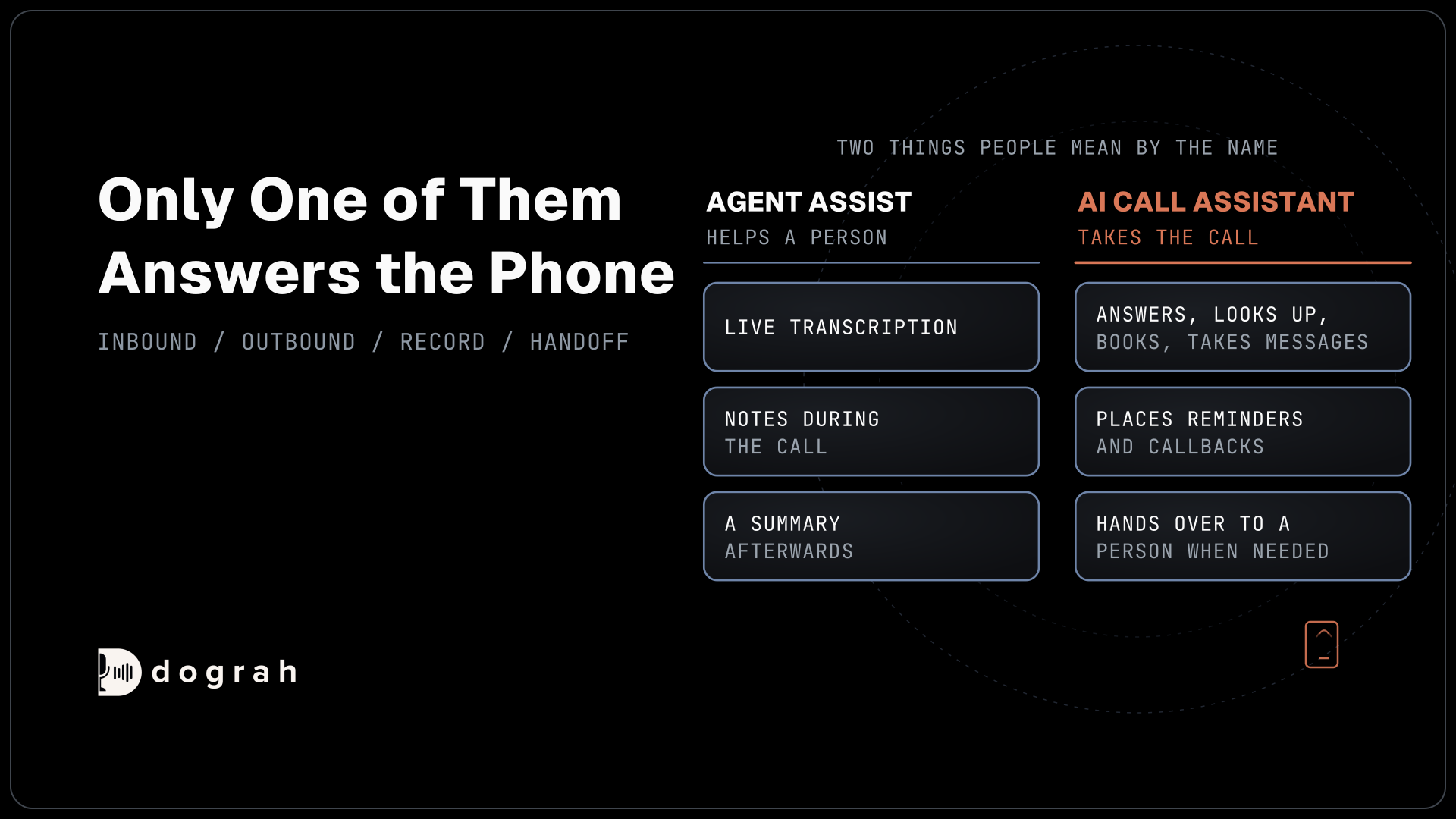

An AI call assistant is a voice agent that takes or places business calls itself. Inbound, it answers questions, looks things up, books and takes messages. Outbound, it places reminders and callbacks. It hands over to a person when the caller asks or judgment is needed. Dograh, the open-source AI voice agent platform, can run this assistant.
Key Takeaways
- An AI call assistant takes the call itself. A notes app only helps a person.
- Outbound jobs need a reason, a contact list and calling hours.
- Decide which calls go to a person before you write the prompt.
This post is part of our guide to AI receptionists, which judges a receptionist by its handover. Here we follow the assistant through inbound and outbound business calls to the record it leaves behind, then show where each of those jobs is set up in Dograh.
Two things people mean by "AI call assistant"
The name covers two different products, and only one of them answers the phone. The first helps a person who is already on a call, with live transcription, notes and a summary afterwards. Business phone systems sell this as AI notes or agent assist. The second is a voice agent that takes or places the call itself, and that is what this post covers.
The difference shows up on the calls nobody answers. Quo looked at 16.7 million missed calls on its business phone platform and found that 69% of missed business calls got no callback within 48 hours. Callback rates ranged from 41% in healthcare to 21% among non-profits. A notes app does nothing for a call that rang out on an empty desk.
An AI call assistant also differs from a phone menu, or interactive voice response. A menu routes callers by key presses. The assistant holds a conversation and finishes the job when it can.
The jobs on inbound calls
On an inbound call the assistant does one of a few jobs, and it should know which one within the first few turns. The most common is answering a question from your own information. Prices, hours and policies go into the Knowledge Base as PDF, DOCX, DOC, TXT or JSON files of up to 5 MB each, and the prompt tells the agent to answer only from them.
Looking something up comes next. Pre-Call Data Fetch can pull the caller's record before the greeting, and an HTTP API tool can check an order or an appointment during the call. A phone number finds a record, but it does not prove who is calling, so the agent confirms one detail on file before it reads anything personal back.
Booking is the job most businesses want first. The agent reads open slots, offers a few and writes the chosen one back, and the booking counts only when your system confirms it. Our post on how an AI answering service takes calls follows that booking from the first ring.
When the agent cannot finish the job, it takes a message with the details your team needs, or it routes the caller to a person. Routing has its own section below.
The jobs on outbound calls
Outbound, the assistant starts the call, so each one needs a reason, a contact and a time. The reasons are usually reminders, booking confirmations, callbacks to missed callers and replies to new leads.
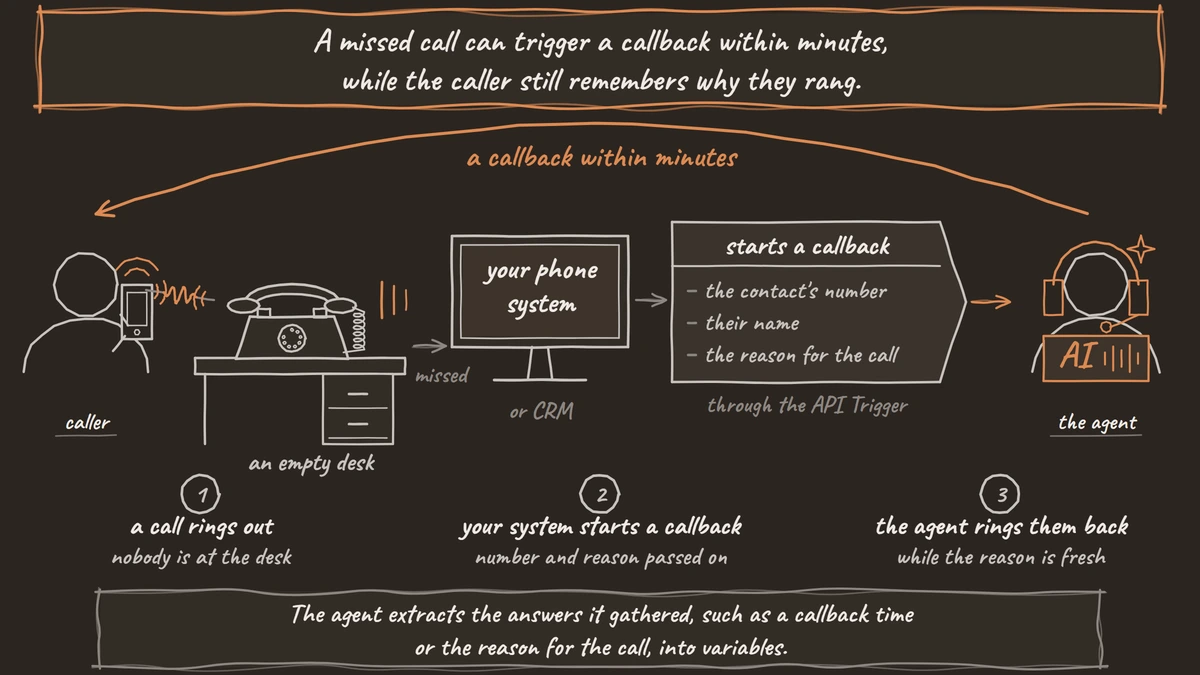
A single call starts from your own system through the API Trigger, which passes the contact's number and context such as their name and the reason for the call. A missed call can trigger a callback within minutes, while the caller still remembers why they rang. For a list, a campaign calls everyone in a CSV file. Calling hours run in one time zone per campaign, so split a list that spans time zones, and you set the retries (0 to 10).
Expect voicemail. Voicemail handling is off by default. Once you turn it on, "When voicemail is detected" starts on Disconnect the call, and the agent leaves a message only when you set it to Leave a message.
Outbound calls also bring consent rules that inbound calls do not. Our post on inbound vs outbound voice agents sets up each direction, including the consent check before the first campaign.

Open Source Alternative to Vapi / Retell
Self-hosted voice agent platform — no per-minute fees
dograh-hq/dograh
Star on GitHub
What it writes down after the call
The call is half the job, and the record your team reads afterwards is the other half. The agent extracts the answers it gathered, such as a callback time or the reason for the call, into variables. Extraction is an AI step that records each answer as the caller stated it, so the transcript and recording stay the exact record.
A Webhook node at the end of the call sends those values to your CRM or helpdesk, and it retries temporary failures automatically, up to 5 attempts. Built-in QA then scores each step of the call with tags, a score from 1 to 10, sentiment and a short summary, on whatever share of calls you choose.
Fixed lines can play in a real person's voice. Pre-recorded clips handle the greeting and other set lines, with a cloned voice for the rest. Self-hosted Dograh has no per-minute platform fee, but servers, model keys and phone minutes still cost money. Dograh Cloud charges a 1¢-a-minute platform fee.
When it hands the call to a person
Decide the handoff rules before anything else, because callers judge the assistant by how it hands over. A caller who asks for a person gets one, at any point in the call. Complaints and anything that needs judgment, such as a refund outside policy, go to a person too. Card numbers are never taken on the call. A caller in danger hears that they should get to safety and call 911.
Transfer Call works on Twilio, Telnyx, Plivo, Cloudonix and Asterisk ARI. While hold music plays for the caller, Dograh calls the destination and joins them once it is answered. The transfer timeout is 30 seconds by default and can be set from 5 to 120. If nobody answers, or the line is busy, the agent is told the transfer failed and the call continues, so it can take a message and write a callback request to your system. Where the line runs on Exotel, the agent books a callback request whenever the caller asks for a person.
By default nothing is summarized for the person who picks up, so have the agent write its note to your system before the transfer starts. On Twilio, a short spoken introduction both people hear can be turned on. Browser test calls cannot transfer to a phone number, so test every handoff over a real phone call. Our post on AI receptionist call transfer walks through the transfer step by step.
Join the Dograh Community
Dograh is an OSS alternative to Vapi. Join our Slack community for queries, releases, best practices & community interactions.
Start with one inbound job and the handoff rules, and add outbound calls once a week of inbound records reads cleanly.
Glossary
- Agent assist
- AI that helps a person who is on a call, with live transcription, notes or suggested answers. It never takes the call itself, which is the job of the AI call assistant in this post.
- Extraction
- The step where the agent pulls answers such as a callback time out of the conversation into named fields. It is an AI step, so the transcript and recording remain the exact record.
- API Trigger
- Dograh's endpoint for starting one outbound call from your own system, with the contact's number and context. A missed-call callback or a booking confirmation usually starts this way.
- Transfer timeout
- How long Dograh rings the person before the transfer counts as failed. It is 30 seconds by default, settable from 5 to 120, and the caller then stays with the agent.