
Five9 pricing starts at $119 per concurrent seat a month for Digital and $159 for Core, with a 50-seat minimum. Plus, Pro, Enterprise and AI Agents are quoted. For teams that want to own the voice agent beside their contact center, Dograh, the open-source AI voice agent platform, runs self-hosted or on Dograh Cloud.
Key Takeaways
- Five9 lists Digital at $119 and Core at $159 per concurrent seat monthly.
- Each bundled seat carries 3,000 AI minutes, with usage billed on top.
- Telecom surcharges, SMS usage and named WEM seats sit on top of seats.
Five9 prints two seat prices and quotes everything else, so the list price is where the bill starts. We map the five plans, what concurrent seats mean, what sits on top and a worked month, then what to ask sales, and then we talk about how Dograh fits beside Five9.
Five9's five plans and what each adds
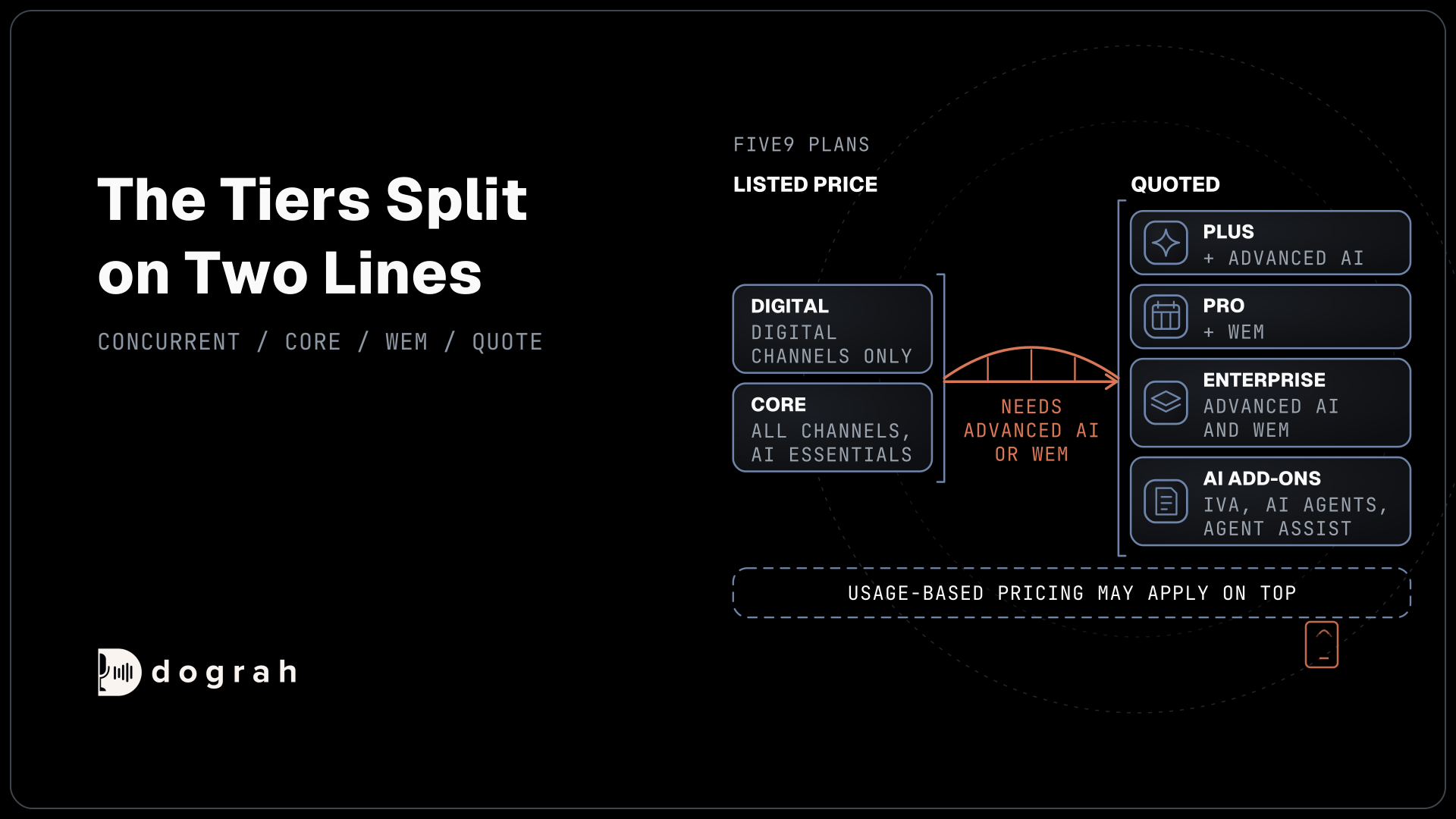
Five9 sells five plans, and only the two entry plans carry a price. Five9's pricing page lists every plan per concurrent seat a month with a minimum of 50 seats, and notes that usage-based pricing may apply.
| Plan | Price per concurrent seat a month | What Five9 says it covers |
|---|---|---|
| Digital | $119 | Digital channels only |
| Core | $159 | All channels with AI essentials |
| Plus | Quoted | All channels with advanced AI |
| Pro | Quoted | All channels with AI essentials and WEM |
| Enterprise | Quoted | All channels with advanced AI and WEM |
The tiers split on two lines. Plus adds advanced AI to Core, Pro adds workforce engagement management (WEM), and Enterprise has both. So the moment a team needs advanced AI or WEM, the price moves from the page to a quote.
Five9's pricing page lists Agent Desktop Plus, call recording, ACD, IVR, a dialer, reporting, queue management, geo redundancy, SRTP and Inference Studio access among its plan features. Adapters connect Teams, Zoom and RingCentral on the unified communications side, and Salesforce, ServiceNow, Dynamics, Zendesk and Oracle on the CRM side. Our Five9 AI Agents review covers what the AI features do and where they are strong.
What a concurrent seat means for your bill
A concurrent seat counts the agents logged in at the same moment, so payroll headcount does not set the bill. That makes shift teams the main lever on a Five9 bill. A center with 120 agents across two shifts, and 80 logged in at the busiest hour, needs 80 concurrent seats rather than 120.
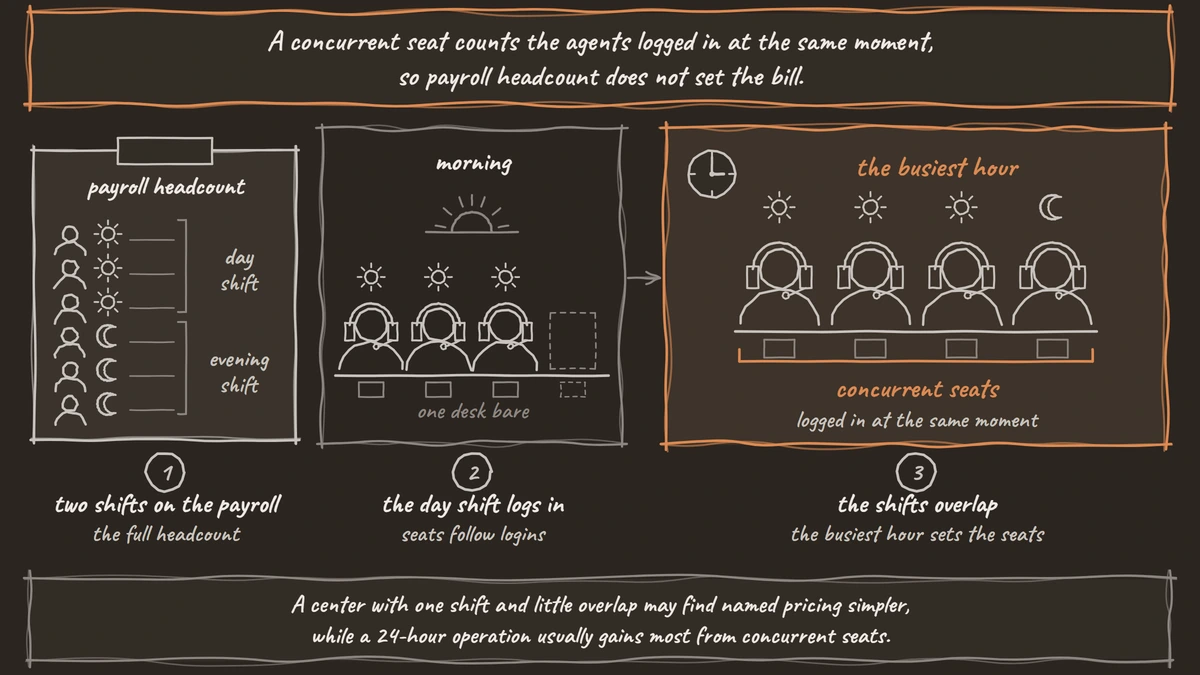
WEM is counted the other way. Five9 says WEM is "offered on a named-basis", and when the named seats needed exceed the concurrent seats sold, the rest are sold as add-ons. In the example above, 120 people need WEM while only 80 seats were bought, so 40 named WEM seats come on top, at a quoted price. Five9 offers WEM from Five9 itself or from Verint or Calabrio.
Concurrent seats are not the only way to buy. Five9 says it prices on concurrent users, named agents or pay per use, and also sells preconfigured bundles and custom quotes. A center with one shift and little overlap may find named pricing simpler, while a 24-hour operation usually gains most from concurrent seats. The 50-seat minimum applies to the published prices either way, so smaller teams start above their headcount.
What sits on top of the seat price
The seat line is where the bill starts, and Five9's own footnotes say so. Voice seats carry the note "SMS usage charges apply". Workflow Automation carries "Additional usage-based pricing may apply". And the line under the plan cards says usage-based pricing may apply to the published prices too.
Telecom charges come next. Five9's fees and surcharges page lists a Federal Universal Service Fund surcharge, with the rate adjusted quarterly by the FCC. It also lists a Regulatory Recovery Fee, which recovers relay, numbering and other carrier costs, and an Administrative Fee applied to all telecommunications charges. None of the three has a fixed rate on the page, so they move with your minutes and with each quarter.
Phone minutes are a separate line again. In a breakdown of what sits on top of a Five9 seat, Aloware, which sells a competing dialer, says telephony is billed in arrears. Citing Five9's annual report, it says contracts can run monthly, annually or for several years. Treat both as points to confirm in your order form, since neither appears on five9.com.
So a Five9 quote has at least five lines beyond seats. Usage, SMS, Workflow Automation usage, named WEM seats and telecom surcharges each need a figure before the monthly total means anything.

Open Source Alternative to Vapi / Retell
Self-hosted voice agent platform — no per-minute fees
dograh-hq/dograh
Star on GitHub
The AI line, bundled minutes and quoted add-ons
Five9 includes bundled AI minutes with seats and quotes the AI products themselves. The pricing footnote reads "AI: 3000 minutes per bundled seat + usage", so every bundled seat brings 3,000 AI minutes and anything past that is billed as usage. The page does not tie those minutes to a period or a product, so the questions below start there.
Three AI add-ons sit beside the plans. Five9 lists Intelligent Virtual Agent, AI Agents and Agent Assist, each priced by quote. The Voice AI Agents page describes orchestrated agents with deterministic IVA flows, escalation to a human "with full context", guardrails and redaction, and ends with "Get a Quote".
That leaves the AI line of a Five9 budget without numbers until sales replies. A team can plan the seat line to the dollar, but the virtual agent that answers calls, the copilot that helps human agents and the minutes beyond the bundle all arrive as quoted figures. Ask for each as a rate and a unit, so a busy month can be priced before it happens.
A worked month for 80 concurrent seats
Seats are the only part of this month that can be priced from the page, so the example stops there. Take a center with 80 concurrent seats, 60 on Core for voice and 20 on Digital for chat and email. The figures are our estimate from Five9's list prices.
| Line | Amount a month |
|---|---|
| 60 Core seats at $159 | $9,540 |
| 20 Digital seats at $119 | $2,380 |
| Seat line | $11,920 |
| AI minutes in the bundle | Up to 240,000, if all 80 count as bundled seats |
| AI Agents, IVA and Agent Assist | Quoted |
| Usage, SMS, phone minutes and surcharges | Billed on top |
| Named WEM seats above 80 | Quoted add-ons |
The seat line alone comes to $143,040 a year before anything else. Whether the Digital seats count as bundled seats decides whether the AI bundle is 240,000 minutes or 180,000. Our Genesys Cloud AI alternatives post sets Five9 beside other suites at 500 seats.
Adding WEM changes the shape of this month. Pro and Enterprise move the whole seat line to a quote, and if 110 people need WEM against 80 concurrent seats, 30 named WEM seats come on top as add-ons. Price both versions before choosing a tier, because the step from Core to Pro is a conversation with sales rather than a list price.
Join the Dograh Community
Dograh is an OSS alternative to Vapi. Join our Slack community for queries, releases, best practices & community interactions.
What to ask Five9 sales
A short list of questions turns a Five9 quote into a number you can plan with. Start with the AI bundle. Ask whether the 3,000 minutes per seat are monthly, which seats count as bundled seats, which AI products draw on them, and what a minute beyond the bundle costs.
Then ask for every AI add-on as a rate and a unit. That covers Intelligent Virtual Agent, AI Agents and Agent Assist, and whether each is billed per minute, per interaction or per named user.
The seat questions come next. Ask for the WEM price per named seat, whether you can mix concurrent and named seats on one order, and what the term and the notice to cancel look like. Ask how the phone minutes are rated, and get an estimate of the USF surcharge, the Regulatory Recovery Fee and the Administrative Fee on your expected volume.
Last, ask where call recordings and transcripts are stored and for how long, and how you export them if you leave. Those answers matter as much as the price once an AI agent is talking to every caller.
Where Dograh fits beside Five9
Dograh, the open-source AI voice agent platform, runs voice agents rather than a whole contact center, so human seats, WEM and digital queues stay in Five9. What it changes is the AI line. One call type goes to a voice agent your team runs, with the speech and language models chosen per agent, and a Five9 IVR branch can transfer those calls to the number the agent answers.
Calls go back to people with an ordinary transfer. Transfer Call dials a Five9 queue number, and Dograh calls the destination first and connects the caller only when someone answers. If nobody picks up, the line is busy or the transfer fails, the result goes back to the agent and the call goes on. It runs on Twilio, Telnyx, Plivo, Cloudonix and Asterisk ARI.
The agent can know the caller before it speaks. Pre-Call Data Fetch sends the caller's number to your own endpoint when the call connects and loads the record before the greeting, and View Trace shows the speech-to-text, AI and voice time for every turn. Self-hosting keeps recordings and transcripts on your servers. With your own model keys the contract moves to you, while the call text still reaches the model provider you picked. Handoff routing gets a fuller treatment in our guide to AI voice agents for BPO and contact centers.
The platform is its own line next to the Five9 bill. Hosting Dograh yourself removes the per-minute platform fee, while the servers, model keys and phone minutes still land on your own bills. The database and each upgrade become your team's job. Support for the open-source version comes from its community, and Enterprise adds custom SLAs. Dograh Cloud is the hosted option, at a 1¢-a-minute platform fee, and its pay-as-you-go plan includes 10 concurrent calls, with more on request, while a self-hosted install runs 10 by default and can be raised.
Glossary
- Concurrent seat
- A license that counts agents logged in at the same time, not people employed. Five9 prices its published plans this way, with a 50-seat minimum.
- Named seat
- A license tied to one person. Five9 sells WEM on a named basis, so named needs above the concurrent seats bought come as add-ons.
- Bundled AI minutes
- AI minutes included with a seat. Five9's footnote gives 3,000 minutes per bundled seat, with usage beyond them billed on top.
- Regulatory Recovery Fee
- A Five9 surcharge on interstate and international telecom that recovers relay, numbering and other carrier costs passed to Five9.